
Community Forums › Forums › 21 Day Program › 21 Day Program: Errors and Solutions
Tagged: educatuion
- This topic has 80 replies, 41 voices, and was last updated 7 months, 3 weeks ago by
epien.
-
AuthorPosts
-
Stoyan Stoyanov
ParticipantIn this topic we focus on identifying and resolving common errors encountered with the 21 Day Program. Share your experiences, troubleshooting tips, and solutions related to installation issues, configuration problems, algorithmic errors, performance optimization, and more. Whether you’re a seasoned trader or a newbie, join us to exchange valuable insights and enhance the performance of your trading robots. Let’s work together to master these powerful tools for a more successful trading journey!
MehChe
ParticipantDear Petko,
I am happy I came across your video in you tube and decided to take the course. My dream as a trader is within reach now that I found you. The way you simplify the course has never before be seen in the industry. I have tried creating my own eas or trading manually with a full time job and a family, and that was a disaster.
I am running the EAs on demo accounts and monitoring the results. So far so good , and I am waiting for the EAs to run for some time before I post some results here.
The links in the “DAY 10! Trade the Robot with a WORLD RECORD” does not allow me connect to the crm.eatradingacademy.com site for reasons not know to me.
Can you check that out for me?
Regards
Ezekiel
ParticipantSorted out. Thanks for the help.
Byron Ross
Participantin MT5, is there a URL I have to put in under the options tab?
Alan Northam
ParticipantHi Bryon,
I don’t know what you are trying to do. Can you provide more details on what you are trying to accomplish?
Alan,
ParticipantI apologize if it was unclear. I am taking the course “Professional Trading Strategies + 5 Bots Included”….and I am making sure that I have those 5 Bots working correctly. I see the smiley face at the top right of my charts but these Bots have yet to place 1 trade in over 24 hrs of running. I guess I’m trying make sure I’m not missing anything. Also do I need to add a webrequest URL?
ParticipantHi Byron,
I just went to the course to make sure the downloaded bots were the latest ones. Unfortunately, the download webpage was blank so there were no bots for me to download. So my question is, “Are you sure you have the latest bots.” You might want to contact [email protected] to make sure the latest bots are downloadable.
Now to address your question. As long as you are seeing a smiley face you are good to go and you may need to wait another day or two before you start seeing trades. Be patient, and give it some more time!
Alan,
ahmad aboud
Participantit has beens 2 days since i installed ftmo robot on my mt5 and i activated gold only and it stil didnt execut any trades yet
is there a problem ?
Andrew Forkes
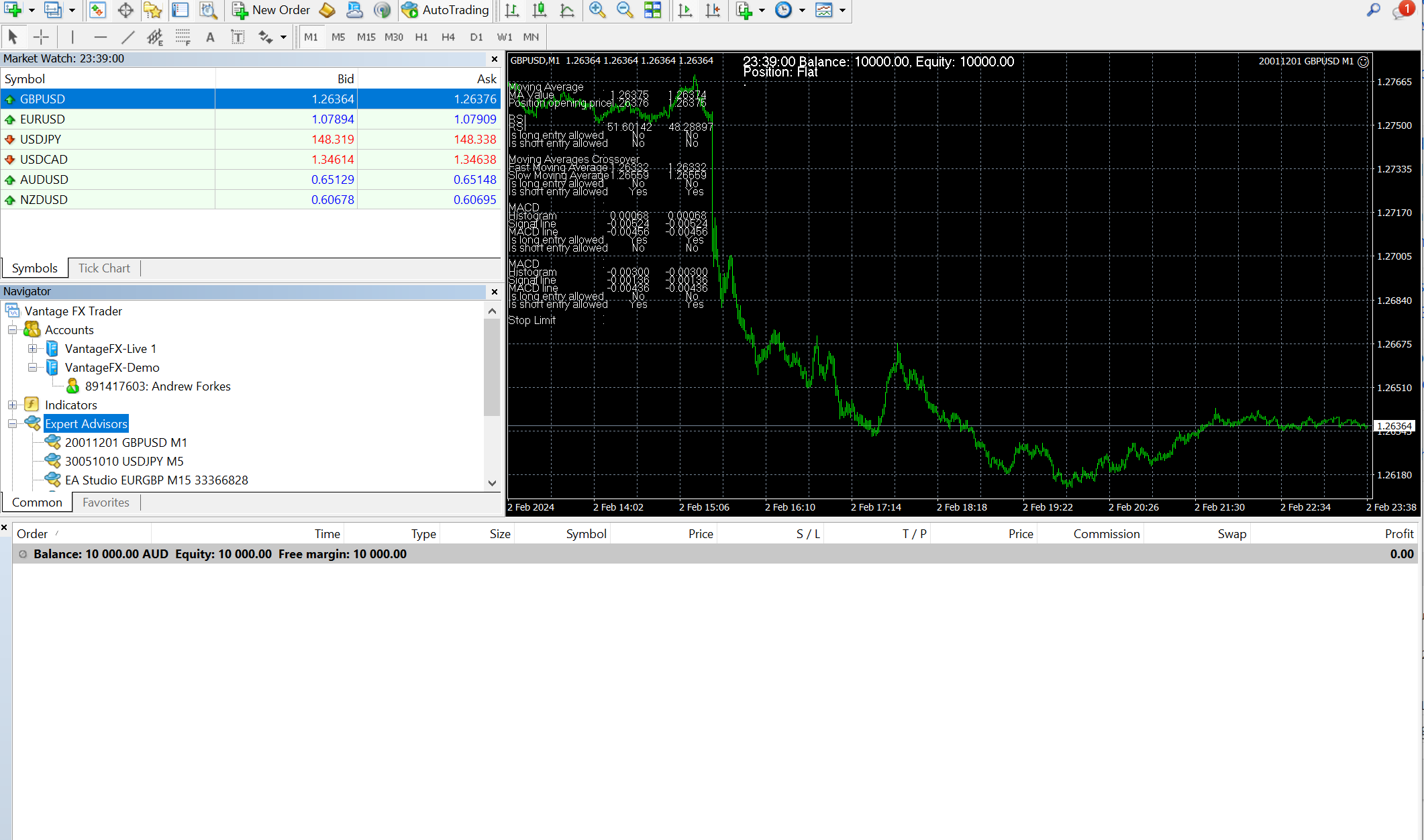
ParticipantI have installed the bots in meta trader 4 and added them to a chart as explained in the course, attached an image below you can see the bot attached and there’s a 🙂 on the chart which I believe indicates that the bot is running when I right-click on the chart I can see the bot settings so I’m pretty confident it’s attached, auto trade is enabled, I’ve reapplied the bot several times but a few days I’ve not seen any trades placed.
Does anyone know where I’m going wrong?
Jason Kennedy
ParticipantHi There,
I have the five bots from the 21 day program and ten bots that I purchased separately, and a portfolio bot installed on my demo account. two of the bots traded for two days. But nothing from any of the installed bots for over a week? Have I done something wrong? They appear to be installed correctly? Any information would be much appreciated.
Thank You.
Jason K.
ParticipantHi Jason,
As long as the bots are installed correctly then you just need to wait for them to trade. Are you using the FREE FTMO demo account? If not I would recommend you testing the robots with this demo account. The robots were created using the historical data from FTMO so you should expect best testing using FTMO.
Alan,
ParticipantHi Alan,
Bots still not trading, it has been two weeks. I will start over again and see what happens. I am trading on my demo account.
Thank You.
Jason K.
ParticipantHi Jason,
If you are trading on your own broker demo account you can test the robots by backtesting them using the MT4 or MT5 Strategy Tester. Checking the results will inform you as to how often the robots place trades. Also check with your broker to make sure you can use Expert Advisors. I know Forex. com does not allow using Expert Advisors on their demo accounts but you can use them on their live accounts, as an example.
Alan,
ShaynaOrozco
ParticipantIf your account doesn’t have enough money or if the way you’ve set up how much you can borrow (leverage) doesn’t match up with the size of trades your bot wants to make, it might not go through with any trades. I had a similar issue once where I set everything up, thinking I was good to go, but then nothing happened. Turned out, I didn’t have enough in my account to cover the trades my bot was trying to make. It’s like wanting to buy a big-ticket item but not having enough in your wallet – the purchase just can’t happen. So, I had to adjust my settings and make sure my account balance was sufficient.
Ashley Regan
Participantin the experts tab I get the message “Error: actionTrade::ManageOrderSend(): OrderCheck(): Invalid order filling type” I have tried restart the robot but still get the same error message. Is there anything I can do to get it working or is the issue with the robot?
-
AuthorPosts