

Forum Replies Created
-
AuthorPosts
-
September 23, 2024 at 12:02 pm in reply to: Last Month best Robots + 30 EAs Every Month – providing fxblue results #311618
Ilan Vardy
ParticipantHi Jacek,
We don’t link the EAs to FXBlue – we link the account the EAs are trading on. If you would like to see the performance of an EA for any previous period, the easiest would be to import it back into EA Studio. You don’t need a license for this. In terms of which EAs were removed, every month we select the best performers of the previous month, and you can easily see if any have performed well for a longer period by looking at the magic numbers.
Thanks,
IlanParticipantHi Oran,
The way EA Studio works is that trades will open at the next bar opening when conditions are met. This cannot be changed. You can remove the text by editing the code in MetaEditor. Look for this value:
string robotTagline = “An Expert Advisor from Expert Advisor Studio”
Thanks,
IlanParticipantHi Michael,
The robots are designed to work on the currency pairs they’re created for. In other words, the EURUSD robot will work on a EURUSD chart.
The currency of your account with your broker/prop firm doesn’t affect this.
Regards,
IlanParticipantNo problem! I look forward to speaking with you soon.
September 19, 2024 at 9:46 am in reply to: Best Robot Trading App Course + 10 Free EAs Monthly #310596ParticipantHey Arnis,
There was a small issue with the site yesterday. Our apologies. The EAs can be found in lecture 3 now.
 Participant
Hey jpkan,
The Academy is still very much alive and thriving.
Please reply and let me know the email address you used to register, and I’ll ask Marin to look for it. It may have ended up in spam or junk mail for some reason.
Thanks,
IlanSeptember 18, 2024 at 8:49 pm in reply to: Best Robot Trading App Course + 10 Free EAs Monthly #310513ParticipantHey Arnis,
They’re attached a s resource file to lecture 3.
Thanks,
Ilan
ParticipantHey PetrowskiFX,
Sorry to hear about your challenges. I’m sure your mail may have somehow ended up in a spam folder automatically, for some reason. Please let me know what your email address is, and I’ll ask Marin to look for it and assist you.
Thanks,
Ilan
ParticipantHi Anne-Marie,
Good to hear you’re happy with the robots.
This is a possibility. What you can do is change the magic number, and make slight changes to the take profit, stop loss, as well as the values for the indicators. We will be introducing a randomisation option soon, which will make several changes like the ones I mentioned, but through the software with the optimisation tool to ensure the robots are still profitable but unique.
Regards from Joburg :-),
Ilan
ParticipantHey Tsholo,
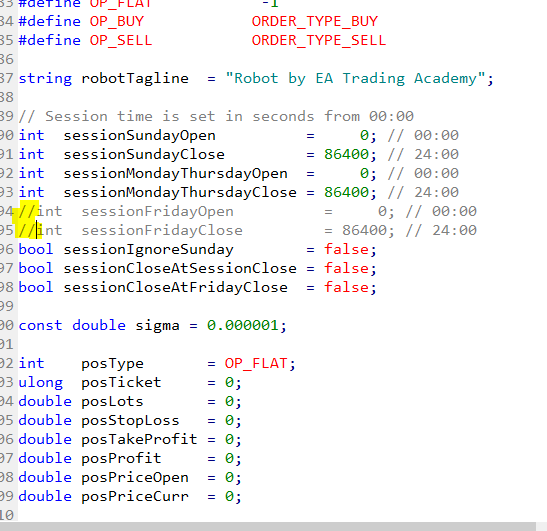
Good to hear from you again. Yes, you can do this in the code of the EA. Open the EA in MetaEditor.
Scroll down until you see “// Session time is set in seconds from 00:00”Then, in front of “sessionFridayOpen” and “sessionFridayClose” add 2 forward slashes. This will disable trading on Fridays.
Thanks,
IlanParticipantHi Akeem,
Please ensure you are logged in using the same email address your license was issued in. If you are logged in, please email [email protected] with your account details, and Marin will make sure all is in order.
Thanks,
IlanParticipantHi hkkaitak
Please reach out to Marin at [email protected], and he’ll gladly help you out.
Thanks,
Ilan
ParticipantHey Denzeljefthas,
There could be many reasons why your EAs are not opening trades.
First, make sure when you place the EA on to your chart, you have enabled auto trading beforehand. You must see a smiley face or blue hat in the top right corner.
Other reasons could include your entry lots being too high, not enough capital or margin in your account, an issue with the broker. Check the journal to see if there are any errors. If you’re still stuck, please send some screenshots so I can take a closer look.
Thanks,
IlanParticipantHi Karim,
Please reach out to Marin on [email protected] with your details, and he’ll check what’s going on, and get you going.
I look forward to meeting you in the 1-on-1 call later in the course.
Cheers,
Ilan
ParticipantHey Charlie,
The way the system works, you can only enrol once with an email address. Re-registering won’t initiate the email flow. Please reach out to Marin on [email protected] with your details, and he’ll sort you out.
If you have any other questions, we’re here to help.
Thanks,
Ilan -
AuthorPosts