
Community Forums › Forums › Ready-to-use Robots › Top 10 EAs › Top 10 EAs: Properties & Settings
Tagged: 4 major pairs, EUR/USD top 10, lot size, Missing Portfolio Code, negative take profit, spread protection, Top 10 Gold EAs, Top 3, W1, weekly
- This topic has 58 replies, 20 voices, and was last updated 1 year, 1 month ago by
Scoot.
-
AuthorPosts
-
July 3, 2024 at 10:21 am #267430
Marin Stoyanov
KeymasterHi, let me address all the properties one by one.
R-Squared is a statistical measure that can be useful to gauge how the strategy’s performance is influenced by broader market movements. An R² of 0 means that none of the performance can be explained by the index used for comparison. An R² of 50 for example, suggests that approximately 50% of the strategy’s performance can be explained by fluctuations in the benchmark. Please check this post and the linked video to learn about R-Squared (this is a complex statistical measure and it’s not that simple to explain so better read the post and watch the video).
Return to DD (Return to Drawdown) is a measure that helps evaluate the risk-adjusted return of the trading strategy. This ratio is calculated by dividing the total return by the maximum drawdown experienced during the observed period. For example a ratio of 0.99 suggests that for nearly every 1% of drawdown experienced, the strategy generated an equivalent increase in value. With another example, if Return to DD is 3.57 it indicates that the strategy earned about 3.57 times the maximum percentage decrease experienced in account value. This high ratio is a positive sign, showing that the returns significantly outweigh the risks taken (measured by drawdown).
Profit Factor is the ratio of gross profits to gross losses over the specified period. It helps to understand how well the strategy performs in terms of profitability.
Regarding what would be good values, we don’t put that much attention to the actual values of the above parameters. The way we use the app is just to pick the top 3/5 for from the weekly/monthly charts and trade with them. Then we check the performance on a daily basis and make amendments to the strategies we trade with if there are new top performers in the top 3/5 for the period we’re looking at. This is the system we follow and it works for us but this is not a recommendation or the only way to do it. Some traders might use the above properties to select their strategies or might have their own way to manage the EAs.
July 3, 2024 at 11:31 am #267451KeymasterI see. Thank you again for the comprehensive explanation. i will check out the post and video.
July 3, 2024 at 2:16 pm #267476KeymasterSorry Marin
just one more question, from your own trading experience with EAs, do you ever close your positions when you meet your objectives, or do you advise allowing the EA to close on its own, either through SL, TP or EA settings.
Regards
Tsholo
July 12, 2024 at 3:30 pm #269860KeymasterIf the EA meets my objectives I would close the position of course. But my objectives might be different than yours.
If we’re talking about long-term objectives, with the Top 10 EAs usually our traders close the positions at the end of the day if the strategy that has an open position is no longer in the top performers in the app and needs to be replaced. If the strategy is still in the top 3 or top 5 (depending on the initial setup we started with), then they keep the position open until it closes automatically or the EAs is no longer in the top performers in the app.
July 12, 2024 at 5:55 pm #269885KeymasterHi Marin.
THank you.
Please explain what you mean here. “If the strategy is still in the top 3 or top 5 (depending on the initial setup we started with),”
So, ive noticed that the top 3 is changing all the time. If im always going with what is on the top 3, which is based on historical performance, how do i know if its about to become negative in the next trades. is there anything you look out for, just from experience, to determine if the top 3 will remain winning in the next trades.
Regards,
Tsholo
July 13, 2024 at 4:40 pm #270042KeymasterWe check the app every day and if the top 3 are different from what we’re trading on our accounts, then we replace the running EAs. If we have open traders in the account with EAs which are no longer in top 3 in the app, we close them manually and replace these EAs. If we have open traders in the account with EAs which are still in top 3, we keep them running until they drop from the top 3 in the app. In short, everyday we trade with the top performing EAs from the app.
Noone can predict how the EAs will perform in the future. That’s why we pick the EAs which perform the best in the most recent market. And we update them daily if there are new top performers in the app.
July 13, 2024 at 5:52 pm #270051KeymasterOk.
so Ive notices that sometimes you use the top weekly EAs and sometimes, like at the moment, you use the top monthly.
what informs your decision to either go with top weekly, or monthly EAs.
And lastly, i heard Petko say he would not trade the EURUSD at the moment, is it because of market trends, or is it just not a good pair for EA trading.
August 23, 2024 at 10:10 am #302213ka ho yat chan
Participanthi
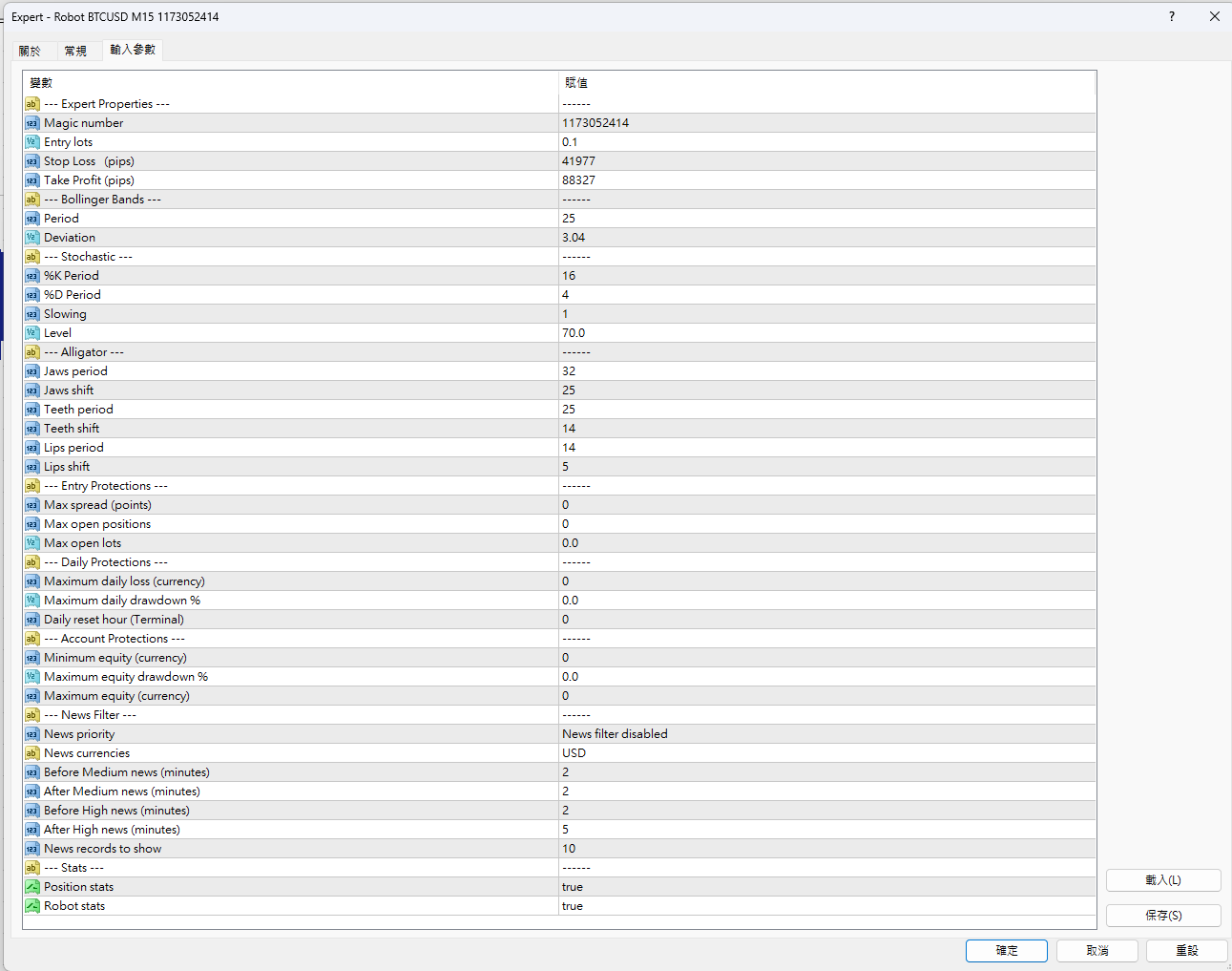
i want to ask about how to set these?
i have see the youtube video,but still not understand what they mean for.
any help?
 August 23, 2024 at 5:47 pm #302270Keymaster
Hello, please check the following sections in our Knowledge Base, they cover the inputs and the UI of the Top 10 App.
Also you might read the Top 10 Robots app complete guide.
Should you need additional information, please reply in the thread and we’d be happy to assist you.
October 16, 2024 at 5:17 pm #315948Zoran Čuturilo
ParticipantHello!
Can somebody clarify me entry lot size settings for portfolio EAs. What is usually good practise regarding to account size, number of EAs, etc.
Also, do you have prefered browser for eatradinacademy.com? Sometimes I have issues as Firefox user.Thanks,
ZoranOctober 18, 2024 at 12:32 am #316224Mark Kamrath
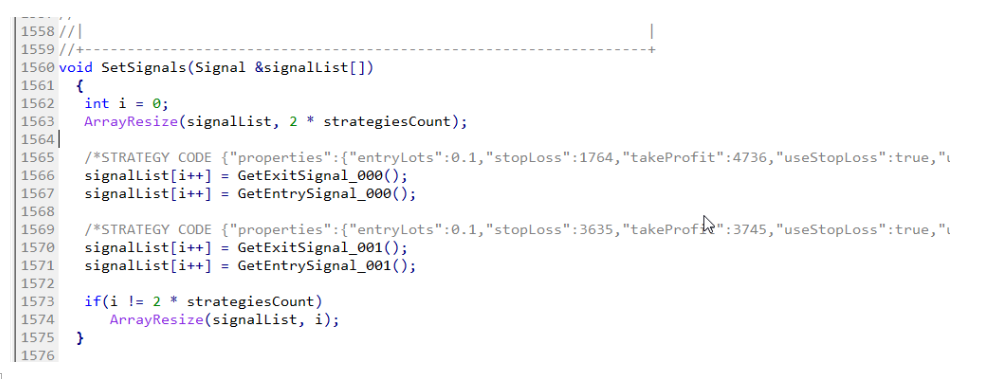
ParticipantHello. In both the MT4 and MT5 version of the portfolio manager, I can’t see all 10 Gold EAs to enable or disable them. I only see the first two (ooo and 001), per the screenshot below. Can you tell me where I get the rest of the EA codes? Thx
 October 19, 2024 at 11:22 am #316587
Jojo
ParticipantWill changing the Entry Lot Size setting higher or lower have any affect with the current open orders’ exit criteria in any way?
I’m assuming not, but I want to make sure. Thanks.
October 19, 2024 at 3:30 pm #316639Alan Northam
ParticipantHi Alexius,
Changing the lot size will not have any affect on open positions but will affect your account risk and margin!
Alan,
January 8, 2025 at 5:12 pm #425134Scoot
ParticipantDo the top 10 EUR/USD robots all go on 15 min timeframes or on the times that are individually allocated?
Kind regards
Scott
-
AuthorPosts
- You must be logged in to reply to this topic.