
Community Forums › Forums › Ready-to-use Robots › Prop Firm Robots › Prop Firm Robots: Settings and Inputs
Tagged: #PARAMETERS, copy trading, EA Settings, Envelopes, FTMO, FTMO payments, FTMO Robot Parameters, FTMO Robot settings, High Impact News Settings, Marin Stoyanov, news filter prop firm Alpha Capital., Petko, Pip value for XAUUSD, Prop EA App, Prop Firm Robots, Proprobots stop trading, protection, RSquared PropEA, trailing stop
- This topic has 195 replies, 73 voices, and was last updated 5 months, 2 weeks ago by
Xavier Whitfield.
-
AuthorPosts
-
NIKOS KYRIAKOU
MemberHey Derek,
Yes, I meant with the same prop firm.
From what I know, indeed, the prop firms are not communicating with each other because there is competition and I do not think they want to cooperate with each other.
Kind Regards,
NikosRichard Lawrie
ParticipantGood day EA Trading academy team
Could you please explain R squared?
What are we looking for when it comes to this number?Thank you
Marin Stoyanov
KeymasterHello Richard, please check this post about R–Squared where Petko covers the topic in detail. There you can find a video explanation as well.
VapoChill
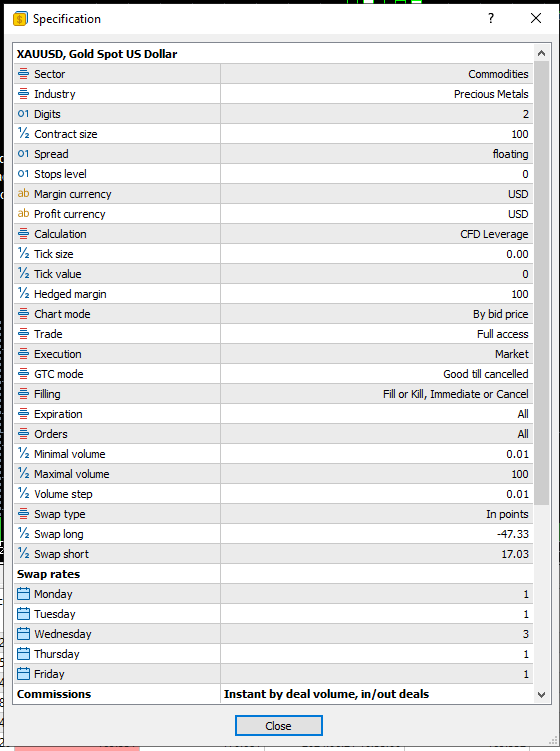
ParticipantWhat is the right Pips value for XAUUSD ?
Default setting don’t work on Eightcap.
ParticipantSorry, it’s on FTMO mt5.
 Member
Hey VapoChill,
The pip size depends on the risk that you want to trade with. Also, to find the inputs of the EA, you just right click on the chart after you have placed the EA and then you just click on Expert List and Properties. From there you can change any settings you want for the EA.
Kind Regards,
NikosParticipantThe values are very close to the T/P and S/L.
 Member
Hey VapoChill,
I see what you mean. So, to calculate the pips, you need to know what percentage you want to risk per trade to actually set the correct pip value for T/P and S/L.
Kind Regards,
NikosParticipantAdded two zero’s after the pip values seems about right.
ParticipantFound the problem, XAG is silver, lol.
Don’t put it on a XAU/USD Gold chart.
KeymasterThe instruction video shows i should able to set my trading day start and end times, but i don’t have any in my prop app download files once loaded on mt5…shows no setting for this.
suggestions or direction please. I am only interested to Trade New York open hours.
Michael Jonsson
ParticipantIf we have a day with high impact news, do you close all ongoing trade before the news ?
MemberHey Michael,
If you have enabled the settings for the news, the trades should close at the time you set them to close. In case you do not trust it though, you can just close them manually.
Kind Regards,
NikosParticipantDo you mean that if I have the setting “news priority” set to “high news filter” and the “Before High news” to 5.
It will not take any new trade 5 min before the newsand also
It till close all ongoing trade 5 min before the news ???
.M
KeymasterHi, there isn’t such property in the EAs. Can you share a link to the video where you saw this and tell at which minute you saw this so I can better understand what you are looking at?
-
AuthorPosts