
Community Forums › Forums › Ready-to-use Robots › Prop Firm Robots › Prop Firm Robots: Settings and Inputs
Tagged: #PARAMETERS, copy trading, EA Settings, Envelopes, FTMO, FTMO payments, FTMO Robot Parameters, FTMO Robot settings, High Impact News Settings, Marin Stoyanov, news filter prop firm Alpha Capital., Petko, Pip value for XAUUSD, Prop EA App, Prop Firm Robots, Proprobots stop trading, protection, RSquared PropEA, trailing stop
- This topic has 195 replies, 73 voices, and was last updated 1 month ago by
Xavier Whitfield.
-
AuthorPosts
-
October 8, 2024 at 4:58 pm #314539
Flyhigh430
ParticipantThan you so much,
Just a quick follow up;
Does this mean that I could purchase the Prop firm bots and actually use them on my live accounts with other brokers and equity as well? I guess the difference would be that the Prop firm bots use FTMO data right?
Best regards,
E
October 13, 2024 at 7:39 pm #315437Sand0r
ParticipantYes, you can do so!
October 17, 2024 at 12:48 pm #316121Ilan Vardy
ParticipantHey Flyhigh430,
Correct. The prop firm robots are actually created using Blackbull data, and then cross-validated against several other data sources, including FTMO.
As always, start with a demo account and check the results before placing them onto a live account.
Thanks,
Ilan
October 29, 2024 at 10:05 pm #374054Bob Gal
ParticipantHey guys,
Where can I find the “Web Request for URL” to add to MT5 Expert Adviser options please ?
Thanks
October 29, 2024 at 11:48 pm #374082Marin Stoyanov
KeymasterIf you wish to use the news filter, in your MetaTrader platform, select Tools -> Options. Navigate to the Expert Advisors tab. Select the check box: Allow WebRequests for listed URL. Add the following URL: https://forexsb.com. Click OK.
Check this detailed guide for more info on the different settings: https://platform.algotradingspace.com/prop-firm-robots-app-complete-guide/
November 5, 2024 at 9:39 am #375350Ilja Gurevich
ParticipantHi all,
has anyone modified his prop robots by adding a trailing stop mechanism? I’m currently setting up an ATR based trailing stop and would love to read some others strategies.
November 8, 2024 at 7:14 pm #376251Anthony M
ParticipantThere is a variable in the EA called Daily_Reset.
I believe this is time the EA uses to calculate the daily loss.
What number format is used for that variable, eg (00:00 UTC + 2) or seconds from 00:00?
November 9, 2024 at 4:42 pm #376680ParticipantAs a follow-up question, would the reset time be relative to the time on the local PC, the market watch time, or GMT?
November 13, 2024 at 10:41 am #377618Cristian Nembrini
ParticipantHi! Can you help me understand the meaning of this message on the dashboard? If I set the dashboard to 1 month, I see the profit of the month in the table and above it “out of sample profit” with another profit and a different number of open trades.
What does it mean?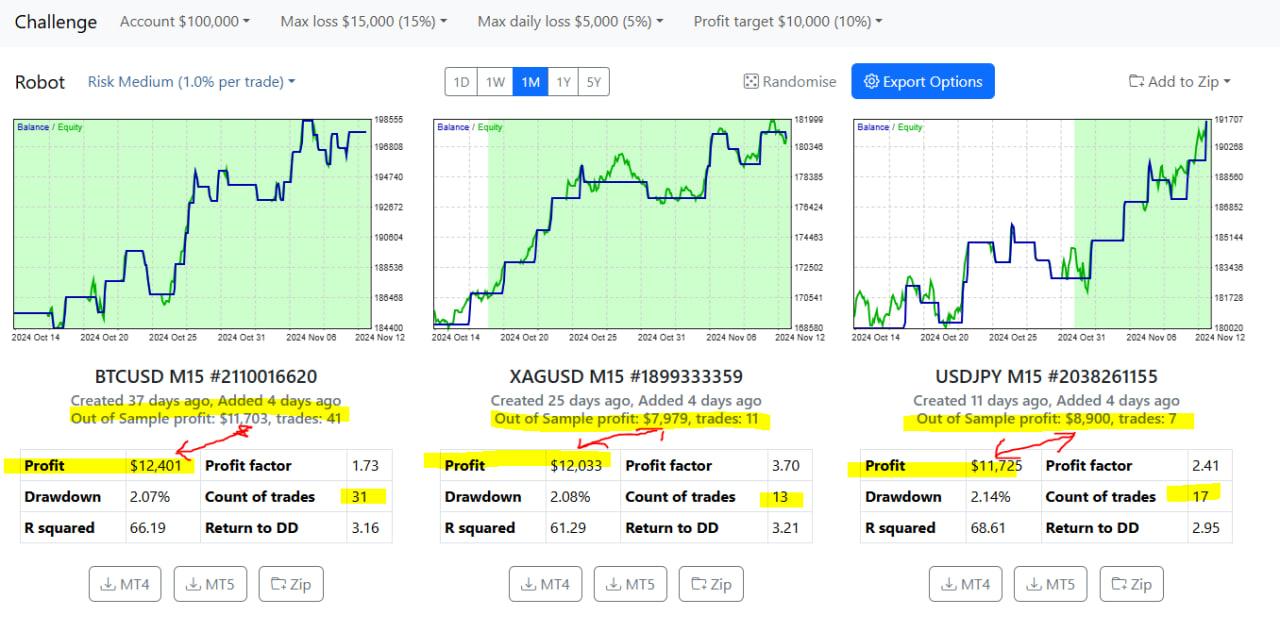 November 13, 2024 at 11:01 am #377623
Juan Guirao
ParticipantOut-of-sample profit means this is the profit result obtained by the EA with new price data, which the EA had never seen before.
The EA is optimized with “in-sample” price data, up to a certain date. Beyond the end of the in-sample period, we are dealing with “future” or live price action, which was not used to optimize the EA.
The out-of-sample performance is an indication (but not a guarantee) of potential future performance.
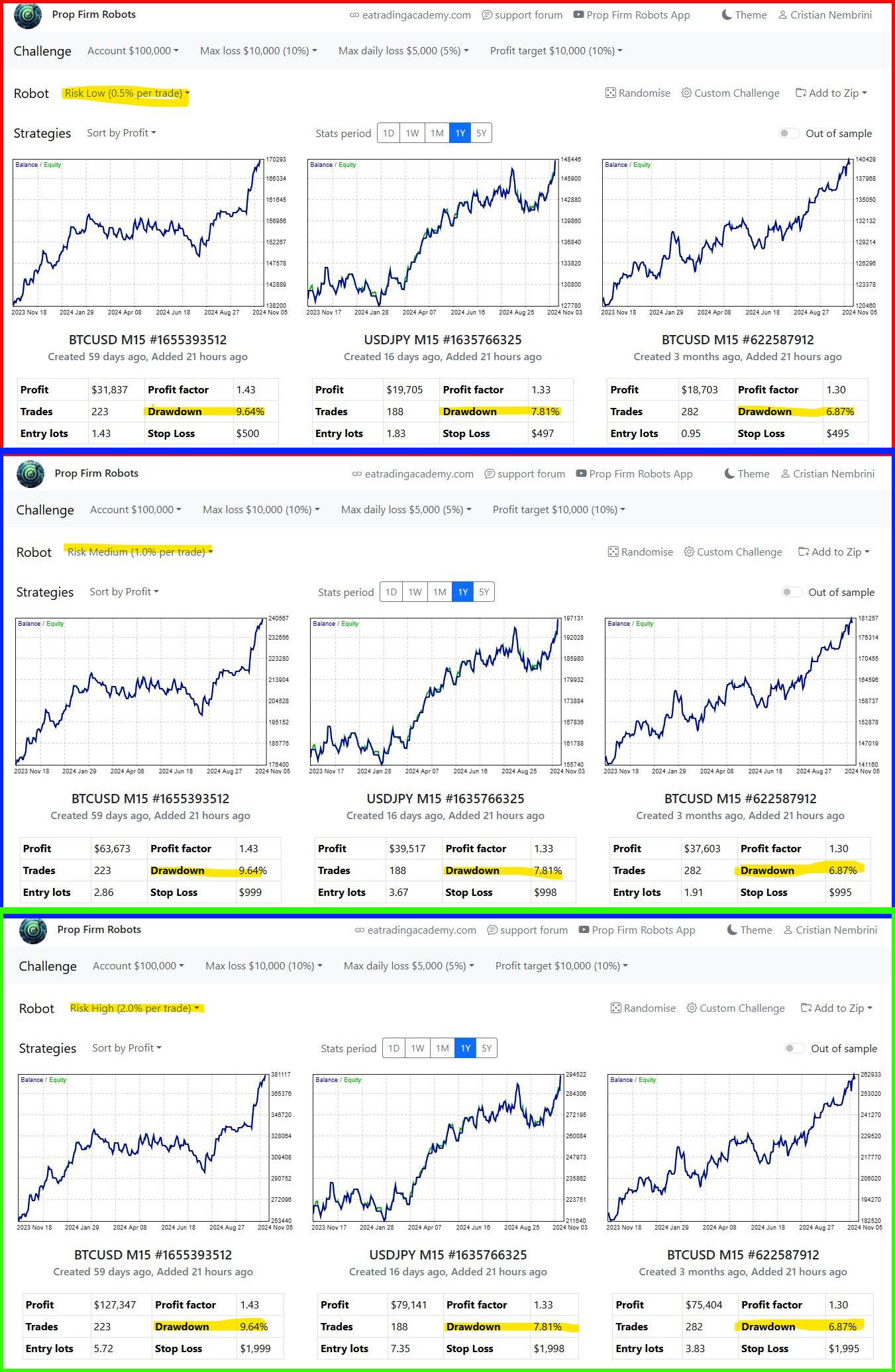
November 17, 2024 at 9:15 pm #378759ParticipantHi, I would like to understand if it is a display problem or something else. I attach 3 screen shots with low medium and high risk on the annual backtests and as you can see the drawdown value does not change
 November 19, 2024 at 2:37 pm #379123Keymaster
You can read the documentation about this metric here.
Or take a look at this blog post where Petko explained the Out-of-Sample in EA Studio. The logic is the same here in the app.
November 19, 2024 at 2:49 pm #379135KeymasterHi, this is not a problem. It’s normal to be like this since the Drawdown shows the maximum drawdown experienced during the trading period, representing the peak-to-trough decline in account balance.
The risk per trade has impact on the lots traded, respectively on the Stop Loss value. The higher the risk is (means you invest higher volume or more lots) the higher the potential loss can be but
November 20, 2024 at 5:52 pm #379412ParticipantHey Guys,
Ive been testing out the Prop Robot on an FTMO Demo Account.
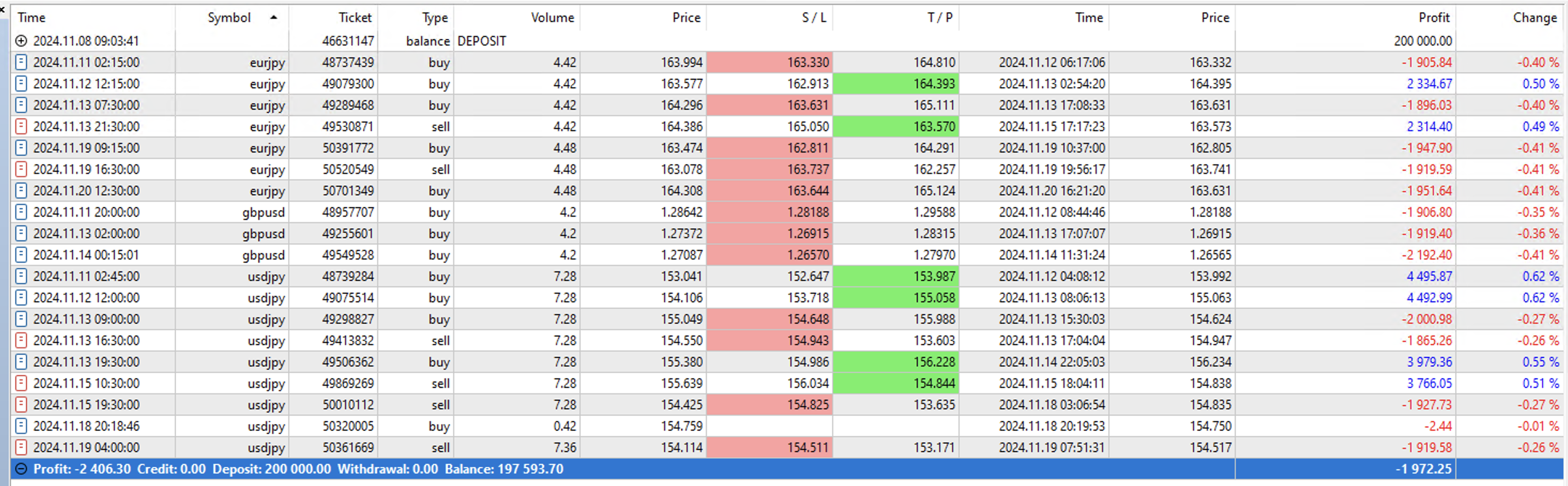
Ive been hit with some massive DD mainly with JPY pairs. I first selectted the top 10 EAs and then only top 5 EAs. I downloaded the updated and installed the EAs every sunday.
Its a 200k FTMO demo challange with a profit target of 10% I hit around +/- 7.5% twice and then only to loose it all again.
Im posting a screenshoot of my history, has any member actelly passed a challange and managed to keep it with these EAs, if there are any tips one could shear I would apprecate it.
Looking forward to any responce of advice and ppl suffering the same experance.
Thank you in advance.
Regards
 November 20, 2024 at 7:00 pm #379426
Douglas
ParticipantHi Bob, yes, I started a 100K challenge this week, and the same here — I selected top-performing EAs that were shown in the 1-month and 1-year performances. However, I have experienced massive daily drawdowns. I would be keen to hear further thoughts from the community and team.
-
AuthorPosts
- You must be logged in to reply to this topic.