
Community Forums › Forums › Prop Firms › FTMO Challenge › How to Pass FTMO Challenge
Tagged: Best Forex EA for Prop Firms
- This topic has 140 replies, 18 voices, and was last updated 2 years, 6 months ago by
Alan Northam.
-
AuthorPosts
-
Petko Aleksandrov
KeymasterIt is hard to say…I see just the smiley face, which is good.
Do you see any errors in the journal or the terminal?
Alan Northam
ParticipantChi,
Be wise and test in a demo account until you know it is working correctly!
Chi Kong Yu
ParticipantI want to ask I want to set the entry price myself,I am using Best Forex EA for Prop Firms
ParticipantI would like to ask, do I need to change his setting according to the amount of each challenge? If so, how should I set it? or ea automatic setting
KeymasterHey Chi,
I am not really sure if I understand you…you are using the EA but you want to set the entry price yourself?
In the course, and in my videos I show what amount I trade in the 10k challenge.
It is up to every trader what amount one would use in a challenge or trading account. But if you decide to follow my trading you can see what amount I use in the 10k challenge, I think it is very basic math to calculate with how much to trade in an account with a different size.
Kind regards,
John Noland
ParticipantThank You Petko,
I plan on purchasing EA Studio and FSB pro, but want to take the EA Studio Professional course sooner. Any discounts available? I have purchased 18 of your courses.
Any ETA on the new FTMO robot?
Thanks Again
John
ParticipantHelp please..
I am in my trial of EAS and am downloading the collections once they are generated. The are down loaded as a zip File that contains the EAs.
When I try to upload the collection it says it needs to be a .json file
How do I download and upload the collection. I have watched the video tutorial and read the help section. It also says it should download as a .json file.
Thank you
ParticipantJohn,
If you are trying to upload a zipped file containing EA’s back into EA Studio then do the following:
1. Go to Validator
2. Click on “1. Strategies”
3. Click on the box that says “Drop files here or click to upload”
4. Navigate to the zipped file, double click on the zipped file and the EA’s should be loaded. You can see the number of loaded files where it says “Loaded Strategies”
5. Click on “3. Validator settings”
6. Make sure ” Use the common Acceptance Criteria” box is unchecked
7. Make sure all the “Optimize strategies” boxes are unchecked.
8. Make sure all the “Perform robustness testing” boxes are unchecked
9. Click on START
10. All EA’s should now be in the “Collection”ParticipantThank you Alan!!!
KeymasterThanks for the support, Alan!
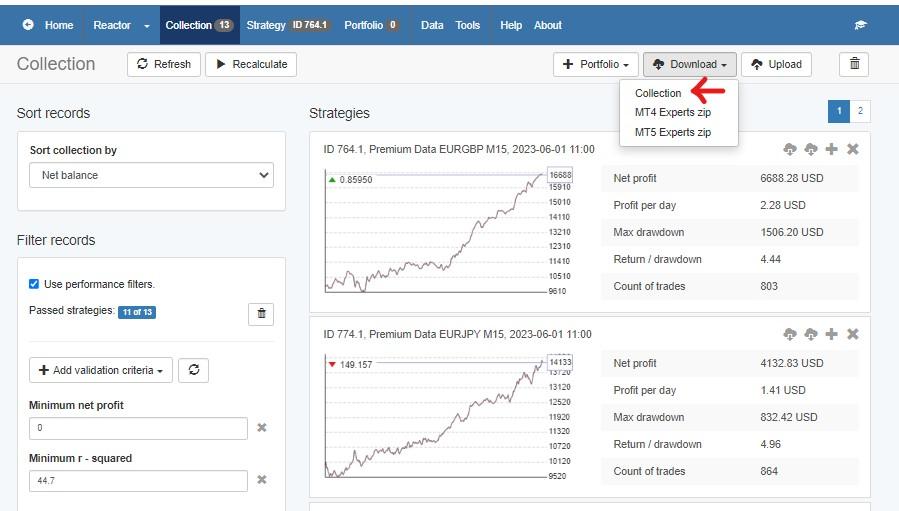
I think what John was doing is to download the EAs from the collection, not the collection itself.
So if you want to download the collection only, make sure to click the 3rd option in the dropdown manu:
 Participant
Petko,
First option, not third option :o)
Saving a collection as a collection is the better option as it makes it easier to organize all your collections.
And, for Gareths’s knowledge the the Collection file is a json file.
David Hanlon
ParticipantI’m also thinking of using MFF. In your view is the Studio EA a good tool for this?
ParticipantHi David,
Yes EA Studio is a great tool for creating EAs for MFF. After creating the EA carefully review the report and study the stats to make sure it doesn’t violate the daily drawdown. Also, check the stagnation to make sure it doesn’t consume too much of your evaluation phase. What I am saying is to review the EA Report in detail to make sure the EA has a good chance of passing the eval phase. Keep us up to date as to how it goes! I would be interested in how things go.
warrichief
MemberWhat is your average lots sizeyou used
fxbam
ParticipantCan I ask what you are using?
-
AuthorPosts