
Community Forums › Forums › Forex Strategy Builder Pro › FSB Pro Discussion
Tagged: FSB #Fsb
- This topic has 197 replies, 28 voices, and was last updated 2 years, 8 months ago by
Alan Northam.
-
AuthorPosts
-
April 25, 2019 at 6:58 am #11530
Petko Aleksandrov
ParticipantHi Ossaio,
I use a powerful computer at home and I do not have an issue with that.
Do you mean you use one and the same EA for multiple timeframes and currency pairs? Or you create different for each?
April 25, 2019 at 2:53 pm #11568Roman
ParticipantGood morning Andi,
I played Trombone :).
I just had a few nice trades close on the GBPJPY this morning. Entry on the H1 in accordance to the D1 and H4 momentum confirmations. Was just curious on your results with that many indicators since everybody in the trading industry preaches “keep it simple”.
April 27, 2019 at 2:22 pm #11621Andi
ParticipantHello Roman,
Glad to hear you did good trades.
I am not really doing the higher timeframes as H4 and D1, but if you say that good trades and strategies are there, I might consider generating some.
What I do is just adding the indicators one by one and compare the results on the backtest. If I see that I make it too strict and fewer trades are there, then I remove it.
Also, the good thing with FSB Pro is that we can lock the indicators, so we can use the generator to find which other indicators will fit the ones you already have.
I want to complete a few months on profit with these EAs before I share them in the Forum. I am now in the second month.
Cheers,
April 27, 2019 at 6:56 pm #11631Ossaio
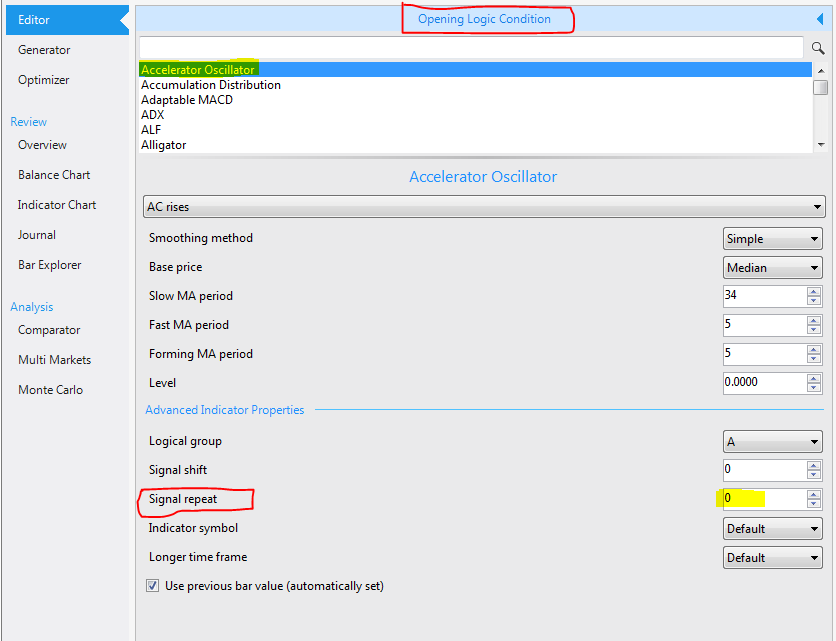
Participant@ Roman, Some indicators have a parameter called “Signal Repeat”. This will force FSB to repeat the signal by the specified number of times after the first signal is received. I always try to keep it between 0 and 10. These are “forced signals” but they could come in handy when you have 2 indicators in a strategy which might not line up at the same time, especially the “crosses upwards or downwards” indicators. It is a double edged sword. It could be good and bad at the same time. If “Signal Repeat” is used in a strategy, then it is advisable to confirm that it is still working properly rechecked during every future strategy optimization, since it might become invalid with changing market conditions.
@ Andi, I adopt different approaches. I create different strategy for different pairs. However, I stumbled upon a strategy that works for all pairs and in multiple time frames. It uses a smaller take profit and large stop loss but the equity line is incredible. I’m cautiously testing it now and will report back later. The success of the strategy will depend on finding an honest broker with low spreads. After the issues with my current broker, I plan to find 4 other brokers next month and test the strategy on all 4 brokers at the same time for comparison.
Although, my computer is relatively good, I opted to use VPS to test this strategy, as a precaution, since it is high frequency EA which will be running on 15 pairs and on M30, H1 and H4 timeframes. Lot size is between 0.01 and 0.05.
 April 28, 2019 at 1:05 am #11636Participant
@Andi – That’s an interesting approach to stack the indicators for more accuracy. After you mentioned it that’s what i figured you meant. But yes as a discretionary trader multiple timeframe analysis is a must. So i make sure in both manual trading and now that i can use FSB to make sure i have the story from the higher tf’s taken into account. Even while monitoring my EA Studio strategies, I’m always tracking the market on the daily. This was my first timeframe due to my work schedule and very first mentor. Was easier for me to set trades during the Asia Sessions and while I slept my limit orders were grabbed and ran in their respective sessions. It would be nice if FSB could set limit orders, maybe that’s something Popov is looking into in the future.
@Ossaio – I’ve never experimented with the signal repeat, but as I’ve come to learn we all have different tastes in strategies and their development. Let me know how that goes in your testing. Very curious!
April 29, 2019 at 12:11 pm #11655ParticipantHello Ossaio,
I see that you got in FSB Pro in details which is awesome! I like the way you approached creating a strategy for different time frames and currency pairs. This might be work for you now, but might be a time saver in the future.
Brokers are always an issue but if you stick with the major currencies, you will get the small spread. Keep in mind not to put all the exposure to the USD.
April 29, 2019 at 12:15 pm #11656ParticipantHello Roman,
You can always drop a suggestion to Popov at the wish list. I know currently they put more energy into EA Studio but I do not think something more and essential will be updated there. It’s already complete software.
Also, what you can do is to generate the strategies with the powerful Reactor in EA Studio and add some longer and lower time frame filters to the best strategies with FSB Pro. I create some of my good and constant EAs in this way.
April 29, 2019 at 10:14 pm #11663ParticipantHello traders!
I am happy to see that in the forum there are already such discussions. Not just basic questions but professional approach, different suggestions and most important – DETAILS! This is why profitable traders stand in front of the losers. They pay attention to details. Good job!
April 30, 2019 at 4:11 am #11667Participant@Andi – Thats a great idea! That’s actually on my list of things to try LOL. I’ve only been able to use EA Studio for so long now that FSB like learning an entirely different language. Even optimizations and robustness testing feels so different to me. Any pointers are appreciated as always!
April 30, 2019 at 9:51 am #11679ParticipantAs far as I know, Forex Software was planning to make the EAs from EA Studio suitable for FSB Pro. When this happens we will be able to generate strategies with the EA Studio and drop them in FSB Pro for further analysis, adding more conditions, adding to positions and so on.
This will save much manual work to get strategies from EA Studio and build them condition by condition in FSB Pro.
May 1, 2019 at 12:53 am #11693ParticipantGood evening Petko,
That would be amazing! I love EA Studio but yes to manually transfer the strategies over is a little tedious.
I’m still struggling to properly optimize strategies in FSB… I’ve managed to generate a few decent strategies but when the indicators get complicated like macd histogram and bears power, how to optimize but not over opt is a little frustrating.
May 1, 2019 at 10:56 am #11698ParticipantHello Roman,
yes in FSB Pro there are some more indicators that are normally unfamiliar. If you are not sure how to optimize them, just leave the optimizer to the default just changing to round numbers the steps.
May 2, 2019 at 1:58 pm #11792ParticipantHola Petko,
Will try that.
May 2, 2019 at 9:46 pm #11803ParticipantIt is actually very important to use round numbers (maybe I should point out that more in my courses) because this way we limit the optimizer. The generators and the optimizers of FSB Pro and EA Studio are really good. I mean they are so good that if we leave them just like that they will find the best best parameters which are getting to the over-optimization. And it is great the programs are being updated, but the better they become the risk to over-optimization increases. This is why in my recent courses I talk a lot about over-optimization.
One of the ways is round numbers. This way we limit the optimizer and when using Monte Carlo everything is fine.
May 3, 2019 at 12:00 am #11827ParticipantPetko,
You make a great point here. Still trying to get used to how FSB behaves in generator and optimizer. Trying to stick to steps of 10 where possible, but my strategies are looking ugly so far.
-
AuthorPosts
- You must be logged in to reply to this topic.