Nico see your result, Van! Keep up the good work!
Yes, M15 is a great start with EA Studio.

Trading Robots from EA Studio
 by edu
Nico see your result, Van! Keep up the good work!
Yes, M15 is a great start with EA Studio.

I have built a nice portfolio of M1 chart EAs using the FSB Pro. I used similar structure from Petko’s course with the top 5 EAs. I used different filters on M15, M30 and H1.
As filters I used moving average, moving average crossover, MACD and Vydia Moving average indicators.
For each strategy I used different filters on the Longer time Frames, and each strategy has 3 longer time frames indicators. This way I filter the entries a lot, some of the EAs open trades just few times a week even they are on M1.
hope it is useful to the other traders as idea…
Hey Thapelo!
It sounds you have done a good job!The more you mix it, the better! How many EAs totally you have in that portfolio?
Thapelo, good job. Do you mean you have in each strategy three different longer time frames with different indicators?
Yes, three different longer time frames, and mixed. With the different strategies – different filters.
Maybe its too much because some open few trades, but so far with good results.
With FSB Pro I want to create strategies that are trading with fewer trades(using more filters on other time frames) but fewer losses.
While with EA Studio I create more active EAs – smaller SL and TP and with 2 entry conditions only. This way I will compare which one of the two is better. Of course, there are so many other approaches with the two strategy builders….but I am focused on these two now.
Very interesting approach, Thapelo!
One thing here, it is not about the number of entry conditions you have but about what they are.
For example, if you use more conditions as “the line is higher than the other line” or ” the indicator is higher than the 0 line” you will have trades all the time. There is a new feature in the Backtest output. They are two actually:
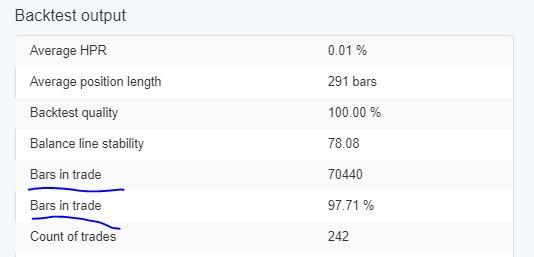
It shows you in percentage how active is your strategy.
If you use more conditions as “the line crosses the other line” or ” the line changes its direction upwards” you will have fewer trades.
Hey Andi,
good point here. The bars in trade are really useful when you want to create more active EAs or the opposite.
As well as Average position length is interesting.

Hey, I missed those new lines in the Backtest Output. They are interesting. I observed some of the strategies and I saw that some are trading nearly all the time, and some are trading less than 50%. Not sure which one is better.

They Thapelo!
Thanks for making it clearer. Keep up updated with your tests. If everyone shares his experience in the forum will be just really amazing.
I hope soon to share my successful system 🙂

Hey Desita,
this was my idea for the Form at the beginning. It takes time for everyone to find his own trading style in trading and to share it. For some people, it takes a lot of time to start writing at all. Some feel shy, others lack confidence, but I am happy that many of you already write and share ideas and experience.
This is correct. It took me 2 months to start writing in the Forum. Now I feel comfortable because I learn new things and I can ask any questions. It is a great support for me.
I am willing to trade more the M1 chart but at the same time, I do not want to have very active EAs (to pay a lot of spread). How can I limit the number of trades?
Hey Sisi,
if you use FSB pro you can do what Petko shows in his USDJPY top 10 EAs course. Place Longer Time Frames filters on the M1 strategies. This way the strategies will open only when the filters allow that.
If you use EA Studio, you might need to place more indicators as entry conditions. Which will make the strategy not so active. Look at the picture Andi posted above – you can monitor how long time the EA is trading.
I am going over the Top 10 USDJPY course and I really like what I see so far!
All of the trading courses are very valuable! I went over all of them 3 times, and in each one there is a lot to learn.
Sign in with your Algo Trading Space account to reply. Members get notified when someone answers.
The Academy’s free courses take you from a demo account to your first Expert Advisor, taught by the traders who answer here.