
Community Forums › Forums › 21 Day Program › 21 Day Program: Errors and Solutions
Tagged: educatuion
- This topic has 80 replies, 41 voices, and was last updated 7 months, 3 weeks ago by
epien.
-
AuthorPosts
-
Miroslav Popov
MemberThis is unusual.
Please send me your robot to inspect it.
What is your broker?
Ashley Regan
ParticipantHello Miroslav. It is odd the other robots work for me. The broker is FTMO. How would you like me to send the robot? Do you have an email address?
ParticipantDo you have an email address?
Kathrine Wolf
ParticipantHi,
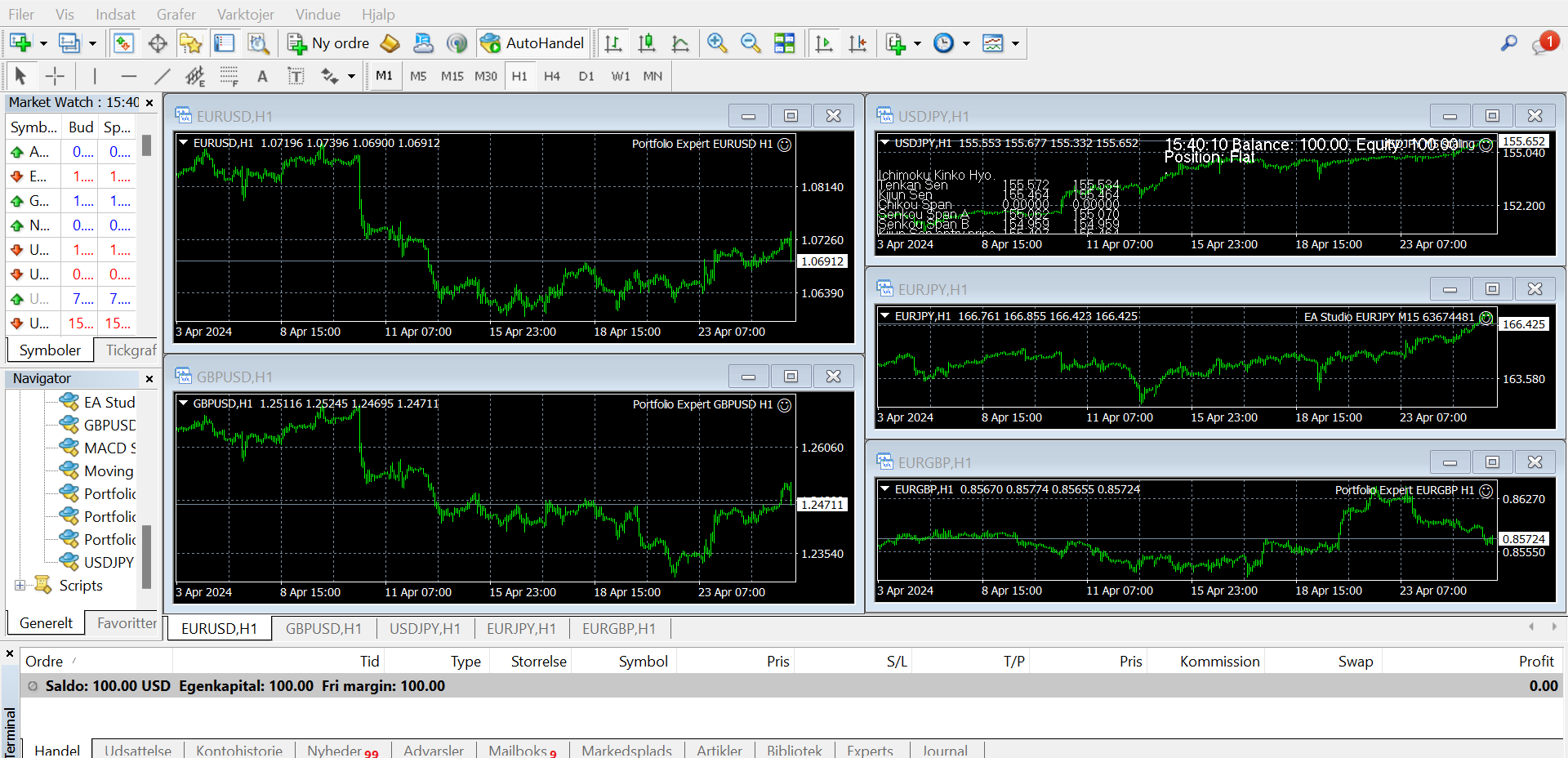
I was wondering if someone knows what the minimum deposit should be for the bots to have enough money to trade. I have applied the following bots on a demo account with 100 USD:
Portfolio Expert EURGBP H1
Portfolio Expert EURUSD H1
Portfolio Expert GBPUSD H1
USDJPY M5 scaling
EA Studio EURJPY M15 63674481
Nothing is happening, so maybe there isn’t enough money but how much is minimum then?Thank you for the help! 🙂
Alan Northam
ParticipantHi Katherine,
Maybe if you limit to one Expert Advisor and change the lot size to 0.01 you might be able to get some trades.
Alan,
MemberUpload your strategy on Google Drive and post a shared link. I’ll check it.
Participanthere is a link to the ea, the complied version and the settings I am using:
https://drive.google.com/drive/folders/1Iq6ONeTIfDfcGJLUiuoWVw23PWLNxEym?usp=drive_link
The account size is 20000 gbp
Abigail
MemberPlease advise am i able to load the robot on a MT5 Demo Account and let it run over a few days, i have tried an it is not generating any orders, so i was wondering if its possible or can one only load it on a live account.
ParticipantHi Abigail,
Yes you can load in into a demo account. There could be a few reasons why it is not placing trades. Can you send a screenshot of the upper left area of the trading chart so we can review what is being said? Once I know what the problem is then we can fix it!
Alan,
Maarten Vollebregt
ParticipantHello,
WHat happend 🙁 In my MT4 journal tab I saw multiple messages “Trade context busy” followed by multiple lines with the message for multiple EA …. removed. Now I have a big gap in my demo capital 🙁 Al orders seem to have been cancelled with loss…. What happend?? I made the strategies with the generator..
Maarten
ParticipantI figured it out on my own.
in the source code change
ENUM_ORDER_TYPE_FILLING GetOrderFillingType()
{
const int oftIndex=(int) SymbolInfoInteger(_Symbol,SYMBOL_FILLING_MODE);
const ENUM_ORDER_TYPE_FILLING fillType=(ENUM_ORDER_TYPE_FILLING)(oftIndex>0 ? oftIndex-1 : oftIndex);return (fillType);
}to
ENUM_ORDER_TYPE_FILLING GetOrderFillingType()
{
return (ORDER_FILLING_IOC);
}USDJPY trades can now trade for me without error
Ilan Vardy
ParticipantHi Maarten,
Could you please share a screenshot of your journal, or download it an attach it to the chat so I can take a closer look.
Thanks,
Ilan
Ahmed22
ParticipantHi
About testing portfolio EAs i opened demo accout with $10000 ,the EURUSD portfolio EA did not work , zero trades tilll now (1 week) ,although other portfolio EAs working well (EURGBP and GBPUSD) and placing orders from day 1
ParticipantAny one have reply
ParticipantHey Ahmed,
Please run a backtest on the portfolio EA, using the exact settings you’re trading with, and see if trades should have opened. Also, please check the journal for any errors. You can also screenshot the results and share them here so I can take a closer look.
Cheers,
Ilan
-
AuthorPosts