

Forum Replies Created
-
AuthorPosts
-
Ilan Vardy
ParticipantHi Casanogues,
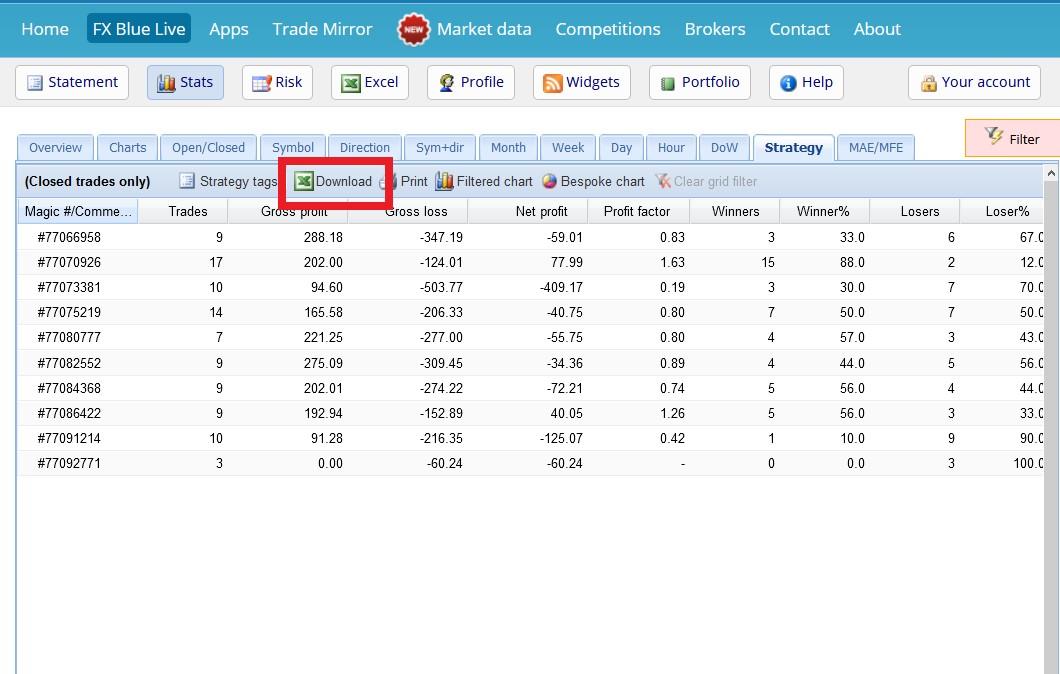
Are you using the Download button, as per the image below?
If you are, it would seem the file is being opened by a program other than Excel, or similar. Perhaps Notepad, or another text editor?
If you could take some screenshots and post them here, it may give me a better idea as to what is happening.
Thanks,
Ilan
 Participant
Dear Students,
The weekly EAs for the course -MetaTrader 4 Forex Trading course + Weekly Robots, have been uploaded and are available to download.
Safe trading,
Ilan
ParticipantHey Richard,
Great! How often do you filter, and move the EAs from demo to “live”?
Ilan
ParticipantHey Samuel,
Not necessarily too strict, but there certainly is a lot of Acceptance Criteria which will limit your EA quantities generated.
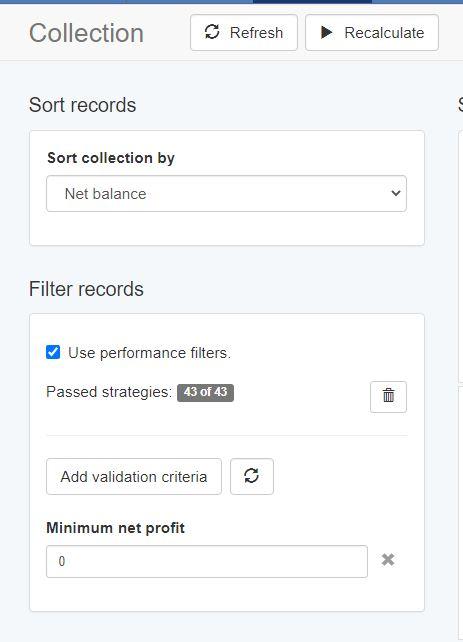
I’d suggest having less Acceptance Criteria, then once you have an adequate number of EAs, use the Performance Filter on the Collection page, to add, remove or change Validation Criteria until you’re at the number of strategies you’d like.
Personally, when I generate strategies, I use only Minimum Count of Trades – 300 – 500, depending on the time frame of my historical data, and minimum profit factor. Once I have many strategies in my Collection, I apply Validation Criteria and filter the results.
Cheers,
Ilan
ParticipantHey Adam,
It’s very rare for an EA to be consistently profitable for a long period of time. Market conditions change, so we’re always generating new strategies based on the most recent data from the broker/s. An EA may, over an entire 5 year period be profitable overall, but it will, a few times, go through draw downs. We try to avoid these draw downs by regularly analyzing our EAs and selecting the most profitable ones in current market. conditions.
Thanks,
Ilan
ParticipantHey Adam,
It really depends on the asset and market conditions. Personally, most of my EAs are M15. I’ve just found this works best for me, but try different time frames and different assets on demo accounts and see which you prefer.
I always have about 10 – 15 demo accounts running where I test different strategies, time frames and assets.
Ilan
ParticipantHey guys,
100% correct.
Tai, it’s always best to check your broker’s asset specs, and adjust in EA Studio as needed. It will give you more accurate results. Don’t forget to check the spread too. Most regulated brokers have floating spreads, so watch the spread in the Market Watch window in MT, and set it at the highest value you see, so if it is lower when your trade executes, you will make a bit more profit if it goes in your favour, or a bit less of a loss if it goes against you.
Cheers,
Ilan
ParticipantHey Tai,
The way I do it, is I look at EA performance in my demo accounts using FX Blue on a weekly basis. If an EA has performed well in the last week AND month, I then transfer it to my live account. My personal criteria is a profit factor of 1.4 and min. count of trades of 3 for both periods. It’s also important to ensure you keep a balanced portfolio, meaning a number of different assets, and if possible the same quantity of EAs for each, so you manage your risk better. I change my EAs every week on my live account. I close all positions, delete all EAs, then copy the new EAs that I have selected based on the criteria mentioned from my demo accounts to my live account and attach them to new charts. Market conditions change all the time, so EAs that have been profitable, can become unprofitable, and vice versa, so it’s important to analyse and update your EAs regularly.
Cheers,
Ilan
ParticipantHey Samuel,
All courses can be found on our website. The one you are asking about is below in the link.
If you’re unsure which would be best for you, simply ask me and I’ll guide you.
Cheers,
Ilan
ParticipantHey Jordy,
Net profit is of course very important, but I would include a minimum count of trades too. This way, you will know the EAs are more robust. But let us know how your current system is working.
Cheers,
Ilan
ParticipantHey Jordy,
What criteria are you using to select the top 3 EAs? Net profit only?
Cheers,
Ilan
ParticipantHey Richard,
Yes, there were some draw downs, but overall, the portfolio is profitable for the week.
Which broker are you using?
Ilan
ParticipantHey Richard,
This is very interesting. Please keep us informed, not only on the development, but the results of you “live” demo account.
The question I have for you is, if you choose to change the criteria by which the system selects the EAs to move from demo to live, how easy is it to do?
Cheers,
Ilan
ParticipantHi Adam,
Try the following settings, it’ll be a good place to start. Once you’re more familiar with the software, you can additional acceptance criteria (R-Squared would be good to try too).
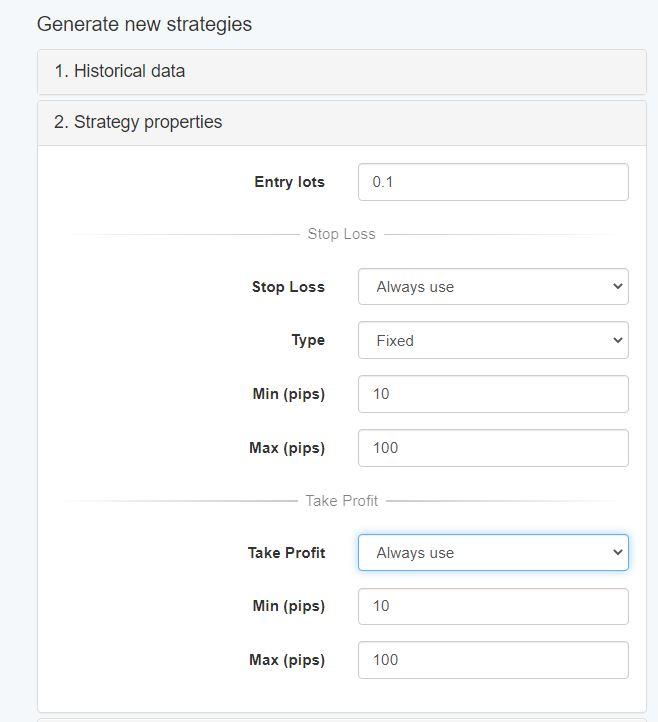
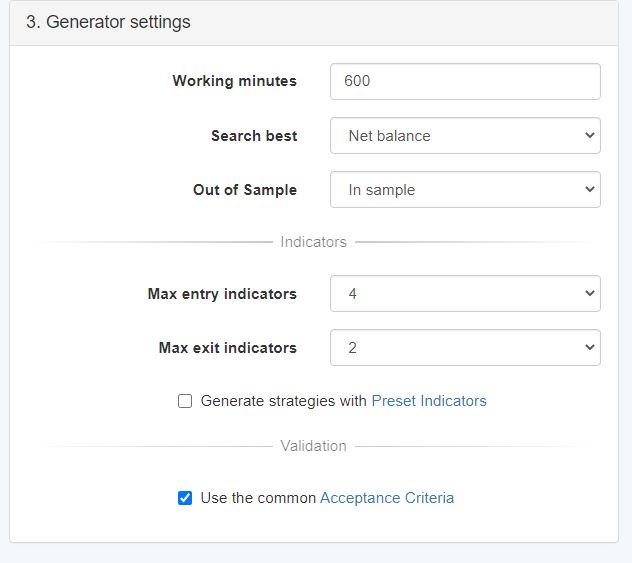
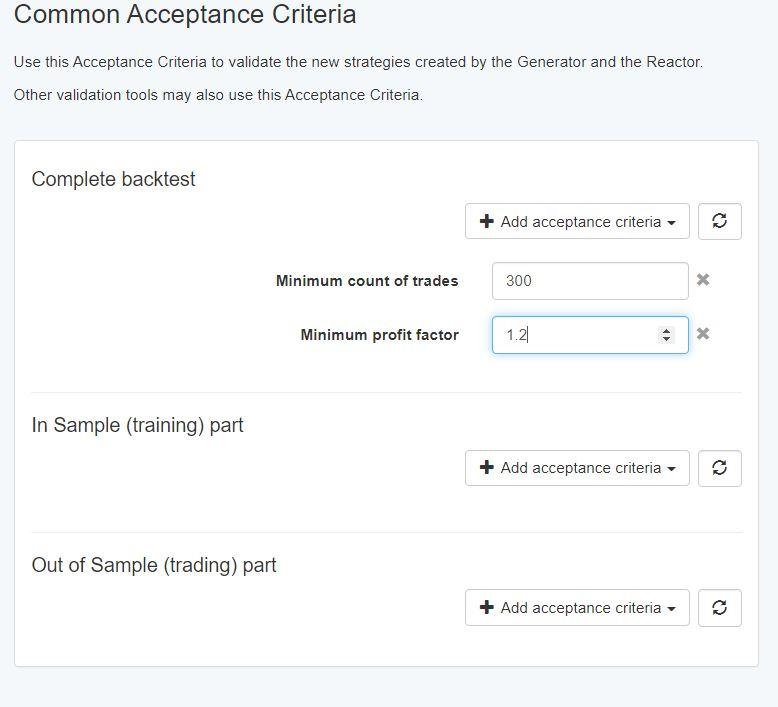
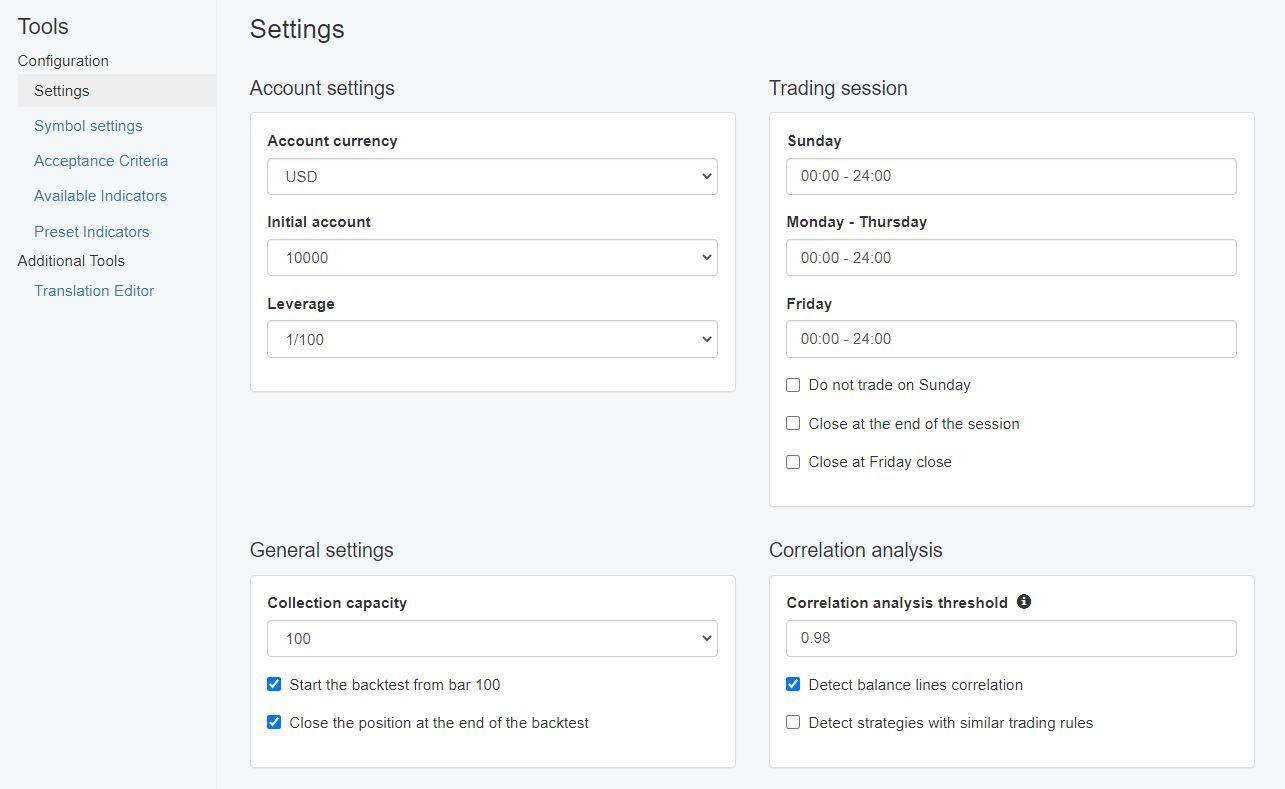
Please let me know how you get on, and if you need more assistance.
Cheers,
Ilan
ParticipantHi Samuel,
My advice would be to use either the Premium Data (DukasCopy) or Meta-trader Demo (JFD) data in EA Studio, if possible. If the asset you want to generate strategies with is not listed, then I would look at DukasCopy to export historical data from. From my experience, they have the most amount of bars. On most M15 time frames, for example, you should get about 65 000+ bars. Just remember to change the Symbol Settings to match the broker you’ll be trading with.
Here is a video explaining how you can do it:
Thanks,
Ilan
-
AuthorPosts