

Forum Replies Created
-
AuthorPosts
-
Petko Aleksandrov
ParticipantGreat, he might give you an idea. It is something with your data after you upload it on EA Studio.
Now, if you have another broker with similar data (you can check that with the Meta Trader backtester. You can use this other data to create and analyze the EAs with EA Studio.
ParticipantHello traders,
recently we have a new member of the team who started working on captions/subtitles for the courses. We believe that this way your experience with the lectures will be better and you will understand every word I say.
The first two courses with captions are:
1. Forex trading strategies from a professional trader + Top 5 Robots
2. Forex strategy course – Portfolio trading with 12 Expert Advisors
Hope that will make it easier for you to learn.
Kind regards,
ParticipantI used to connect the tablet with Remote Desktop, but as Jacpin says, you can monitor the account from Fx Blue. Much easier.
ParticipantHey Edu,
Thapelo is correct. Personally, I would not trust only the backtester at MetaTrader. The robustness tools as Monte Carlo and the Walk Forward validation are essentially important. However, you can drop an e-mail to Forex Software and Mr. Popov to have his opinion on the issue with your data. He might give you some insight from the developer’s point of view.
ParticipantHello Edu,
if you have tried with the other broker and it is fine, it means it is something the data once it is imported to EA Studio.
Now, I think you have no worries if the MT backtester shows profits. It means the EAs are just fine. There is just something with this particular broker’s data when it comes to EA Studio but I can not say what…
let me know if there is something else.
Kind regards,
ParticipantI would be scary to trade EAs with such a difference in the SL and TP. What if you hit 2-3 consecutive trades on a loss.
Jacpin, how many consecutive losses you see for this strategy in the backtest output?
ParticipantUploaded those as well!
ParticipantHello Edu,
that is quite interesting! Have you tried uploading different data into EA Studio, with a different broker?
At first glance, I do not see anything else but the spread (which you said you have tested with variable values)
Tomorrow morning when my head is fresh I will have a look at the pictures again, but give it a try with other broker’s data. Just to see if the problem is with the data that you export from the broker or is it something on the settings in EA Studio.
ParticipantThank you, Petko! I am just placing all the EAs. Have a nice Sunday!
ParticipantYes, it is! I really liked the recent video about Why Forex traders lose money:
ParticipantHey Jacpin,
I have some EAs with such big SL and small TP on Forex, I saw also, from the beginning that Petko uses bigger SL than TP.
I would suggest you rise your min of 50 trades. Go at least to 300. Normally Monte Carlo does not passes such strategies with a small number of bars, because the generator finds kind of optimized strategies (even you do not use optimizer).
ParticipantHello Edu,
What is see is just the spread difference? 2.5 for EURUSD is a HUGE spread. It will reflect a lot on your data.
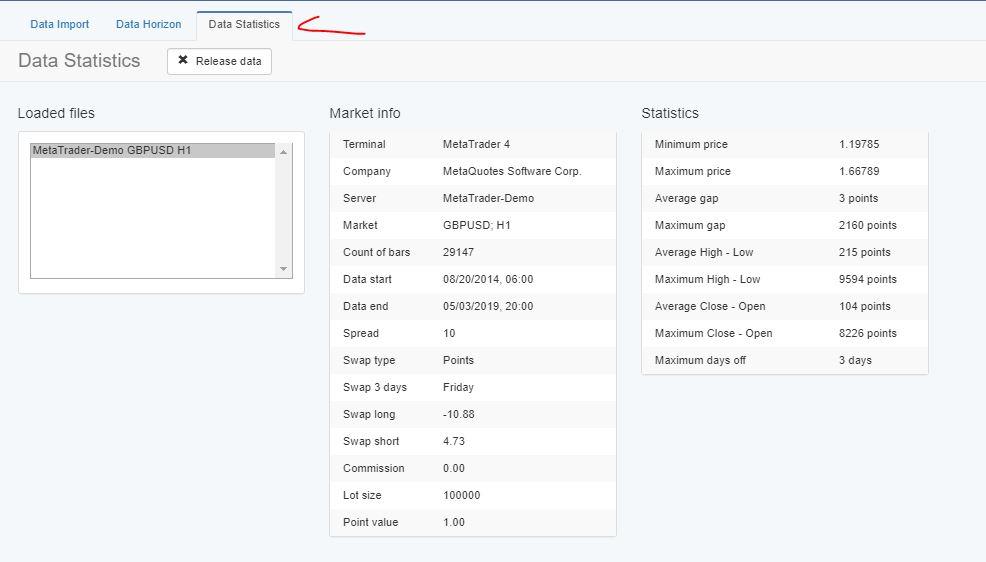
Can you send a picture from the Data-statistics of your broker? Could be something there:
 Participant
Hello Roman,
You are right about that, but I just prefer to use M5 and M15 if I am trading on H1, for example. So I want to have actual indicators on these lower time frames confirming the trade logic.
ParticipantHello Craig,
here is an example order you can follow:
1. MetaTrader 4 Forex platform: Start trading with a pro trader
2. Basic algorithmic trading course + 3 Robots
3. Forex Algorithmic trading course – Top 10 GBPUSD Expert Advisors
4. Automated Forex trading course + 99 Expert Advisors
5. Algorithmic trading strategies Top 10 USDCAD EAs
6. How to trade Forex with 100 GBPUSD strategies in the account
And then just complete the others which will fill some missing parts.
Anyway, all of the courses are separate, which means that in each one you will learn a strategy, system for trading, or multiple strategies that you can apply. The more you combine, the better, but try to keep it simple and not too complicated.
It is great you have the experience, this way you will relearn it all faster.
Let me know if you have any questions.
ParticipantHello Edu,
there is something that you are missing.
Please, use the img tool that is available here:
It is much easier to upload pictures.
Now, please, send me some screenshots from your set up on MetaTrader Tester and on EA Studio, from the Historical data, etc.
By looking at these graphs I can not say anything…I can not see what you are missing.
Also, keep in mind that both work fine, and try to find what is the thing that causes you the difference.
-
AuthorPosts