

Forum Replies Created
-
AuthorPosts
-
November 14, 2023 at 2:49 am in reply to: Are you able to run a demo and live account on one VPS? #212359
Alan Northam
ParticipantA VPS is just like your desktop. You can use the VPS chrome browser and go to your brokers website and download MT5. To run all 6 demo accounts at the same time you will need to install 6 copies of MT5. So to run 6 separate MT5 terminals, one for each demo account, you would need to order a VPS capable of running 6 MT5 terminals.
To run 20 robots in one MT5 terminal you would need to open 20 charts, one robot for one chart. MT5 can handle up to 100 charts.
Alan,
ParticipantCan you show a screenshot of the Strategy Tester settings?
Alan,
ParticipantHi Eric,
Which version of the FTMO robots are you wanting to know which robots are top performing?
Alan,
ParticipantHi Eric,
Which version of the FTMO robots are you wanting to know which robots are top performing?
Alan,
ParticipantThe robot looks to be set up properly however you have not yet gotten any trades. You need to wait longer and you should see the robot enter a trade.
Alan,
ParticipantYou will need to give it more time for a trade to develop!
Alan,
ParticipantYou will need to give it more time for a trade to develop!
Alan,
ParticipantDo you have a firewall blocking MT4?
Alan,
ParticipantHi Robert,
No you do not need to adjust the time frame of the robot. As long as there is a smiley face in the upper right corner of the chart you are good to go!
Alan,
ParticipantHi guidb3629,
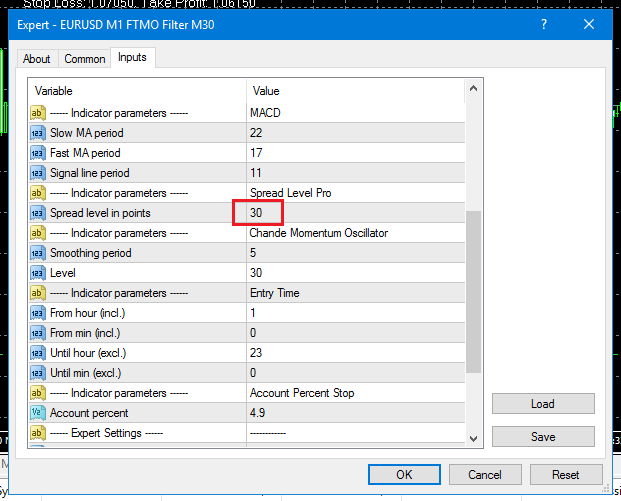
You will need to increase the Spread Level. I recommend identifying the spread during the first couple of hours after the market opens for the day and using this spread level or slightly less so the EA will not take trades when the spread is high. High spreads has the potential of limiting profits and increasing losses.
Alan,
 Participant
Change Max Count of Trades to Min Profit Factor = 1.2 and start there to see if it will now start collecting strategies.
Make sure EA Studio is running in a separate Chrome web browser and not just in one of the tabs. As soon as you change tabs EA Studio will stop collecting strategies but the timer will keep on running. So take the tab you have EA Studio running in and grab it with your mouse and pull it out of the existing chrome browser and into its own browser and do not minimize it. You can run other chrome browsers on top of it. This may be what your problem has been all along.
EA Studio was developed by Popov at forexsb.com. Both forexrobotacademy and eatradingacademy have been approved by Popov to offer EA Studio on their websites.
Alan,
ParticipantV4.3 should be available in the download link.
Alan,
ParticipantI am starting an FTMO 10K challenge on Monday using USDCHF and GBPAUD V5 with 1% risk for each asset. Will consider scaling up when account reaches 2% profit.
Alan,
ParticipantBy eliminating these two items should allow you to collect strategies. When EA Studio has stopped collecting strategies you can go to the Collections and see what the minimum count of trades is and what the minimum net profit is for the collected strategies. This will be what EA Studio has been able to collect for the time period EA Studio ran.
If you want to stick with the numbers in the red boxes you might need to increase the length of time the EA Studio runs to a much longer time period.
Alan,
ParticipantHi Andreas,
I always leave my trades overnight and weekends.
The EA’s are created to perform the best over the long term with the SL set a certain distance from the open price as shown in the EA properties box. However, you can at your own discretion change it.
Alan,
-
AuthorPosts