
Community Forums › Forums › Ready-to-use Robots › Top 10 EAs › Top 10 EAs: Properties & Settings
Tagged: 4 major pairs, EUR/USD top 10, lot size, Missing Portfolio Code, negative take profit, spread protection, Top 10 Gold EAs, Top 3, W1, weekly
- This topic has 58 replies, 20 voices, and was last updated 1 year, 1 month ago by
Scoot.
-
AuthorPosts
-
April 19, 2024 at 10:56 am #249874
Oly
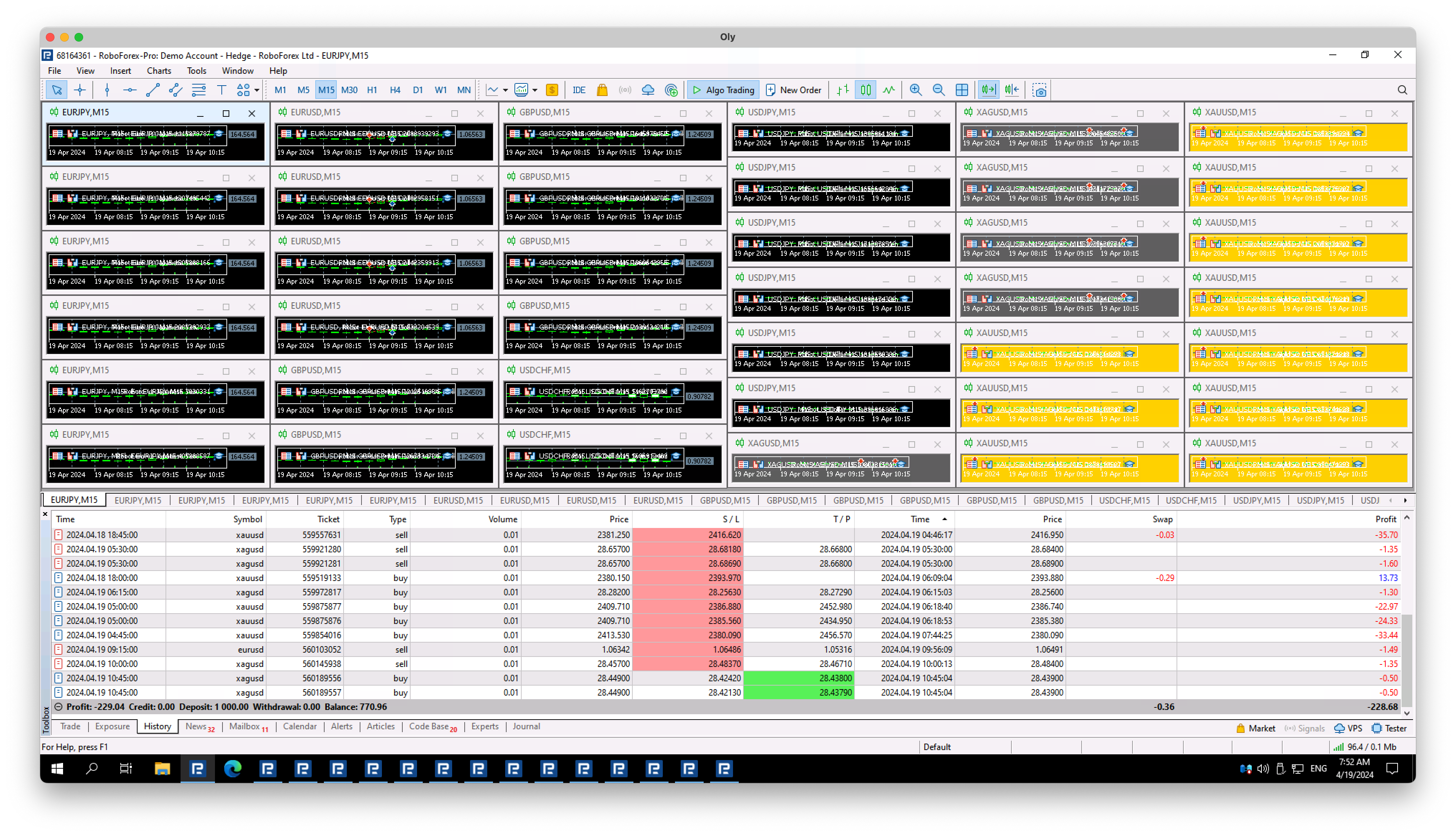
ParticipantDay 2, now I’m running it on a standard demo account, not a cent account… and the results speak for themselves LOL. Best 10 bots of the last 30 days…
 April 19, 2024 at 11:20 am #249881
Marin Stoyanov
KeymasterHey Oliver,
I see the results. In this case, I would ask you to also try in a different broker and see if that has different results. But it could be due to the market conditions as well.
You can see what brokers we are using and try to use the robots in one of them: https://platform.algotradingspace.com/trusted-brokers/
Kind Regards,
NikosApril 29, 2024 at 6:35 pm #252312Pak
ParticipantHi team,
Would you please to explain the protections feature in the Portfolio EAs please?
Also any tips and best practices would be appreciated.
Thanks
Pak
May 14, 2024 at 11:33 am #254938KeymasterHey Pak,
I am so sorry for the late reply.
So, in portfolio EA, you get 3 settings for the protection that are:
Max spread (points): What it does is that you set a limit on the spreads which means for example if you set it at 10 and the spread of the pair is 15, it will not open a trade.
Minimum equity (currency): So, minimum equity means that the trades that are open will close if they reach to that amount that you have set. If let’s say you have a balance of a 1000 and you have set the minimum equity to 850, what it will do is that if you have an open trade and from it is on a loss of 150$, the trade will close automatically and there will not be another trade unless you set it to a lower amount.
Maximum daily loss (currency): It is almost the same as the minimum equity but the difference is that it just close the trades for the day if they reach the amount you have set. Once the next day comes, it will trade again.
Hope this helps!
If you have any other questions, let me know!
Kind Regards,
NikosMay 15, 2024 at 12:51 pm #255131dani schmitz
ParticipantHello, I was wondering if anyone here could help me out with this question that I have.
so in the top 10 robots app you have the ea’s and underneath are a few things listed like:
Profit
$8,083
Profit factor
1.32
Drawdown
9.34%
Count of trades
935
R squared
86.57
Return to DD
4.65just as an example I listed the above, but on what account size and lot size is the DD, profit and the rest calculated so I know what I am risking and how much DD it has on what lot size.
Thanks in advance.
May 15, 2024 at 1:41 pm #255136Alan Northam
ParticipantHi dani,
The problem as to account size is used in determining the drawdown of the asset in question is resolved by expressing the drawdown as a percentage. So whatever your account size is the drawdown will be 9.34%. As an example, a $1000 account would have a drawdown of $93.40.
Alan,
May 15, 2024 at 1:47 pm #255137ParticipantHello Alan,
I understand that but let me rephrase my question better,
Lets say I have a $10.000 account and in the app it says the draw down for the bot is 2.5%
2.5% of 10k would be $250, what lot size would I use to get a maximum of 2.5% drawdown so I know I don’t blow the account.
Thanks in advance,
Dani
May 15, 2024 at 2:27 pm #255147ParticipantHi dani,
You would use a lot size calculator. The following is the one I use all the time:
https://www.forextime.com/eu/trading-tools/trading-calculator/pip-calculator#pip-calculator
Alan,
May 18, 2024 at 12:25 pm #255521Boyan Todorov
MemberHello Alan,
as to the risk calculation I am using these two
https://www.myfxbook.com/forex-calculators/position-size/XAUUSD
https://www.babypips.com/tools/position-size-calculator
How do you use the pip calcuclator?
And one more thing in the Export Options in the App you can pre-set the properties for the exported EAs, but how can you predefine the Entry lots, since you don’t know the SL of the EAs in advance and the Entry lots are actaully calculated based on the account size, which is not being taken in consideraion in the Export Options? Can you please explain, thanks!
kind regards
Boyan
May 18, 2024 at 12:40 pm #255606ParticipantHi Boyan,
No sure I understand your question but I will give it a try:
You do not pre-set the entry lot size in the app. You do this when you add the robot to the chart. During the install process onto the chart a properties box will show up. Click on Inputs. Here you will find the Loss in pips. Use this Stop Loss in the Calculator to find the Entry Lots. Then enter the lot size into the properties box. Click OK.
Alan,
May 21, 2024 at 10:24 am #256140MemberHi Alan,
if you open the Export Options you will see, that right on the top there is a prompt for the Entry lots, this is what I meant. However I downloaded the EAs with the default setting 0,1 and then I calculated my risk according to the pair and the SL from the properties fron the EA and then I changed the 0,1 value in the properties with the result from the calculator. I assume I did everything right?
kind regards
Boyan
May 21, 2024 at 11:25 am #256154ParticipantHi Boyan,
I see what you mean. Kind of hard to set the lot size if you don’t know the risk. During the process of adding the EA to the chart there is a box that shows up on the screen. If you click on inputs then you can see the SL and calculate the risk before the EA is actually attached to the chart. When I want to change the lot size of an EA already installed on the chart then I right click on the smiley face or the blue hat in the upper right corner of the chart. Then I select properties and from there I can see the SL and I can calculate and add the lot size.
The way you eventually did it works!
Alan,
June 17, 2024 at 1:30 pm #261631Jeremiah Say
ParticipantI plan to trade 4 major pairs top 3 on the W1 meaning there will be a total of 12 triggers.
What is the recommended account size for 0.1 default lot?
June 17, 2024 at 8:33 pm #261680NIKOS KYRIAKOU
MemberHey Jeremiah,
I believe 5-10k is more than enough as you will be more safe, actually if they are just forex pairs.
If you plan to trade metals, like Gold, Silver etc., I think it’s better to have a bigger account if you want to trade with this lot size as the account can be blown easily if things go wrong.
Kind Regards,
NikosJune 25, 2024 at 7:52 pm #263116Tsholo Monyausi
Participanthi Guys
i would like clarification on the following in your top 10 app. in simple terms, can you explain the follwong
R Squared
Return to DD
Profit Factor
What would you suggest as the good parameters to have on the above in order to select a strategy
And ideally, on a weekly basis, how many trades should an EA do to be considered good.
Regards,
Tsholo
-
AuthorPosts
- You must be logged in to reply to this topic.