
Community Forums › Forums › Ready-to-use Robots › Prop Firm Robots › Prop Firm Robots: Access Issues & Assistance
Tagged: Darwinex Zero, FTMO Robot, problem to coonect my account and download EA, prop firm robots app, Prop Firm Robots Plan, Refund, Robot App Software
- This topic has 150 replies, 48 voices, and was last updated 4 months, 3 weeks ago by
nectar.
-
AuthorPosts
-
August 11, 2025 at 3:42 pm #465644
John christophrous
ParticipantHi Maria , i purchased the prop firm robots life time sub off this site laat year off, so.this is the right forum i believe
August 11, 2025 at 3:56 pm #465645phenixiou
Participant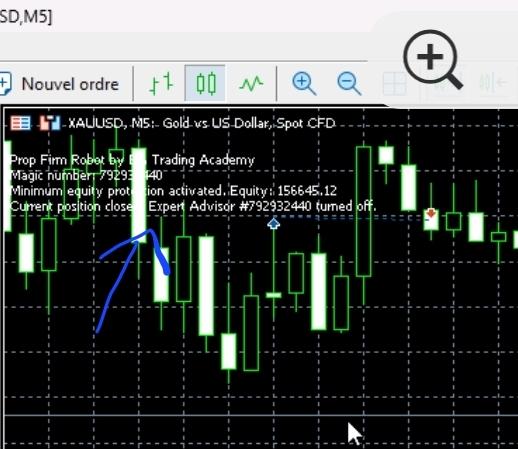 August 11, 2025 at 8:59 pm #465688Participant
<p style=”text-align: left;”>Thank you for your message. It shows “current position closed” and “Turned off,” and the EA disappears right after I set the configuration. Only what is indicated on my screen remains.</p>
<p style=”text-align: left;”></p>August 12, 2025 at 11:01 am #465746Maria Docheva
ParticipantHello Marie-Catherine,
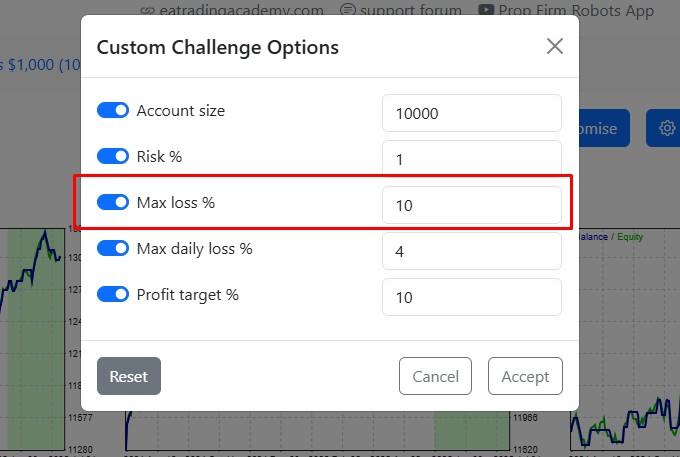
Thank you for providing the screenshot. I can see that “Minimum Equity Protection” has been activated. This means that when you customized your robots, you set a percentage for the drawdown (DD), and that threshold has been reached. Once this level is reached, the robot(s) are automatically deactivated. Please check if this is the case and let us know.
 August 12, 2025 at 1:47 pm #465799Participant
<p style=”text-align: left;”>Hello,</p>
<p style=”text-align: left;”>I found the issue. The activation limit was not reached. I managed to fix it by downloading the robots one by one.</p>August 12, 2025 at 2:16 pm #465801ParticipantHello, I would like to request the cancellation of my one-year subscription, as I am not satisfied with the robots. Could you please let me know the process to proceed?
August 13, 2025 at 8:11 am #465895Samuel Jackson
MemberHi Marie, sorry to hear that you are not satisfied with the robots from the app, please contact [email protected] and they will assist with this request. It seems like you have just started using this app and have quickly decided its not for you. This is fine and just get in touch with support. But can I ask out of curiosity why you are not satisfied and if there is anything I can help with?
August 13, 2025 at 8:36 am #465901MemberAdditionally I am putting together some resources to help people improve their results with the Top 10 App and Prop Firm Robots App currently and just started a topic that may be of interest as I see you still have plenty time left on your 30 days. https://community.algotradingspace.com/forums/topic/method-for-profiting-with-top-10-and-prop-firm-app/
Additionally see that I have passed many prop challenges and am a funded FTMO trader and have a lot of experience in making EA Studio EAs profitable over the long term: https://community.algotradingspace.com/forums/topic/many-prop-firm-challenges-passed-with-ea-studio/
August 13, 2025 at 2:02 pm #465978Marin Stoyanov
KeymasterHi John, the problem with your access is solved now. Your profile was missing first and last name, that was an issue back in 2024 but was fixed in bulk for all of our users. Seems that your profile didn’t went through that update last year. Now all is fixed and you should be able to access the app as usual.
August 13, 2025 at 2:54 pm #465983ParticipantIve just checked and its all sorted , thank you
August 21, 2025 at 8:54 am #467191Ben10power
ParticipantSo the prop Firm Robots EA are updated every Saturday night?
August 21, 2025 at 2:05 pm #467283ParticipantHi Support team – I have a query. After I downloaded top 5 EAs from the Prop Firm Robots. I noticed there are two EURUSD and two EURJPY. Both on M5 charts. I want to test them on demo accounts but the M5 chart only allows me to add one EA for the currency pair (eg EURUSD). How do I add both EAs onto the same M5 chart in MT5?
August 21, 2025 at 2:20 pm #467285Ilan Vardy
ParticipantHi Ben10power
You can only place one EA per chart. So, all you need to do is open a second chart for the same asset and time frame. Simply right-click over the asset in the Market Watch, and select “open chart.” Once you have the second chart open, you can attach the EA as per usual. You can repeat this process as many times as you like.
Please let me know if this is clear or you need further assistance.
Cheers,
IlanAugust 21, 2025 at 2:24 pm #467288ParticipantHi Ben10power,
The servers generating the strategies run 24 hours a day, and any strategies that pass the criteria are added to a collection. On Saturdays, all of the EAs in the huge collections are tested against the historical data from the brokers, and the best are uploaded or kept in the app. But once they’re in the app, they’re tested every 30 minutes against the historical data and arranged in the app according to the metric you have selected.
Cheers,
IlanAugust 22, 2025 at 7:59 am #467381ParticipantThanks Ilan. I have done as above. It is working fine now.
Question on best practice with Prop firm robot EAs. Can you please advise if my understand is clear – I got this from Petko’s video.
1. Download top 5 EAs on Sat to run a demo account for a week (use 1 year or all results). Including OOS results.
2. Connect to FXblue for analytical data on each of the strategies. Check which currency or strategy is the most profitable after full week.
3. Use the same strategy on the Prop Firm challenge account (preferably use 2 or 3 different ccy pairs for randomness)
4. Update the strategy on the next saturday if strategy is not performing.
Can you please let me know if I miss out anything above?
For funded account –
1. Use the top 3 in the weekly result and apply them on the funded account.
2. Monitoring the performance and update on Sat when new list of top 10 is updated.
Can I please suggest to add a fortnightly result on the top 10 list? This is a better indicator than weekly and would be more relevant to current market condition.
-
AuthorPosts
- You must be logged in to reply to this topic.