
Community Forums › Forums › EA Studio › How satisfied are you with the automated trading software EA Studio?
- This topic has 149 replies, 23 voices, and was last updated 1 year, 2 months ago by
astral.
-
AuthorPosts
-
May 2, 2020 at 12:26 pm #46796
Andi
ParticipantGreat to have the search bar, Petko! Thanks a lot!
EA Studio with the Free Historical data App is just a fantastic combination! Really things got easier for me.
I hope soon the data will be inside the software for the licenses users at least. This way we won’t need to download and upload the data. Even it works really fast this way 🙂
May 30, 2020 at 10:44 pm #49604Petko Aleksandrov
ParticipantI love the Historical data tool. I am testing currently the Dukascopy with a small live account to see how it goes.
I hope I can use it in a longer-term with this fantastic data.
Yes, Andi if it gets inside EA Studio it will be even better.
How is your trading going recently?
I did above 50% this month which was a target that I couldn’t reach the last 6 months. Thanks to Petko of course…
June 15, 2020 at 11:22 pm #51142ParticipantHey Van! Fifty percent!!! You rock man!
Can you share more of your trading with us? How many EAs do you test on Demo and how many you trade on live? What lots? Money management?
Check out the new video in the Historical data app. Petko shows how to use that data for other brokers. it is awesome.
July 10, 2020 at 8:39 am #53474ParticipantHi Petko,
I saw some changes in the Generator in EA Studio:
1. The graph shows the new strategies, and the old ones disappear in 5 seconds
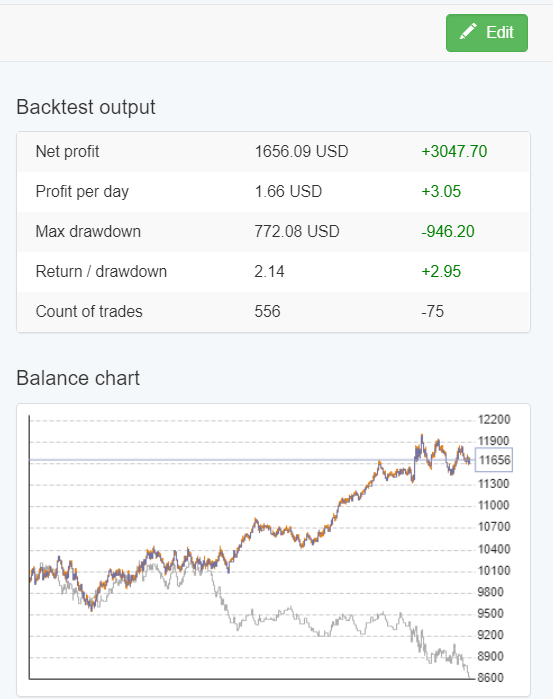
2. There is a change in the Backtest output. Does it show the difference with the previously generated strategy?
Is there a change in the work of the generator is that is just a visual update on how the generator improves every new strategy?
July 12, 2020 at 11:29 am #53583ParticipantHello Andi,
Yes, it is just a visual update. I had 1:1 class with Petko yesterday, which was great by the way.
So he explained that this is just for the traders to see how the new strategy is different from the previous one generated. It stays 5 sec and it disappears. But the one that disappears remains in the collection. It disappears just from the graph.
Also, there is the could change the Backtest Output which shows the different parameters. Same with the Optimzer:
 July 13, 2020 at 8:09 pm #53717Participant
Yep, exactly guys! It is just a visual presentation of how the generator works and what are the differences between the strategies.
There are some more updates that are coming up and I will record videos about them.
Cheers,
August 13, 2020 at 10:50 pm #57005ParticipantEA Studio gets better and better.
I saw the videos in the EA Studio Updates topic and it is really great to see how the strategies improve one after another.
I love the dark version!
August 14, 2020 at 12:19 am #57008aaronpriest
ParticipantYeah, the dark version helps my eyes a lot!
August 19, 2020 at 2:10 pm #57533ParticipantI am glad to hear that the dark version was useful.
We are working on the user guide of EA Studio at the moment. As well, Ilan will record videos on each guide next month and that will make EA Studio easier for the beginner traders.
September 29, 2020 at 10:06 pm #61735ParticipantEA Studio gets better and better. With the Premium data, I feel like the last missing part is placed in the puzzle.
It’s really the best strategy builder out there!
November 12, 2020 at 2:06 pm #66032ParticipantAutomated trading has always been a dream for me and it looked impossible since I can’t do any programming and I do not have enough capital to hire good developers.
Using EA Studio for over 6 months now I feel my dream comes true. The last 3 months were profitable for me (Oct just 8%).
EA Studio is super easy to use, but of course I did it all because I watched nearly all the courses from Petko 🙂
November 16, 2020 at 10:19 am #66464Ilan Vardy
ParticipantHey Cone,
That’s great to hear.
Keep up the good work!
Ilan
January 29, 2021 at 9:50 am #75055ParticipantHello all,
I wanted to share how happy I am with EA Studio and how much I learned from it.
I have programming skills a bit, but before using the software I didn’t really understand how the EAs work. I learned a lot from the code of the EAs as well.
Thanks to Petko, Ilan, Desi, and the whole team for making great courses!
February 1, 2021 at 5:17 am #75262ParticipantHey Travis,
Good to hear from you, and thank you for the kind words. We’re all really happy to hear how much you’re benefiting.
Keep it up!
Ilan
February 9, 2021 at 5:57 am #76736treleonbey
ParticipantHi, I am new to EA Studio. Is it possible to use custom indicators in the EA Studio like ‘pivot points’?
-
AuthorPosts
- You must be logged in to reply to this topic.