
Community Forums › Forums › Ready-to-use Robots › Prop Firm Robots › Prop Firm Robots: Settings and Inputs
Tagged: #PARAMETERS, copy trading, EA Settings, Envelopes, FTMO, FTMO payments, FTMO Robot Parameters, FTMO Robot settings, High Impact News Settings, Marin Stoyanov, news filter prop firm Alpha Capital., Petko, Pip value for XAUUSD, Prop EA App, Prop Firm Robots, Proprobots stop trading, protection, RSquared PropEA, trailing stop
- This topic has 195 replies, 73 voices, and was last updated 1 month ago by
Xavier Whitfield.
-
AuthorPosts
-
November 8, 2023 at 11:19 pm #210926
Dylan Mueller
ParticipantThank you for your reply Petko, however i am still a little confused. The way i currently understand is if i have spread protection set to default at 30 points then the bot will not open or reverse trades if the spread is greater then 3 pips? Is that correct? Because the AUDNZD pair very rarely has a spread that low for me.
November 9, 2023 at 2:13 am #210954Alan Northam
ParticipantHi Dylan,
With respect to AUDNZD or any other asset you should adjust the spread protection appropriately. The idea is to keep an asset from trading when the spread is too wide. Wide spreads reduces potential profit and increases potential loss!
Alan,
November 9, 2023 at 4:16 am #210978Ahmad Ahmad
ParticipantHello I just added 3 robots on 3 different pairs and kept the algo on the whole day and it did not take any trades I dont know what is the problem? can someone helpme
November 9, 2023 at 7:20 pm #211131vinnysvinyl
Participant*** TURNING OFF FOR NEWS ***
I just purchased V.5 of the FTMO EA> Looking forward to getting going. I heard someone on YouTube say that Petko manages the EA’s to avoid red news events. Is that right? If so, could you please give some guidance on specifics?
- Does he close open trades before RED FOLDER news relevant to currency? e.g. USD
- How much time either side of the red news does he allow? 60 mins? 90 mins?
- Does he turn them all off for NFP? For the whole day?
Thank you!
November 10, 2023 at 1:02 am #211208ParticipantHey guys what is the correct way to increase lot size without messing with the reversing system in the bots? can i just increase lot size for a trade and a reversal and the bot will only trade the max size allocated size that is set? or is it best to open a new chart and place the bot on there with the increased size?
November 10, 2023 at 9:22 am #211265ParticipantHi Dylan,
If you want to increase new position size then you will need to increase max position size so that it is equal to the new position size.
Alan,
November 11, 2023 at 9:22 pm #211645Sipho Bhiya
Participant November 13, 2023 at 6:22 am #212122
robert finn
ParticipantI went through the passing the FTMO course and have the FTMO robot installed and ready to go. I just have 1 question. Do I need to adjust the time settings for when it runs with my brokers time on MT4? If so, how? Thanks
November 13, 2023 at 9:44 am #212144ParticipantHi Robert,
No you do not need to adjust the time frame of the robot. As long as there is a smiley face in the upper right corner of the chart you are good to go!
Alan,
November 13, 2023 at 3:34 pm #212204ParticipantThank you Alan, much appreciated!
November 13, 2023 at 5:49 pm #212233Eric Culla
ParticipantHi! Is there a live FTMO Robot running in MyFxBook that we can check which are the top performing pairs in the current market condition?
November 14, 2023 at 2:37 am #212356ParticipantHi Eric,
Which version of the FTMO robots are you wanting to know which robots are top performing?
Alan,
November 14, 2023 at 2:37 am #212357ParticipantHi Eric,
Which version of the FTMO robots are you wanting to know which robots are top performing?
Alan,
November 14, 2023 at 12:56 pm #212453Participant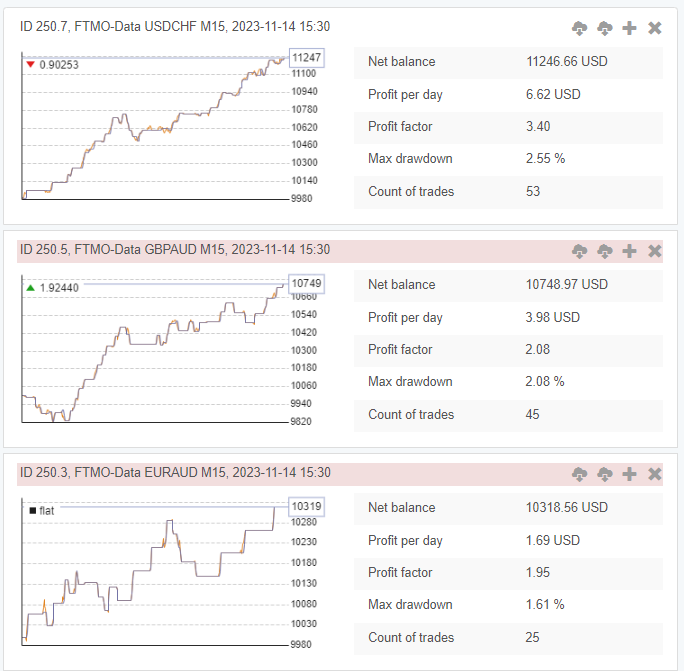
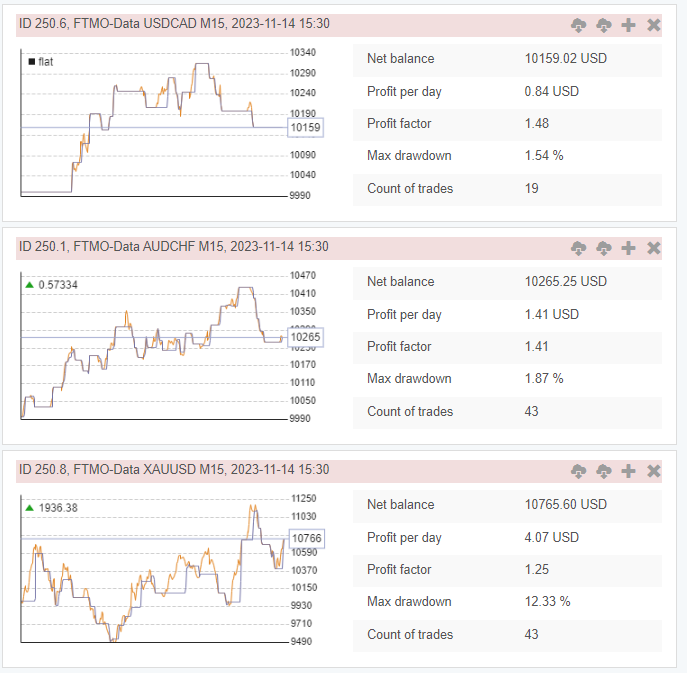
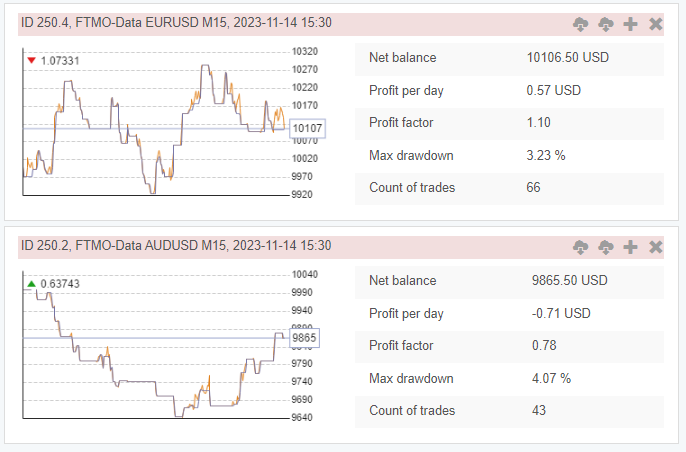 November 14, 2023 at 2:30 pm #212476Participant
Hi Alan,
Thanks for sharing, how long do we need to try it on demo before using it on live/funded account? Also, my prop firm doesn’t have a demo acct, what can you suggest?
-
AuthorPosts
- You must be logged in to reply to this topic.