
Community Forums › Forums › Ready-to-use Robots › Prop Firm Robots › Prop Firm Robots: Settings and Inputs
Tagged: #PARAMETERS, copy trading, EA Settings, Envelopes, FTMO, FTMO payments, FTMO Robot Parameters, FTMO Robot settings, High Impact News Settings, Marin Stoyanov, news filter prop firm Alpha Capital., Petko, Pip value for XAUUSD, Prop EA App, Prop Firm Robots, Proprobots stop trading, protection, RSquared PropEA, trailing stop
- This topic has 195 replies, 73 voices, and was last updated 1 month ago by
Xavier Whitfield.
-
AuthorPosts
-
September 22, 2023 at 11:37 pm #200506
Dion Burroughs
ParticipantI have run the strategy tester with the FTMO-Robot on at least 4 of the 7 pairs on an FTMO $50,000 demo account, and I either get $20 – $118 negative profit or $500 – $689 positive profit at the end of the test. I have changed the lot size lower from 1.0 to 0.8 and still bad results. The relative drawdown is always around 2% to 3% but never reaching anywhere near the 10% profit target. Please advise.
September 22, 2023 at 11:50 pm #200524Alan Northam
ParticipantIt looks like overall the FTMO robots are showing profit from how I read your comments. I recommend testing the robots with an FTMO Demo account over at least one month. Since the FTMO Demo account only last for 14 days you would have to do it twice. After one month review the results. I have been doing this since the first of August for the FTMO EURUSD EA version 4.1. You can review my results in the forum.
September 25, 2023 at 11:21 am #200972Petko Aleksandrov
ParticipantThe problem is that most people depend 100% on the MetaTrader backtester, which is not perfect, actually, it is far from being perfect.
Like Alan said, the best is to test the EAs on Demo, which is a realistic forward testing.
Also, the EAs created with FSB Pro are advanced for the MetaTrader backtester, and the results are often not realistic. So a Demo test it the best thing to be done.
September 25, 2023 at 5:46 pm #201107martin garstang
ParticipantDo you have to change the stop losses and take profits ? Or leave them as they are?
September 26, 2023 at 3:21 pm #201318ParticipantThe only change you need to make is to adjust the lot size based upon your account size to reduce risk! The following recommendations limit risk to 1%. You can adjust the recommended based upon your tolerance to risk.
200K Account: Amount for new position = 6.0 / Maximum position amount = 6.0
100K Account: Amount for new position = 3.0 / Maximum position amount = 3.0
50K Account: Amount for new position = 1.5 / Maximum position amount = 1.5
25K Account: Amount for new position = 0.75 / Maximum position amount = 0.75
10K Account: Amount for new position = 0.30 / Maximum position amount = 0.30September 28, 2023 at 12:29 pm #201882Cristian Nembrini
ParticipantHi, I recently purchased these 7 EA for FTMO but I don’t understand how I should set the “Amount to close on reduction” value.
If I have a $200k account, the 1% risk per trade based on the SL is 6.13 lots. I understood the meaning of the first three settings but I don’t understand the 4th. Can you help me? Thank you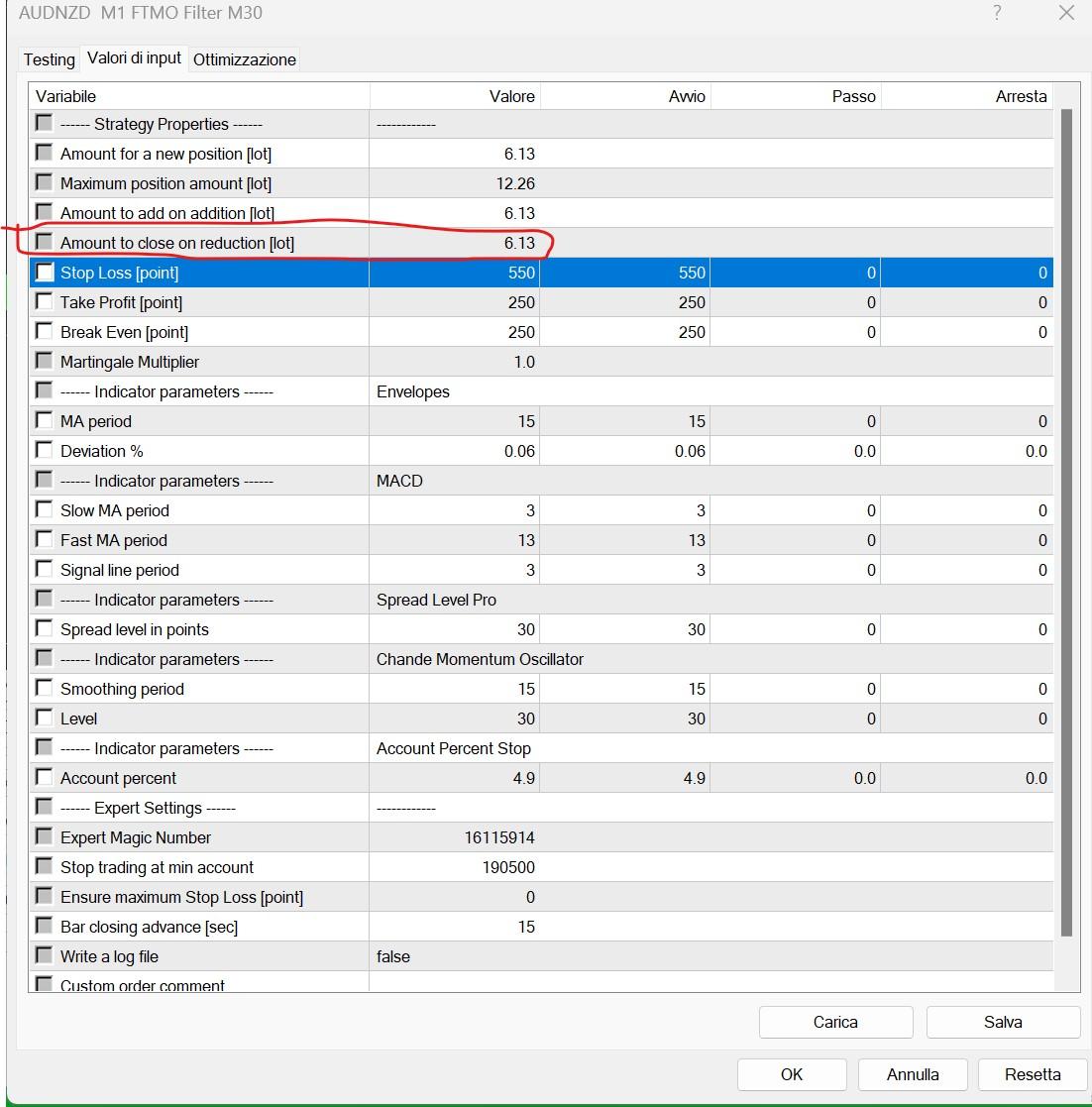 September 28, 2023 at 6:10 pm #201937Participant
Here is how it works: Lets say you are in a long position with a lot size of 6.13 lots. Now you get signal to go short. What will happen is your long position of 6.13 lots will be reduced by 6.13 lots. This then would mean that your long position lot size is now equal to zero and your long position would be closed. Now lets take another case. Let’s say you have set the reduction lot size to 1.0. Now when you get a signal to go short your long position would be reduced to 5.13 lots and you would still be in a long position instead of a short position because you still have a long position with a lot size of 5.13. Now lets take another case. Let’s say you have se the reduction lot size to 7.13 lots. Now when you get a signal to go short your long long position of 6.13 lots would be reduced by 7.13 lots. Since your long position only has 6.13 lots this would mean that your position will be changed to a short position with 1.0 lots.
September 30, 2023 at 4:22 pm #202333ParticipantTHANKS VERY MUCH FOR THE EXPLANATION. YOU HAVE BEEN VERY HELPFUL TO ME!
October 4, 2023 at 12:24 am #202998Diego Del Castillo
ParticipantHi, i am planning to buy this robot but its not clear if it can be used for MT5! can it?
October 4, 2023 at 12:37 am #203001ParticipantYes! You will receive two EAs, one for MT4 and one for MT5.
October 6, 2023 at 11:54 am #203399ParticipantHi everyone! I would like to ask the community if on days with high volatility impact news it is better to stop the FTMO EA. Do any of you use them during news stories like no farms, CPI, etc? thank you
October 6, 2023 at 1:21 pm #203412ParticipantIt’s a personal choice. I don’t stop trading during NFP or any other news event. Sometimes it hurts my trading somewhat and sometimes it helps my trading. It all averages out in the long run. In my opinion, the purpose of auto-trading is to let the EAs do the trading.
You can follow my demo trading of FTMO. The demo accounts only last for 14 days and then I have to restart them. So I just combine all the results of all the 14 day periods to see how the FTMO is doing over the longer term.
October 8, 2023 at 6:20 pm #203732Ethan Allen
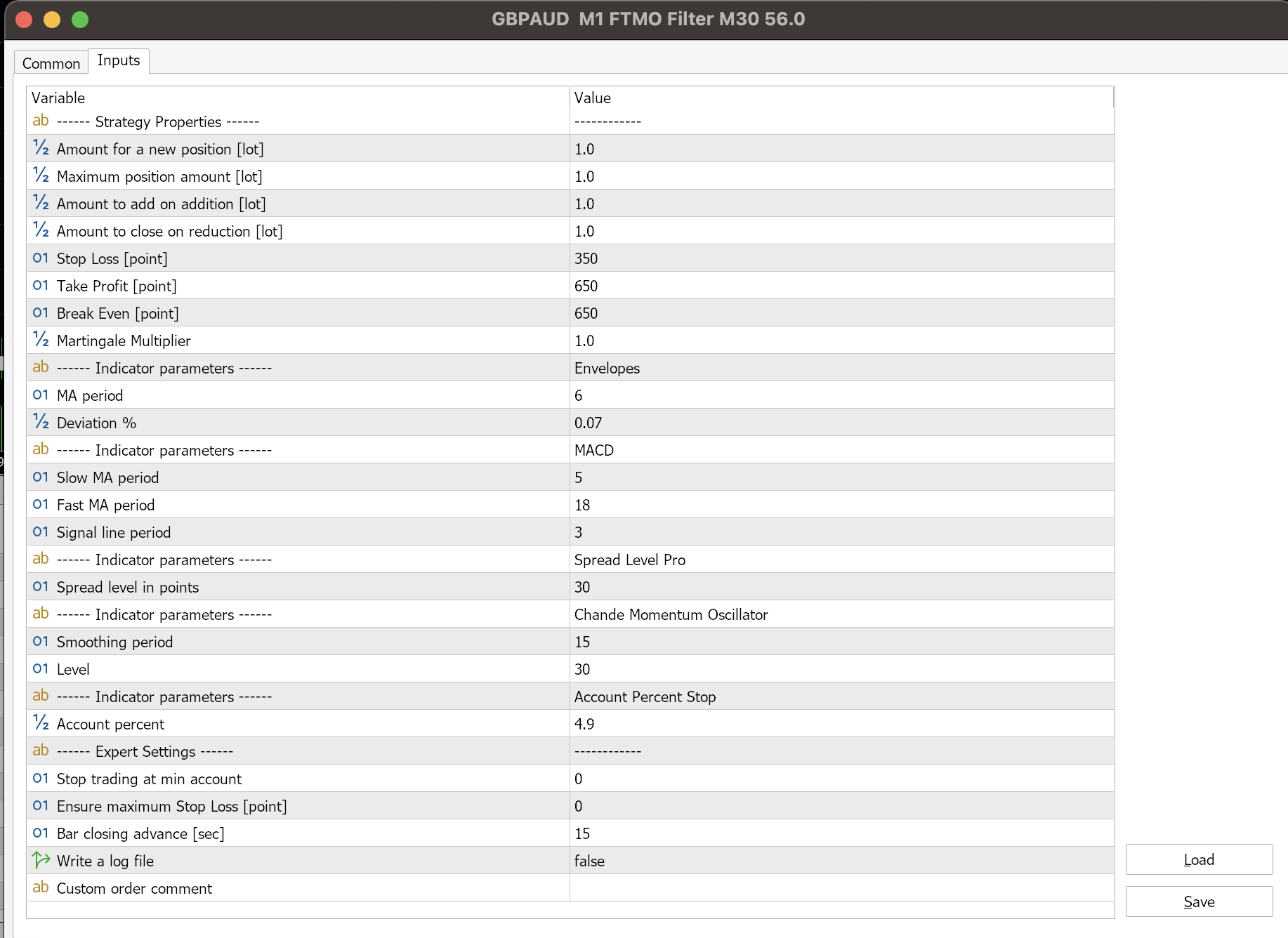
ParticipantI thought these EAs had a trailing stop and magic number parameters, v 4.2.
Does v4,2 have Trailing Stop and Magic Number parameters?
Attached is a screen shot of a compiled GBPAUD EA, note the lack of Trailing Stop and Magic Number.
Please advise.
 October 8, 2023 at 8:04 pm #203745Participant
Hi Ellen,
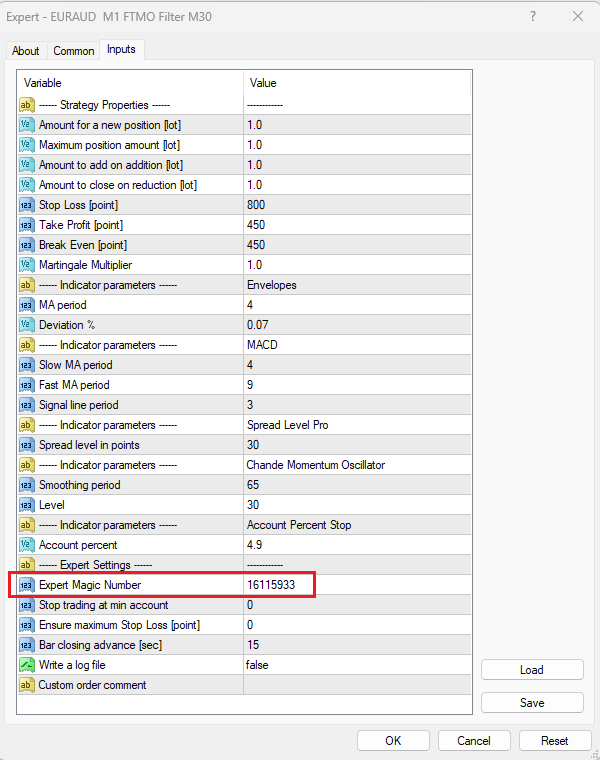
Petko doesn’t normally use trailing stops so the FTMO EAs do not use them. He had tested trailing stops over a long period of time and did not see any benefit from using them. Petko prefers to use a fixed Stop Loss and a fixed Take Profit. In the FTMO EAs he has set the Stop Loss to 80 pips and the Take Profit to 45 pips.
I have shown the magic number in the red rectangle in the image below. You will find it in the Experts Settings section:
 October 9, 2023 at 4:16 pm #203862Participant
Yes, Alan answered precisely about the Trailing Stop Loss.
Regarding the Magic Number, it is available on MT4 but not on MT5.
Cheers,
-
AuthorPosts
- You must be logged in to reply to this topic.