
Community Forums › Forums › Ready-to-use Robots › Prop Firm Robots › Prop Firm Robots App & v6.0 – New Features Released!
- This topic has 519 replies, 97 voices, and was last updated 1 year, 9 months ago by
NIKOS KYRIAKOU.
-
AuthorPosts
-
January 6, 2024 at 10:08 am #225049
PipWzrd
ParticipantHello, I tried clearing my browser cache, then logged in to the Academy website, but I still cannot download the robots from the new FTMO app. Tried different browsers (Edge, Chrome, Firefox) and still get the same message: “To access and download the FTMO Robots, you need to be a registered user and have an active plan with us. Please log in to download the Expert Advisors. If you haven’t purchased a plan yet, you can select one that suits your needs here.”
Any other suggestions so I can download the robots and have everything configured successfully for next week?
Thanks in advance for your help!
January 6, 2024 at 1:59 pm #225082Alan Northam
ParticipantHi PipWzrd,
Please contact [email protected] so they can check on why you cannot download the new FTMO app.
Alan,
January 6, 2024 at 4:10 pm #225111Danny Pyttel
ParticipantHello, quick question.
I saw that Petko’s challenges via myFXbook always had a SL of 30 pips and a TP of 60 pips. Are these freely chosen by Him? Other values are specified in the current version.January 6, 2024 at 4:20 pm #225114Luce
ParticipantHello together,
first of all thank you for this very good update and the work you put behind this robot.
A lot of people requested to know somehow the best pairs (Top 3 performers) of the last week without running the robot on an VPS.
Is this possible now with the latest update? (couldnt find anything for this)
BR Luce
January 6, 2024 at 4:45 pm #225121ParticipantHi Danny,
In that video he was just showing an example by using a robot from an earlier strategy which is not part of the current FTMO robot strategy. So no, he is not arbitrarily changing the TP and SL of the current FTMO V6.0 robots.
Alan,
January 6, 2024 at 4:49 pm #225122ParticipantHi Luce,
Petko stated as long as your personal pc can stay active 24/7 you do not need a VPS. However, for real Challenges it is still recommended to use a VPS.
Alan,
January 6, 2024 at 6:54 pm #225144gabiscriba
ParticipantRegarding the Max spread setting, is it okay to set 30 for Forex pairs and 50 for Gold?
January 6, 2024 at 7:01 pm #225145ParticipantHello Alan,
thank you for your response but i think you misunderstood my question:
A lot of people asking what are the actually best pairs to trade because they dont want to spend money on an VPS or dont wont to run their PC all day long.
Then your Team replied that maybe in the future a puplic MyFXBook link with a live update will be shared so everyone can see what are the best performing pairs. But then you decided not to do it because people could use that link for Trading Signals for example.
Then the team wrote that you are looking forward to find a solution that everybody knows the best performing pairs of the last week to trade this week (without having the robot running for themselves)
My question was if this problem was already solved in the latest update?
BR Luce
January 6, 2024 at 7:22 pm #225147ParticipantHi Luce,
Sorry for the misunderstanding. The new FTMO app was created so traders can use it to decide which are the best pairs to trade so they don’t have to demo test the robots themselves.
Alan,
January 6, 2024 at 7:30 pm #225151ParticipantHello Alan,
but in the App i cant see what were the top 3 performers of the last week, right?(just overall)
BR Luce
January 6, 2024 at 7:37 pm #225153ParticipantHi gabiscriba,
Those settings seem reasonable to me.
Alan,
January 7, 2024 at 6:33 am #225258Brian Pelton
ParticipantAfter reading the posts from Jan 5 people can’t sync results with EA Studio? So how do we know these are profitable?
I mentioned in another post that your results will always be different on a live account/challenge then what you see in demo. This could be what the issue is maybe? Thoughts?
January 7, 2024 at 9:51 am #225274Miroslav Popov
MemberHello Brian,
>After reading the posts from Jan 5 people can’t sync results with EA Studio?
The FTMO App and EA Studio use very similar backtesting engines.
I tested a robot from the FTMO App, compared it with EA Studio, and received the same results.
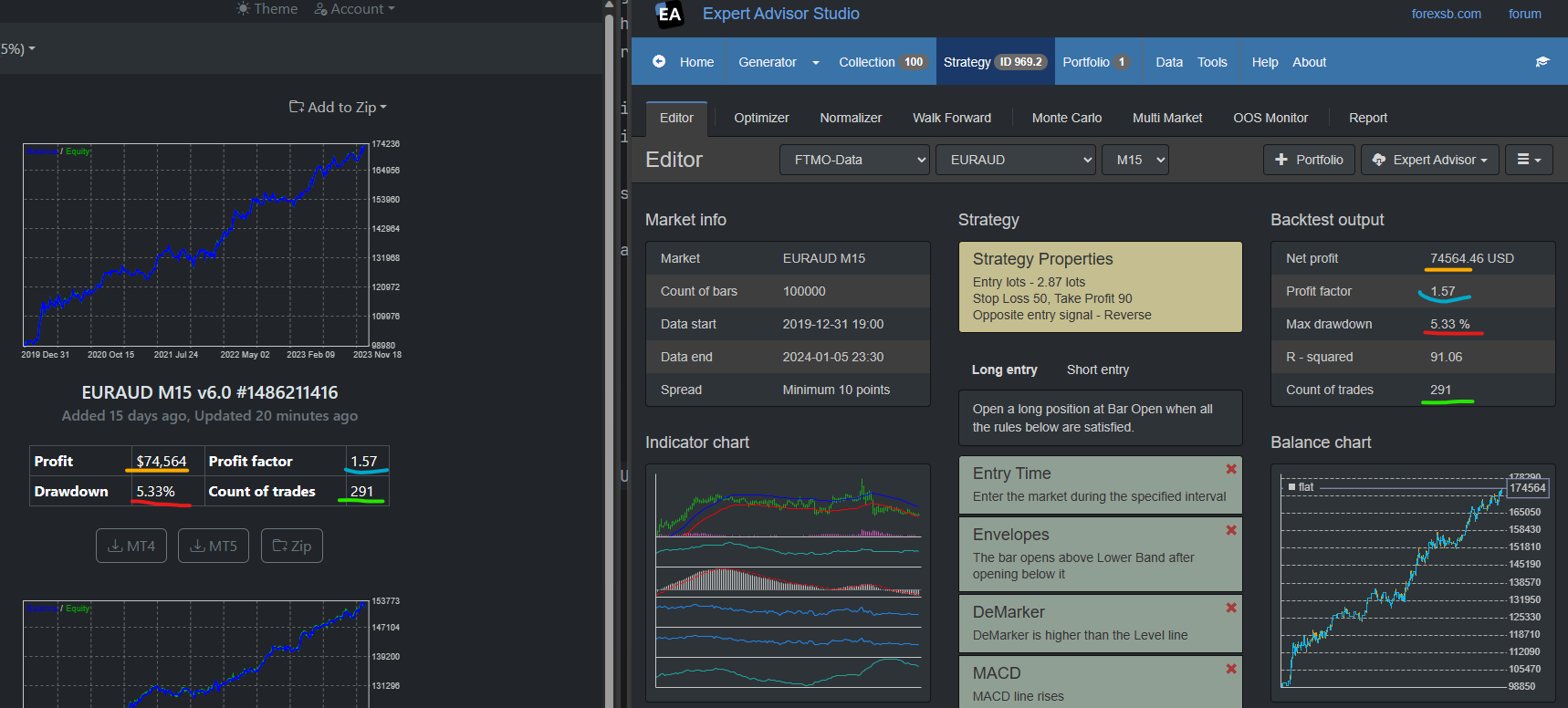
To have the same result you need to have the same Data Horizon settings. Currently, the FTMO App displays the stats for the last 100k bars only. (Though it uses 200k bars for the calculation)
(If you are curious about the Dark FTMO theme, you will have it very soon online 🙂 )
January 7, 2024 at 10:29 am #225281ParticipantThank you Miroslav. Now say for example I wanted the top 5 robots that finished last week.
Would I just select the top 5 from the drop down and swap them out each week?
Can’t decide if I want to use all 8 on low risk or top 5 low-medium risk.
January 7, 2024 at 11:31 am #225289ParticipantThanks Alan, already sent an email. Awaiting a response to troubleshoot further.
-
AuthorPosts
- You must be logged in to reply to this topic.