
Community Forums › Forums › Ready-to-use Robots › Prop Firm Robots › Prop Firm Robots App & v6.0 – New Features Released!
- This topic has 519 replies, 97 voices, and was last updated 1 year, 9 months ago by
NIKOS KYRIAKOU.
-
AuthorPosts
-
January 5, 2024 at 10:43 am #224814
Bob Gal
ParticipantHi Alan,
Thank you for the reply, ill back-test, I’m more concerned if I’ve set up the EA properly.
I took a manual trade and if the EA is working properly, shouldn’t the EA automatically close the manuel trade?
Thanks
Rob
January 5, 2024 at 10:43 am #224815Alan Northam
ParticipantYou can do a backtest on each of the robots using the MetaTrader Strategy Tester. This will give you an idea when the last trades were taken and how often trades are taken. From this info it will give you an idea how long you may need to wait for each robot to take the next trade.
Alan,
January 5, 2024 at 11:06 am #224819smartkary
ParticipantThe 6.0V EA has been running, no trades taken since yesterday. Attaching screenshot for review. please advise if this looks ok.
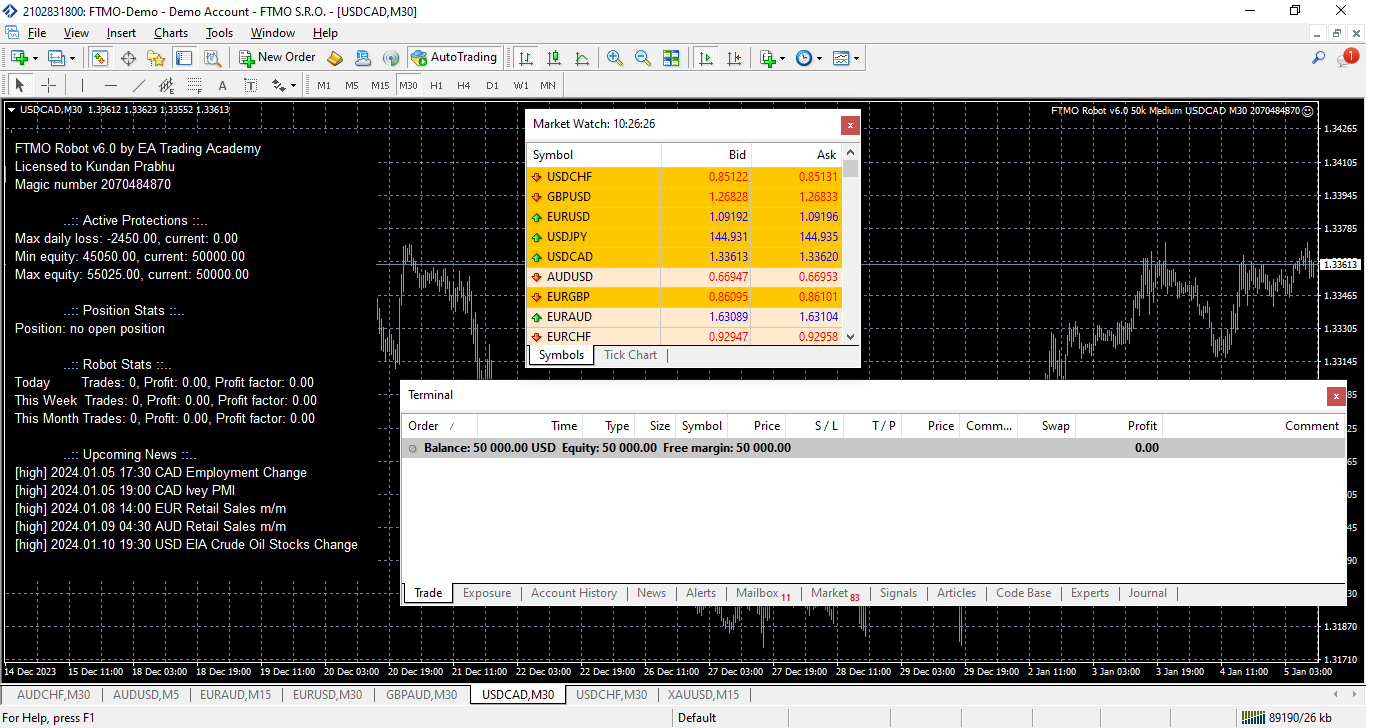 January 5, 2024 at 11:58 am #224824Participant
Hi smartkary,
Everything looks good, you just need to give it more time. Like I have been telling others you can do a backtest using the Strategy Tester and the results will give you an idea on how often the robots trade.
Alan,
January 5, 2024 at 12:02 pm #224825ParticipantThanks Alan … actually i saw your suggestion to backtest after i posted my query.
Yes the backtesting is helpful, i am now able to check for each of the EAs.January 5, 2024 at 12:48 pm #224832gabiscriba
ParticipantHi Alan, about changing some parameters to make the trades unique.
In a comment you said “Petko has started in another Topic you can change the strategy by changing the indicators settings by a small amount and it will not significantly change the performance of the EA.”
I can’t find this topic. Can you tell me the name or give me the link?
So that I can stop asking questions and read by myself there?
Thanks.
January 5, 2024 at 12:50 pm #224833ParticipantIts been some time ago I may have forgotten, it could have been in one of his videos. I just remember him saying it. You may need to check some of his earlier FTMO videos.
Alan,
January 5, 2024 at 1:37 pm #224837Brian Pelton
ParticipantI finally broke down and purchased the FTMO robots. Here’s my plan. I’m going to be trading all of them but start at 0.25% risk. If account can get up to 1.25-1.50% I’ll bump up lots to .50% risk. If it can get to 3.5% to 4% growth I’ll then bump my risk up to 1%.
Starting my50K challenge on Monday. I’ll let everyone know how things go.
January 5, 2024 at 2:12 pm #224845ParticipantNot a bad plan. Let us know.
January 5, 2024 at 2:18 pm #224849ParticipantI purchased but for some reason I can’t access them.
January 5, 2024 at 2:19 pm #224851ParticipantIt’s ok, Alan.
I understood what the rules are at FTMO, but now I’m asking in general so that we don’t have problems with other prop companies.
We change the name and the magic number and slightly modify the parameters of the indicators. Is it enough to modify only the Envelopes parameters or is it good to also modify the DeMarker, MACD, RSI?
Is it necessary or is it safer to change the name of the robot in the source code?
Thanks and congratulations once again for the upgrade and the app.January 5, 2024 at 2:49 pm #224862ParticipantNevermind, I guess my order was just recently processed. All set. Everything was very straightforward and easy. Thank you! Great idea with the app!
January 5, 2024 at 4:35 pm #224884ParticipantPersonally, I have never worried about it. I just trade Petkos’ robots as is, and I have never had a problem with it. Petko has said just changing one indicator slightly is sufficient to make the robot unique. I just contacted the FTMO Chat line and they cannot answer the question as to what it takes to make a robot unique. They said the robot provider is the only one that can say the robot provided to you is unique. They said if I change the magic number they cannot confirm that someone else might make the very same change and only the robot provider can confirm that there are no more than one robot with the same magic number. The same with changing an indicator setting as it is still possible for another person to make exactly the same change. See the problem? It is only the robot provider that can say for sure the robot is unique.
I also asked the FTMO Chat line if the Third Party EA rule applies to the Challenge and Verification stage. The response was that it only applies to FUNDED accounts! So nothing to worry about!!!
Alan,
January 5, 2024 at 6:15 pm #224909ParticipantI came across something very strange. The challenge account I’ll be using is on Eightcap brokerage. I installed it on my VPS because I wanted to run these robots through the strategy tester on the different brokerage. However, when doing so it looks like I get a 3rd of the amount of trades compared to when I run it through FTMO.
Is this normal? It’s a bit concerning.
January 5, 2024 at 6:29 pm #224911Heinz Neumann
ParticipantAfter I have installed the new version 6.0 of FTMO Robot, I get the following message when I activate it:
Current position closed. Expert Advisor #xxxxxxxxxxxx turend off.
Can someone help me what I am doing wrong. -
AuthorPosts
- You must be logged in to reply to this topic.