
Community Forums › Forums › Ready-to-use Robots › Prop Firm Robots › Prop Firm Robots App & v6.0 – New Features Released!
- This topic has 519 replies, 97 voices, and was last updated 1 year, 9 months ago by
NIKOS KYRIAKOU.
-
AuthorPosts
-
January 14, 2024 at 8:02 pm #226857
aaronpriest
ParticipantDo the FTMO robots use close conditions? Would it be better to set the number of trades to 0 to prevent it from opening new ones, but leave the EA on the chart to still close a trade based on exit indicators? At least that’s what I do with my own strategies/EAs that I create.
January 15, 2024 at 7:40 am #226935Nicholas Grobler
ParticipantHello All
Very excited about V6. I had a look at the Robots page.
This page gives backtested data, not which EA’s are currently the best performers, as in for the past week, am I correct?
I did activate on a FTMO test account, been running since the 8th, but there’s ZERO winners at this time.
What do I do?
January 15, 2024 at 8:02 pm #227057gabiscriba
ParticipantLast week I told you that I sent a request to FTMO asking them if they use the same server for all types of accounts. To know if the test results on a demo account will be the same on the challenge account and on a funded account.
Here is the answer received:
Dear Gabriel,
Thank you for reaching out to us.
Regarding your questions about the results obtained.
The Max Loss and the Max Daily Loss will always be the same on the FTMO Challenge, Verification and FTMO Account (funded account).
Notice that the FTMO Challenge requires you to reach a 10% Profit Target, while the Verification requires you to achieve the 5% like the Free Trial.
You have no required Profit Target on the FTMO Account.Notice that we have different servers at FTMO, The FTMO-Demo and the various FTMO-Server. The historical data will always be the same on all the FTMO different servers, we just have many of them for management reasons but they all act the same with the same characteristics.
If you have any other concerns, feel free to contact us again.
January 15, 2024 at 8:33 pm #227066Gaurav Kataria
ParticipantDear Chief Petko,
im going to use my best knowledge and your best EA to trade in a challenge acount but someone has posted a while ago teh Eas drawdown strategy tester is showing different results .. it’s quite disturbing to see this post I’m only quoting this research here under. Please be kind to suggest why his Eur AuD robot strategy tester showed such a huge relative drawdown and someone else said two days no trades taken.. kindly answer this two relevant urgent questions
many People want this Robot to win and even those who want to see it succeed!
January 5, 2024 at 23:20#<b>224969REPLY</b>
Chris PopovParticipant
Has anyone personally backtested the files? I am getting quite different results than the ones in the App:January 16, 2024 at 11:38 am #227107Sergio Oliveira
ParticipantDear Technical Support,
I hope this message finds you well. I am currently facing challenges with the installation of the FTMO Robot EA that I purchased (Order #211193 was placed on November 9, 2023, and is currently Completed).
Unfortunately, I have been unsuccessful in getting the program to function on my MT5 platform. I diligently followed the comprehensive video guide on how to use the FTMO Robot application, titled “FTMO Robot App is Live! // FTMO Robot Guide 2024.” Despite these efforts, I am unable to access the features provided by the FTMO Robot.
I have attached a video demonstrating the issue, illustrating the EA disconnecting within a few seconds of connecting to the MT5 platform.
As I have been unable to find an email contact for support, I am reaching out through this message. I would greatly appreciate your assistance in achieving a successful installation. Thank you in advance for your support.
https://www.youtube.com/watch?v=RcQq40we4Ss
January 16, 2024 at 12:12 pm #227177Alan Northam
ParticipantHi Sergio,
You need to change all the FTMO V6.0 robots perameters as follows for your account size of $70,000:
Maximum daily loss (currency) = 3450
Minimum equity (currency) = 63050
Maximum equity (currency) = 77025Also each robots lot size need to be changed as shown below to adjust the account risk to low risk:
AUDCHF Entry Lots = 0.6
EURUSD Entry Lots = 0.7
AUDUSD Entry Lots = 0.7
EURAUD Entry Lots = 1.05
GBPAUD Entry Lots = 1.05
USDCAD Entry Lots = 0.94
USDCHF Entry Lots = 0.6
XAUUSD Entry Lots = 0.07Alan,
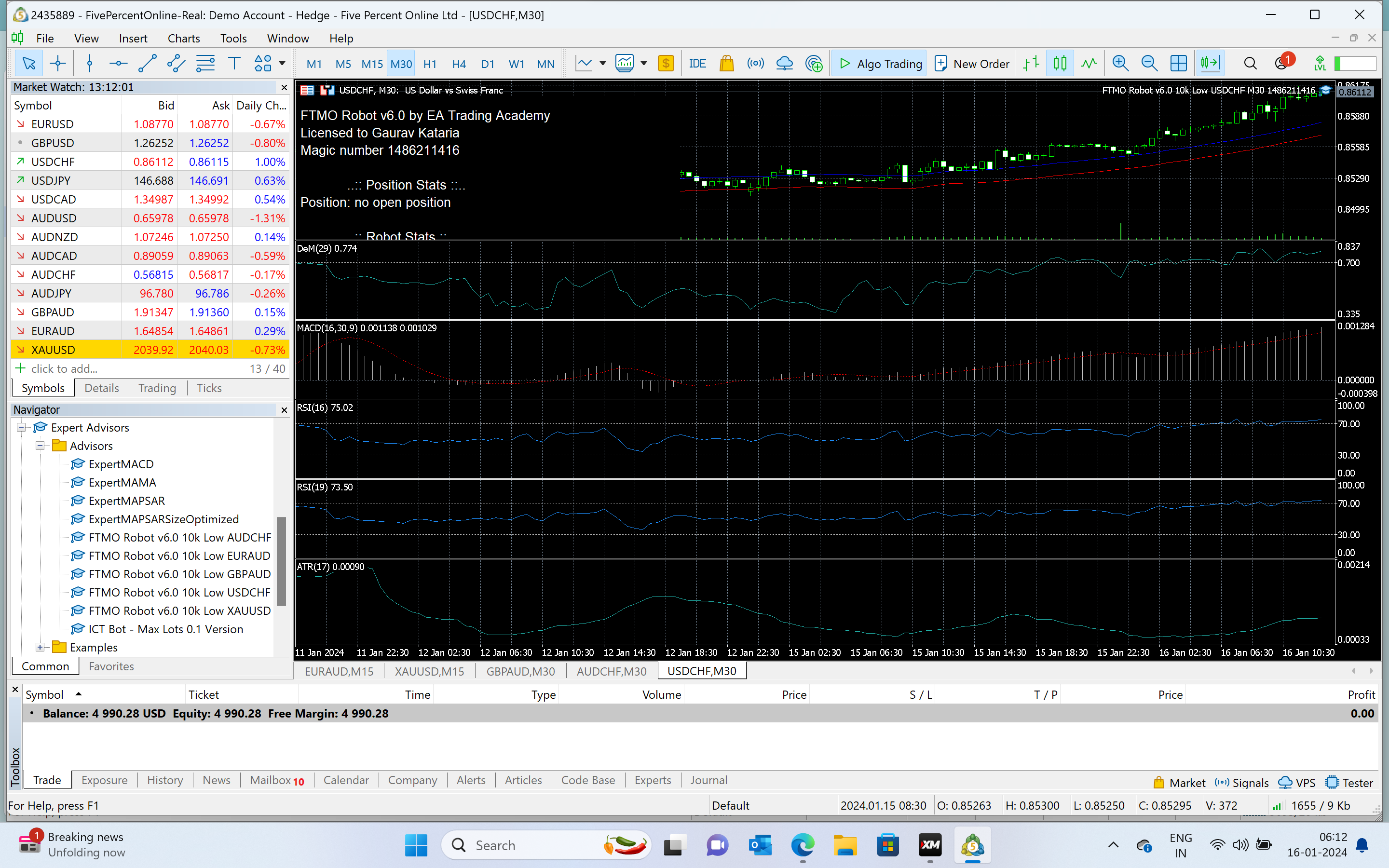
January 16, 2024 at 1:17 pm #227193ParticipantDear Alan , Petko,
I’m facing more or less same issues with a small 5000k account possible in mT5 5%ers maybe you can tell me if there is any thing to do ..make it to take place new trades il be stoked. Please help dear. Please if you can recall the entry parameters of this robot i have placed for your perusal. ThankingYou in advance.
 January 16, 2024 at 2:48 pm #227213Participant
Hi Nicholas,
The FTMO app shows the results of backtesting using EA Studio so you do not have to do the backtesting yourself. Petko is working on an updated version of the FTMo app to show backtesting results over 1Y, 1M, 1W, and 1D which I think is suppose to be available next month. As far as I understand it will still be up to each trader to look at the backtest results and decide which robots to trade.
As to what to do: I have been demo testing since 01/08/2024 and have not yet found a top performer to trade.
Alan,
January 17, 2024 at 3:12 am #227331ParticipantThank you for clarifying. It’s working.
January 17, 2024 at 6:49 am #227340ParticipantDear Alan & Petko,
Please stay with me till as
My Ftmo robot is still not taking a trade , i did incorporate whatever Alan wrote back instructions followed.. maybe I need a two-minute WhatsApp /zoom call i can show you or tell this.. please connect with me
I reduced lot sizes in pairs of robots im trying AUDCHF, EUR AUD (30min tf), GBPAUD (30min tf), USD CHF (30min tf)
made equity changes in the EA still no trade dear.. Do i need to write anything in fields
Equity max drawdown% and daily drawdown %?
Please make this robot come back to Life.. My life is on the line i took a small challenge hoping to go step by step
Your Truly,
Gaurav
January 17, 2024 at 7:06 am #227342ParticipantHi Gaurav,
The reason you are not getting trades is the hat in the upper right corner of the chart is not blue. You need to remove the robot then press the Algo Trade button in tool bar to activate auto trading then reinstall the robot. The hat should now be blue. Do this for each robot.
Alan,
January 17, 2024 at 7:13 am #227343ParticipantDear ALAn,
it is blue check the post where all indicators i made visible…Thanks please stay a while
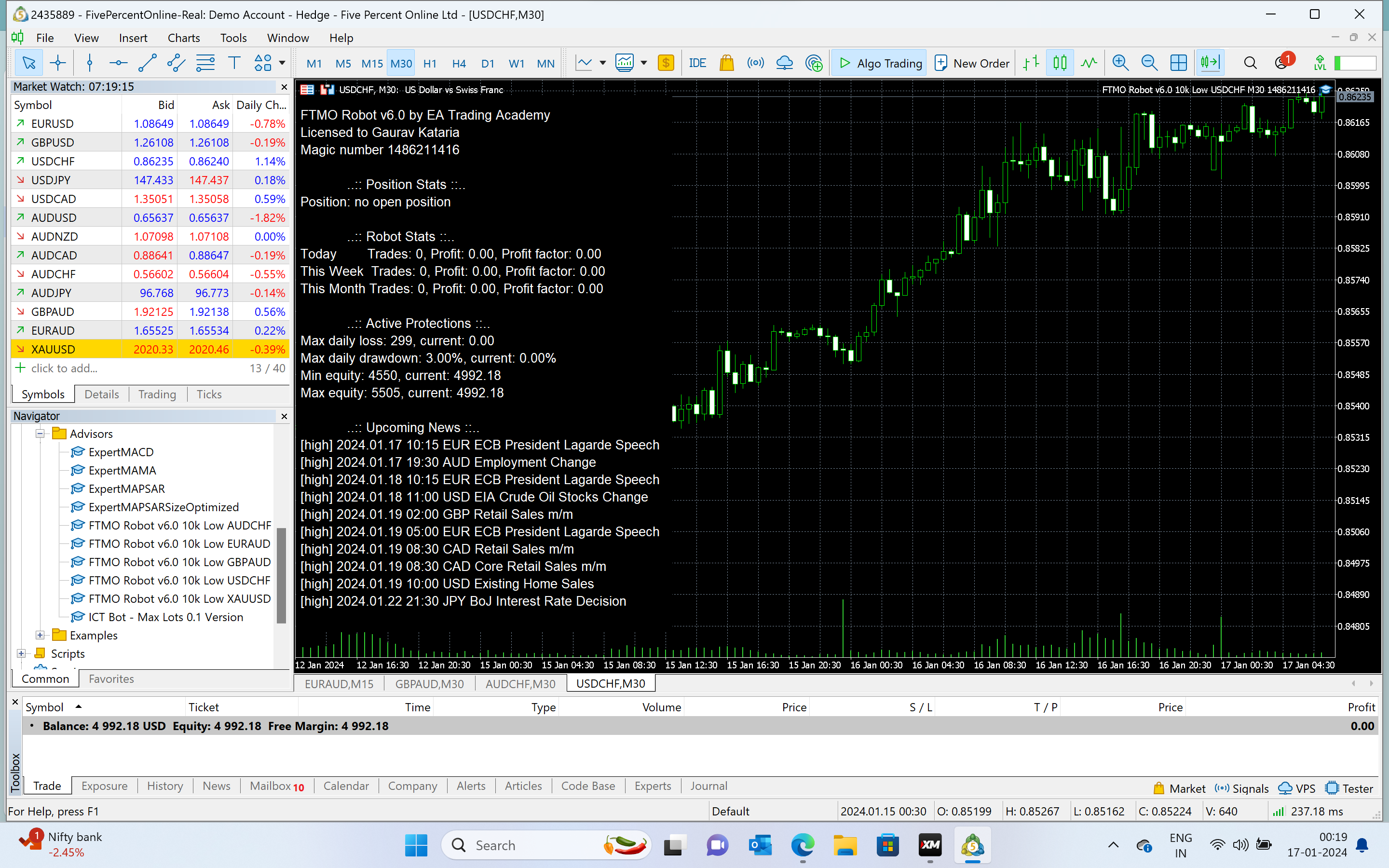
January 17, 2024 at 7:21 am #227344ParticipantPlease see if i did anything wrong or missed something please take a minute and call me dear
 January 17, 2024 at 12:40 pm #227440Participant
Hi dear,
I see you downloaded the 10K robot files but your account size is 5K. Did you change the robot properties so the robots will work with a 5K account? If not let me know and I will calculate the changes you need to make.
Alan,
January 17, 2024 at 5:45 pm #227491ParticipantDear Alan,
What exact properties,
I saw one message today earlier where you sent the idea lot sizes, Minimum Equity 4550, and max Equity 5505,
loss 299, I made the lot sizes changes as you will not 0.04 from 0.08 USDCHF and some other assets also i reduced lot sizes as per your instruction but. anything else maybe don’t know what to do can you say step by step what exactly needs to be done for robots to be working.
I don’t know how to make the set files or maybe you want to share how to keep computer on 100%/99% screensaver lock comes here how to reduce the capital to 5000k because robot option was 10K so thats why its not trading?
I look forward to any ideas from everyone
Thanks a lot
humbled trader gaurav
-
AuthorPosts
- You must be logged in to reply to this topic.