
Community Forums › Forums › Forex Strategy Builder Pro › FSB Pro Discussion
Tagged: FSB #Fsb
- This topic has 197 replies, 28 voices, and was last updated 2 years, 8 months ago by
Alan Northam.
-
AuthorPosts
-
March 25, 2019 at 4:46 pm #10786
Petko Aleksandrov
ParticipantFSB Pro supplies only the netting accounts in MT5, that is why you do not see magic numbers.
March 25, 2019 at 4:53 pm #10789Ossaio
ParticipantThanks Andi. That’s a serious limitation. So, I need to use EA Studio for hedging accounts only. The problem is that EA Studio doesn’t have custom indicators, so I can’t migrate my strategies from FSB Pro. Anyway, I now I understand what is going on. I thought I was doing something wrong.
March 25, 2019 at 7:43 pm #10801ParticipantHey Ossaio, Andi gave you the right answer. Cheers, Andi!
March 29, 2019 at 3:27 pm #10897Roman
ParticipantHey everybody, I’ve been trying to put in more work with FSB now that i have a computer that can handle it. It might just be me, but i noticed that when i set up the scans to do “Reverse” behaviors when i came back it had switched it to something totally different. Anybody else experience this?
March 29, 2019 at 7:38 pm #10909ParticipantHello Roman,
do you mean that you set the strategy to reverse and you run the generator, but the generated strategies are not with reverse?
March 30, 2019 at 8:12 am #10928ParticipantHi Roman,
I did not have such an issue so far. Do you make it for one and the same strategy?
April 1, 2019 at 9:50 pm #10975Stephen
ParticipantI have a question regarding FSB Pro. I have set the Data Source script which gives me all spread, swap, and info about the currency pairs. and I have imported the Data from my broker. However, after a few hours, the data is the same, and I have to drag the CSV file again over the chart.
While in EA Studio the MetaTrader-Demo data updates all the time. How is that difference coming and can I make it update automatically in FSB Pro as well. Thanks!
April 5, 2019 at 8:01 pm #11053Deniza
MemberHello Stephen,
for FSB Pro you need to drag the CSV file over the chart for each currency pair and it will load you the bars till the moment. And this is if you have done the Data source(which you did).
With EA Studio the Metatrader-Demo comes automatically from the application it is uploaded in few hours automatically.
April 9, 2019 at 9:08 am #11107ParticipantThat is correct, Deniza!
April 12, 2019 at 9:03 am #11140ParticipantGlad that there are already experienced traders here who answer before me 🙂
April 20, 2019 at 9:31 pm #11391ParticipantGood afternoon All, just got my PC back up and running this week so sorry for the delayed response!
Yes Petko, when i set the reverse in my generator it ignores it. As I’m typing this, I just set the FSB generator and it switched from Reverse to No reduction.
April 20, 2019 at 9:35 pm #11392Participant@BOB – I set it a few indicators i like to use on multiple time frames, and had been setting “reverse” so that its following the market the way i normally would consider. I’ve noticed the generator removes my reversal behavior and usually changes it to no reduction.
April 21, 2019 at 4:48 pm #11403ParticipantHey Roman,
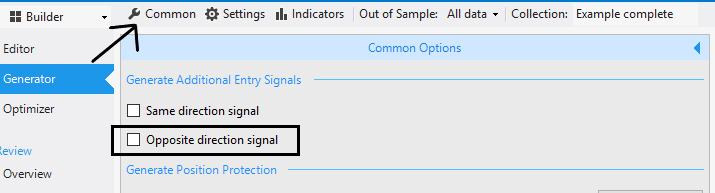
Glad to hear from you again. When you click on the Generator, go to Common settings:
 April 22, 2019 at 11:14 am #11414Participant
Roman, to make it a bit clearer – if you have selected this Opposite directional signal, the generator will change the variations to add, reduce or reverse.
April 22, 2019 at 11:58 pm #11420ParticipantThank you for making it clearer, Andi! I guess Roman has ticked that at some point.
-
AuthorPosts
- You must be logged in to reply to this topic.