
Community Forums › Forums › Forex Strategy Builder Pro › FSB Pro Discussion
Tagged: FSB #Fsb
- This topic has 197 replies, 28 voices, and was last updated 2 years, 8 months ago by
Alan Northam.
-
AuthorPosts
-
March 3, 2019 at 7:31 am #10284
Petko Aleksandrov
ParticipantHi Haliffa,
that is a good idea. I was wondering how to combine EA Studio and FSB Pro.
So after having the best strategies in the Reactor left, we can move this strategy to FSB Pro.
As far as I know, we can not import back EA from EA Studio to FSB Pro or the other way around.
So I am planning to build it there in the generator, and put some longer time filters to eliminate some of the wrong entries.
Will let you know how it goes, but sounds great. Thanks for the idea.
March 3, 2019 at 10:55 pm #10311ParticipantHey Stephen,
that sounds like really a nice approach.
Make sure to use the same Historical data.
There might be a small difference in the results when you transfer strategy from EA Studio. This is because with EA Studio the EAs open on bar open, while if FSB Pro they open at bar close(which is nearly the same moment). Also, with some of the indicators, you can have the entry in the bar.
March 4, 2019 at 11:35 pm #10322ParticipantSorry for the silly question here, but how do you transfer Expert Advisors from EA Studio to FSB Pro, I tried to use the Import Back, but it fails.
March 6, 2019 at 9:49 am #10356ParticipantHello Iohan,
No silly questions here. You can ask anything. For the moment you can not import back an Expert Advisor created with EA Studio to FSB Pro, or one created with FSB Pro to place back in EA Studio.
What you can do is to build the strategy in FSB Pro. Just open a new strategy, and place the entry and exit conditions you see in the strategy in EA Studio. Place the exact methods, parameters values, SL and TP, and you will have the strategy there.
March 8, 2019 at 11:18 am #10408ParticipantI have not done that, but it is so logical 🙂 I will give it a try and see if I can improve the EA Studio strategies with FSB Pro. Thanks, Petko!
March 9, 2019 at 12:21 pm #10428ParticipantYes, you can use the fact generator of EA Studio, and then add some LTF indicators or custom indicators with FSB Pro.
March 18, 2019 at 10:49 am #10629ParticipantI would depend on the FSB Pro generator as much as on the EA Studio. I know it works slower, but if you leave it overnight, it will give you nice results till the morning. When you transfer the EAs (one by one) still you will lose time.
March 18, 2019 at 10:19 pm #10633ParticipantGood point here, Sharapova!
Also, ignore that the generator of FSB Pro is slower than the generator of FSB Pro. Two years back there was no EA Studio, so it was the generator of FSB Pro that was working extremely quick for us, and we were depending only on it. Learn to take your time, and not to be in a hurry.
March 20, 2019 at 12:42 pm #10658Ossaio
ParticipantHi,
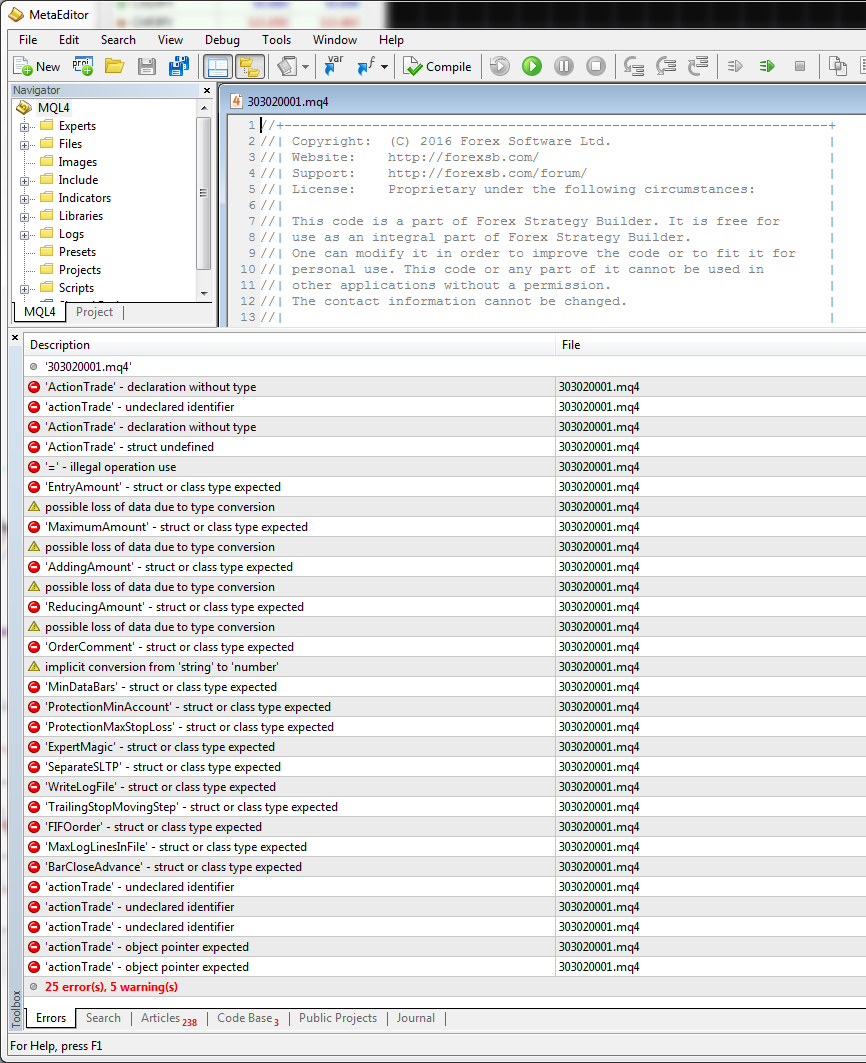
I get errors and warnings when I try to compile EAs I exported from FSB to MT4. Has anyone had similar problem and how to resolve it? Attached is screen shot of the errors I received.
 March 21, 2019 at 8:44 am #10667
Thapelo
ParticipantHello Ossaio,
I have been using FSB Pro for long time now, and never had such errors.
from which broker did you download the platform?
March 21, 2019 at 10:55 am #10674ParticipantHey Ossaio,
I have no idea why you see such errors. That is unusual.
This might happen if you added some custom indicators, or moved some folders in the program.
Try to re-install it, and it should work fine.
Cheers,
March 22, 2019 at 12:09 am #10693ParticipantThanks guys. The issue is now resolved.
Petko, yes it is related to some custom indicators which do not have .mqh files. It started working after I made a fresh installation.
March 22, 2019 at 8:56 am #10694ParticipantGlad to hear that Ossaio!
Let me know if you have any other questions.
Cheers,
March 22, 2019 at 8:56 am #10695ParticipantGlad to hear that Ossaio!
Let me know if you have any other questions.
Cheers,
March 24, 2019 at 8:44 pm #10745ParticipantI finally exported some EAs to both MT4 and MT5 demo accounts on 21/03/2019! Some of the EAs have opened and closed trades already. I’m excited and hopeful. It has taken me 4 long months to get to this stage.
I observed that all the MT4 EAs have magic numbers in the Expert Settings which I can modify. However, none of the MT5 EAs have magic numbers. Is this how FSB Pro exports EAs to MT5? It is really difficult to associate the MT5 trades to the specific EA when the magic number option is missing.
Has anyone experienced this or know how I can resolve this? I’ll appreciate if anyone who has FSB Pro can export any random EA to MT5 and check if they have magic number in the Expert Setting. Thanks.
ps: my broker states on their website that they allow hedging.
-
AuthorPosts
- You must be logged in to reply to this topic.