
Community Forums › Forums › EA Studio › Portfolio EAs › Building a strategy portfolio the RIGHT way
- This topic has 18 replies, 6 voices, and was last updated 1 month, 4 weeks ago by
Samuel Jackson.
-
AuthorPosts
-
January 3, 2020 at 1:31 am #33360
Simon
ParticipantHello traders,
Firstly to apologise to anyone reading this post thinking I have the answer about building strategy portfolios the right way, I don’t – I am asking the question!
Until now, I have been generating around 8 to 12 strategies at a time using the Reactor, for several different forex pairs. In an effort to diversify risk, I have moved on to the next pair each time I add the new 8 to 12 strategies to the demo MT5 platform.
What I am noticing is that there seems to be some correlation in the 99 strategies on each MT5, there will be many wins, then many losses over a period of two or three weeks, even though I purposefully changed the AC, SL and TP parameters, and available indicators each time I made a new basket of strategies, and had set the collection to remove correlated strategies.
I wonder if this could be because I haven’t made an entire collection of 99 strategies for one forex pair in one go, with all the same Reactor settings?
Maybe that is the only way to ensure that the software can effectively filter out correlated strategies, by allowing it to look at all 99 strategies at once, rather than showing it 8 to 10 at a time, and then grouping each small basket of strategies for a pair together on MT5? In theory, each small basket of strategies could be very closely correlated?
This would mean that large scale risk diversification could take quite some time!
What are your thoughts?
January 3, 2020 at 4:02 pm #33393Roman
ParticipantGood morning Simon,
Happy New Year, did you try uploading the strategies back into portfolio in order to see exactly which strategies are showing correlation with each other? In my opinion there will always be a bit of correlation overall since we’re scanning the same markets over and over using the same horizon periods for the most part. I think as long as the portfolio you take live is showing minimal similarities in the strategies (different rules, sl, tp etc) you should be fine. I just looked at my demo account and saw a lot of my new strategies taking the same direction as some of my older strategies that are still working from the beginning of 2019. This helps give me confidence in the newbie strats. Hope this helps?
January 3, 2020 at 4:29 pm #33394ParticipantHi Roman,
Thanks for the reply.
No, I have not re-imported any strategies back into EA Studio, in fact, I have never used this feature, too busy exporting EA’s!
Can I ask your advice?, if I re-import them, will the names I have given them and the magic numbers be affected? I have spent considerable time organising them, and would like to keep them that way!
I hope they will stay intact, because I see that your point is a good one, and would seem to be the easy way to check for correlations.
I understand what you say about the likelihood of correlations, although I have not been doing this for as long as you have, so have yet to see patterns emerge.
Cheers!
January 4, 2020 at 11:10 am #33476Andi
ParticipantHi guys,
what I have been doing the recent months is to avoid the Demo account and use just the reuploading.
I generate strategies daily, but I do not export the strategies as EAs.
I download the collections and name them according to the date it was created. After 1 month, I re-upload the collection and I see which strategies performed best during this one month(it is the same as if I tested on Demo).
It works really great so far, but I am doing some tests now to see if I recalculate it after 2 weeks or after 2 months will be better. I am not sure if 1 month is the best option…
January 4, 2020 at 12:04 pm #33479ParticipantHi Andi,
That sounds interesting, and like a good way to cut out a lot of work – I currently am uploading each EA to MT5 (sadly no portfolio capability yet with MT5 😐 ) and naming, uploading, compiling, and attaching to charts takes a lot of time, not to mention tring to keep track of all the EA’s on all the different MT5 platforms and all the different accounts!
Do you use Walk Forward and Monte Carlo? In theory, using these in the Reactor can eliminate demo trading too?
As I write this, I have set the Reactor to run for three days, it is currently at 23% of it’s run and has ascended eight strategies. I will keep running the Reactor until it has 99 strategies, and then think about what to do with them.
I’ll keep you posted 🙂
January 4, 2020 at 6:12 pm #33635ParticipantHappy Saturday,
Simon when you import them back into EA studios you don’t lose the magic number unless you export it again (just dump the collections when you’re done looking at the strategies by pressing the trash can at the top right corner). The magic number will just stay the same. When you upload and put all the EA’s for the pair into the portfolio you can see the contents (if you select the correlations in options it’ll display equity line and trading rules correlations) as they currently are running in your MT5, and then you can see their performance as an aggregate portfolio when you are in the “summary” tab.
To Andi’s point you can just sit on the collection for a few months and then re-upload them. But for me, i like to have them in demo so i know they are acting on the correct market structure before i put them live. This also helps me track their performance without bias. So at the end of the day you get to create your own “style” in work flow 🙂
January 7, 2020 at 8:45 am #33801ParticipantThanks Roman,
I’ve been playing around with the Portfolio tool, and it is certainly very useful 🙂
I’m rethinking my workflow.
Cheers!
January 9, 2020 at 11:06 pm #34188ParticipantCheers Simon
September 16, 2022 at 1:58 pm #123523Alan Northam
ParticipantI have collected over 1000 EURUSD strategies using the following criteria:
REACTOR
DATA HISTORY: 2017 TO PRESENT
Premium Data adjusted to use with Oanda USA
Validator settings
Out of Sample 20% OOS
Acceptance Criteria
Complete backtest 1.2 pf
In Sample 1.1 pf
Out of Sample 1.1 pf
Normalization
Remove Take Profit unchecked
Remove needless indicators checked
Reduce Stop Loss checked
Reduce Take Profit checked
Normailize indicator paramenters checked
Out of Sample: 20% OOS
Numeric values steps: 20 steps
Search best: Net balance
Normalize Preset Indicators unchecked
Accemptance Criteria checked
Monte Carlo validation
Count of tests: 20
Validated tests: 80%Then I determined best 10 strategies for my portfolio using LECTURE 5.3 as guideline
The following chart shows results for July thru mid-September. At the start of each month new best 10 strategies were selected:
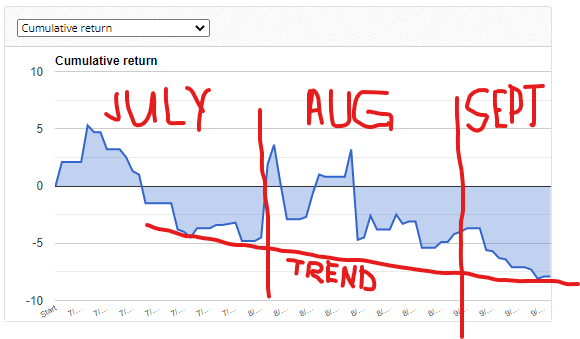
As can be seen the trend is down and not up!
September 16, 2022 at 2:00 pm #123580Samuel Jackson
MemberHey Alan,
I’m not seeing a minimum count of trades in your acceptance criteria. Also selected best 10 according to what criteria?
Also, in my opinion focusing on a single asset like this is not the way to go at all. Could be really good for a period if it’s doing well but the reverse is also true.
September 16, 2022 at 9:34 pm #123603ParticipantMinimum count of trades: 300
Selection of 10 Best Strategies: I followed EA Studio Professional Course Lecture 5.3 which is as follows:
First I filter my collection of EURUSD Strategies as follows:
Validator
Historical data (Adjusted to last 6 months)
Data source Premium Data
Period M15
Loaded EURUSD; M15 – 12768 bars.
From 2022-03-01 00:00, to 2022-09-01 16:45.Validator settings
Out of Sample: 20%
Common Acceptance Criteria
Complete backtest
Minimum count of trades: 200
Minimum profit factor: 1.2
In Sample (training) part
Minimum profit factor: 1.1
Out of Sample (trading) part
Minimum profit factor: 1.1Optimize strategies:
Normalization
Remove Take Profit unchecked
Remove needless indicators checked
Reduce Stop Loss checked
Reduce Take Profit checked
Normailize indicator paramenters checked
Out of Sample: 20% OOS
Numeric values steps: 20 steps
Search best: Net balance
Normalize Preset Indicators unchecked
Acceptance Criteria checked
Monte Carlo validation
Count of tests: 20
Validated tests: 80%Perform robustness testing:
Monte Carlo validation
Count of tests: 20
Validated tests: 80%The results are then further filtered
Historical data (Adjusted for last one month)
Data source Premium Data
Period M15
Loaded EURUSD; M15 – 2280 bars.
From 2022-08-01 00:00, to 2022-09-01 17:45.Validator settings
Out of Sample: not used
Acceptance Criteria
Complete backtest 1.2 pf
In Sample 1.1 pf
Out of Sample 1.1 pfNone of the other filtering is used as Petko says its all been done before and don’t need to do it again.
The results are then filtered in the Collections tab as follows:
Profit factor adjusted until about 15 to 20 strategies are left
Count of trades is then adjusted to minimum of 10 trades (this is about one trade every other day).Finally the resulting strategies are eyeballed looking for best 10 strategies balance line with no downward trends showing over approximately last one week.
September 16, 2022 at 10:00 pm #123605ParticipantHi Samuel,
The following comment from you confused me:
“Also, in my opinion focusing on a single asset like this is not the way to go at all. Could be really good for a period if it’s doing well but the reverse is also true.”
The reason it confuses me is because Petko has a whole trading course just using EURUSD. And, also somewhere in the courses I have taken from Petko I believe I learned it was best to use different EURUSD strategies to reduce risk. So if it is not advisable to just use EURUSD then why the course on just trading EURUSD. Further what other currencies would I then need to use to make a correct trading portfolio and how many difference currencies is the correct amount? So this is now all confusing to me.
September 16, 2022 at 10:16 pm #123617MemberHey Alan, that all seems sensible enough, it sounds like you are running the normalizer one the validator? I would remove that personally as it’s already been run in the reactor. Monte Carlo a second time is fine
Also in the validator I would remove the OOS = 20% as it should be in sample.
Further to this I would suggest using an mt4 demo account to validate that your selection of EAs using EA studio matches your selection using FXBlue to make sure you have things set up properly.
September 16, 2022 at 10:23 pm #123619MemberRegarding the different Assets suggestion this is just my opinion.
Trading a portfolio of a single asset can work provided correlation between strategies is low, although I would be mixing timeframes personally.
Also certain reactor settings will work better for different assets so I expect that’s why Petko has courses focusing on a single Asset.
Additionally you could combine portfolios from different assets. I personally just trade single EAs but would definitely be happy with converting Ea Ea to a portfolio Ea that combines several strategies for a single asset, time is the only reason I don’t do it at the moment/I don’t feel it’s necessary even if it would be good.
September 16, 2022 at 10:27 pm #123620MemberDoesn’t need to be complicated regarding combining assets Alan, 3 or 4 different assets is plenty.
Try EURUSD, EURJPY and USDJPY for example or EURUSD, EURGBP and GBPUSD
-
AuthorPosts
- You must be logged in to reply to this topic.