
Community Forums › Forums › 21 Day Program › 21 Day Program: Properties & Settings
Tagged: #EA #bots #parameters #input #admin, 21 day program, Assignment, EA setting help, HELP, portfolio manage account
- This topic has 38 replies, 17 voices, and was last updated 1 year, 2 months ago by
27shells.
-
AuthorPosts
-
April 30, 2024 at 6:38 am #252355
Maarten Vollebregt
ParticipantHello Alan,
No nothing special:
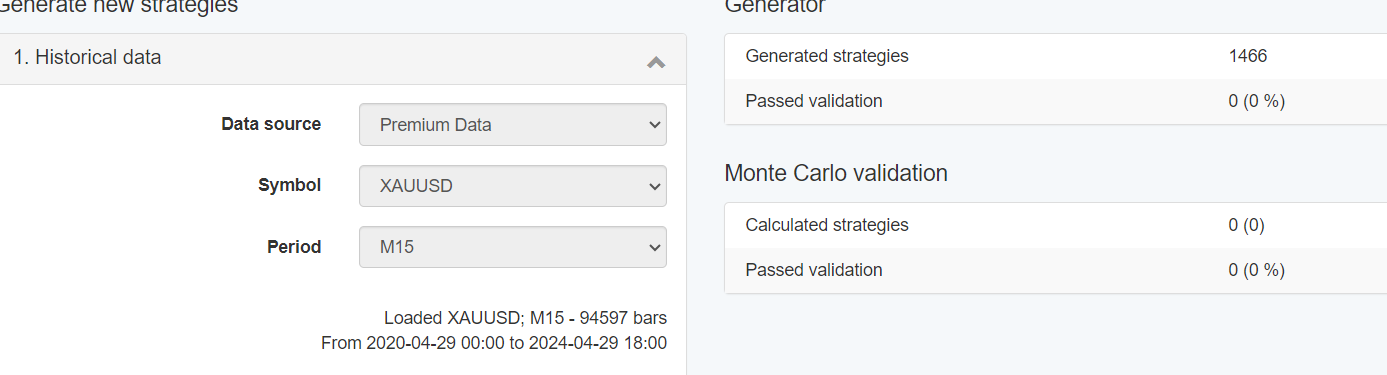
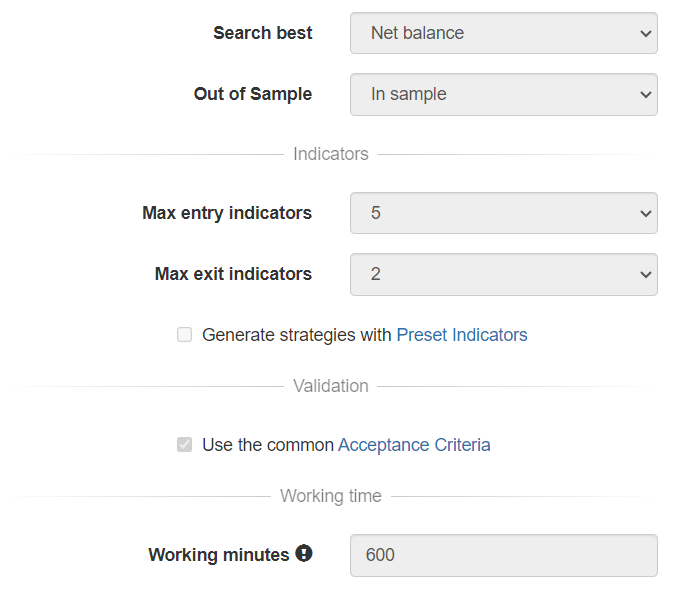
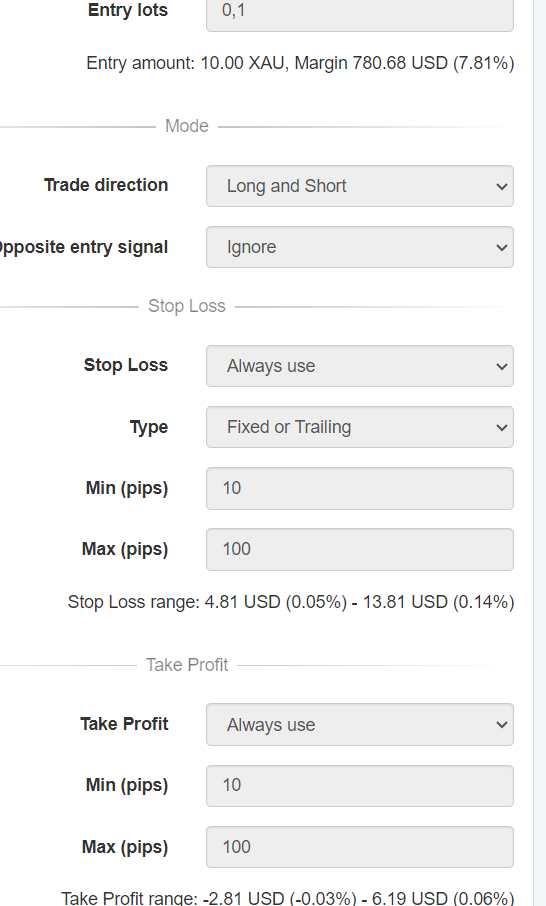
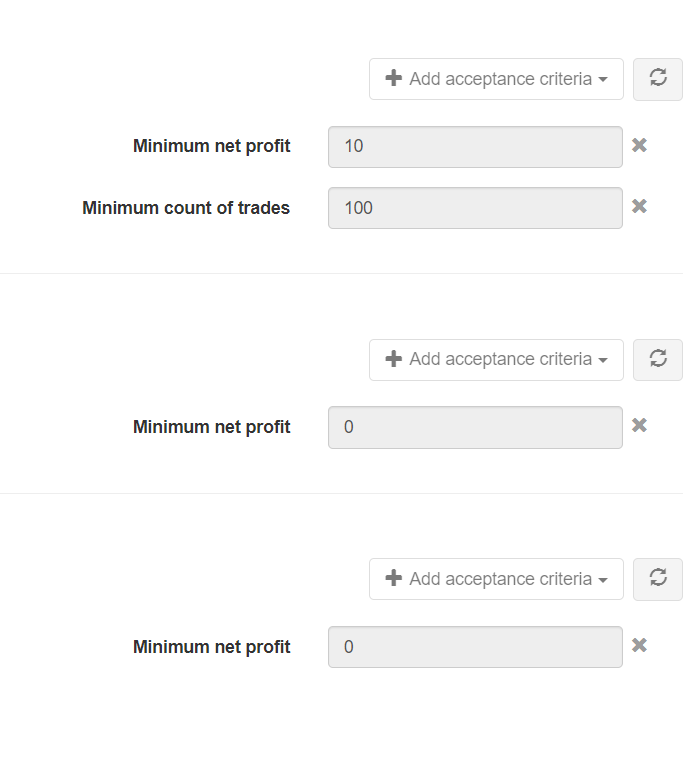
I have no clue?
April 30, 2024 at 6:39 am #252357ParticipantHello Allan,
No, nothing strange:
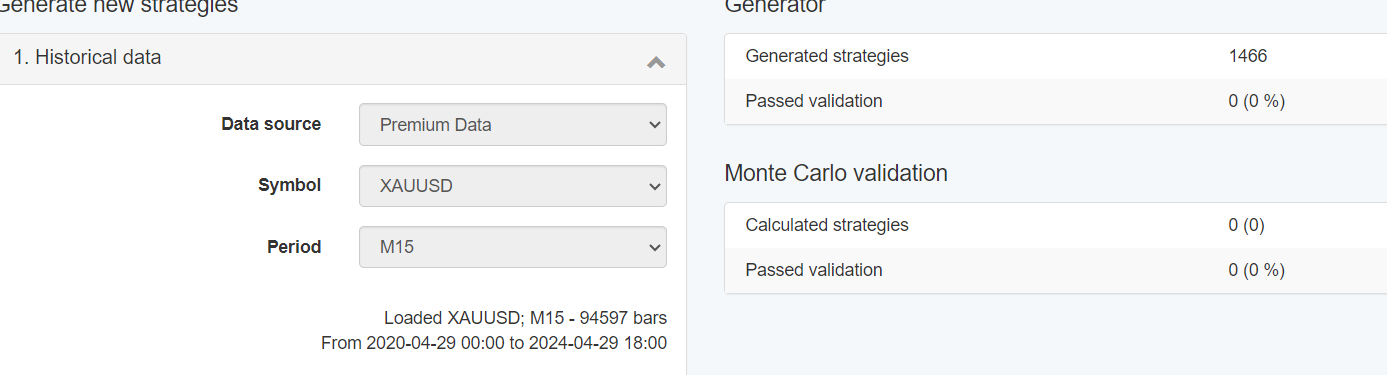
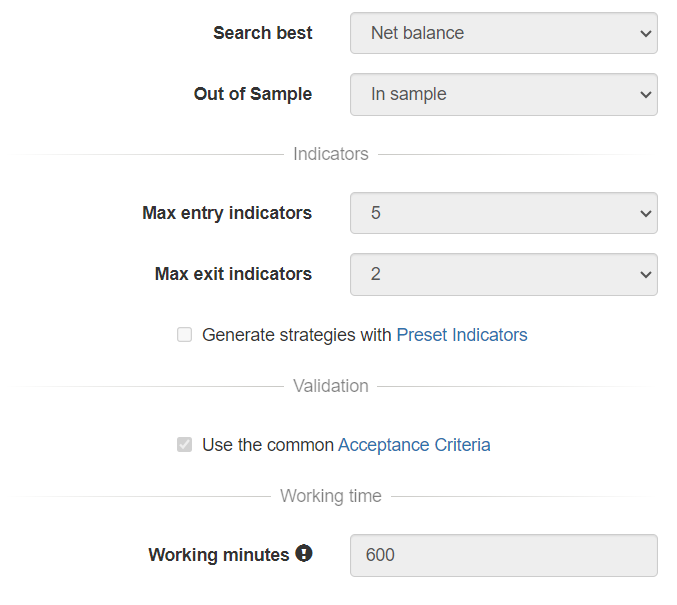
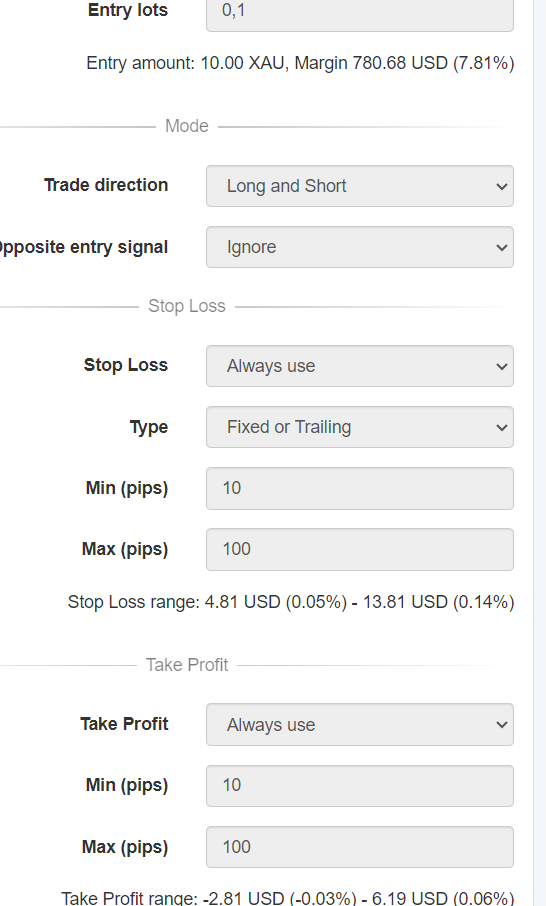
I have no idea.. 15 minutes works for every pair. Maybe I should try a hour?
Cheers,
Maarten
April 30, 2024 at 6:59 am #252430Alan Northam
ParticipantHi Maarten,
Use Generator
Turn off Acceptance Criteria
Set Stop Loss Min (pips) = 1
Set Stop Loss Max (pips) = 1000000
Take Profit Loss Min (pips) = 1
Take Profit Loss Max (pips) = 1000000
Click Start
Go to Collections (you should be collecting lots of strategies)
Go to Filter records (start adding in validation criteria to filter strategies to best performers)
example: minimum count of trades = 50, Minimum r-squared = 50Once you have some good strategies you can click on a strategy and it will show you its strategy and Stop Loss and Take Profit chosen.
If count of trades is not what you want then try a different time period.
Hope this helps!
Alan,
April 30, 2024 at 5:49 pm #252523ParticipantHello Alan,
But how do you trade the strategies that come out of the generator. How do you trade strategies with the big stoploss sizes,is that even possible… Can you give an example on xauusd with a stoploss of 819725 pips when I use a 10000 USD account. The risk I want to take is 2% with every trade without a leverage… Can you explain why you can make the scope for gold so big for the amount of pips?? Is gold that volatile?? It’s the only thing I’m worried about with the products you deliver. It would be very helpfull if there could be more information about risks with examples and the stragies you create. The position size calculator I use https://www.myfxbook.com/forex-calculators/position-size can’t even work with stoplosses this high 819725…
Hope you can help more with risk management and the specific bots you create.
Maarten
May 1, 2024 at 1:00 pm #252652ParticipantHi Marten,
Yes, gold is volatile!
Keep in mind you have selected to have 2 indicators to signal closing the trades. With EA Studio pushing the SL and TP so far away, it is telling me it is not using them but is using the indicators to signal buy and sell signals as well as signals to close trades.
I ran a test with account $2000 and lot size 0.1.
I then went to Collections and filtered with Maximum equity drawdown of 10% and Minimum count of trades of 50.
I then selected a strategy, selected Report and then selected Stats info.
I then scanned down to “Maximum Loss” which equaled 8% in the strategy I selected. So with a $2000 account this equals to a max loss of $160. You can go to the Journal of the strategy and scan down through to profit column to see the losses in dollars. You can then calculate the losses in percent by dividing dollar loss by the account balances. The maximum loss you should find should equal 8%.
You can use 8% to set up your stop loss.
I am in the United States so I cannot actually trade gold with a forex broker, all I can do is use EA Studio to look at back tests.
Alan,
May 1, 2024 at 4:31 pm #252673ParticipantHi Maarten,
Once I realized there were some strategies with maximum drawdown of 8% or $160 I set the Stop Loss to $200. I then set take profit to $400 to $1000. This then provided a RRR of 1:2 through 1:5. I will now let EA Studio run for 10 hours to collect strategies. I will report my results then.
Alan,
May 2, 2024 at 11:33 am #252802ParticipantHi Maarten,
After 10 hours here is the best performing EA:
In this screenshot you can see the Stop Loss range and Take Profit range in dollars I selected. Then I clicked on Edit and then clicked on Report to see the stats.
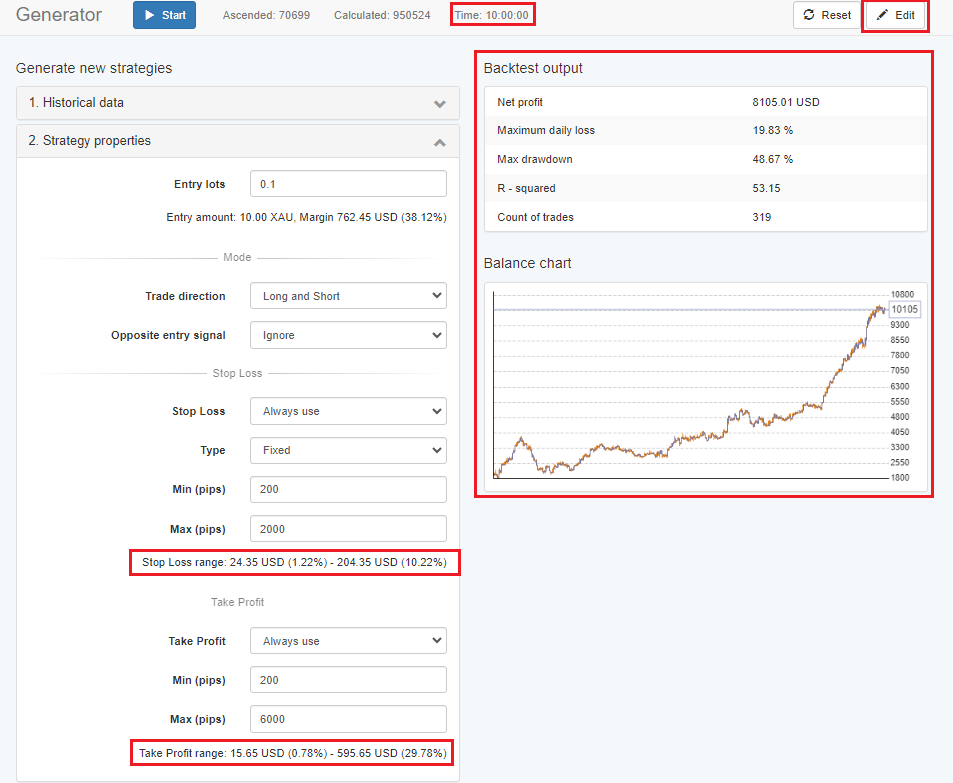
Here are the stats:
Here you can see many statistics about this EA. I only boxed in one of the stats because you were worried about how to determine account risk. The boxed in stat shows that over the last one year of backtesting the worse case trade had a loss of 9.89%. So you could use this to set your account risk.
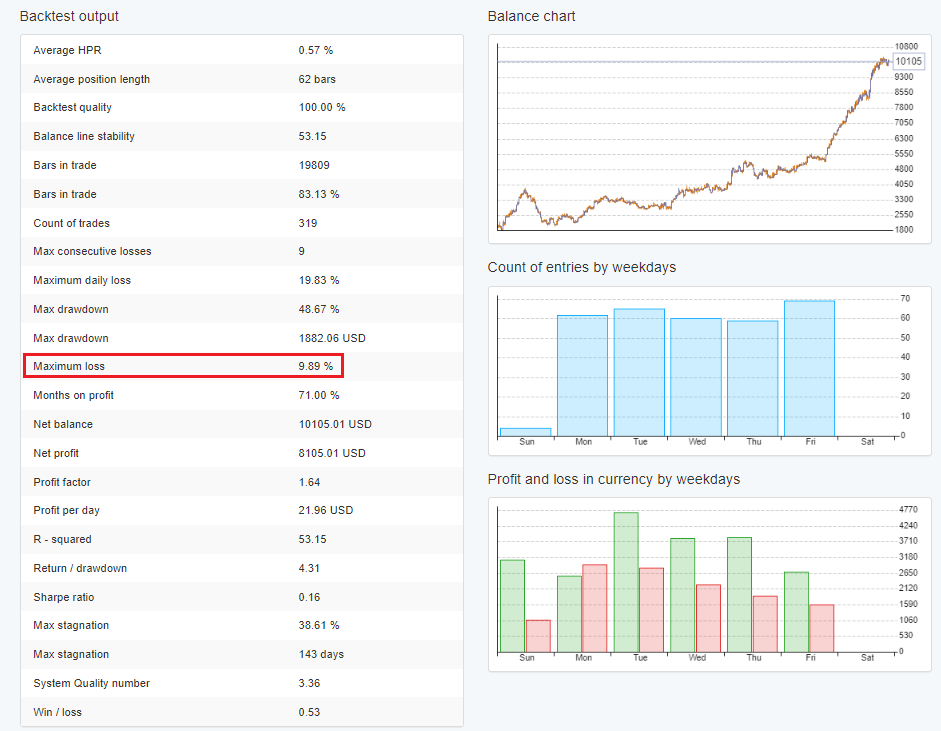
Here I have shown an example on how to use EA Studio to find some EAs for XAUUSD. Hope this helps to get you going!
Alan,
May 3, 2024 at 3:08 pm #253127Tsholo Monyausi
Participanti would like to open a %100 dollar account.
i have registered with blackbull and use the MT5 platform.
currently im trading on a demo account using the 5EAs that came with the 21day programme, which im still busy with
please can i have advise on the best approach on such a small account, what lot sizes, which specific EAs should i use, should i use all 5 at once and should i use MT4 or MT5
please assist
May 5, 2024 at 11:12 am #253366ParticipantThanks, Alan. It’s so much information. This makes things much more clear. I’m getting a better feeling about the services you deliver 🙂
May 6, 2024 at 9:53 am #253485Matt
ParticipantHello Tsholo,
Great work and congratulations so far! I’m unable to advise you on your financial activities as I’m not a financial advisor.
MT4 or MT5 is up to you and your preferences. I like MT5 as I find it has a little better functionality.
Which EAs have you found to have the best results so far? Which tracking software are you using? FXBlue?
And how much are you willing to risk per trade? 1% is usual practice, or less to help build confidence in the robots and the process.
What do you think? Does that help you formulate a plan?
Warmly
MattMay 14, 2024 at 10:37 am #254924ParticipantIam using MT5 on with a blackbull demo account.
USDJPY and EURJPY has been the most profitable so far.
i have not started tracking yet, but i will be using FX blue.
i have readjusted my settings to 0.01. i have been told that your EAs are optimised for $10 000 accounts. so i need to increase the amounts.
this has been helpful. thank you Matt.
May 27, 2024 at 11:11 pm #257582timaddamz
ParticipantHi,
I am very new to trading and EA’s. I am following the course but don’t understand what needs to be done with the inputs. The EA set files I downloaded show different inputs to the the ones on the screen. Do we change them to match the ones on the screen or do we just leave them as they are? Should we make any changes?
Thanks
May 28, 2024 at 9:31 am #257703Ilan Vardy
ParticipantHi there,
The EAs that are included in the course get updated regularly, so the settings may be different from those in the course. You can use them as they are without changing any settings.
Ilan
June 18, 2024 at 7:16 am #261740Stephen Schilg
ParticipantHey everyone,
I’m currently at day 7 of the 21 day program so bear with me if this does get explained in later videos.
I’d like to get a bit more insight into how strategies are used once they are generated.
From what I can gather the process is as follows:
- Produce new strategies once a week/month
- Demo the strategies for 2-4 weeks
- EA’s that are profiting can be moved to a live account. Others can be removed / disregarded
Now, this is what I’m unsure of. If I produce another 30 EA’s that have promising results do I put these on a separate demo account to test? Once they pass the 2-4 week trial do I place them on the same live account or another one?
If EA’s are not performing well on the live account anymore do I start removing them? Should I continue trading strategies after 1 – 2 months if I’ve generated new ones that are ready for a live account e.g. out with the old, in with the new?
I’m just trying to think of logistically how people manage portfolios after they’ve found a profitable EA and moved it to live.
Thanks team 🙂
July 8, 2024 at 6:41 am #268815Joseph Yong
ParticipantHi Guys
Just wondering if it’s possible to use EA studio to improve another EA’s feature to make it more effective.
Appreciate any constructive inputs
Joeforex
-
AuthorPosts
- You must be logged in to reply to this topic.