

Forum Replies Created
-
AuthorPosts
-
Marin Stoyanov
ParticipantHello Stewart,
In the portfolio EA, you cannot change the tp but mostly the lot size but in the EAs the take profit parameter is set already!
If you use them individually, you can set the take profit and stop loss in the inputs as well as other inputs!
Hope this helps!
Kind Regards,
NikosParticipantHello Dani,
The robots should have a tp point set already but in case there is not one set as you mentioned, you just need to set it manually. In my opinion, a good tp point is about 2% but this is not a recommendation. You can set your own tp point with which you are happy!
Hope this helps!
Kind Regards,
NikosParticipantHey Markus,
Yes, this is only Forex robots, no gold or crypto!
Kind Regards,
NikosParticipantHello Oliver,
So, from what I can understand, the take profit was placed below the opening price of the position.
There is a reason for that and probably it’s because the trend changed the robot just placed the take profit a little below the opening price.
Another reason could be the spreads, you need to check what are the spreads of the account and what does the broker offers in spreads.
Hope that helps!
If you have any more questions, let me know!
Kind Regards,
NikosParticipantHello Durga, we don’t have any discounts for the Prop Firm Robots app at the moment.
By the end of the week you can take advantage of our launch week offer discounts for the Top 10 Robots app.
Keep in mind that there are differences between the EAs from the Top 10 Robots App and the Prop Firm Robots App.
First, the Prop Firm App robots have a completely different strategy which is optimised for different currencies and timeframes. The EAs from the Prop Firm app are built in a way to trade according to the prop firms requirements – they are created in a way not to go over a specific daily drawdowns, to keep the equity within the defined minimum etc. You can learn more about this app in this and this video.
The robots from the Top 10 Robots app follow different strategies they use different indicators and settings. You can learn more about them here.
ParticipantHello Paul, as Craig pointed out, the Top 10 Robots app is a different app. Your existing purchase gives you access for 6 months to the Prop Firm Robots app.
Regards, Marin
ParticipantDear traders,
I have an update regarding the account.
We have decided to keep the robots trade with 0.01 lots as they are active and we just upgraded the account from 200 to 500$
Kind Regards,
NikosParticipantHey Craig,
You must have received an email that gives you access if you have purchased any of the Top 10 Robots!
Hope this helps!
Kind Regards,
NikosParticipantHey Stewart,
The difference of the Top 10 Robots to the Expert Advisor packages is that on the Top 10 Robots app, is that on the packages you get more robots than on the Top 10 Robots App.
On the Top 10 Robots App, you get the Top 10 performing robots on the available pairs so that you do not need to search on which are they as they are displayed on the App and you can get them faster.
In case you want more options though, the Expert Advisors packages is worth it!
If you have any more questions, let me know!
Kind Regards,
NikosParticipantHello traders,
We have placed the Top 5 Gold Robots on weekly timeframe from the Top 10 Robots App on a 200$ live account!
We are choosing the top 5 robots that have the most profits and we are placing them in the account. To be able to identify the robots inside of Metatrader, we just check the magic number and we change them accordingly if another robot is more profitable inside of the Top 5 range!
To show you more on that, you can see the screenshot below:
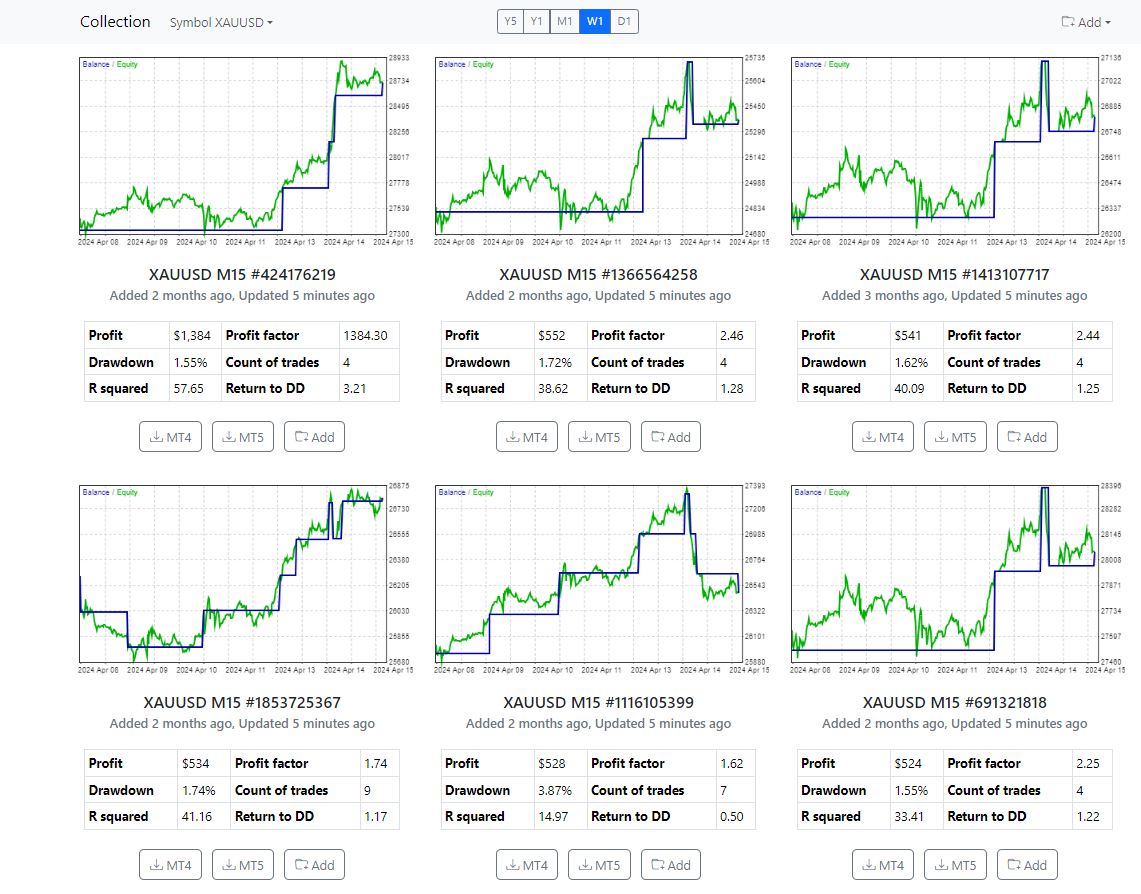
We pick the Top 5 from there and we place them on Metatrader.
You can check how they are performing here:
https://platform.algotradingspace.com/live-trading/
If you have any questions, let me know!
Kind Regards,
NikosParticipantHello Edina,
I am sorry for the late reply.
So, probably the reason it opens another entry when the price gets in the opposite direction is part of the strategy so that cannot be changed.
Thank you!
Kind Regards,
NikosParticipantHello Edina,
So, the only way to see the margin level percentage is by opening a position. You can open a small one manually to see how it is working and then close it.
But what the Bitcoin robots have as protection is a daily drawdown, which means that when the amount reaches to a specific amount that you have set as a loss, it will stop trading. So, with this option, it is not possible to get stopped out by margin if you set it to an amount that is not for example the whole amount of the account.
There is also an equity drawdown which means that if an open trade, reaches to an equity of the amount that you have set, it will close the position.
About the video, I have already provided you one on how to manage the EAs and there should be some settings as well. If you have not watched, I suggest that you do as it has most of the information you need!
In case you do not have the video, here it is:
Hope this helped!
Kind Regards,
NikosParticipantYou’re welcome!
Kind Regards,
NikosParticipantHey Edina,
In this case, if you never had this issue before and it happened after you placed the robot, probably it could be Algo Gold Robot.
So, about the floating amount, keep in mind that when it reaches to about 50% of margin level, the position gets stopped out. So, when you have an open position, keep checking the margin level.
Hope this helps!
Kind Regards,
NikosParticipantI see Edina. I just found out this means that the trade got stopped out, which stands for so: 47.89% which means that margin level was 47.89%, equity was 134.05 pounds or dollars, whatever currency you are using in the account and margin at 279.91.
In that case, to see what is the expert advisor that made this trade, a way is to check the expert advisor settings and see what the comments are and just try to see in the closed trades or even open trades what are the magic number or comment of the trades that do not have been stopped out and that way you could find which robot made the stopped out trade.
Hope this helps!
If there is anything else, let me know!
Kind Regards,
Nikos -
AuthorPosts