

Forum Replies Created
-
AuthorPosts
-
Marin Stoyanov
ParticipantAgreed. Without a delay, we will always get flagged for copying. Excellent idea.
ParticipantA way to set a delay for trade entry and exit so that you are not taking exactly the same trades as other people using the same ea on any particular platform.
ParticipantI have a suggestion to add a news filter feature in the EA portfolio.
thank you
July 20, 2024 at 12:08 pm in reply to: I am not able to use the indicators the same way for some reason #271518ParticipantHello Adam,
Here are the step-by-step instructions to resize the Forex Profit Supreme Meter on both MetaTrader 4 (MT4) and MetaTrader 5 (MT5).
For MetaTrader 4 (MT4):
Access Indicator Settings:
- Open MT4 and navigate to the chart where you’ve applied the Forex Profit Supreme Meter.
- Right-click on the chart and select “Indicators List.”
- From the list, find “Forex Profit Supreme Meter” and click on “Edit.”
Adjust the Font Size:
- In the indicator’s properties window, navigate to the “Colors” tab. Here, you’ll see various elements of the indicator. For each element, there’s an option to change the color and the font size.
- Click on the “Font…” button next to the element you want to resize. A new window will pop up where you can adjust the font size.
- Increase the font size to a value that’s comfortable for you.
Adjust the Size of the Indicator Window:
- Hover over the top or bottom border of the Forex Profit Supreme Meter window until the cursor changes.
- Click and drag to adjust the size of the window.
- Click “OK”:
- Once you’ve made the necessary adjustments, click “OK” to apply the changes.
For MetaTrader 5 (MT5):
Access Indicator Settings:
Open MT5 and navigate to the chart where you’ve applied the Forex Profit Supreme Meter. Right-click on the chart and select “Indicators List.” From the list, find “Forex Profit Supreme Meter” and click on “Properties.”
Adjust the Font Size:
- In the indicator’s properties window, navigate to the “Colors” tab.
- Here, you’ll see various elements of the indicator. For each element, there’s an option to change the color and the font size.
- Click on the “Font…” button next to the element you want to resize. A new window will pop up where you can adjust the font size.
- Increase the font size to a value that’s comfortable for you.
Adjust the Size of the Indicator Window:
- Hover over the top or bottom border of the Forex Profit Supreme Meter window until the cursor changes.
- Click and drag to adjust the size of the window.
- Click “OK”:
- Once you’ve made the necessary adjustments, click “OK” to apply the changes.
These instructions should help you resize the Forex Profit Supreme Meter on both MT4 and MT5. Remember, the appearance and visibility can also be influenced by the overall screen resolution and display settings of your computer.
Please let me know if this works for you.
ParticipantThe news filter tracks Medium and High news from the Forex Factory economic calendar.
ParticipantHello All, I read the post from Tijl above and clicked the link. Then I see the equity as of today. I have had the same problem. Ran the set files with great success to over 120% per month for 3 months but then recently crashed the account because of open positions which triggered high DD and dropped leverage to under 100% forcing the close of positions and the loss. No settings in the EA seems to stop this from happening. Even the monetary and percent stop loss set at 1% didn’t close the EA. Lastly, I am wondering if we all have had the same experience. Can this be that July was an anomaly or that the EA only runs for max of 3 months before you should expect a crash?
ParticipantParticipantExcellent and essential for prop firm trading.
ParticipantFor now I play it safe and set high and medium enabled
ParticipantThank You Marin i know the filter settings but i am wondering if it covers all the news alpha is listing to avoid mandatory
ParticipantHello, you can find explanation of all News Filter properties here.
ParticipantHi,
Does anyone know how to set the news filter for Alpha Capital. After you pass the Assessment and are a Qualified Trader you should be careful when trading during news releases there. because Qualified Analyst are NOT allowed to execute any new trade or close an existing trade on the targeted (as per the table in link) instrument in the window of 2 minutes before until 2 minutes after the release of the below News announcements.
Is the filter on high news enough? or should i choose high and medium? and does it tick all the boxes like in the table in the link?
Thank You in advance!
ParticipantThe video is still showing the non-updated version. See screenshot below for the updated one:
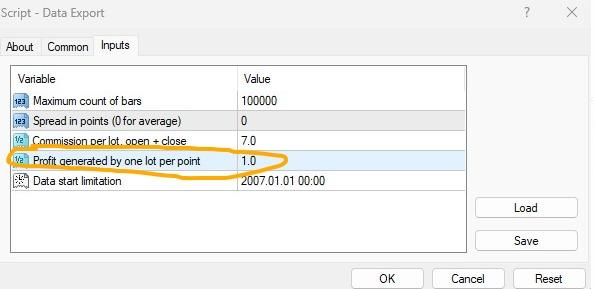
If i am going to drop the script into XAUUSD, XAGUSD, BTCUSD and ETH USD, is the default still 1.0 or should I change the number?
ParticipantGreetings please I am new here and am interested in the ftmo trading robot..
Just the price is a little too high for my current budget please can I get a discount on the one year plan?? It’s I plea I really want to be a part of this great revolution .. I am a great fan of your work sir and am really motivated..
Participanthttps://platform.algotradingspace.com/funded-accounts/ this is the link
-
AuthorPosts