

Forum Replies Created
-
AuthorPosts
-
Petko Aleksandrov
Participant16. How to trade Forex with 100 GBPUSD strategies in the account
I have updated the Portfolio GBPUSD EAs for November.
You will find new 100 strategies in those 3 Experts.
Safe trading!
Petko A
Participant15. Algo trading course – Top 10 AUDUSD Expert Advisors
We have updated the 10 EAs for AUDUSD. We used the Normalizer, which is the newest feature to improve the Expert Advisors.
The EAs are the same but with different parameters, and they are attached to the course.
Let me know if you have any questions.
Participant14. MetaTrader 4 Forex platform: Start trading with a pro trader
I have updated the 3 Expert Advisors for EURGBP, EURUSD, and GBPUSD.
The strategies are the same. Just the parameters are changed a bit.
Participant13. Basic algorithmic trading course + 3 Robots
I have just updated the 3 Expert Advisors. These are the same strategies but with little changes in the parameters.
Participant12. Forex Algorithmic trading course – Top 10 GBPUSD Expert Advisors
I have updated the 10 GBUSD EAs in the course. The new tool called Normalizer allows me now ti improve the strategies without the risk to over-optimize.
It removes needless indicators and lowers the parameters (if only the strategy gets better).
So these are the same strategies but improved.
Let me know if you have any questions.
Participant11. Cryptocurrency trading course + 12 Expert Advisors
I have updated the 12 Expert Advisors for the Bitcoin, Dash, Ethereum, and Litecoin.
The new feature in EA Studio called Normalizer allows me now to improve the strategies and I have used it for this update.
Here is the free video how it works:
Participant10. Bitcoin Trading Robot – Cryptocurrency Never Losing Formula
I have updated the BTC trading robot. I have changed the Stochastic Signal to 24, which works better for the last couple of months. All the rest stays the same.
Let me know if you have any questions.
Participant9. Cryptocurrency algorithmic trading – the revolution
I have updated the course with new 12 Expert Advisors for Bitcoin, Ethereum, and Ripple.
Let me know if you have any questions.
Safe trading,
Participant8. Top 10 EA for EURUSD strategies
I have reviewed the performance of the 10 EURUSD EAs, and since June they are doing really great. Just two of them needed a change this month, and I have optimized a bit of the parameters.
These are the EAs with magic number 73762987(M15) and 09960635 (M30).
The new EAs are with magic number 18543282 (M15) and 18778024 (M30).
Participant7. Forex trading strategies from a professional trader + Top 5 professional EA
I have reviewed the 5 Expert Advisors included in the course, and I have updated 2 of them – the strategy for USDJPY and EURGPY.
You will find the changes in the attached PDF files, and I have updated the Experts with the new parameters.
Safe trading,
ParticipantHello James,
In this course, I did not include EAs because of the time difference. When I create such EAs to trade only during the Stock exchange hours, they would work just for my time zone. If someone else uses them in different time zone, there will be a difference in the hours and the EAs will not work according.
Since you have EA Studio, just follow the steps from the course if you want to create such EAs for your time zone.
Cheers,
November 6, 2019 at 9:17 am in reply to: How to Transform portfolio EA (100 strategies) entry lot sizes into % ? #26159ParticipantGlad to hear that, Charbel.
Let me know if there is anything else.
ParticipantSure, James, let me know. Just keep in mind that if you want to do scalping using EA Studio EAs, you need to have really low-cost broker. Because you will have a lot of spread paid, commission.
Cheers,
ParticipantHello James,
yes, you can upload an Expert Advisor back if you go to the strategy editor, and after that, you click that arrow down on the left side of the Data resource:
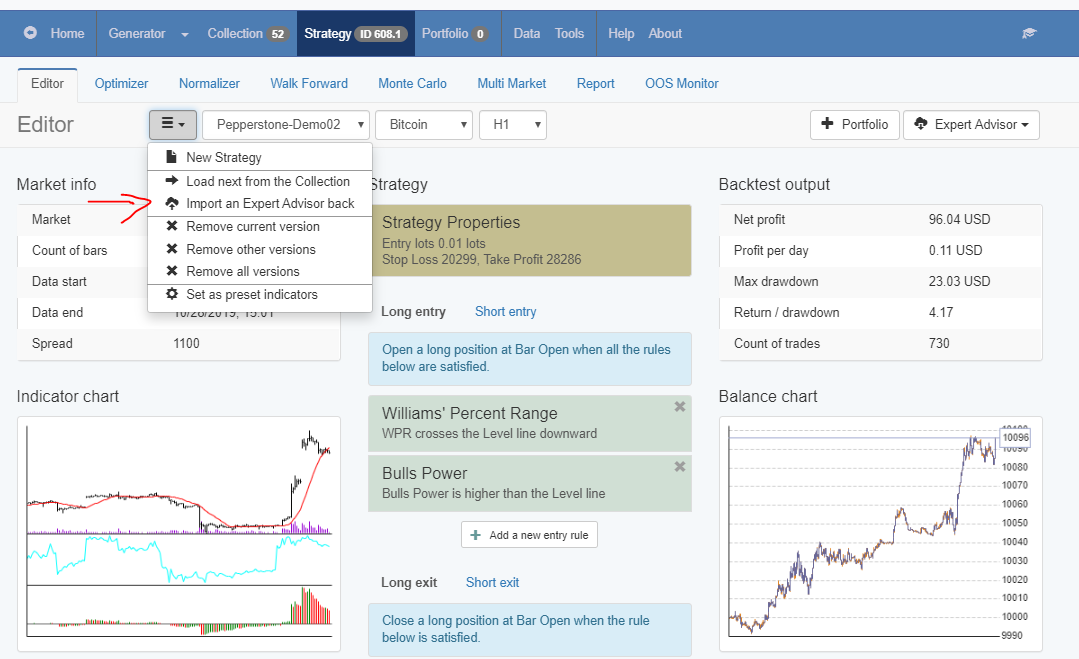
Also, if you want to import not just one but whole portfolio or let’s say the 10 EAs from any of my courses, you can use the Validator.
Drop them there, filter if you wish with acceptance criteria and Monte Carlo and press Start. The EAs that go trough will show in the collection.
ParticipantYes, I did the mistake to depend on one broker at the beginning. When they changed some of their trading conditions, I had to move and I realized that I do not have data for another broker.
That is why I share it, so you won’t make the same mistake.
-
AuthorPosts