

Forum Replies Created
-
AuthorPosts
-
Petko Aleksandrov
ParticipantHello Samuel,
I get confused about what is your name. Sometimes you say Samuel, sometimes Smaul 🙂
All the EAs that are based on trend indicators are trend-following EAs.
You can find the trend indicators if you go to MetaTrader – Insert – Indicators – Trend. You have 7 indicators there which are known as trend indicators.
If you want to build an EA using any of these indicators just add it as a preset indicator. The Generator will find strategies for you using this indicator.
Now, the trend trading EA depends a lot on the rule of the indicator.
For example, if you use Moving Average, you have a few options:
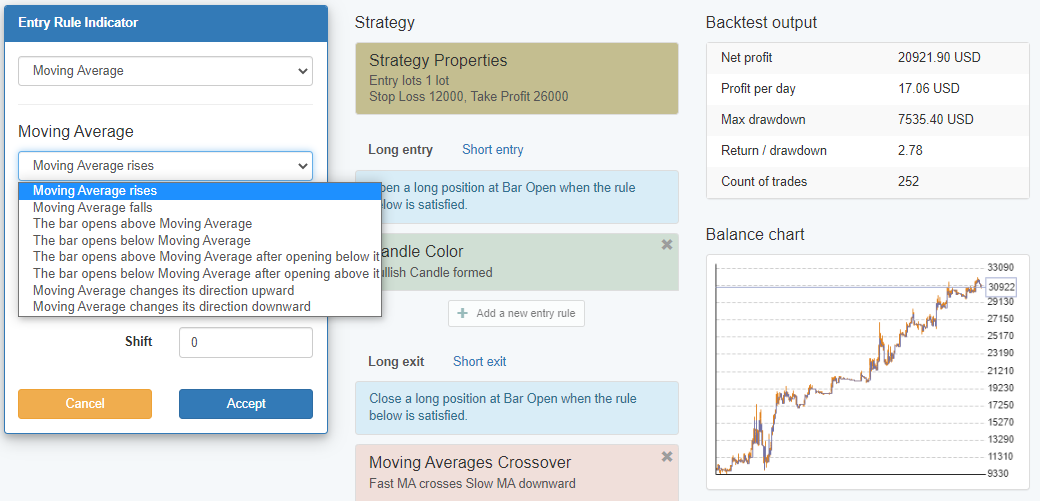
If you use Moving Average rises for entry condition to buy, then yes, you have a trend trading EA.
But if you use the Moving Average changes its direction downwards then you will have in EA that opens a buy trend against the trend.
So when you runt he generator with preset indicators, just have a look at the entry rules and pick up the ones that are following the trend.
Of course, you can combine a few indicators which would be the better thing to do.
ParticipantHello Smauel,
It’s coming up. I will upload that video for free on youtube as well. The team is just editing it right now.
You can try it out in EA Studio. Add Candle Color as a present indicator and generate some strategies with it.
Cheers,
October 3, 2020 at 6:44 am in reply to: How to Distinguish between “Premium Data” adjusted to 2 different brokers #62050ParticipantHey Asser,
I am glad to hear that I succeeded in helping you quickly.
I didn’t have the time to record a video but I will do it next week.
Let me know if there is anything else.
Cheers,
ParticipantHey guys,
Yes, recently I stick to these 6 currency pairs. Over time I saw that I better focus on them and generate more and more strategies on these assets instead of losing time on the others. Well, it is not losing time but with these 6 we can get really decent strategies with great equity lines.
I am glad you liked the last videos, Richard!
Cheers,
ParticipantHey Tremosor,
Yes, there are indicators that are price action. In FSB Pro you will find more. In EA Studio we have Candle Color for example.
It actually gives great strategies. I have such for the BTC that is very profitable and I just recorded a video today and I will show it in my upcoming course.
It has the entry rule Candle Color with 4 consecutive bars and min 24 pips as a body hight. This means that the trade will open if there are 4 consecutive same color candles and each one has 24 pips of body hight (close – high for bullish and high-close for bearish).
September 30, 2020 at 10:56 pm in reply to: How to Distinguish between “Premium Data” adjusted to 2 different brokers #61821ParticipantHey Asser,
Glad to hear from you again. I understand totally what you want to do and actually after discussing it with Mr Popov, we have come with a solution for you.
Before you download the data from the App go to Settings. From there you can set the max bars and Server Name. Here you can write the name of your first broker:
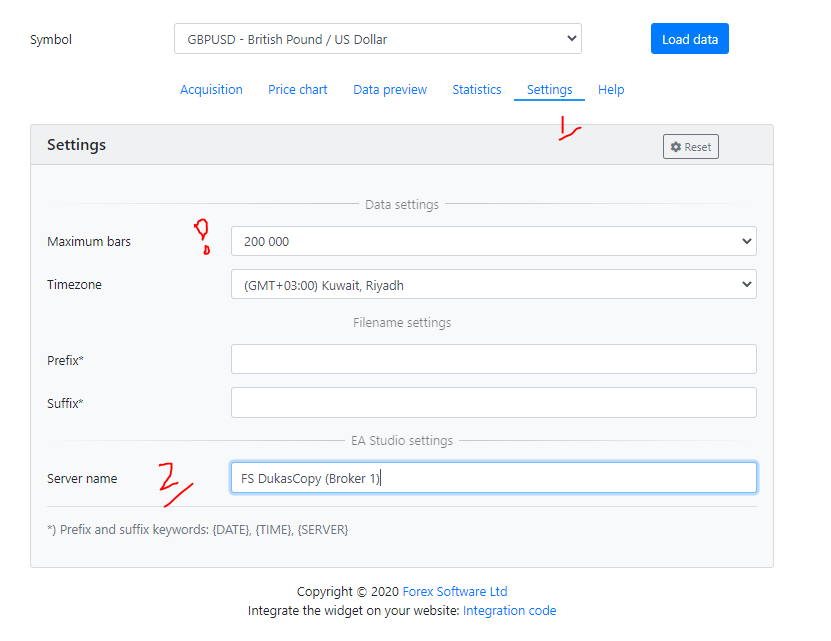
Then drop the data in EA Studio. You can do the same with another broker or even more. There is no limitation.
As far as you change the name of the Server, EA Studio will recognize it as a different Historical data. And then for each one, you can modify the Symbol settings.
Let me know if that makes sense and if I succeeded to explain. If not, tomorrow I will find time to record a quick video about it.
Cheers,
September 29, 2020 at 10:14 pm in reply to: EA Studio Tools and Settings: Experience and Results #61736ParticipantHello Petko!
I realized what you said in this last post after watching the course 🙂 Amazing!
I did many tests and right. The generator still produces strategies within my acceptance criteria of 500 trades and 1.3 PF.
You are always right! It is so evident that if we have fewer bars and we still want 300 to 500 trades as a minimum, we would have more active strategies. I didn’t think it is possible.
Now comes the question: How much should we decrease the number of bars? 🙂
September 29, 2020 at 10:06 pm in reply to: How satisfied are you with the automated trading software EA Studio? #61735ParticipantEA Studio gets better and better. With the Premium data, I feel like the last missing part is placed in the puzzle.
It’s really the best strategy builder out there!
September 29, 2020 at 10:03 pm in reply to: How to Distinguish between “Premium Data” adjusted to 2 different brokers #61734ParticipantHey Asser,
I am glad to hear from you. Yes, the premium data is the data from Dukascopy. It loads automatically in EA Studio which is pretty cool.
However, it is not limited to 50,000. You can increase the number of bars if you go to Data – Data Horizon – Maximum Data bars,
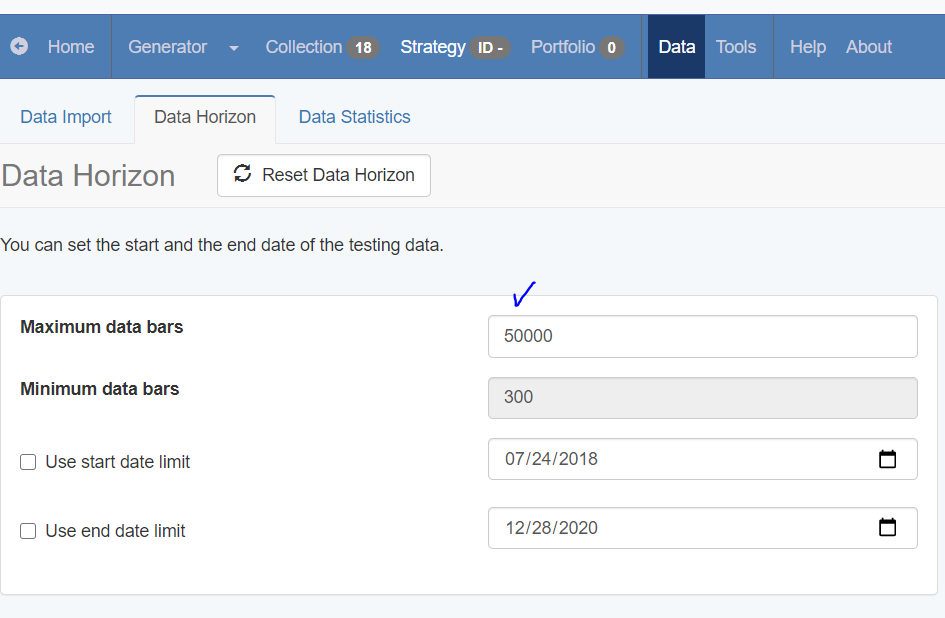
Regarding the symbol settings to use the Premium data for 2 different brokers, I don’t think that would be possible.
We have two options with the symbol settings – to use the original settings or to set custom settings.
So if you use the Premium data and you change any of the symbols with custom values, you are changing it for the Premium data in general.
But what you say is interesting and I will discuss it with Mr. Popov (the developer of EA Studio and the Premium data) and I will let you know if something like that might be done.
ParticipantHey guys,
interesting topic here. Richard, that is a very detailed and precise answer, thanks!
Samuel, I am not really sure why you want to trade these currency pairs but give it a try. Personally, I do not trade currency pairs like AUDNZD, but it might be interesting to see what will be the results.
The four that Richard says – USD, JPY, GBP, and EUR are the most common and that is why they have the lowest spreads.
You can try running the Generator for EURUSD and another one for AUDNZD, with the same acceptance criteria and data range, and see which one will show you better strategies (more net profit, for example). Make sure to run the generator long enough to have a decent comparison (3 hours at least).
ParticipantHello nu2this2,
Yes, that is possible to be added with FSB Pro as a condition. And please, write in the topics in the Forum accordingly or open new topics. This topic is for Ideas for the Platform.
ParticipantHello Samuel,
Welcome to the Forum!
No, it is not wrong. Actually, I do the same, and I show it in my courses. I create portfolio of EAs on one currency pair and one-time frame with different strategies. This is risk diversification.
Of course, if you combine a few different currency pairs and time frames that would be even better.
Let me know if you have any other questions.
September 24, 2020 at 4:31 pm in reply to: What should I aim for in terms of returns? Setting Expectations #61482ParticipantGuys, just to make something clear:
When someone shares results that must not be accepted as a promise…
Quite often I get the questions about what profits I do every month, what are the expected returns from the EA. It depends on so many things.
The market is different every month. I might get some good results because I have a lot of experience, but at the same time, this does not guarantee even to me that there will be the same results next month.
Just remember that every month is different, and we just do our best in each month. That is all.
Cheers,
ParticipantHey there!
I am not really sure what you mean…yes, we always get different results on the different brokers.The price determined the values of the indicators (which are the trading rules behind the strategies).
So the best thing to do is to place the same EAs on a few brokers and test them for a month. See which broker will give you the best EAs.
This is what we showed with Ilan in our latest course Algorithmic Trading Course for Beginners + 40 EAs
ParticipantGuys, make sure to enable the AutoTrading before placing the EAs on the chart. That is the most common mistake.
The EAs are the same, it does not matter if they trade on Demo or Live. As long as you are with a regulated broker (not a scam broker) and you place the EAs properly onto the MetaTrader platform, all must work fine.
Send me more pictures and details so I can help you out. Anyway, I am guessing most of the time.
-
AuthorPosts