

Forum Replies Created
-
AuthorPosts
-
Petko Aleksandrov
ParticipantAnother very interesting video, Petko! I had to watch it few times as I am still new with EA Studio, but at the end I got it how you generate such EAs!
Thanks a lot!
January 26, 2019 at 12:52 pm in reply to: Forex strategy, Forex ea or cryptocurrency ea – share with everyone #8787ParticipantHello Desita,
if you can not generate EAs for some reason for any currency pair or asset, you need to find the reason for that.
What you need to do first is to remove the acceptance criteria, and run the generator. If you do not see still strategies, it means that their is an issue with your Historical data that you have imported.
If you see strategies, start setting up the acceptance criteria, but slowly. With every new criteria added, run the generator. This way you will see what is the reason for not getting strategies.
ParticipantHello traders,
I have uploaded a new video with another updated in EA Studio regarding the Out of Sample.
So far I was not a fan of using the OOS, but with this update the things changed a lot!
Please, find the YouTube video here: EA Studio Updates: Out Of Sample monitor and acceptance criteria
There are two major improvements with Out Of Sample in EA Studio.
First, we have a change in the Acceptance criteria:
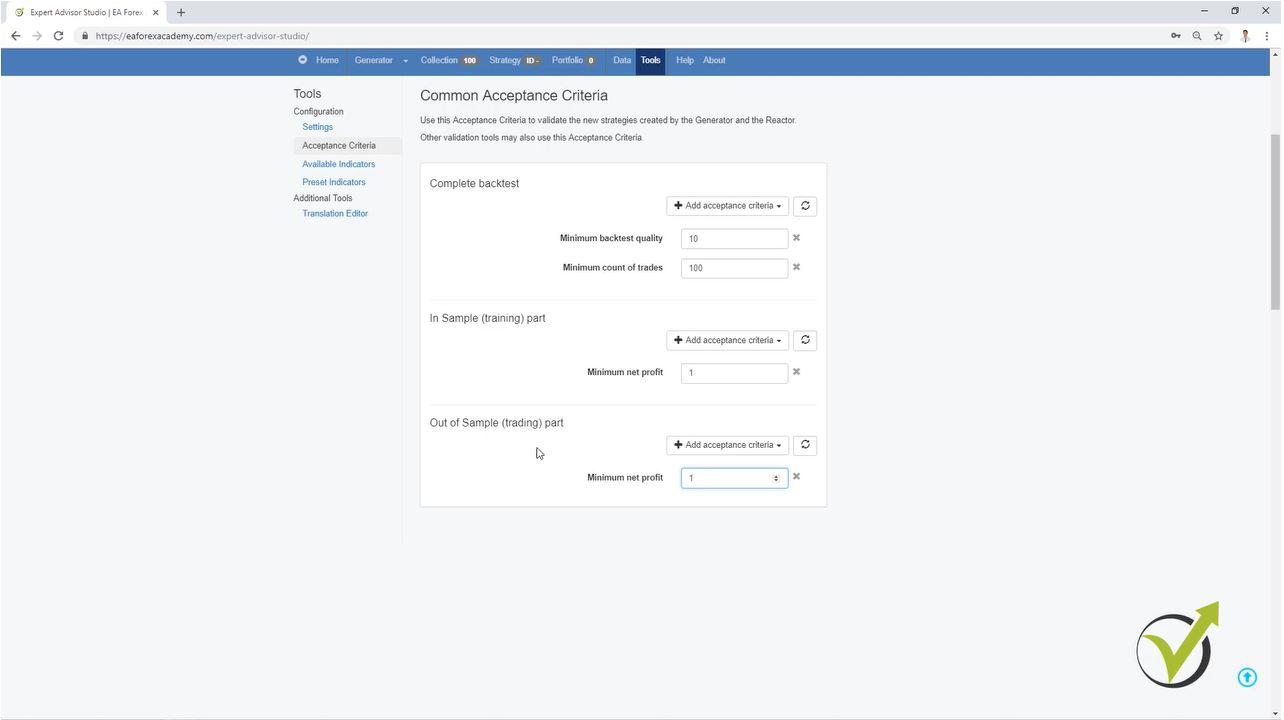
Now we have the chance to generate the strategies with different acceptance criteria for the Complete backtest, for the In Sample Part, and for the Out Of Sample part.
This way we can use for example, 70% of our Historical data to generate strategies with predefined acceptance criteria. And with the rest 30% we will see simulated trading from EA Studio, as it was actually trading. NOW, here is the thing: We want to see only the strategies that actually profited in these 30%. So we can place precise criteria in the Out of Sample part.
In one of my courses I showed a trick how to avoid Demo testing, but we had to change the data range, than filter the EAs manually. Now it is possible to do it all automatically.
Second we have the Out of Sample monitor:
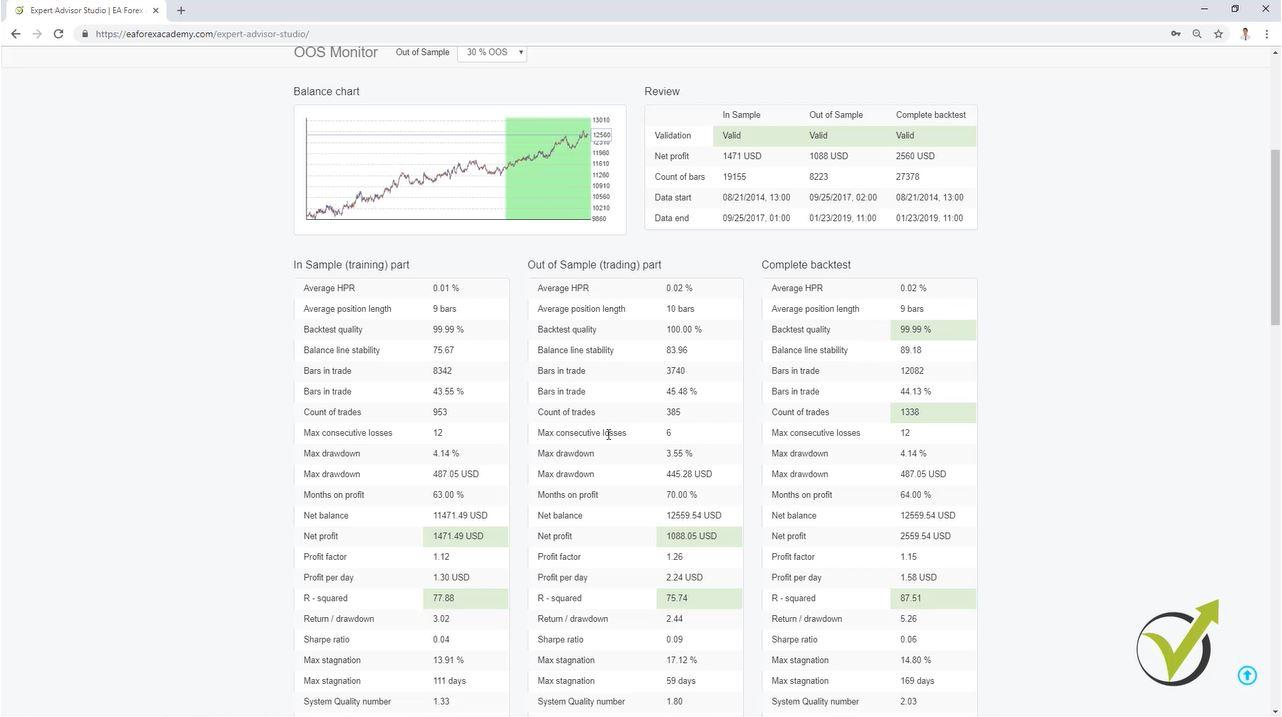
Here you will see detailed statistic for the complete backtest, the In Sample part, and in the Out Of Sample part.
In green you will see the same criteria that you have set in the Acceptance criteria. This shows that this is validated criteria. If it is in red, this means that the criteria was not validated with the minimum you have set in the acceptance criteria.
At the end of the video I show an example method how to generate trading strategies using the OOS in the acceptance criteria but in the Optimizer, not in the Generator. Combined with the r-squared new criteria, you will see great trading strategies.
ParticipantHi Petko,
very nice topic here, we can learn more from the free videos you upload in Youtube.
Thank you for your hard work!
January 25, 2019 at 9:53 am in reply to: How satisfied are you with the automated trading software EA Studio? #8769ParticipantWOW! Thank you all for sharing your experience! I did not expect that opening this topic will cause so many answers.
I am already on board 🙂 I took the Optimal Pack, so I have it all now. It all depends on me 🙂
Thanks again to all for the kind answers!
ParticipantHello Desita,
Yes, we can say they are the results of the trades, but added to the equity. Not alone.
Simply, when we use R – squared in the generator, it founds such strategies that the equity line is closer the the regression line.
Kind regards,
ParticipantHello Petko,
thanks so much for the video! I have some statistical skills but I did not imagine that r-squared could be implemented in EA Studio. It is really a top product in algorithmic trading.
So as far as I get it, the points around the regression lines are the results of the trades, right?
January 24, 2019 at 9:59 pm in reply to: Forex strategy, Forex ea or cryptocurrency ea – share with everyone #8758ParticipantSo kind of you, Andi!
Thank you so much!
I have exported the strategy and placed on a Demo. The equity line is really nice. I will try generating EAs again for EURGBP, but if this one works, I will use it for sure.
Thanks again!
January 24, 2019 at 9:56 pm in reply to: Forex strategy, Forex ea or cryptocurrency ea – share with everyone #8757ParticipantGreat you share strategy Andi! Glad to see that you included the R – squared, look at your equity line! It is great!
ParticipantHey Viktor,
yes, many moved to Serbia, because there they pay less to the sales people they have. The keep normally some office in Europe country to pretend that they are regulated. Desita is right, they are everywhere.
ParticipantHey Jacpin,
Yes, the R-squared is WOW! But I tested it a lot before recording the video, because I wanted to show the best of it, and to demonstrate how to use it.
I am planning to include it in my generation permanently. Also, for the monthly updates of all courses. It really really improves the strategies.
I have prepared another video, which will surprise you even more. I will upload it tomorrow.
It is a method to generate the EAs using the trick with testing the recent data(avoiding Demo trading) and combination with the R-squared. Works brilliant!
ParticipantHello Rose,
Glad to see you back in the Forum. Yes, many students and traders joined the Forum, which makes me very happy.
I will keep you updated with the updates in EA Studio in this topic.
ParticipantHey Andi,
Glad to hear that I made it clearer with the r – squared. I had to test a lot before making this video, but it is really a huge thing with EA Studio.
Take your time to test more, and you will see even better results.
Happy to hear you shared a strategy! That is very generous in trading!
January 24, 2019 at 8:36 am in reply to: How satisfied are you with the automated trading software EA Studio? #8744ParticipantHello Chingi,
I have experience with EA Studio since the time it was launched(before that was only FSB Pro).
I can say that EA Studio is a must in algorithmic trading. I have about 5 years of experience in EAs, and I divide it all on two periods.
First was the time when I started to try coding EAs and buying EAs which were expensive. Never ended with a good result.
Second is when I found FSB Pro and EA Studio later on. Put my things together. Tested EAs for nearly year before going to live accounts, and saved some money. Now for the last one year I do this full time, so I can say that EA Studio and FSB Pro changed my life a lot!
I do not have a boss over my head, I do not have working time, I take holidays whenever I decide, and most important I have time for my family now!
So, how satisfied I am with EA Studio, from 1 to 100, definitely 101 🙂
ParticipantHi Petko,
Long time I did not look at the Forum, and I was so surprised to see so man new people and topics. This one is great. I like your videos, and I like that you make it clearer how to use the updates in EA Studio!
Keep up the good work!
-
AuthorPosts