

Forum Replies Created
-
AuthorPosts
-
Petko Aleksandrov
ParticipantHello Simon,
the EA Studio follows the Account settings you have in tools. And it follows the historical data that you use.
It is good to keep it similar in EA Studio and MT Backtester to get the same results. Same starting account, same lot trading, same spread.
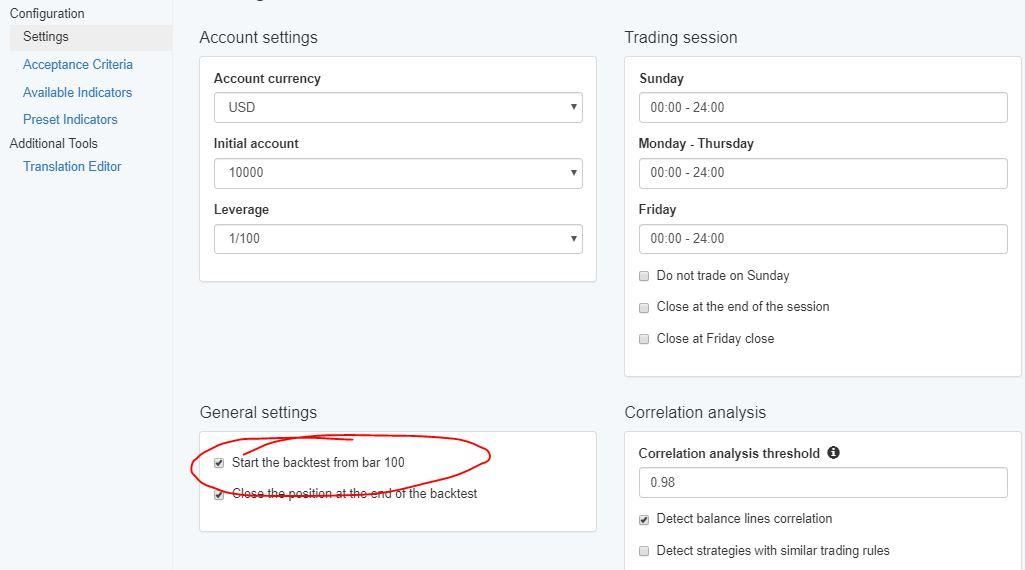
Also, the MT4 backtest starts from 100 bar and there is such an option in tools, make sure to check it:
Now regarding the data. MT4 should not cut the data, at least it does not with me. I am not sure if the broker can cut it..
I just download these hst files from time to time to make sure it is not lost if I have to preinstall the MT.
Also, in of my courses called Forex strategy course – Portfolio trading with 12 Expert Advisors
I show how to save the bars in Excel which is the 100% option where you will save your data. But that works for FSB Pro. In EA Studio and json files are different and it is harder there to save them this way.
Let me know if you have more questions.
Cheers
ParticipantHey Jie,
yes, the indicator should be coded according to the language… actually, you can write their in the forum, there are some people that do this.
ParticipantYou are welcome, feel free to ask any questions.
Cheers,
ParticipantHello Simon,
Glad to hear from you. I have been over all the things you are struggling with right now, and I will assist you as much as I can because I know how hard it is.
You are correct that the best data is the actual one from your broker. And yes, all the brokers provide small data. However, when you start collecting the data, you can download the hst files from time to time. This way you will make sure not to lose them again.
We are about to provide Historical data from Ducas copy, we have done a lot of tests and we are at the final stage. This data seems to be very accurate and detailed. We tested creating EAs with it, and compared to most brokers, it is similar. Also, what we do is to convert it from tick data, which makes it very precise. Maybe it will be available next month.
Stay away from the strategies that have no SL. They show great backtests but in actual they can drive you to huge losses.
Now, EA Studio uses the timezone from the data that you have imported.
Regarding the GBPNZD, you are correct but still, you don’t want to do algo trading with a huge spread.
ParticipantHello Jammerly,
well, personally I prefer to use MT4. There are still many bugs in MT5, and most of the brokers with MT5 do not allow hedging.
And actually, I can not update the EA with this indicator Long or Short, because I can make it open only in one direction. For example, only long.
The idea is the traders to choose the direction according to the trend at the moment.
Kind regards,
ParticipantHello Simon,
Now here is what I see from the pictures:
1. On your MT backtester, the journal shows an error. It should not be from the small money you have inside. You can set the trading amount to start the backtest. For sure it a big number. About that, you should connect your broker, and ask why a backtest could not be completed. Are you sure they allow algorithmic trading on this live server?
2. The Historical data looks alright, but it is too small. Did you try to get more by pressing the Home key? If you look at your strategy, it has less then 100 count of trades which is really small.
3. The spread is big! You should look for brokers with a smaller spread. With GBPNZD it should be about 2-3 pips. You have 7. Even you do everything right, wich such spread, you will hardly see profits into your account ever.
I would suggest you give it a try with another broker with smaller spread and more Historical data. I am sure, this way you will do it all properly.
Kind regards,
ParticipantHello Centcel,
The message clearly says that you need to reload the app. Simply refresh the page or press Ctrl+F5 ( Fn+F5 for Mac). And you will have the updated version.
Kind regards,
ParticipantHello Jammerly,
Yes, that is not available actually in MT5. What you can do is to upload the Expert back in EA Studio and add the indicator Long or Short.
Actually, that is a great idea for an update in the course. I will do it tomorrow and update the course.
Cheers!
ParticipantHello Simon,
Glad to hear from you. You should be getting the same results with FSB Pro/EA Studio and MT Backtester. Before I give you some reasons, what you are missing, can you please post the following pictures:
1. The strategy in EA Studio – with the entry/exit rules, everything, simply the Editor of it
2. The MetaTrader where you do the backtest
3. The statistics of your Data – go to EA Studio Data – Data statistics
Kind regards,
June 16, 2019 at 10:11 am in reply to: Bitcoin trading robot: EA Studio Bitcoin H1 78 doesn’t compile in Metatrader 5 #13624ParticipantHello Jammerly,
Yes, MT5 gives some bugs from time to time. Restart always helps. Also, in MT, you can not compile if you refresh the Experts in the Navigator. You need to open the Meta Editor and compile it from there.
Regards,
ParticipantHello Jie,
Glad to hear from you. here is the guide for it:
https://forexsb.com/wiki/fsbpro_guide/repo_indicators
And here they are uploaded:
ParticipantHello Sisi, here we talk more about the methods of how EA Studio and FSB Pro open the trades. Not so much is it on Demo or Live, that is not connected to it.
ParticipantHello Sisi,
Glad to hear you took some good EAs from me. It makes me happy when my work is useful to others as well.
Cheers!
ParticipantWow! Thank you for all June updates! I am a bit late with them, but I hope not that late 🙂
Last month I had really good results with some EAs from the courses. And I say some, just because I mix my EAs and yours.
Thank you for all the hard work you do!
ParticipantThanks, Petko, this makes much sense. This way I will have a better idea which strategies to trade on Demo and which on Live.
-
AuthorPosts