

Forum Replies Created
-
AuthorPosts
-
Alan Northam
ParticipantHi MoHaMmE,
Yes it is possible to pass the real FTMO accounts.
My demo FTMO account has been making on average 3% per month. This month I started a live 50K challenge. So if it continues to make 3% a month this would be $1500 per month or $50 a day. So for a 200K account it would be possible to make $200 per day. Having said that nothing is guaranteed. There is only possibilities!
Here is my demo account:
ParticipantHi Diego,
I can answer your questions for you:
A1. The suffix “x” is just the name of the chart on the tab and has nothing to do with the actual data feed. So no, you do not need to do anything. As long as the EA has been loaded onto the chart successfully then it is working correctly. Depending upon the EA and the time frame it may take a day or two before you will see a trade. If the EA you are referring to is one of the seven FTMO EAs then “yes” it may take a day or two before you see an open trade. The FTMO EAs are filtered such that they only take high quality trades.
A2. What the instructions say is that on the M1 chart you should hold the HOME key down until the chart loads the maximum number of candles or bars. You can tell when it is finished loading bars when the chart stops moving. Before doing this however please un-depress the “Scroll to the end of the chart” button and the “Shift end of chart” button located in the tool bar. Also press the “Zoom Out” button to zoom out as far as possible.
Also on the M30 chart do the same thing.
On the Mac here is the key combination for the Home and End keys:
Home Key: Command-Left Arrow
End Key: Command-Right ArrowHope this helps!
Kind regards,
AlanParticipantHi Martin,
It happens don’t give up. My demo FTMO account is about even for the last two weeks. I am still running FTMO EURUSD version 4.1 on my demo account. I started the demo account August 1st. As of now it is positive about 7%. You can check out my demo account results on the link below. The FTMO demo account lasts for 14 days then I have to restart it. The first 14 days saw good profit of 2.5%. The second 14 days saw good profit of 1.4%. The third 14 days saw good profit of 3.7%. When I combine these I get a 7.6% profit. Tomorrow will complete the fourth 14 day demo account test and it looks like it will be about breakeven. So for two months it looks like my profit will be 7.6%. The demo account is a $10,000 account with a lot size of 0.3 lots.
Based upon these results I started a live 50K challenge last week. As of today the account is at $49800. So I lost about $200 this last week.
hope this helps!
Kind regards,
AlanParticipantHi Martin,
Sometimes the EAs will go through a period of drawdown before they become profitable. This happens to me all the time. There are three things you can do:
1. Let the trade continue to run and let the EA either close the trade when it hits the TP or SL. There are safety precautions in place in the EA to keep it from blowing up your account.
2. If you don’t feel comfortable with the trade you can manually close the trade and let the EA find a new entry point.
3. Put all 7 EAs in a demo FTMO account and watch it for a week or two and then move the profitable one to the challenge.
Hang in there!
Kind regards,
AlanParticipantHi Glqose,
I can answer your questions for you.
A1. The EAs place TP and SL on the chart. So when you disable the EAs the current open positions on the chart will continue to remain active until either the TP or SL is hit.
A2. Yes, with 10 portfolios running with each one containing 10 strategies MetaTrader will count this as 100 EAs.
A3. Not sure if I understand this question however I will give it a try. I assume you have closed trades equaling a profit of 300 euros and you currently have open trades equaling a loss of 400 euros. If this is the case you can either manually close these trades and take the loss or continue to let them trade. If you do not want any new trades to be triggered you can press the Auto Trading button in the MT4 tool bar to disable trading.
A4. The limiting factor with your VPS is the amount of ram. With 3GB of ram you should only run 3 MT4/MT5 terminals. One MT terminal for 1GB of ram. My VPS has 4GB of ram and my VPS provider suggests a maximum of 4 MT terminals. I looked at your VPS provider and they suggest 3 MT terminals for the plan you have selected that has 3GB of ram.
A5. EA Studio runs on a webbrowser. Webbrowers uses a lot of ram. So the reason why EA Studio runs slow on the VPS is because your VPS only has 3GB of ram. Your MAC I am sure has much more ram. This is the reason why EA Studio runs faster on your MAC.
Hope I have answered all your questions.
Kind regards,
AlanParticipantHi Alashea,
It is 1 hour after the market opens for the day. It is 4PM here in Texas and in NY it should be 6PM I think.
Kind Regards,
AlanParticipantHi Federico,
In my opinion MT4 is more user friendly than MT5.
Kind regards,
AlanParticipantHi Martin,
Yes, you can shut down the laptop during the weekend. I usually use the weekend to check my windows update to makes sure my laptop doesn’t try to update windows during the week when I have my EAs running.
Kind regards,
AlanParticipantHi Kikidora,
It sounds like the EA is not properly installed.
For MT4 make sure the Auto Trading button in the tool bar is pressed and then re-install the EA on the chart.
For MT5 make sure the Algo Trading button in the tool bar is pressed and then re-install the EA on the chart.
If this doesn’t help please provide a screenshot of the price chart so I can see what is going on.Kind regards,
AlanParticipantHi Ceo,
Sorry to hear you are having problems with the EA.
Do you mind if I ask a few questions so I can better understand the issue?
1. Which course did you take?
2. Which EA are you concerned about?
3. Did you install the EA on the correct chart and correct time frame?
4. How long has it been since you installed the EA?
5. What is the account size?
6. What is the Lot size?
Kind regards,
AlanParticipantHi Duane,
Thanks for your concerns.
Petko has a Facebook page and is on Youtube:
https://www.facebook.com/eaforexacademy/
https://www.youtube.com/channel/UCdJ3OOOoIyEy3SabxKbrPaw
However, the forum is a concentrated place where traders can get together and discuss their problems and experience. This keeps the place where traders get together from being fragmented all over the internet allowing all traders to see all traders questions. If some traders posted over here and other traders posted over there then you may miss some of the issues facing certain traders unless you scoured all the sites. This doesn’t make sense. Why have some traders posting on this site over here and others posting on this other site over there. Why not bring all traders to one place to discuss their issues and experiences. This is what the forum does!
Hope this helps,
Alan
ParticipantYes! I’m in the Dallas, Tx area. I have an account with forex. com and they sent me an email informing MT5 is now available.
ParticipantHi Strobeman,
I am happy to help you with any and all questions you have to get you going. Just fire away with your questions! I am not sure what email you are referring to but here is what you need to do. First of all it is recommended that you test the EAs in a demo account until you feel confident the EAs are profitable. Keep in mind that all EAs, just as manual trading, will go through a period of profits and a period of losses. The goal is that over the long term you will be profitable. I had to say that so that you don’t get the idea that EAs are always generating profits. Nothing is perfect!
Now lets talk about MT4. If you are going to have more than one demo account you need to have more than one MT4 platform installed on your computer. I have multiple MT4 platforms installed on my computer. I give each installation a unique name so I can tell them apart, such as, demo1 and demo2.
Now about VPS. You do not have to have a VPS. If you are going to install MT4 on your computer then you will need to keep it running during the trading week. If you decide to use a VPS the VPS I use I can run four MT4 platforms.
Hope I have answered your questions, and I am standing by to more questions when you have them.
Happy Trading,
Alan,
ParticipantYes but the process of importing the premium data into MT5 is rather complex! To import the data into MT5 is best explained in the form of a video. There are some videos on Youtube but they don’t show the whole process. I don’t know of a good video that does the subject justice. In addition the premium data in MT5 does not automatically update.
ParticipantHi Ellen,
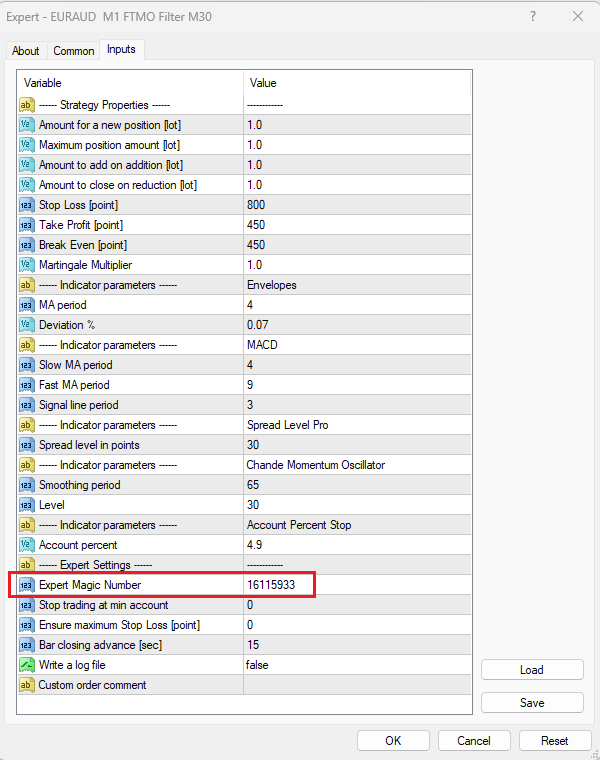
Petko doesn’t normally use trailing stops so the FTMO EAs do not use them. He had tested trailing stops over a long period of time and did not see any benefit from using them. Petko prefers to use a fixed Stop Loss and a fixed Take Profit. In the FTMO EAs he has set the Stop Loss to 80 pips and the Take Profit to 45 pips.
I have shown the magic number in the red rectangle in the image below. You will find it in the Experts Settings section:
-
AuthorPosts