

Forum Replies Created
-
AuthorPosts
-
November 5, 2023 at 11:42 pm in reply to: EA with 100% Win Rate and System Quality Number=100. Reliable? #210077
Alan Northam
ParticipantHi Angelo,
Newly created Expert Advisors should first be tested on a demo account for at least one month to determine if its performance meets expectations before moving to a live account. Demo testing should be done using the same broker as live trading to ensure the historical data is the same.
Alan,
ParticipantThere is actually another level of complexity in the solution as to what are the real Top performers, and this comes from the fact that the pip value for all assets (currency pairs) are not the same. For example, it is recommended that for a 10K account the lot size should be 0.33 lots to limit the risk to 1%. So if you are going to trade the top 3 assets you would think to split the lot size equally between all three assets and make each asset have a lot size of 0.11 lots. However, in reality this does not evenly split the risk as the pip value for each asset is not the same. Another is considering how many pips each asset gained in a given period of time. So there are various ways to determine which assets are the top performers.
Having said this, Petko has kept it simple for new traders by just keeping to lot sizes the same and determining the top performers based upon the profit of each asset over a given time period. It works just as well as any other method!
Alan,
ParticipantEA Studio is really designed to let it create the strategies and not the trader. FSBpro is designed more to let the trader create the strategy. So to do what you really want to do is best done using FSBpro.
However, having said that, you can use the Pin Bar in EA Studio to kind of do what you want to do. The problem that Pin Bars don’t always appear at swing points like Fractals do. To have a Pin Bar in all the created strategies in EA Studio go to Tools>Preset Indicators and then click on Add a new Entry or Exit rule and select Pin Bar.
Note: Fractals are not available in EA Studio because EA Studio was designed to only use the indicators that come with MetaTrader.
Alan,
ParticipantHi Soeren,
As long as you are only going to trade one EA then the 3 lots for a 100K account is the recommended lot size as it limits your risk to 1%. If you are only going to trade one EA on a 200K account then the recommended lot size is 6 lots as this limits the risk to 1%. However, if you are going to trade more than on EA in the same account then you need to divide the 3 lots or the 6 lots between all the EA’s you plan to trade. This way if they all hit the SL then the account will only lose 1%. The idea is to limit the risk to the account to 1% and not each EA. While limiting the account to a risk of 1% you can always limit the account risk to a lower amount.
Alan,
ParticipantTop performers are going to depend upon which broker you are using as when testing the same EA on different brokers you will get different results because their historical data is not exactly the same. Also top performers will depend upon how you have the EA set up. For example, does the EA just close when it hits TP or SL, or does it add to the lot size or does it reduce the lot size. Also do the open trades close when the account falls below a certain price level.
Now since the prop firms have unlimited time period I have started to test my FTMO EAs using a $10K Challenge account. I set my lot size to 0.05 lots so the account size does not fall below the minimum amount that would cause the Challenge to fail while at the same time provide information as to which EA’s are the best performers. By using an FTMO account I will be using the same historical data as I would be using with a larger FTMO Challenge and larger lot sizes while at the same time giving the most accurate info as to which EA’s are performing the best.
The following chart shows the Top performers when using FTMO historical data. The EAs are set to close at TP or SL and do not add or reduce nor am I manually closing any trades or changing lot sizes:
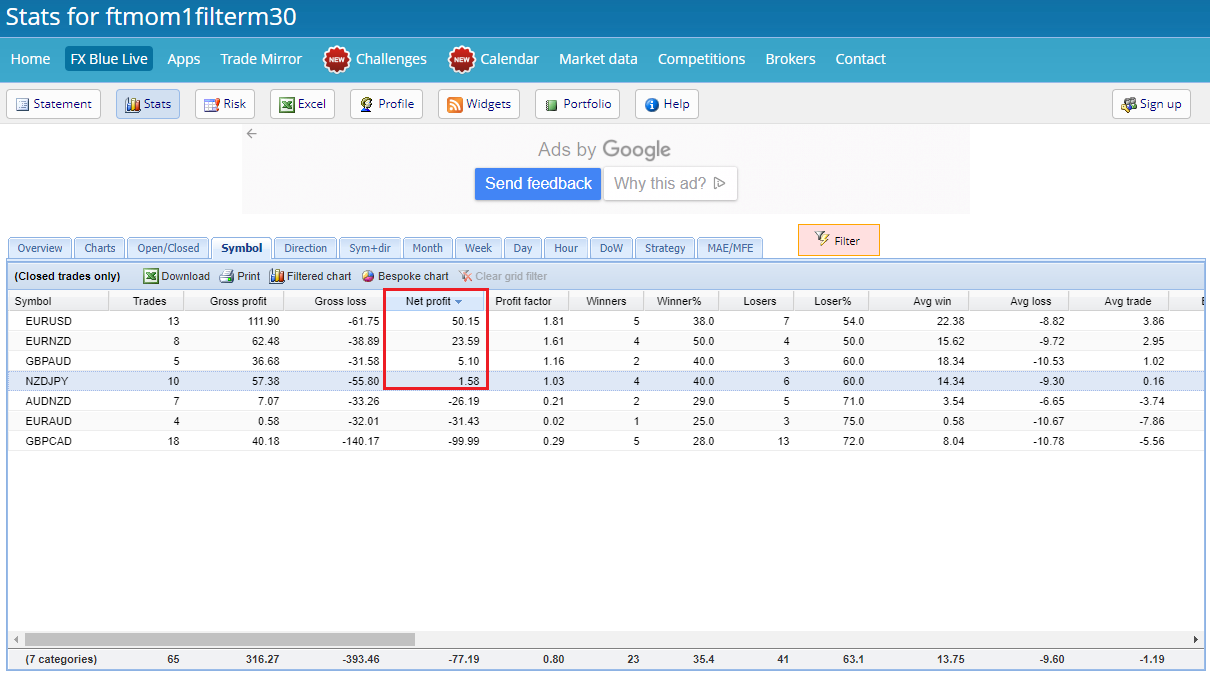
The following chart shows 4 EAs trending upward. EURUSD, EURNZD and NZDJPY have been trading upward over the last 3 days, therefore I would expect them to continue to move upward during this next week. However, GBPAUD has only started to to trend upward over the last one day. Therefore I would not consider this EA as being one of the top performers. I would wait to see if it continues to trend upward over the next two or three days before considering it as one of the top performers.
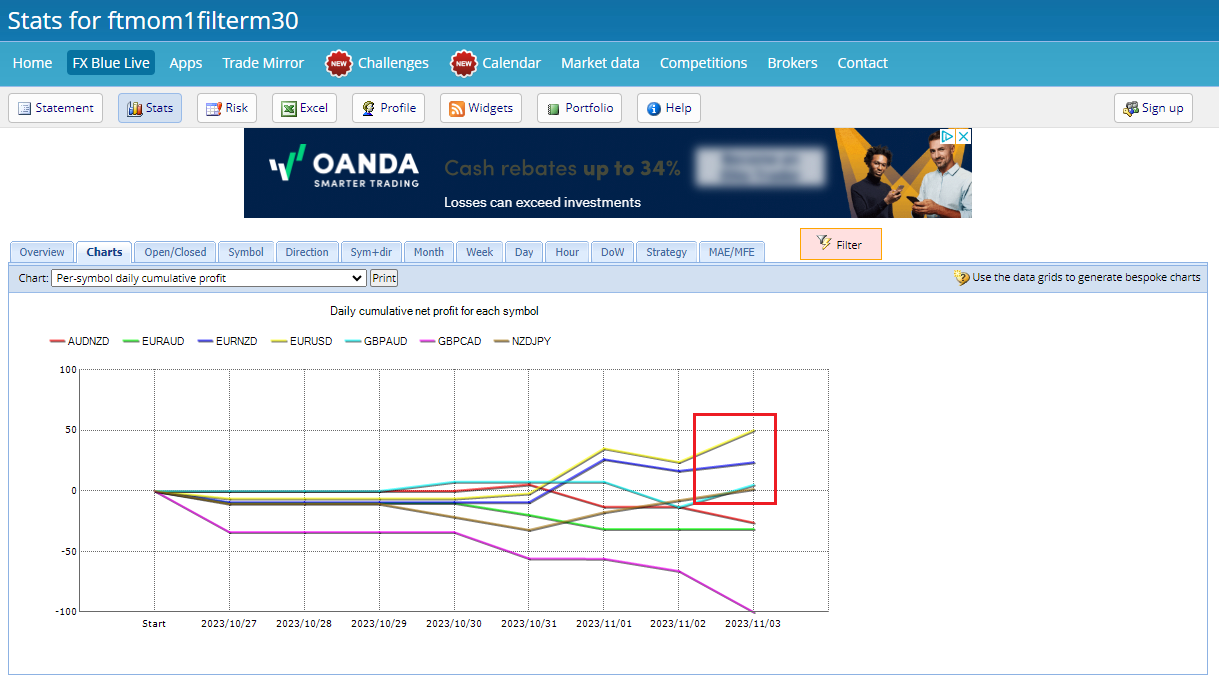
As a result, just looking at which EAs have profited over the last week or so is not really sufficient data in deciding which EAs are top performers can be misleading as they can show profit at the end of the week but can be trending downward and could cause a trader to lose money over the next week or so. It is important to also look at the direction of the trend of each EA showing profit at the end of the week or whichever time period you are using to determine top performers.
So in reality, I would consider EURUSD, EURNZD and NZDJPY as the top performers over the previous week even though NZDJPY ended the week with less profit than GBPAUD. The difference is that NZDJPY has been trending upward whereas it is not determined if GBPAUD is trending upward as moving higher for just one day does not determine a trend.
Alan,
ParticipantYes, if you have the option to select currency pairs in the symbols list that does not have the ecn suffix that is great!
Alan,
ParticipantTo show a screenshot of exactly how to set up the lots depends upon how you want the EA’s to function.
Alan,
ParticipantHi Charles,
The idea of using Expert Advisors is to let them do the trading without having to be manually manipulated. It is a matter of putting trust in the EA’s. Here is what to do:
Demo test your EA’s like you have been doing. Then move the top 1 , 2, or 3 to a second demo account which acts like a live account until you feel confident to trust the EA’s to do the trading. In the second demo account set the SL so that your account will not lose more than 5% of the account balance. I usually set mine to not lose more than 3% to give me some extra risk protection. Once you have been successful demo trading then move to a live account.
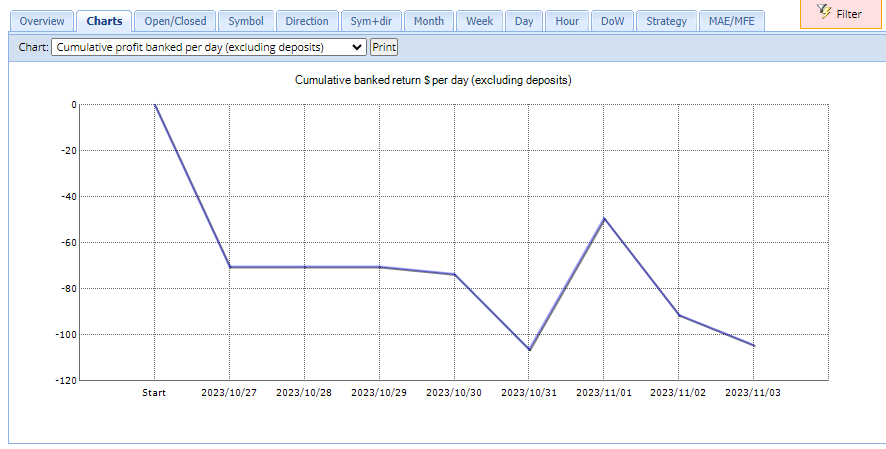
Here is what I have been doing: On October 27 I started a 10K live demo FTMO Challenge. I installed all 7 EA’s and set the Lot size to 0.05 lots. I am using the Challenge to test the EA’s because doing it in the FREE demo account interrupts the testing after 14 days. I also wanted to test the EA’s in exactly the same environment I will be using for passing the Challenge. I have kept the lot size to a small value during testing so that drawdowns don’t do much damage to the account where at the same time I can collect information on how the EA’s are performing. The chart below shows the performance of the 7 EAs since October 27. In the chart I see the collective trading of the 7 EAs have been going through a period of drawdown. I will continue testing using I see the chart start to show profit. Once the chart starts to show profit then I will select the top 3 and move the lot size to 1.0 lots.
Alan,
ParticipantHi Marek,
It looks like you are having an issue with the broker. I suggest opening a demo account with another broker and installing the ForexProfitSupreme meter there. I have tested it with Dukascopy and the indicator works correctly there. Here is a screenshot:
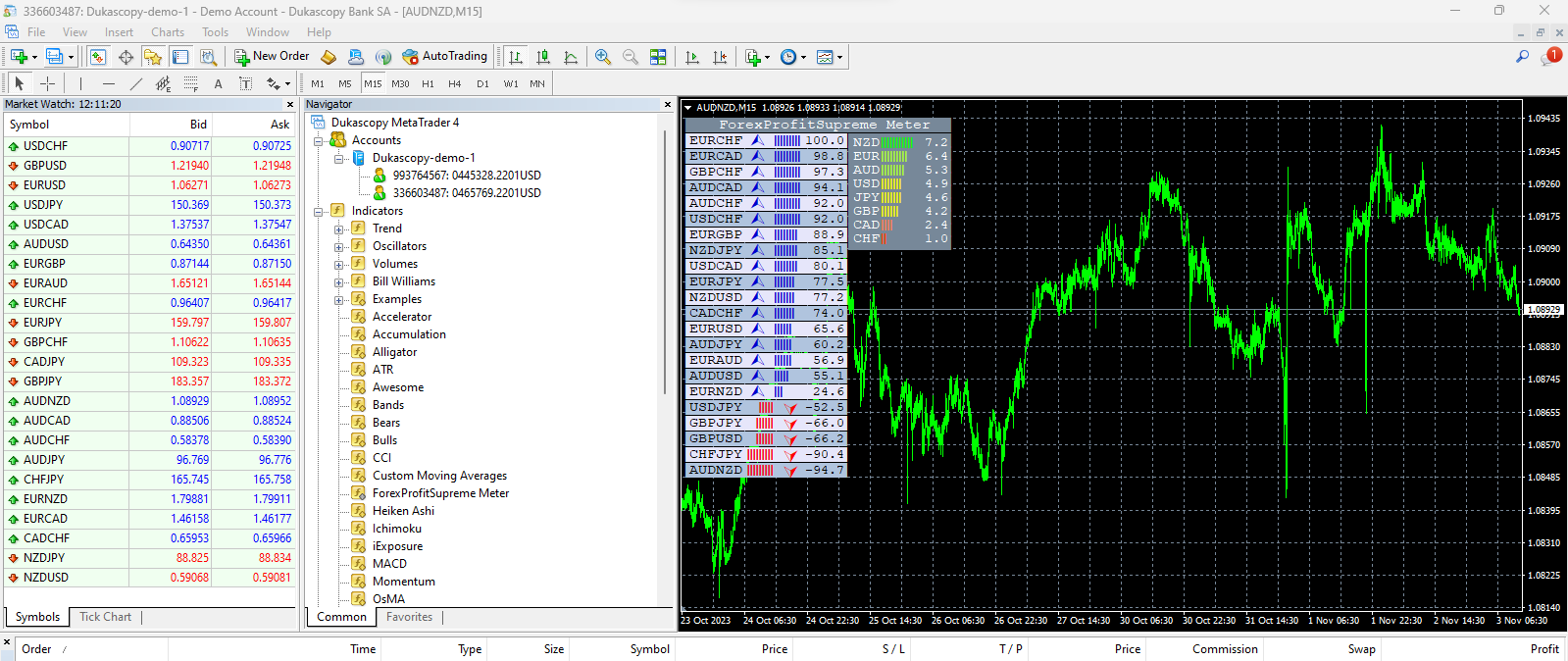
Also note the ForexProfitSupreme meter is only used for manual trading. Once you start auto trading with robots it will not be needed.
Alan,
ParticipantLog into your account. Press Algo Trading button. Install EA on correct chart and time frame.
Alan,
ParticipantHi Rick,
Answer 1) It is up to you as to whether you should choose EUR or USD. However, since you are in Germany EUR might be your better choice.
Answer 2) Yes, use the swing account!
Alan,
ParticipantHi PrimalSci,
The only thing you need to change would be the first four lines in the EA Properties box based upon your account size.
The following is the recommended lot sizes based upon a 10K account which limits risk to 1%:
Amount for a new position = 0.3 lots
Maximum position amount = 0.3 lots
Amount to add on addition = 0.3 lots
Amount to close on reduction = 0.3 lots* For larger accounts simply scale the lot sizes.
Alan,
ParticipantHi PrimalSci,
Good luck with your challenge, and just be aware of your risk! Keep us posted as to how it goes.
Alan,
ParticipantAnswer 1) Trading 3 pairs with 1 lot for each pair yields an account risk of 2%. This is OK.
Answer 2) Manually closing a trade does not affect the EA. It will continue to function normally.
Answer 3) If you are going to trade with EA’s then you need to have faith in them and not be changing their parameters or manually close the trades. Having said that I will manually close a trade if it is close to the TP and I see it is starting to reverse directions. This is the only time I will close a trade.
Answer 4) Use a calculator to set lot size, etc. https://www.babypips.com/tools/position-size-calculator
Alan,
ParticipantMT4 is best for trading with EA’s.
Alan,
-
AuthorPosts