

Forum Replies Created
-
AuthorPosts
-
Alan Northam
ParticipantHI Puns,
I only started testing the 8 FTMO V6.0 robots on 01/08/2024 just two days ago now. As a result EURAUD and EURUSD have not yet opened a trade. I will continue to test the 8 EAs for the balance of the week. I would expect these two EAs will have opened trades by that time.
Alan,
January 10, 2024 at 12:07 pm in reply to: Prop Firm Robots App & v6.0 – New Features Released! #226022ParticipantHi gabiscriba,
The historical data will be different for each broker as there is not a common clearing house where all brokers receive their historical data. As a result, number of trades and the top performing pairs will be different for each broker.
Alan,
January 10, 2024 at 11:12 am in reply to: Prop Firm Robots App & v6.0 – New Features Released! #226011ParticipantHi Hooman,
Use the following settings:
Maximum daily loss (currency) = 3600
Minimum equity (currency) = 67650
Maximum equity (currency) = 82650Alan,
January 10, 2024 at 11:00 am in reply to: Prop Firm Robots App & v6.0 – New Features Released! #226009ParticipantHi Bob,
The FTMO V6.0 Expert Advisors were created by EA Studio. In the creation process of EA Studio it looks at the historical data over the last several years and decides which indicator, SL, and TP settings generate the most profit over this time frame. As a result, it is best to just let the EAs run.
Alan,
ParticipantHi Smartkary,
On FTMO V6.0 I had one pair open yesterday and three pair open so far today on my FTMO Challenge account.
Alan
ParticipantMY FTMO V6.0 STRATEGY
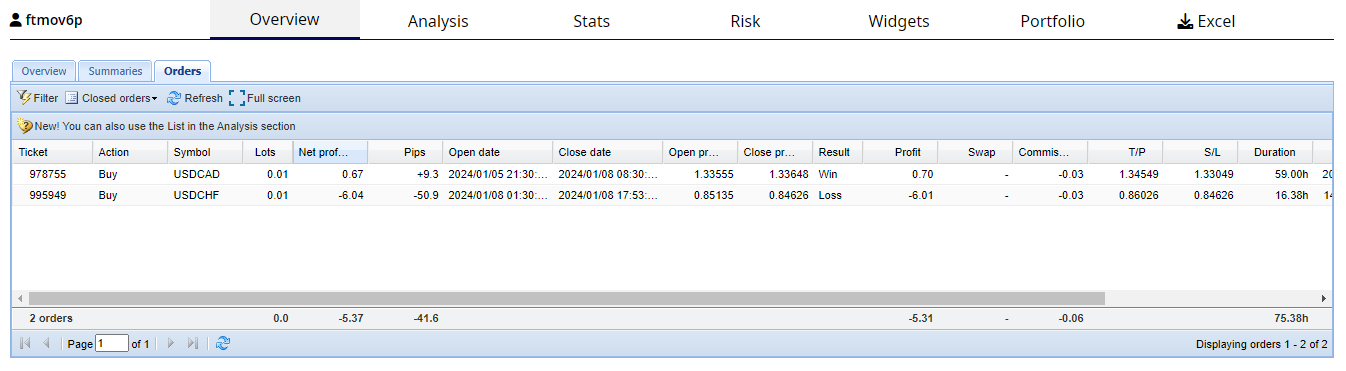
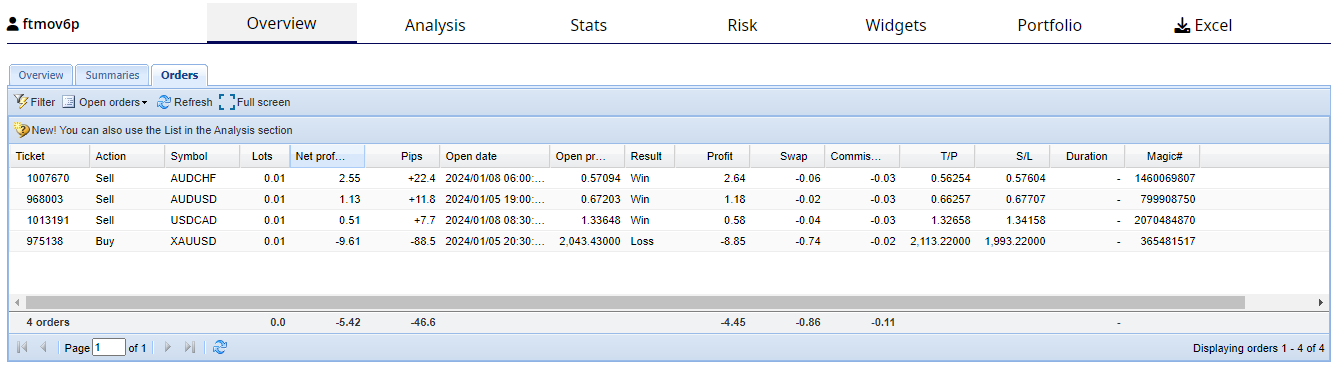
I have opened an FTMO 50K Challenge. I have placed all 8 Expert Advisors on MT4 with lot size set to 0.01. I will be testing these EAs for 5 trading days. I will then look at the top profit maker and if it has at least 3 closed trades I will then change the lot size to the recommended lot size for each downloaded EA. I started testing these EAs on Monday 01/08/2024. The following tables provided by FXblue show the results after just one day of testing. I know the results for only one day of trading is limited but I wanted to get my strategy out there so others can see how I am testing and will trade these Expert Advisors.
This table shows 2 closed trades after one day of testing. One EA was profitable EA and one EA had a loss.
This table shows 4 Open trades. The table shows 3 EAs in profit and 1 EA in a losing trade.
Alan,
ParticipantHi Melvin,
What I do is put all the EAs in a demo account for one to two weeks. I then pick the best one to trade. Then I repeat this process every week to two.
Alan,
January 9, 2024 at 1:57 pm in reply to: Prop Firm Robots App & v6.0 – New Features Released! #225815ParticipantHi Asisipho,
If you are already getting trades with other robots then everything is setup and working correctly. Therefore, just give it a few more days for the other robots to start taking trades.
Alan,
ParticipantJanuary 9, 2024 at 9:09 am in reply to: Prop Firm Robots App & v6.0 – New Features Released! #225757ParticipantHI paul4x,
This video will show you how Petko passed the challenge using the FTMO robots:
http://youtube.com/watch?v=X2YmiRDYYv4&t=5s
Alan,
January 9, 2024 at 9:02 am in reply to: Prop Firm Robots App & v6.0 – New Features Released! #225755ParticipantParticipantHi Melvin,
The data time should be the same time as your Metatrader time. If you are in a different time zone than Metatrader shows you cannot change it to your own local time zone.
Alan,
ParticipantHi Byron,
I just went to the course to make sure the downloaded bots were the latest ones. Unfortunately, the download webpage was blank so there were no bots for me to download. So my question is, “Are you sure you have the latest bots.” You might want to contact [email protected] to make sure the latest bots are downloadable.
Now to address your question. As long as you are seeing a smiley face you are good to go and you may need to wait another day or two before you start seeing trades. Be patient, and give it some more time!
Alan,
ParticipantHi Bryon,
I don’t know what you are trying to do. Can you provide more details on what you are trying to accomplish?
Alan,
ParticipantHi Melvin,
Go back to the Historical Data App and click on Settings.
Alan,
-
AuthorPosts