
Community Forums › Forums › Ready-to-use Robots › Top 10 EAs › Updates on the Top 10 EAs
Tagged: Top 10 App
- This topic has 56 replies, 21 voices, and was last updated 1 year, 11 months ago by
Marin Stoyanov.
-
AuthorPosts
-
Rockworm83
ParticipantHi Alan, how do I put protection levels on his 3 robots?
Alan Northam
ParticipantHi Rockworm83,
The protection levels are set in the robots properties box. The same box where you can change to lot size.
Alan,
ParticipantHi Kerem,
The problem is that the robot/robots have activated the account protections. To get the robots trading again the protection levels need to be modified.
Alan,
ParticipantThanks Alan, but i went to the robot options, but I can’t find anything, in the settings, what is the box in question called and what should be noted inside? if you can if you have a screenshot like I did as a demonstration it would be easier to assimilate
ParticipantHi Rockworm83,
Sorry I think I spoke out of turn. I was thinking in terms of the Prop firm robots or the Top 10 EA robots. Since it is the gold EAs you are referring too I will need to refer you to one of our other moderator/trader who is experinced in trading these robots.
Alan,
ParticipantNo Alan , you’re not wrong, i’m talking about the 3 robots in Petko’s last video, they are part of the EA Top 10, I just would have liked to know which box you are referring to because I can’t find it in the settings
ParticipantHi Rockworm83,
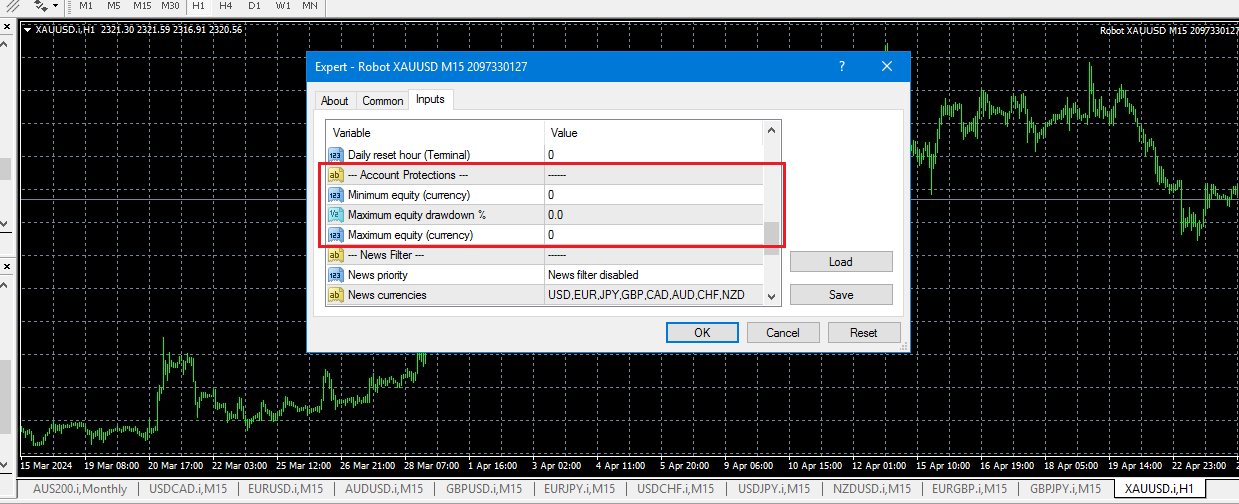
Here is the robot properties box. It shows up on the screen during the process of installing the EA on the chart.
You can also access it by right clicking on the smiley face or blue hat in the upper right corner of the chart and selecting properties.
Can you show me a screenshot?
Alan,
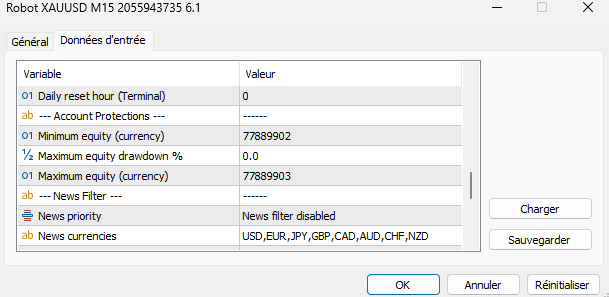
Participantyes, here is the photo
 Participant
Hi Rockworm83,
So we need to make some changes. To get your robot trading again just set the 77889902 in both instances to zero. If you want to have some protections on your account then I need some addition information.
Is the account a 100K prop firm account? If so what is their daily DD limit, max DD limit, and Price Target.
If this is a brokerage account what protections would you like to have.
Alan,
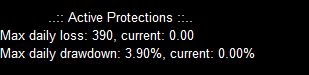
ParticipantIt’s perfect, it worked, and for the rest it’s for a prop firm account of 10k, and for the rest I knew how to modify that on my own,
I’ll show you that in a photo
I put this because I have to do less than 4%
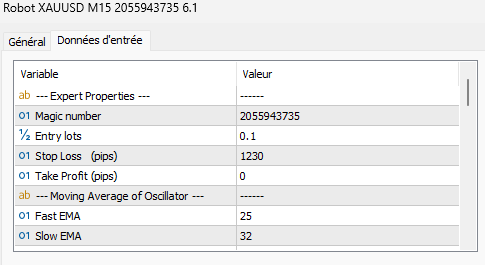
The only thing that makes me ask a question is that there is marked 0 in the Take Profit box, so there was no Take Profit
 Participant
Hi Rockworm83,
Happy to hear you got it working!
Evidently that EA is not using a Take Profit. In that case the EA will have an indicator built into it that will trigger the take profit.
I looked at my Top 10 EA app and I don’t find any v6.1 so I cannot find the exact EA you are referring too. So I cannot look at the source code to see what is triggering the take profit.
Alan,
Marin Stoyanov
KeymasterDear traders,
We have an update on the Top 10 EAs App.
With this update, an issue got fixed which caused the exported Expert Advisors to have wrong trading session settings.
If you have the Top 10 EAs App open, just press Ctrl + F5 to refresh.
Also, it’s best if you have any expert advisors that are running in metatrader to replace them with the updated ones!
If you have any questions, let us know!
Kind Regards,
NikosTradingblueocean67
ParticipantHello Petko and Team,
I see that the starting balance is 10k$ from the chart, can you also mention the trading size ?
In other words, would it be possible to know a bit more about used the money and size management ?
thx
vincenzo
ParticipantHi Vincenzo,
You do not need to use !0K$ account size.
To calculate lot size I use this calculator:
https://www.babypips.com/tools/position-size-calculatorIf you need help on how to use the calculator let me know!
Alan,
Matt
ParticipantHi Vincenzo,
How are you?
I’m sorry, which chart are you referring to? And which lotsize? Can you provide more info please?
We usually try to stick to 1% risk per trade. Or 0.01 per $1000 accounts.
I hope this helps.
Warmly
Matt -
AuthorPosts