
Community Forums › Forums › Trading Courses › Updates in the courses
Tagged: crypto trading courses
- This topic has 601 replies, 56 voices, and was last updated 2 years, 3 months ago by
Petko Aleksandrov.
-
AuthorPosts
-
September 1, 2020 at 5:42 pm #58778
Petko Aleksandrov
ParticipantHello traders!
I have updated the Top 5 Forex Strategies course.
I changed some of the parameters in the USDJPY strategy and the EURGBP strategy.
You can find the changes in the PDF files that are attached.
Also, the new EAs are uploaded.
Safe trading!
Petko A
PS: One of our students posted in the forum her results from the last few weeks trading with these EAs:
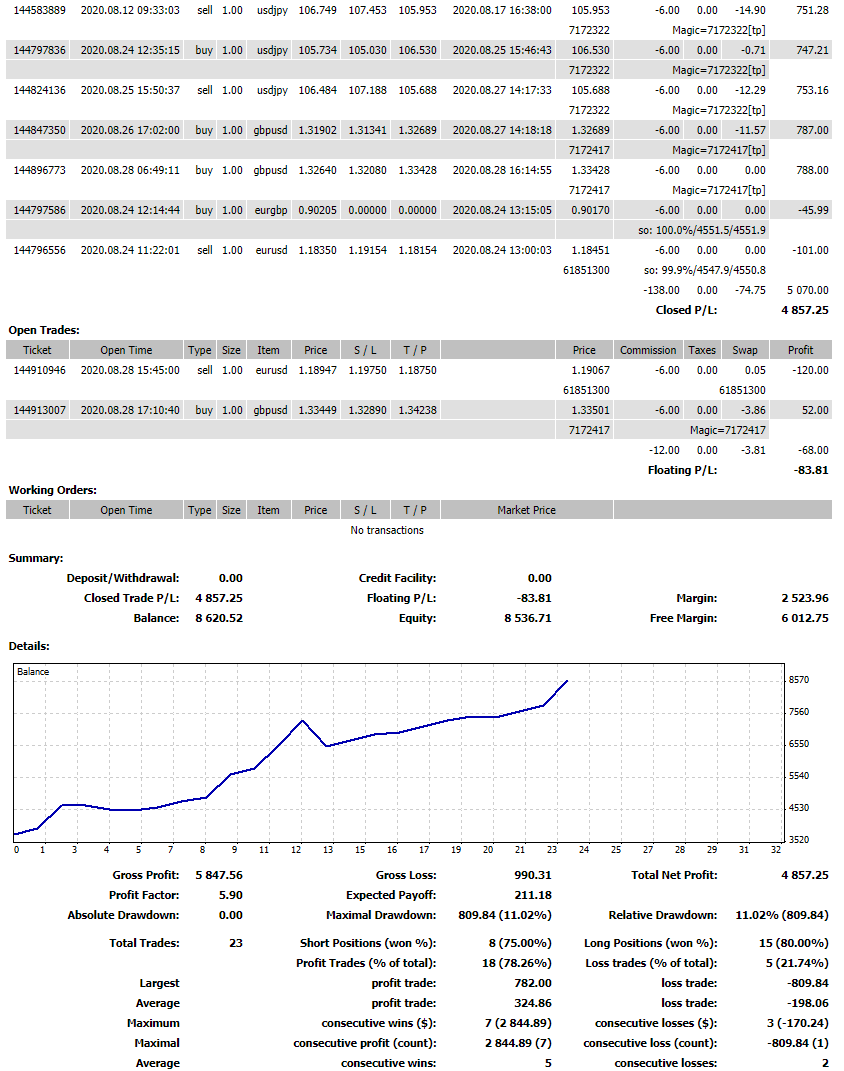
However, she took a significant risk because trading with one lot on a 3k account is risky. But as they say, “The bigger the risk is, the bigger the profits are!”
Anyway, I would suggest trading with 0.3 lots on such an account.
Cheers,
Petko A
September 1, 2020 at 6:59 pm #58981ParticipantHey Traders,
I have updated all the courses that I update every month with new EAs.
More, I have updated some of the other courses:
Forex Algorithmic Trading Course – Top 10 GBPUSD Expert Advisors
(10 new GBPUSD EAs are added to the course)
Basic Algorithmic Trading Course + 3 Robots
Just the GBPJPY strategy was updated. The other two keep performing well for such a long time now…
Algo Trading Course – Top 10 AUDUSD Expert Advisors
(10 new AUDUSD EAs are added to the course)
MetaTrader 4 Forex Platform: Start Trading with a Pro
(3 new EAs were added to the course)
Top 5 Gold Expert Advisors in 2020 + 10 EAs Included
(10 new GOLD EAs are added to the course)
Forex Money Management Strategy in 2020: Top 10 NZDUSD EAs
(10 new NZDUSD EAs are added to the course)
Dow Jones Expert Advisor + 10 Robots
(10 new DOW EAs are added to the course)
Ethereum Trading Robot – Cryptocurrency Never Losing Formula
(The Robot was updated, but the TP remains the same)
September 6, 2020 at 1:55 pm #59385ParticipantHello traders,
I have updated the Algorithmic Trading Strategies in 2020 + USDCAD EAs course with new 10 USDCAD EAs.
They were tested in the same way I show in the course, but I would suggest you try them on a Demo account first.
Have a great Sunday!
Petko A
October 4, 2020 at 8:40 pm #62218ParticipantHey Traders,
I have uploaded all of the October Expert Advisors in the courses that I update every month.
Have a look at them and make sure to test the EAs on Demo.
If you have your top performers from September trading successfully, you can keep trading with them until they get into a losing phase.
You will find the new EAs at the same lectures.
Kind regards,
Petko A
October 5, 2020 at 9:54 pm #62296ParticipantDear traders,
I hope you are doing great. The last month was one of the hardest for the traders. A lot of news, unexpected movements, and difficulties for all traders and investors.
I have updated a few of the EAs in the Forex Trading Strategies from a Professional Trader + Top 5 Professional EA and I have uploaded the updates for October. Also, you will find the changes for the strategies in the PDFs attached to the strategy Set Up lectures.
Let me know if you have any questions.
Kind regards,
Petko A
October 19, 2020 at 2:53 pm #63731Ilan Vardy
ParticipantDear Students,
The weekly EAs for the course -MetaTrader 4 Forex Trading course + Weekly Robots, have been uploaded and are available to download.
Safe trading,
Ilan
October 19, 2020 at 9:24 pm #63747casanogues
ParticipantHello, good afternoon Llan, I am following the steps as you mentioned in the MetaTrader 4 Forex Trading + Weekly Robots Course, and I do not know how to configure the excel to export the data from FXblue, so that it is understandable, because the following appears to me file, you will tell me.
Best regards.
Casanogues
Magic #/Comment,”Trades”,”Gross profit”,”Gross loss”,”Net profit”,”% change”,”Opening balance”,”Closing balance”,”Profit factor”,”Winners”,”Winner%”,”Losers”,”Loser%”,”Avg win”,”Avg loss”,”Avg trade”,”Best trade”,”Worst trade”,”Longest (hours)”,”Shortest (hours)”,”Average length (hours)”,”Total win pips”,”Total loss pips”,”Net pips”,”Pip profit factor”,”Avg win pips”,”Avg loss pips”,”Avg pips per trade”,”Lots traded”,”Avg lots”,”Average winner length (hours)”,”Average loser length (hours)”,”Consec winners”,”Consec losses”,”Consec profit”,”Consec loss”,”Consec win pips”,”Consec loss pips”
#42807332,”4″,”41.66″,”-12.53″,”29.13″,”0.03″,”0″,”0″,”3.32″,”2″,”50″,”2″,”50″,”20.83″,”-6.26″,”7.28″,”20.9″,”-9.75″,”94.64″,”1″,”33.22″,”166.2″,”-49.1″,”117.1″,”3.3849287169042768″,”83.1″,”-24.6″,”29.3″,”0.12″,”0.03″,”62.58″,”3.86″,”1″,”2″,”20.9″,”-12.53″,”83.6″,”-49.1″
#42775434,”3″,”24.06″,”0″,”24.06″,”0.02″,”0″,”0″,”0″,”3″,”100″,”0″,”0″,”8.02″,”0″,”8.02″,”20.64″,”0″,”211.17″,”2″,”74.39″,”98.5″,”0″,”98.5″,”9999″,”32.8″,”0″,”32.8″,”0.09″,”0.03″,”74.39″,”0″,”3″,”0″,”24.06″,”0″,”98.5″,”0″October 20, 2020 at 6:41 am #63751ParticipantHi Casanogues,
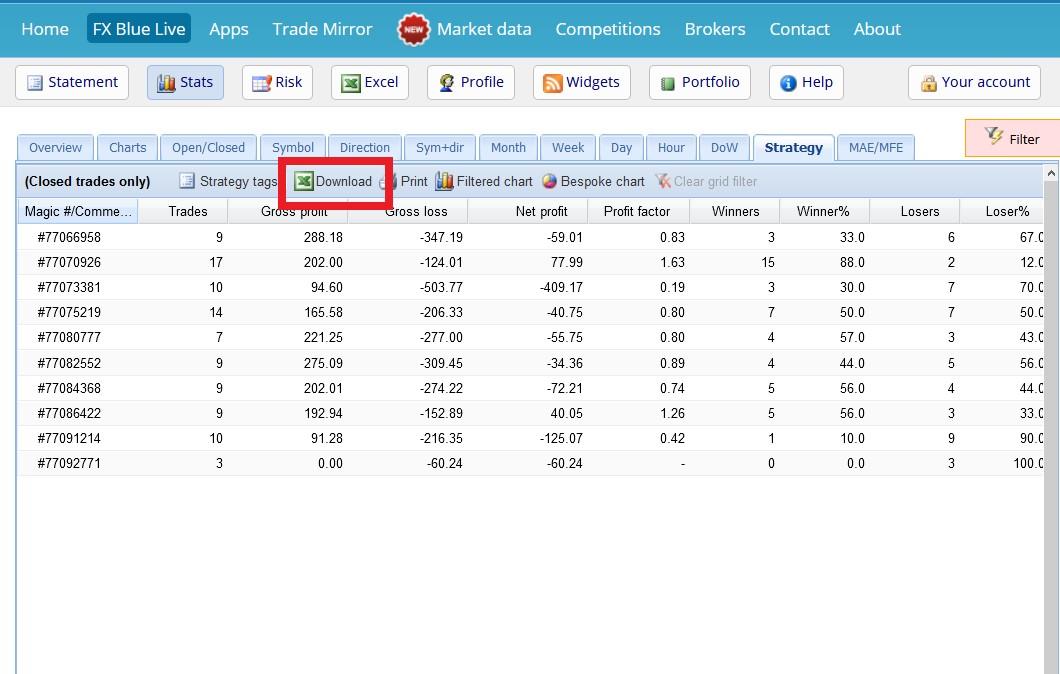
Are you using the Download button, as per the image below?
If you are, it would seem the file is being opened by a program other than Excel, or similar. Perhaps Notepad, or another text editor?
If you could take some screenshots and post them here, it may give me a better idea as to what is happening.
Thanks,
Ilan
 October 20, 2020 at 7:21 pm #63768
Adam Etheridge
ParticipantIf you just need the magic number you can just highlight the text and copy/paste (works in Safari at least!)… saves having to download the excel file etc
October 20, 2020 at 11:41 pm #63771ladytrader2007
ParticipantHello Ilan & Petko,
Are there any new EAs for GOLD for October? I could only find the September version. Is it still valid? Thx, Consuela
October 21, 2020 at 7:27 am #63773ParticipantHi Consuela,
If you don’t see new EAs for any of the courses, it means the EAs are still performing well, and don’t need to be updated.
As always, test them on a demo account before placing them onto a live account.
Ilan
October 21, 2020 at 12:47 pm #63778ParticipantGot it! Thank you, Ilan
October 21, 2020 at 1:11 pm #63779ParticipantYou’re welcome 🙂
October 29, 2020 at 3:17 pm #64609Omosisko
ParticipantAm generating strategy and very slow,, and it very hardly to bring out two strategy
October 29, 2020 at 3:33 pm #64643ParticipantHi Omosisko,
There could be a few reasons for this. Could you answer the following questions please?
- Where is the historical data from (broker) and how many bars do you have?
- What is the Acceptance Criteria you are using?
- Are you running the Generator, or the Reactor with data optimization and robustness testing?
- How long, in minutes, is your Generator running for?
- Are you using In Sample, and Out of Sample, and if you are, what percentage?
- Is your PC / laptop High spec? If possible, please tell me what CPU and how much RAM.
- Please check the date range you are using, by going to ‘Data’, and ‘Data Horizon’ to ensure your start and end dates aren’t selected, or too close together.
Generally, lack of strategies is due to the Acceptance Criteria being to strict, not enough historical data or the Generator not running for long enough.
Once I have received your answers to my questions, I’ll have a better idea of what is causing you to create few strategies.
Thanks,
Ilan
-
AuthorPosts
- You must be logged in to reply to this topic.