
Community Forums › Forums › EA Studio › Trading Robots from EA Studio › Trading Robots from EA Studio: Errors and Solutions
Tagged: BlackBull Markets, ea, EA Strategy Robots turning Off Automatically., Error with EA, MT4, Trading Robots from EA Studio
- This topic has 24 replies, 13 voices, and was last updated 6 months ago by
maryamgray.
-
AuthorPosts
-
May 29, 2024 at 9:21 am #258066
NIKOS KYRIAKOU
MemberThank you for the screenshots Stephen!
From what I see, you can placed the US500 EA to US30 which is a complete different asset. You need to place US500 chart instead of US30.
Search for the US500 or SP500 asset from the symbols and drag it to the chart.
Hope this helps!
If you have any other questions, let me know!
Kind Regards,
NikosMay 29, 2024 at 9:27 am #258070Stephen
ParticipantWell that was silly of me, thank you for your prompt reply 🙂
May 29, 2024 at 9:31 am #258072MemberNo worries Stephen!
If you need anything else, let me know!
Kind Regards,
NikosJune 1, 2024 at 10:17 pm #258997MemberHey zyber,
It seems that you need to change the minimum equity settings from the EA properties.
If you would like to share a screenshot of the settings, I can assist you better!
Kind Regards,
NikosOctober 14, 2024 at 7:58 pm #315651Humberto Otero
ParticipantHello,
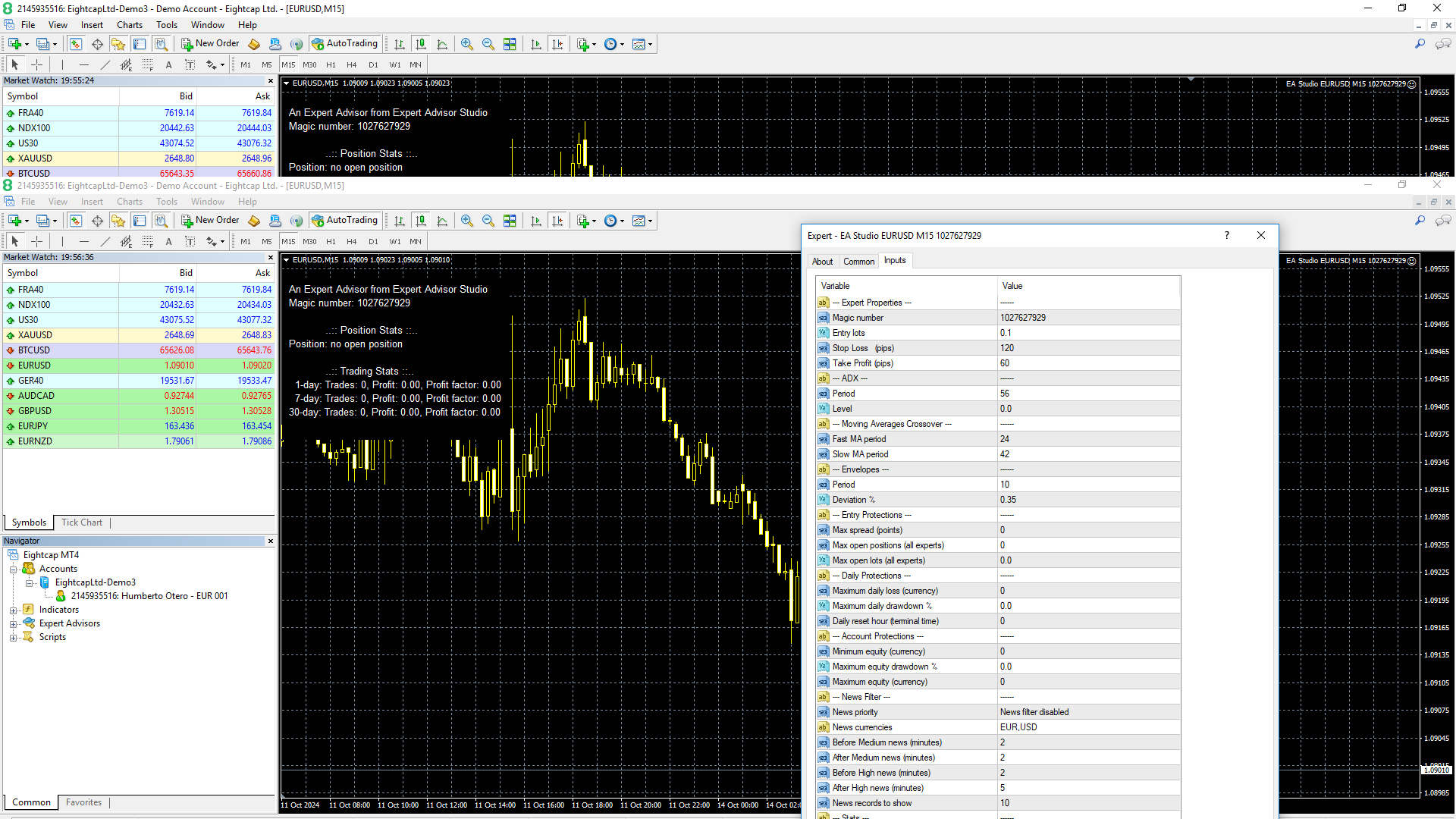
I downloaded an EA for the EURUSD, but does not seem to work.
If anybody can help, I would be grateful.
 October 17, 2024 at 12:41 pm #316113
Ilan Vardy
ParticipantHey Humberto,
All looks good. When market conditions trigger the strategy rules, the EA will open trades. You can run a backtest to get an idea of how active this EA was in the past.
Cheers,
IlanJanuary 9, 2025 at 10:04 pm #425335Andrew Bell
ParticipantI am new to EA’s. I recently purchased an EA called Forex Fury, and then I discovered EA studio, and generated 30 EA’s and installed them too. I can’t work out why, but none of the EA’s have opened a single trade, even after 5 days. To test if my rules were just too strict, I made a very basic EA for the M1 chart that is meant to open a trade whenever the Candle turns red or green. In the graph on EA studio, It shows constant trades opened and closed every minute and quickly blowing the account. I installed this test EA on my mt4 demo and nothing happens. I even used the strategy tester in MT4 and it shows it should have traded that very day.
It’s probably not an EA studio problem as my forex fury EA’s have not worked either.
So to give as much information as I can:
-I have auto trading enabled in the tool bar above with the smiley face in the corner
– I am using mt4 demo programs downloaded from the Blackbull markets secure client area.
– In expert adviser properties I have checked all the Allow boxes, and even tried unchecking the Disable boxes.
Is there something I am missing?
January 9, 2025 at 11:10 pm #425341ParticipantNevermind, I figured it out, I was using the greyed out currency pairs, I had to right click and select Show all, and then select my brokers tradable pairs. (they had suffix at end of symbol, eg GBPUSDp
September 3, 2025 at 1:46 pm #470191Joshua Thomson
ParticipantI downloaded the best free ea but i cant compile it any suggestions it says that there are errors
September 3, 2025 at 4:28 pm #470271maryamgray
ParticipantTrading robots built with EA Studio can sometimes run into errors, which usually stem from incorrect strategy logic, wrong broker settings, or incompatibility between the robot and the trading platform. Common issues include mismatched data between backtests and live trading, execution delays, or invalid trade operations caused by broker restrictions like minimum lot size or spread requirements. Identifying the source of the error often requires checking the journal and experts’ logs in MetaTrader for detailed messages.
Solutions usually involve adjusting the robot’s parameters, re-optimizing strategies with the correct broker data, or modifying money management rules to meet platform conditions. Ensuring that the trading account matches the robot’s tested environment is crucial for smooth performance. In many cases, simply updating the EA Studio data and re-exporting the expert advisor can fix errors and restore consistent operation.
-
AuthorPosts
- You must be logged in to reply to this topic.