
Community Forums › Forums › Ready-to-use Robots › Top 10 EAs › Top 10 EAs: Errors and Solutions
Tagged: EA not getting initiated on the MT5 terminal, EA trading, EAs don't stick, error, Top 10 EAs App, Top 10 forex trading EA's
- This topic has 103 replies, 32 voices, and was last updated 7 months, 3 weeks ago by
Samuel Jackson.
-
AuthorPosts
-
April 17, 2024 at 6:49 pm #249480
Chandan A S
Participanti need one help .
while attaching EA to the chart it ask for some inputs .
like entry lots
minimum Equity
maximum euity
and many othershow to set these parameters properly
currenty balance in my account is 9987$ demo accountreal account around 50 to 80$
for this how to set thos parametets . please give some idea . how to do thiscurrently in my demo account its closing trade after geeting 0.2$ or 0.1$ or ).15$
April 18, 2024 at 12:40 pm #249649Alan Northam
ParticipantHi Chandan,
I can help you with filling in those values but I need to know the requirements from the prop firm. What prop firm are you using and what option from the prop firm did you choose?
Alan,
April 18, 2024 at 7:28 pm #249775Participantlike how to set
stop loss
entry lot
minimum equity
maximum equitytoday because of top 10 robots i lost 10 dollars may be because i changed the default values you guys set .
i changed it because my minimum equity in my demo account is 9987$. what you think what is the reason ?
right now have 63 dollar in my live account i attached portfolio expert bot to the chart
its not asking any of those characters .April 18, 2024 at 7:29 pm #249776Participantwhich is the best trading bot you guys have. which does not make any loses i want to buy it .
April 21, 2024 at 1:13 pm #250259ParticipantHi Chandan,
All robots will have profits and losses. So there is no such thing as a perfect robot that does not make any loses.
How can I help you get started on the right track to being a successful trader?
What robots do you have?
What is your account size?
Is your account a prop firm account or a brokerage account?
Alan,
April 22, 2024 at 4:38 am #250422ParticipantI have top 10 EA bots .
<b>Account size is 64$</b>
Brokerage account
April 22, 2024 at 5:33 am #250425ParticipantHi Chandan,
If your broker has a demo account I would recommend creating a $10,000 demo account. Then install all robots with lot size 0.01. Then let is trade for a couple of weeks. Then look to see which robots are performing the best. Then take the three robots that are performing the best with profit factor greater than 1.2 and put them in a $1000 live account. Then each weekend look at the demo account to see which three robots are performing the best with a profit factor greater than 1.2 and put them in the live account. Keep repeating this process. This is what I am doing with one of my $2500 accounts. Over the last few of weeks the account has grown more than 1%.
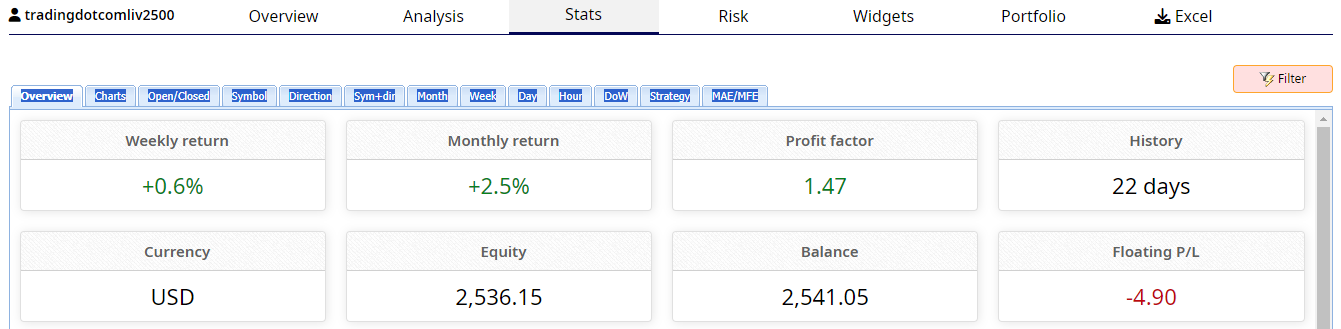
Hope this helps,
Alan,
April 22, 2024 at 5:36 am #250426ParticipantBut i do not have that much of money to put in live account and also i am using portfolio expert only
April 22, 2024 at 5:49 am #250427ParticipantI don’t think there is much you can do with $64 because minimum lot size is 0.01 and margin requirements. I recommend just practicing with a demo account until you learn to trade successfully. Save up some money. Then later when you have proven to yourself you can trade successfully, then open a live account. Can you not get the robots as single robots instead of the portfolio experts. If not then later I can show you how to convert the portfolio experts into individual robots. To do this we will need to go into the source code and make some changes. But first just practice with a demo account.
Alan,
April 22, 2024 at 12:00 pm #250479Participant1)How much minimum i have to invest ?
2) you guys already knows right which EAs are doing well . If you tell that . I will attach them to chart .
April 28, 2024 at 12:14 pm #252081Ashley Regan
ParticipantOne of your robots is not working for me, the 30051010 USDJPY 5M (April 2024) is not trading. In the experts tab within MT5 I get the message “Error: actionTrade::ManageOrderSend(): OrderCheck(): Invalid order filling type” I have tried restart the robot but still get the same error message. Is there anything I can do to get it working or is the issue with the robot?
April 29, 2024 at 2:49 pm #252266ParticipantHi Oliver,
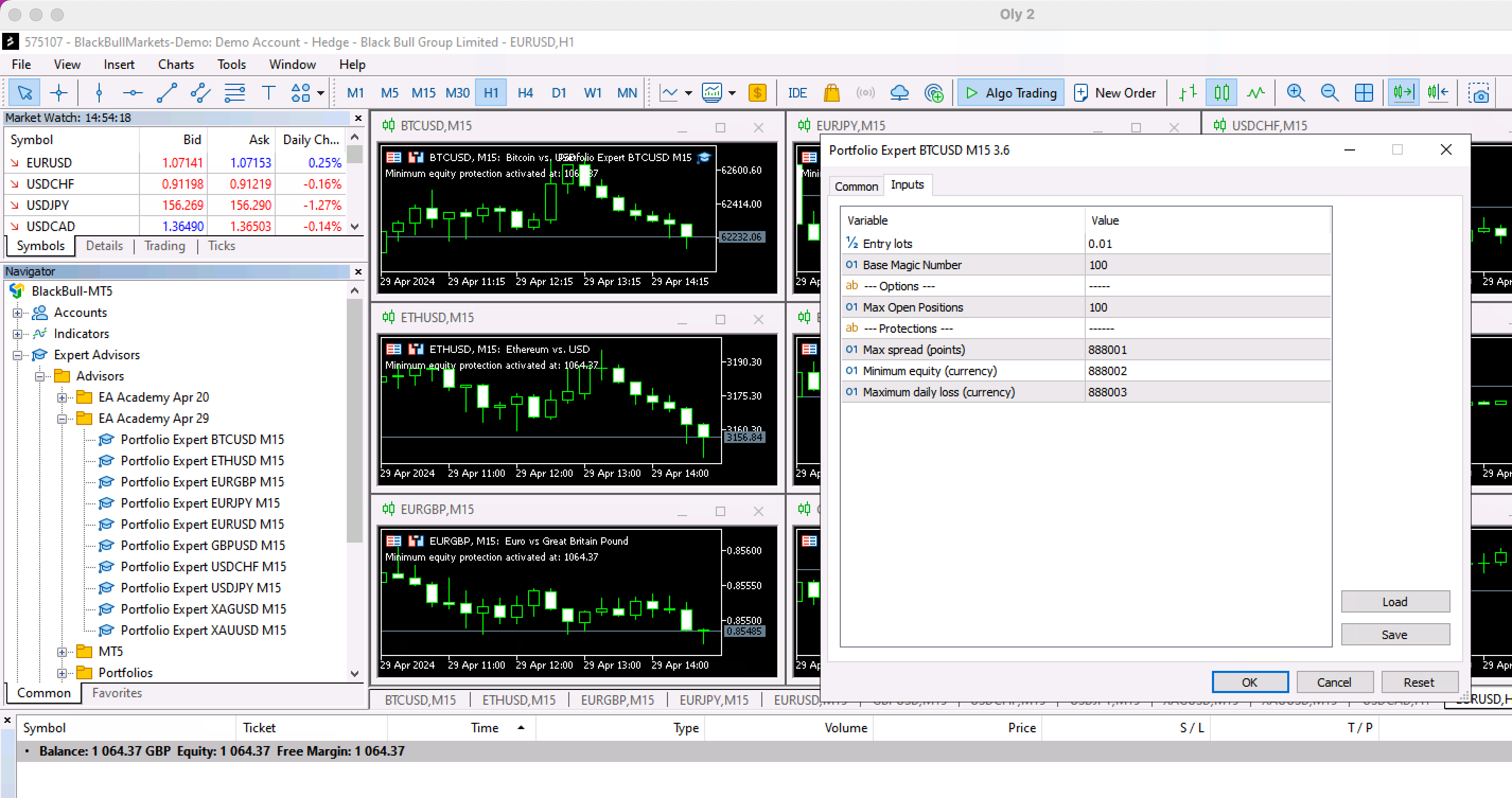
This normally occurs when the account protections have been activated. You can find the account protections in the robots properties box. If you can provide a screenshot of the upper left corner of the trading chart and the properties box showing the account protections I can help further!
Alan,
April 29, 2024 at 2:57 pm #252267Oly
ParticipantI’m not sure what you mean, but here’s a screenshot…
 April 29, 2024 at 3:10 pm #252268Participant
Hi Oliver,
As I thought, the Minimum equity protection has been activated. This shows the account balance is below 888002. You need to make adjustments to Max spread, Minimum equity, and Maximum daily loss. You can set these to zero to get the account trading but you won’t have any protections. If this is a prop firm you can get these protection level requirements from them. If it is a brokerage account then you need to decide what protection levels you are willing to accept.
Alan,
April 29, 2024 at 3:17 pm #252270ParticipantI guess I’m stupid yeah?
-
AuthorPosts
- You must be logged in to reply to this topic.