
Community Forums › Forums › Ready-to-use Robots › Top 10 EAs › Top 10 Robots App vs Prop Firm Robots App
- This topic has 103 replies, 11 voices, and was last updated 1 year, 6 months ago by
[email protected].
-
AuthorPosts
-
May 8, 2024 at 12:13 am #253862
Marin Stoyanov
KeymasterHey Boyan,
So, this risk calculator is mostly for forex pairs not commodities. Also the reason probably it says Current USD/JPY Ask price instead of EUR/JPY is that it just needs the page to be refreshed.
Also about the risk that you mentioned, yes it is correct that it will be 1% risk.
About the daily reset hour which is indeed what I meant, you just need to check with the broker or prop firm that you are using in what time zone the platform operates on and you need to set it at 00:00 at that time zone.
Hope this helps!
Kind Regards,
NikosMay 8, 2024 at 1:05 am #253871Boyan Todorov
MemberHey Nikos,
do you see my screenshots at all? Because I don’t. I tried several times to load them, it simply does not work. Anyway, refreshing the page did not do it, it starts from scratch afterwards. And since I am trading EURJPY I am not sure if I get the right risk calculation putting in the ask price for USDJPY ? Is there maybe another online calculator with more options that also covers the commodities?
Here is my risk calculation:
Inputs:
Account Balance 25.000 USD
Risk Percentage 1%
Stop Loss(pips) 154
Currency Pair EUR/JPY
Current USD/JPY Ask Price 166,319
Oitputs:
Amonut at risk 250 USD
Position Size(units) 26.999,8377
Standard Lots 0,37
Mini Lozs 2,7
Micro Lots 26,9998
Does this look plausible to you? I also noticed, that when I calculate the risk for the currency pair EUR/USD, which is the default setting when you open the calculator, it calculates the risk without asking for the Current Ask Price – what is your comment on this?
How is the daily reset hour setting working after all? What happens when I put a time there?
Thanks!
Boyan
May 8, 2024 at 12:38 pm #253965KeymasterHey Boyan,
Actually, you are right, by refreshing the page, it indeed does not work so I am sorry for that.
A solution to that is to change the currency from USD to EUR and try again.
Also, I cannot see the screenshots but if the issue was that, you probably can solve it by just converting the currency.
About another position calculator, you can also use MyFxBook calculator here: https://www.myfxbook.com/forex-calculators/position-size/XAUUSD
That one covers commodities too.
Regarding the settings which you do not get the current ask price it’s because you need to convert the currency to EUR.
The daily reset hour setting is for example on the prop firms, when you have a loss during the day, you know that if make a 5% loss, you lose the account but the total loss of the account can be about 10% or 6% or depending on the prop firm. So, this setting allows to reset the daily loss. It means that when this hour that you have set passes, it will not be for example a 2% loss, it will be at 0%. And for the robot, it also resets it so it is to protect the account from being breached.
Hope this helps!
If you have any other questions, let me know!
Kind Regards,
NikosMay 8, 2024 at 12:45 pm #253857Member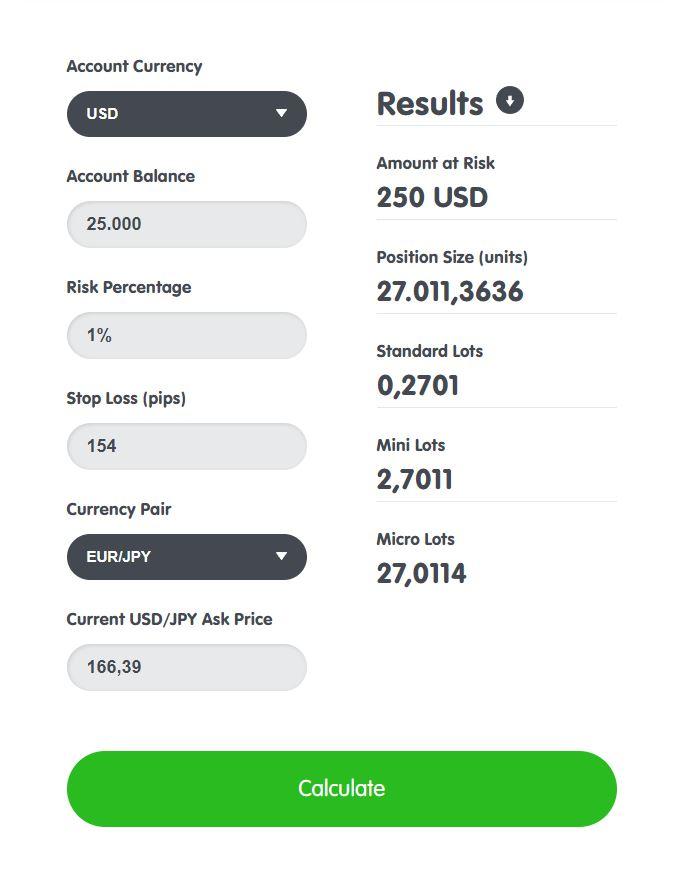
 May 8, 2024 at 12:45 pm #253858Member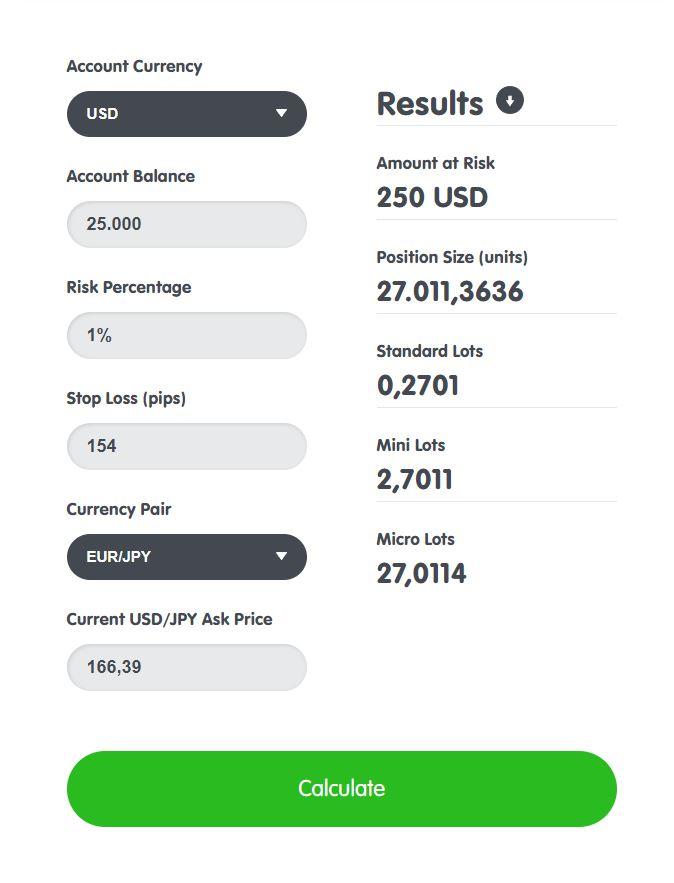
 May 8, 2024 at 12:53 pm #253855Member
Hey Nikos,
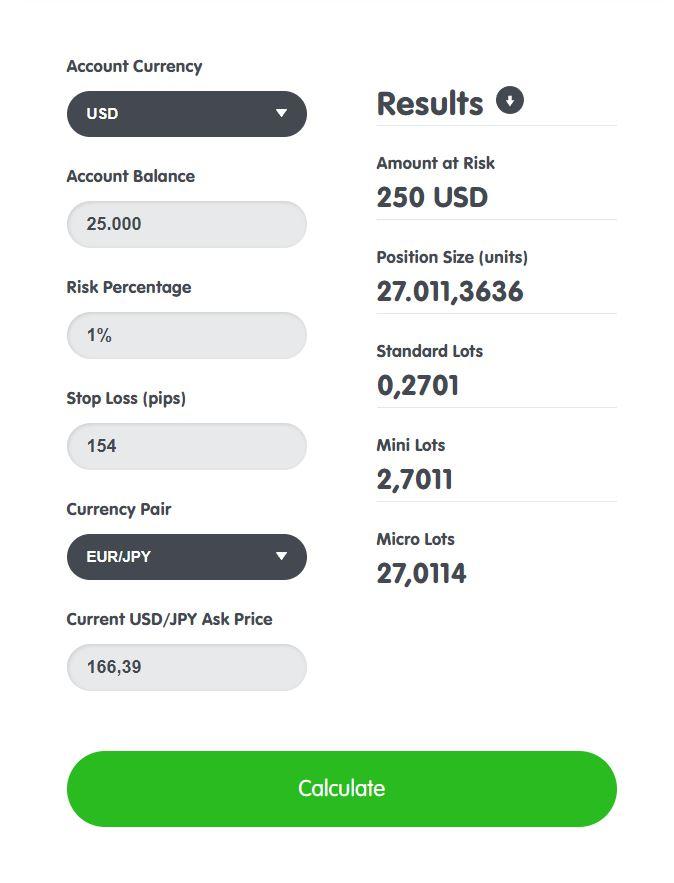
I checked the risk calculator, that you sent me. I put in the parameters of the exapmle EUR/JPY(see screenshot). Do you know why, although I selected EUR/JPY as a currency pair, at the bottom it says ‘Current USD/JPY Ask Price’? And also this calculator is missing the commodities like XAUUSD, can I load them somewhere? In the setting ‘Entry lots’ I assume is meant standard lots, so according to the calculator everything smaller or equal 0,2701 puts 1% or less of the account per trade at risk, is that correct?
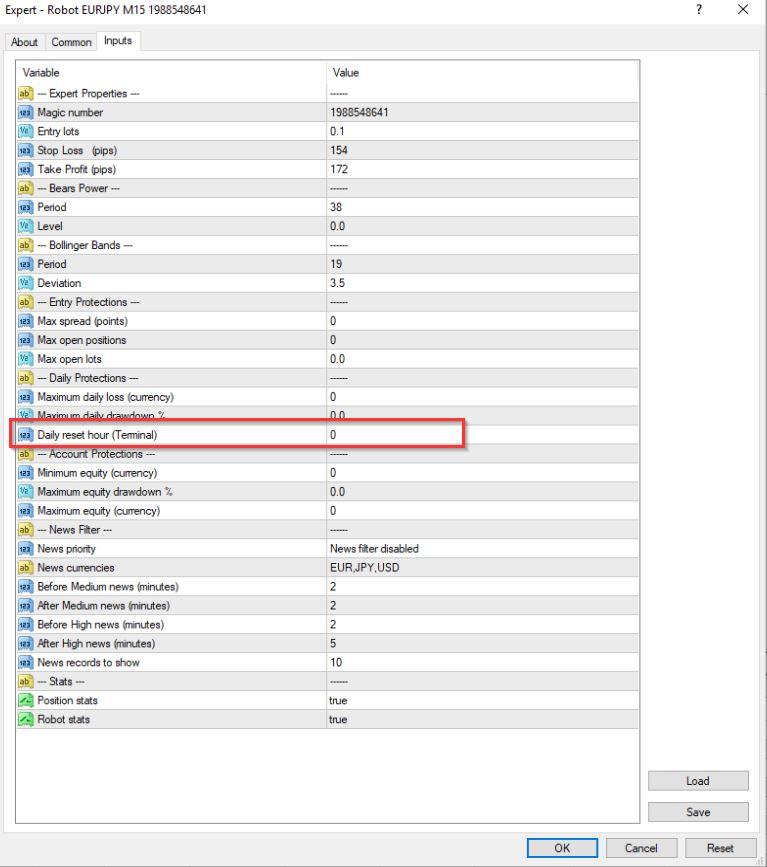
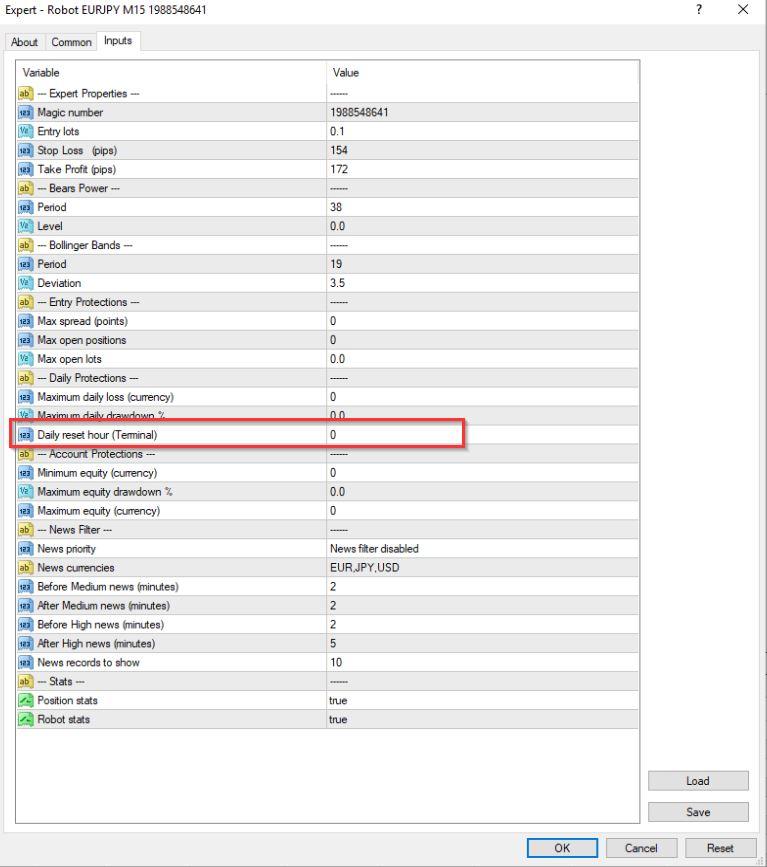
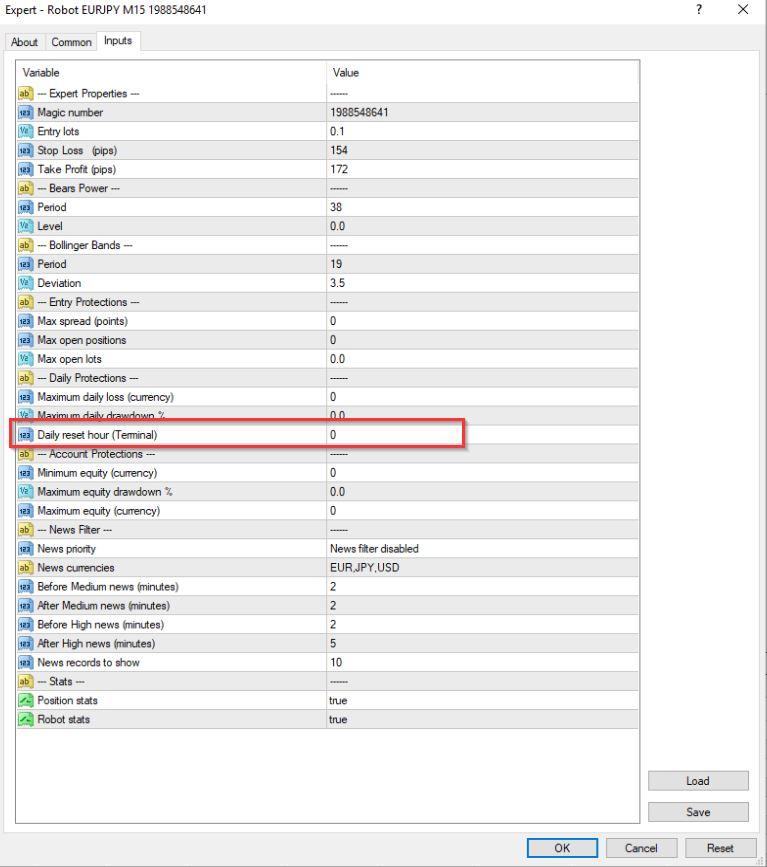
As to the daily time reset, I guess you mean the setting ‘Daily reset hour(Terminal)’ – see screenshot. What hour should I put there?
Thanks!
best regards
Boyan
 May 8, 2024 at 1:07 pm #253981Member
Hey Nikos,
in the meanwhile the screenshots are visible – why does it take that long for them to show up?
I’ve just checked the myfxbook Position Size Calculator. Apparently there is a difference between the Position size and the Trade Size. What I need to know is what to put in the Entry lots field of the EA, so as not to risk more than 1% of the accoint per trade. The myfxbook calculator has a prompt saying Trading Size(Lots) – what do I have to put here? This is actually what I need to know? And when I change the account currency from USD to EUR in the babypips calculator I do get the prompt Current EUR/JPY Ask Price but how does this affect the calculation, because when I do this I am risking 250 Euro which is more than 250 USD hence more than 1% of the account? I am getting confused, how to do it right.
As to the daily reset hour – lets say I have set max. 3% daily loss and the day closes with 2% daily loss and open trades. After the daily loss gets reset it means that I am allowed to have another 3% daily loss for the next day on the rest of the equity, is that correct?
Thank you!
Kind regards
Boyan
May 9, 2024 at 10:33 am #254133KeymasterHey Boyan,
I am not too sure of what happened with the screenshots.
About the Trading Size (Lots) in myfxbook position size calculator, you can just leave it to 1 lot.
Regarding babypips, you just need to calculate the difference. You can do so by seeing how much is 250$ in Euros and just insert that Euro amount instead. For example, I see after doing the conversion today from USD to Euro, the price is 232 Euros. So, instead of 250 Euros, you insert 232 and calculate it that way.
About the daily reset hour, it’s actually like that!
Hope this helps!
Kind Regards,
NikosMay 9, 2024 at 12:39 pm #254152MemberHey Nikos,
as to the screemshots, these got posted several times, because I tried to load them several times. It is not the first time I have this issue. It looks likes to me that I cannot load screenshots instantly, but they have to be approved first by someone from the TA, could that be the case?
As to the risk calculation – I am not sure if I got you right – where do I put the 232 Euros?
Anyway I did the calculation one more time with both calculators with the following inputs: Currency Pair EURJPY, Account Currency USD, Account Size 25.000, Risk Ratio 1%, Stop-Loss(Pips) 154 -according to the EA I am going to use and I put 1 in the ‘Trade Size(Lots)’ field in myfxbook calculator. It shows automatically USDJPY 155,81100 there. This value I put in the field Current USDJPY Ask Price in the babypips calculator. I get pretty much the same results from both calculators – Sizing according myfxbook is 0,25 lots and Standard Lots according to babypips is 0,2529. So that means, that when I put 0,25 in the field Entry lots of the EA I will be risking 1% from the 25k account per trade, correct? In the Complete Guide video Petko used 0,1 but this is myabe because he was trading 10K account right? So this would be risk medium according to the Prop Firm Robots App, and if i want to trade low risk I should put 0,125 in my case right?
Could you please explain what the correlation between the entry lots and the SL exactly is?
Thnaks!
kind regards
Boyan
May 9, 2024 at 12:42 pm #254154MemberPS: And one more thing I forgot – in the Top 10 EAs there is also crypto BTC and ETH, but I do not find them in myfxbook calculator, how can I calculate the risk there? Just to my understanding – I will not be trading the coins directly but some other instrument like inex or contract or something right?
Thanks!
May 9, 2024 at 10:33 pm #254233MemberHey Nikos,
I just chekced the results of the Top 5 EAs, that I put as individual EAs in the charts on Sunday. As of today I have hard times picking 3 of them to trade on a challenge next week. The top 3 performers took only one trade and therefore no profit factor and 100% winners. The fourth one has a profit factor of 3,98, it took 3 trades and has 1 winner and 2 losers – how does the profit factor get calculated? The fifth one took 4 trades so far and has a profit factor of 1,59 – 2 winners and 2 losers. And sixth one took 3 trades and has a profit factor of 1,84 – again 1 winner and 2 losers. All the rest were not profitable at all. So considering these results which 2 or 3 out of these 6 would you pick out for the live trading? I’m sending a screenshot for known reasons in a seperate posting following. Thank you!
kind regards
Boyan
May 9, 2024 at 10:34 pm #254234Member May 10, 2024 at 12:52 pm #254338Keymaster
Hey Boyan,
Actually this is the case about the screenshots!
Regarding the risk calculation, I was just referring to the part you said that you are risking $250 but in myfxbook position size calculator where it says Risk Ratio, there is a button which says swap with money. With that instead of just writing the percentage you want to risk, you write the amount of money you want to risk per trade.
So, to get the correct calculations, you need to import in the Account Currency EUR instead of USD as you want to trade EURJPY.
What do you mean about the correlation between the entry lots and the SL?
Thank you!
Kind Regards,
NikosMay 10, 2024 at 12:53 pm #254339KeymasterThere are no crypto pairs in these calculators.
May 10, 2024 at 1:01 pm #254340KeymasterHey Boyan,
So the trading factor is calculated based on winning and lost trades. So, in your case where you see no profit factor as shown in the screenshot it is because there are no losses which is of course good!
Regarding the results, please know that every strategy has a losing period as well as winning period. Which means that not every strategy can be profitable even it is the best one. Definitely results cannot be guaranteed but by testing the best strategies first before setting them in a real account or challenge, it’s always the best practice to see at least the direction it can go.
Hope this helps!
Kind Regards,
Nikos -
AuthorPosts
- You must be logged in to reply to this topic.