
Community Forums › Forums › Ready-to-use Robots › Top 10 EAs › Top 10 Robots App vs Prop Firm Robots App
- This topic has 103 replies, 11 voices, and was last updated 1 year, 6 months ago by
[email protected].
-
AuthorPosts
-
May 3, 2024 at 2:26 pm #253106
Boyan Todorov
MemberHey Nikos,
I see now that the screenshots from myfxbook showed up, so naow you can see what I mean – where do I have to go to see the lines of the single portfolios?
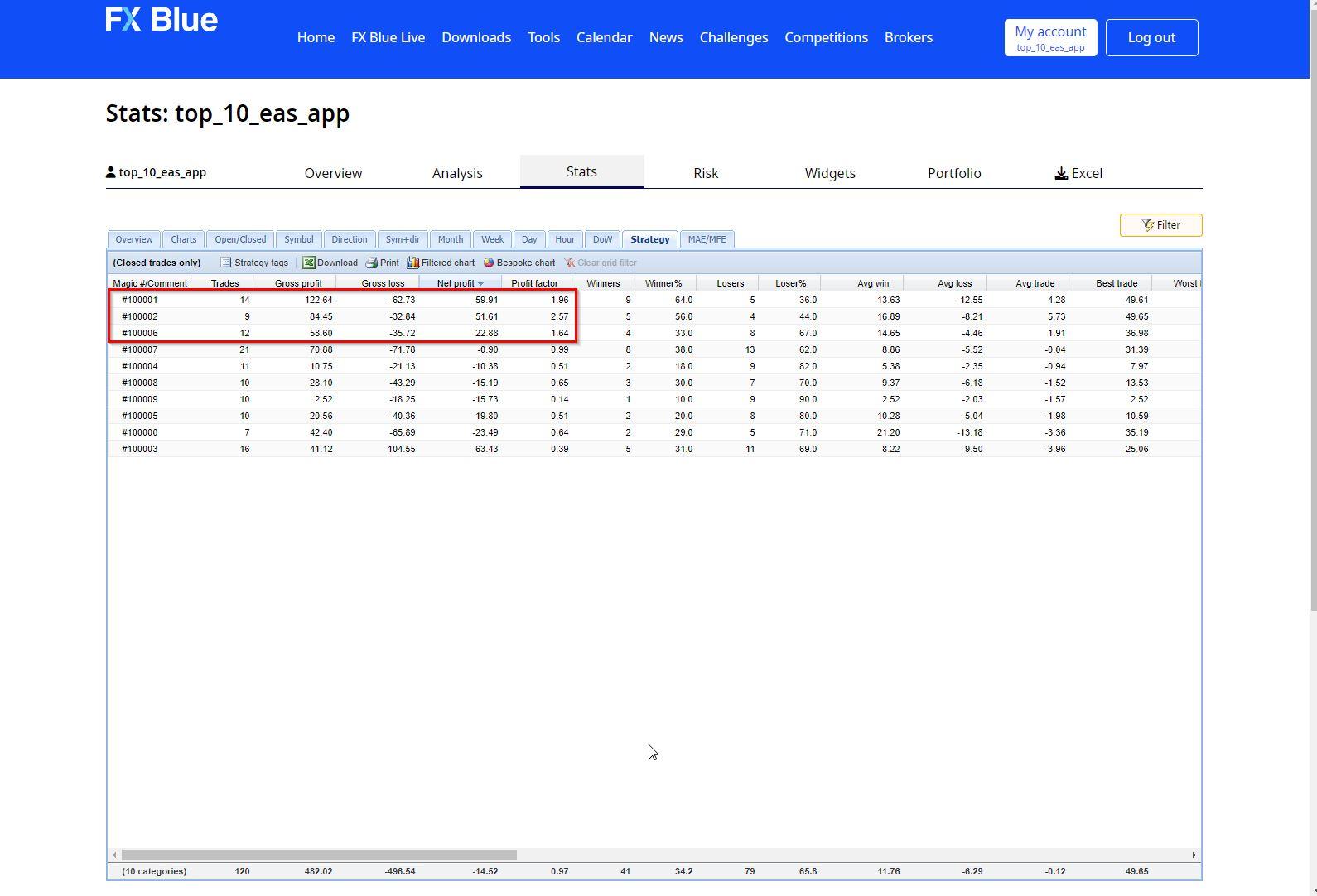
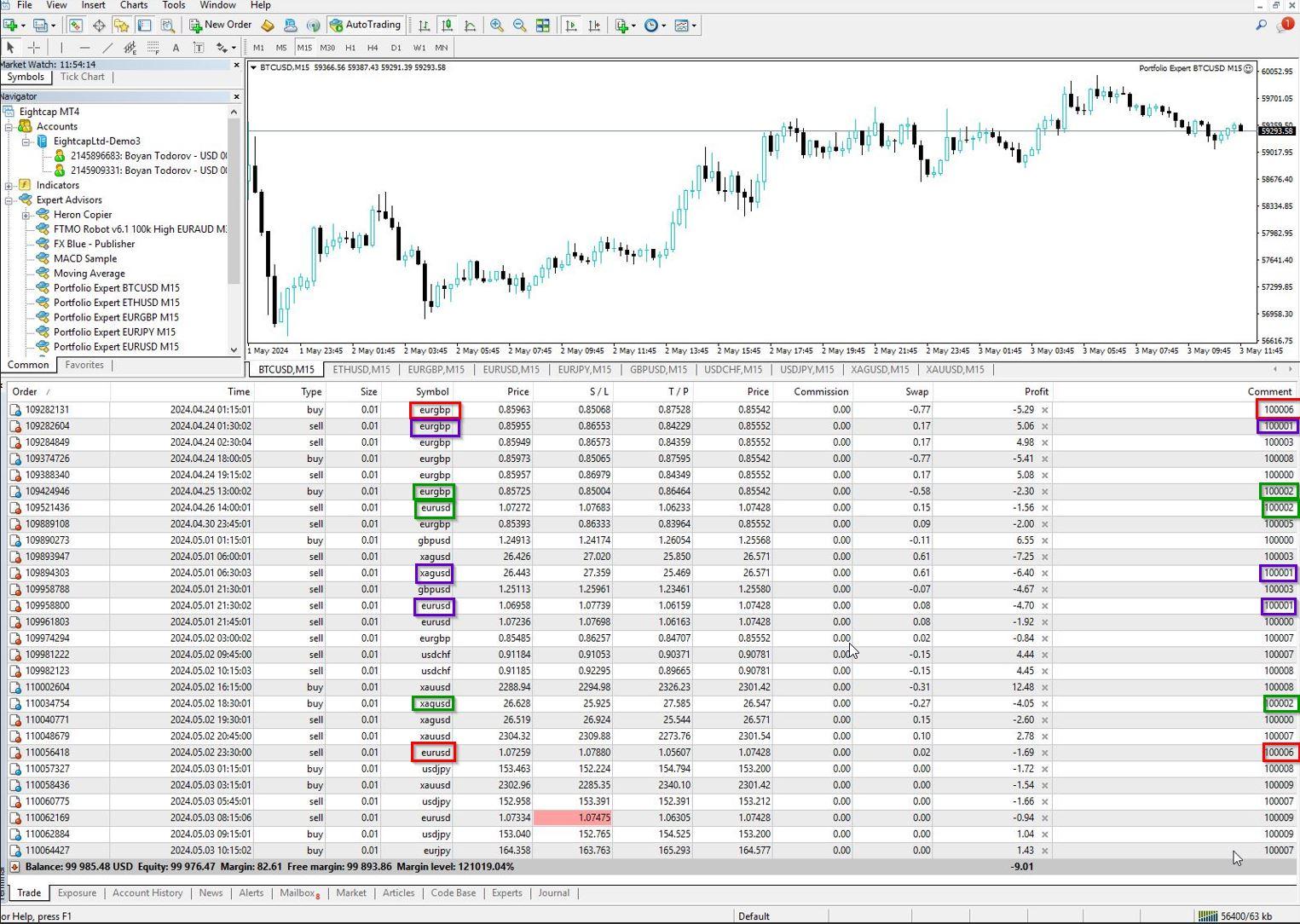
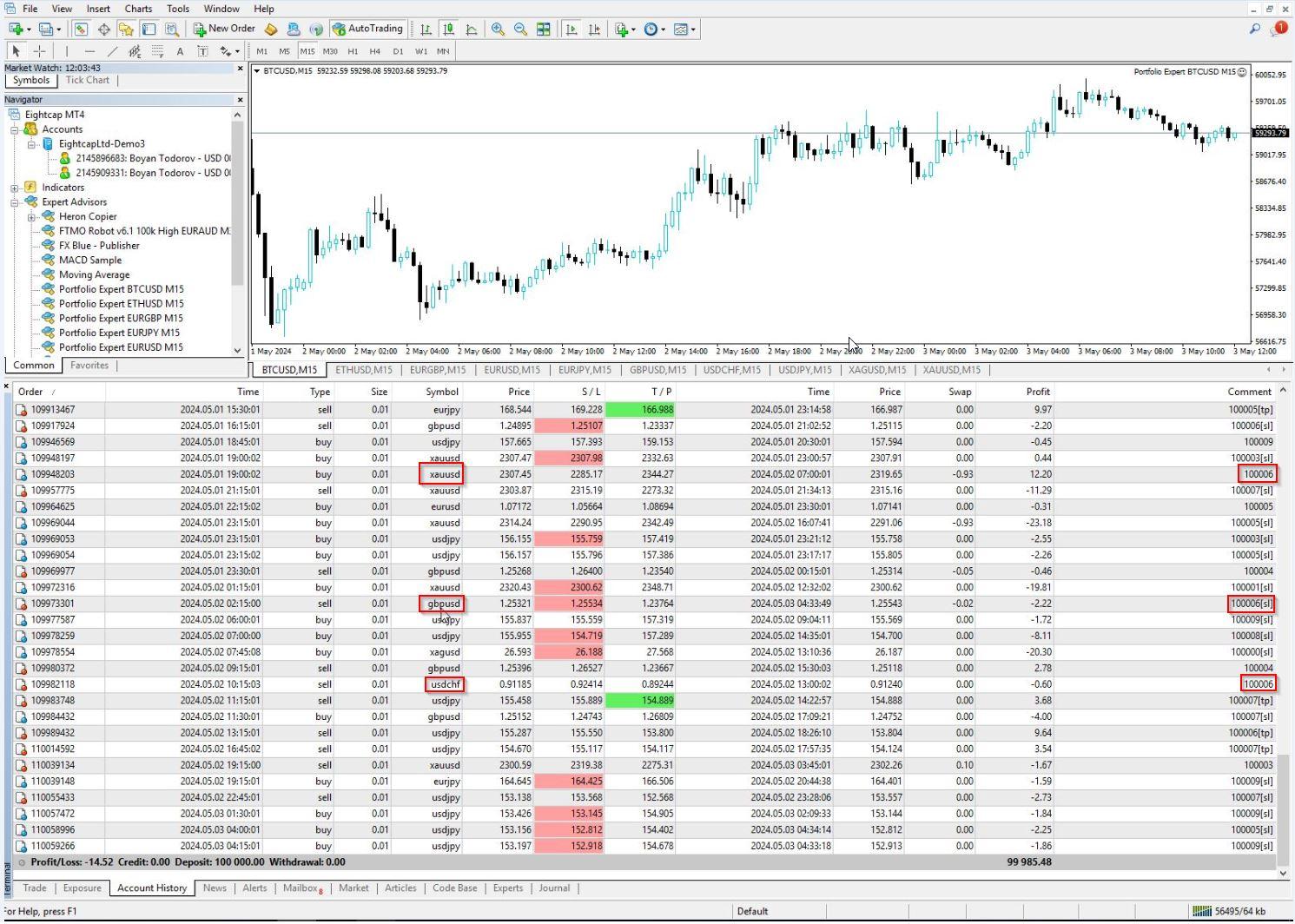
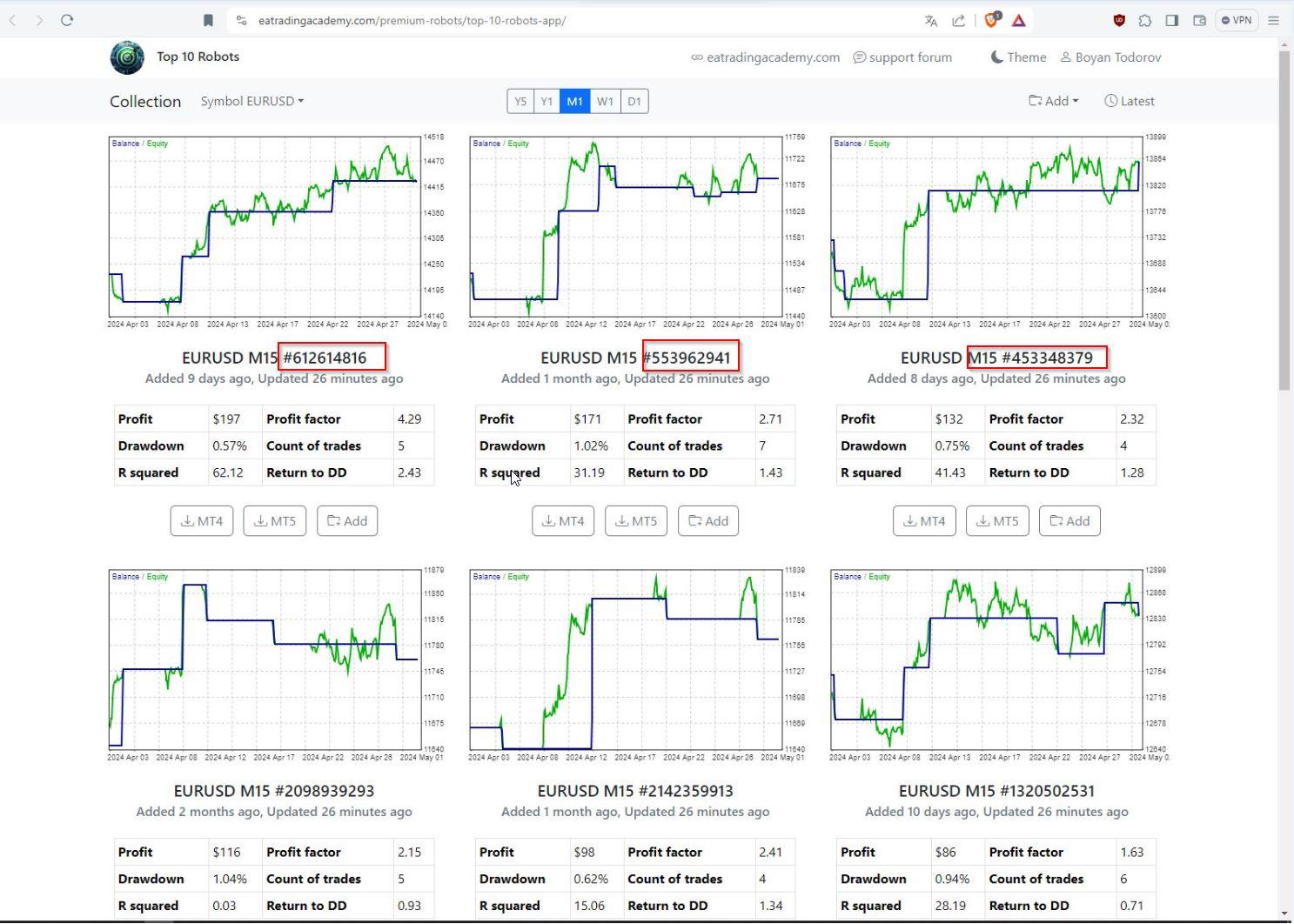
As tot he magic numbers – here I send you the screenshots, I hope they show up. The first one is from FX Blue, where I sorted in the strategies tab the EAs and marked the 3 ones on the top, that I want to trade – 100001, 100002 and 100006. I also send screenshots from mt4 from my demo account where I attached all the 10 Portfolios with 10 EAs each. As you can see there are trades with these magic numbers 100001, 100002 and 100006 and there are different symbols with the same number. So how do I find the 3 most profitable EAs from the FX Blue stats to put them on the challenge? I started trading the 10 portfolios on the 23rd of April. Unfortunately I downloaded only the portfolios and not the single EAs. The magic numbers in the App(see screenshot) have totaly different pattern than 100001, 100002 and so on. I hope there is a way to identify the EAs. Please take a look and give me a feedback, since I have a deadline to start trading the cahllenge which is soon. Thanks a lot!
Boyan
Boyan
May 3, 2024 at 2:42 pm #253121MemberHey Nikos,
I saw the posting with the screenshots went now through, please give me a feedback, thanks!
regards
Boyan
May 3, 2024 at 4:57 pm #253134MemberApparently Nikos is not here, can someone from the other mods please help me out? Thanks!
Boyan
May 3, 2024 at 6:52 pm #253153Marin Stoyanov
KeymasterHey Boyan,
I am so sorry for the late reply.
So, in order to find out what strategies are being traded, the only way to do it basically is before you download the portfolio robot, you need to also choose the top 10, top 5 or top 3 whatever you want to trade in the app from where it says add and see what robots will be inside of the portfolio before you download it.
That is the solution I have for that. Another way is to check the strategies via the code but you still cannot see the magic number, so it’s not possible to see the individual EA magic number and identify which one is it.
Hope this helps.
If you have any more questions, let me know!
Kind Regards,
NikosMay 3, 2024 at 7:08 pm #253154MemberHello Nikos,
thanks for the reply, sorry for being impatient, I just want to get this clear before the weekend so I can run the EAs right on Monday, so I would appreciate if we can get done today with the issue.
So for the future I will adopt the workflow you suggest – at the point of downloading the portfolio EA I will also download the seperate EAs. However there will be 10 EAs in each portfolio. The Portfolios have magic numbers like 10000… something, and the single EAs have totally different ones. So still remains the question how to identify the top 3 strategies?
At the current point I have to start trading and I will do it like in the Complete Guide from Petko – I will open the code and leave only the profitable strategies active. What is still confusing me is that for example with the same Portfolio magic number I have trades with different symbols. And the Portfolio normally trades 10 different strategies but the same symbol – so how is this possible? You see the results in the stats from FX Blue – I really need a step by step guide how to identify the Top 3?
Hope you can help with this, thanks!
best regards
Boyan
May 3, 2024 at 7:28 pm #253157KeymasterHey Boyan,
No need to be sorry, I completely understand!
So, if you choose for example Top 3 from the add button in the app, it will have 3 strategies inside the portfolio robot. You can also check from the code after you download it.
And with that, you can click on the add as mentioned and also download the robots individually and you will see what magic numbers will be inside the portfolio robot.
You can see more in the screenshot below:
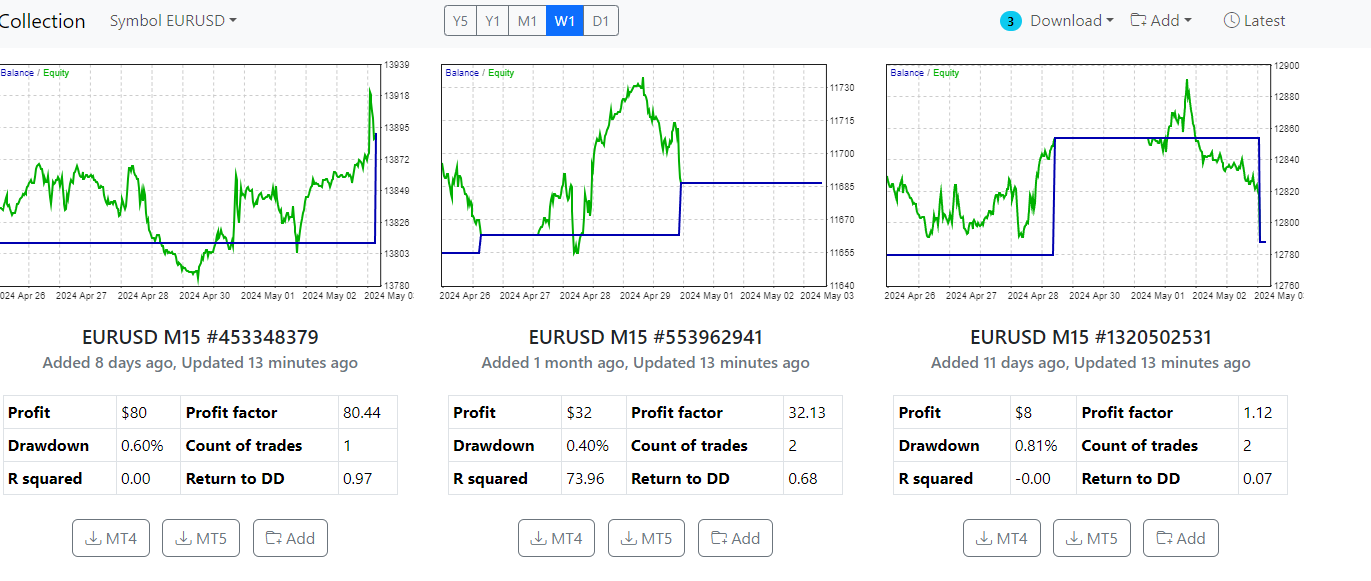
What I did here for example is that I chose the Top 3 strategies of EURUSD pair and they are ready to download either as a portfolio or individually.Here you can also see that if you click one of the buttons in the circle, you can download them individually:
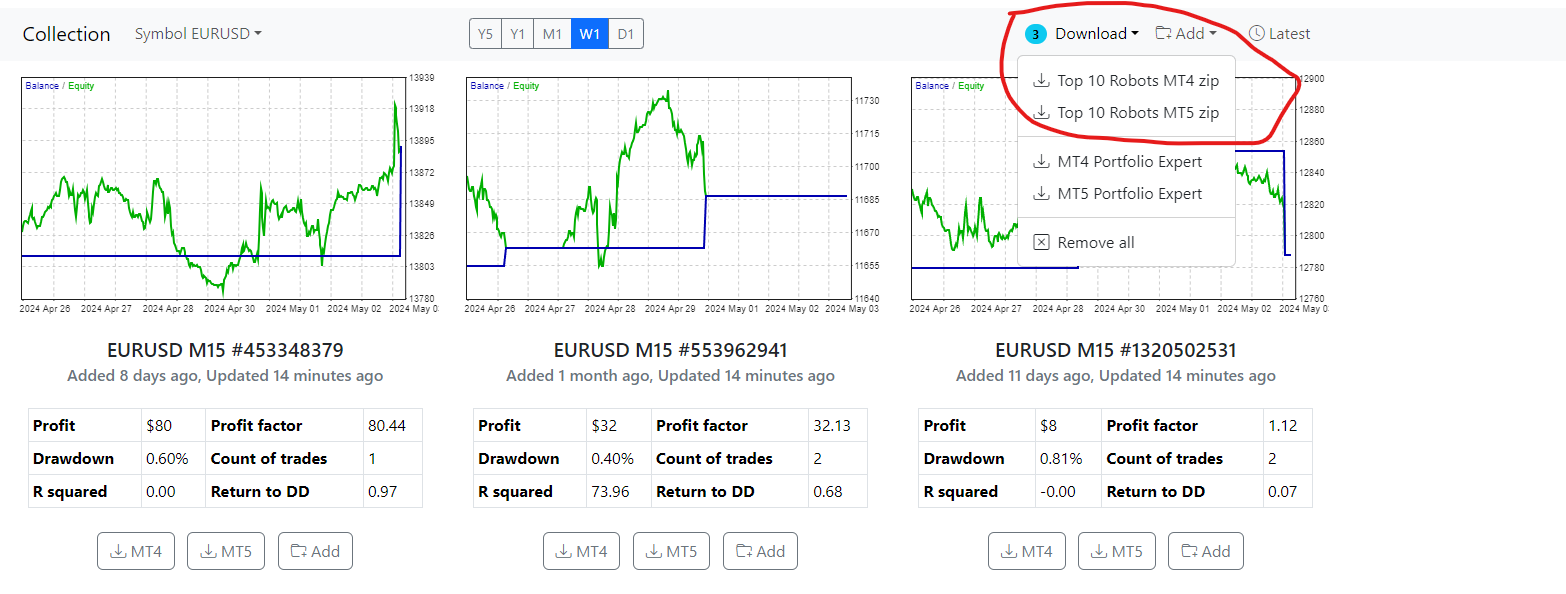
You probably can see it says Top 10 but if you download them, you can see that there are 3 robots if you have chosen Top 3.So, if you also download the portfolio, you will know that inside of it, there will be the strategies that you see in the individual robots.
You can identify the Top 3 as we mentioned by the magic number which you will see in the individual robots you will download.
That is the way it’s possible to be done!
Hope this helps!
If you have any other questions, let me know!
Kind Regards,
NikosMay 3, 2024 at 7:44 pm #253165MemberThanks Nikos, this was the part that I understand. Lets stay with the Top 3 exapmle(I assume if I download all 10 of them it is the same). When I open the portfolio EA in the meta editor the strategies are numbered like 10001, 100002, 100003 and so on. And when I download the individual robots they have random numbers. How do I know which robot corresponds to what number in the meta editor?
Secondly, the other very important thing that bothers me now is the issue with same number different symbol. Like you can see in my screenshot, the best performing strategy is 100001. One can assume it is the first one from the portfolio with magic number 100. However it trades different pairs – EURGBP, XAGUSD, EURUSD – so this is confusing me. It is alywas one symbol per portfolio isn’t it? So what is going on here?
Thanks a lot!
Boyan
May 3, 2024 at 8:27 pm #253172KeymasterHey Boyan,
So, I understand what you are talking about. A way for this is to either compare the robots by placing the individual ones in a demo account and the portfolio ones in another demo account and compare the trades of each robot by seeing what time they were opened for example.
Another way is by seeing the code which might be a little bit more complicated but you can see what are the properties of each individual robot and also see what are the properties of the strategies in the portfolio robot.
About the issue with the different symbol, I saw that on the screenshots you sent and I am not sure what the issue is on that. I would suggest here to try and download a new portfolio robot and see if that happens again.
Hope this helps!
If there is anything else I can assist you with, let me know!
Kind Regards,
NikosMay 3, 2024 at 8:50 pm #253174MemberHi Nikos,
not really what I wanted to hear.
As to the first issue – trading parallel the individual EAs is not an option, because if I start doing this why do I need the portfolio at all? My goal is not to have to put 100 EAs on 100 charts. So I will try to look at the code, but since I am not a developer I am not sure what to look at, can you hive me a hint?
About the second issue – of course I can start over, but I have a challenge that I have not started yet and that expires on the 10th of May next Friday if it stays inactive. I am trading the 10 portfolios since the 23rd of April and I wanted to start using the Top 3 performers on the challenge now. So what would do if you put yourself in my shoes? Is there a chance to get in contact with the developer who developed the app, maybe he can tell us something more about this issue?
Thanks!
Boyan
May 3, 2024 at 8:52 pm #253175MemberAnd one more thing Nikos about myfxbook – you saw the two screenshots. Why does my chart look differently from the chart in Petkos video – I see the account growth, but not the lines of the portfilios – anything about this?
Thanks!
Boyan
May 6, 2024 at 1:21 pm #253530KeymasterHey Boyan,
About the MyFxBook, you can just click on Custom Analysis and then find the magic number tab so that you can check the boxes of which magic numbers you want to be shown.
Hope this helps!
Kind Regards,
NikosMay 6, 2024 at 1:25 pm #253531KeymasterHey Boyan,
About the code, just leave this part as there is a lot to look into.
Regarding the the second issue, the only solution I can provide is to compare from your portfolio EA and another platform of metatrader with the individual EAs in it, compare which are the EAs by the trade time and find the magic number that way so that you can also identify the strategy.
Hope this helps!
Kind Regards,
NikosMay 6, 2024 at 4:45 pm #253572MemberHi Nikos,
like I said, the edge of trading Portfolio EA is, that it saves time letting you put only 10 EAs in the charts and not 100. At the point, where you have to trade simultaneously the individual EAs on a seperate account and have to compare trades and time stamps to figure out which one is which, or to figure out why the same Portfolio EA magic number trades different symbols, the usage of the Portfolio EA becomes pointless, which is very disappointing. So all the testing of the 10 portfolio EAs that I have been doing since the 23rd of April was for the birds, because I cannot really evaluate the results. Yesterday I did the hard work and put the Top 5 on the yearly from all symbols as individual EAs on single charts – 48 piece total(because BTC had only 3). It is the most safe way to keep a track, but really time consuming, especially if I have to do it on a weekly basis. Is there a chance to optimize this process? Maybe run a script on the mt4 or something?
Another thing – I followed a thread in the formu called ‘Prop Firm Robots: Errors and Solutions’ where I read, that the Prop firm robot is not taking new trades 15 min. before the market closes and 15 min. after ist starts again to avoid huge spreads. When is this time window exactly – is it only during weekends or are the markets closing also during business days? Is there such a setting also in the Top 10 EAs?
Thanks!
best regards
Boyan
May 7, 2024 at 2:41 pm #253740KeymasterHey Boyan,
I understand your point and I do not have any other solution unfortunately.
About optimizing the process, I do not think it is possible.
Also, about the Prop Firm Robots not taking trades in the mentioned times, it depends on the daily time reset that you have set in the robot settings. And markets do close on weekends so the robots do not trade on the weekends except bitcoin or crypto in general.
Hope this helps!
Kind Regards,
NikosMay 8, 2024 at 12:01 am #253856MemberHey Nikos,
I checked the risk calculator, that you sent me. I put in the parameters of the exapmle EUR/JPY(see screenshot). Do you know why, although I selected EUR/JPY as a currency pair, at the bottom it says ‘Current USD/JPY Ask Price’? And also this calculator is missing the commodities like XAUUSD, can I load them somewhere? In the setting ‘Entry lots’ I assume is meant standard lots, so according to the calculator everything smaller or equal 0,2701 puts 1% or less of the account per trade at risk, is that correct?
As to the daily time reset, I guess you mean the setting ‘Daily reset hour(Terminal)’ – see screenshot. What hour should I put there?
Thanks!
best regards
Boyan
-
AuthorPosts
- You must be logged in to reply to this topic.