
Community Forums › Forums › Ready-to-use Robots › Top 10 EAs › Top 10 Robots App vs Prop Firm Robots App
- This topic has 103 replies, 11 voices, and was last updated 1 year, 6 months ago by
[email protected].
-
AuthorPosts
-
April 22, 2024 at 10:42 pm #250802
Marin Stoyanov
KeymasterHi Boyan, these packages represent the same thing. I’m sorry for the misunderstanding. If you click on the buy button on both, you will get the same discount as the product is the same. I suppose the left package was visible on the prop firms page which was not correct and we removed it from there earlier today. Just a reminder that tomorrow is the final day of our Top 10 app launch 50% discount. As Alan explained, the robots in the Top 10 Robots App and the Prop Firm Robots App are completely different and the strategies are different.
This is how the Top 10 Robots App works. On powerful servers we use the Express Generator which generates over 8000 new strategies per market every day. Then we pass them via Acceptance Criteria and Monte Carlo. We merge them to our running collections (up to 100 strategies per market). On the weekend, we choose the best 30 for a market and upload them to the Top 10 Robots server. The strategies are kept in Top 10 until they perform well on virtual trading environment. We have strategies staying in Top 10 for more than a few months. All EAs here work on M15.
The EAs from the Prop Firm Robots App follow the its own strategy and are created in a way to satisfy prop firms requirements. They work on different timeframes. Hope this makes sense and gives some clarity on the differences between the two web applications.
April 24, 2024 at 4:40 am #251180Matt
ParticipantHello Boyan. Great points.
Forex Gold Investor has had a protection upgrade since the 12th of april to help protect the account. It’s version 1.94. So check that out, do some testing with it and see how it goes. I hope it helps with your challenges and funded accounts.
On the top of making the account unique, you could simply run a different EA on the account with small risk, small SLs, so there are a number of trades that don’t come from the first EA. Then it will show that your account is operating in it’s own parameters, making unique trades and not copy trading.
As for the best EA that we’re trading atm, you can see up-to-date figures on our website:
https://platform.algotradingspace.com/live-trading/
https://platform.algotradingspace.com/premium-robots/ftmo-robot/
https://platform.algotradingspace.com/funded-accounts/I hope that helps. Let me know if you have any other questions.
Warmly
MattApril 26, 2024 at 12:57 pm #251728Boyan Todorov
MemberHello Alan and Martin,
I got the Top 10 EAs during the discount period and I have all 10 Portfolios with 10 EAs each running on a demo. My strategy would be to monitor the weekly performance and put the Top 2-3 EAs on a live account or/and challenge. I have some questions though. Firstly how often do the strategies in the app get updated? Martin wrote in a reply to me in this thread, that on the weekend 30 strategies get added to the app – does that mean that every weekend 30 EAs get updated in the app? If so how do I know which ones changed? I mean at the end of the first week of monitoring I will put the best EAs to work on real money and I will start the testing on demo for the next week along. For this purpose do I have to download all portfolios new from the app? I watched the tutorial and the video in the course about managing the portfolio EA. It shows how to evaluate the performance using FX blue and how to disable the non profitable EAs in the portfolio. However when I move to a live account I would like to put the top performers as single EAs and not as a portfolio, because I have more setting concerning the account protection. Is there a way, as soon as I identify the EAs I want to trade live to find and download only these from the app? Or maybe it is better to do this at the very beginning, just in case that the EAs in the app get updated in the meanwhile? If I have them downloaded at the start, how can I identify which files to put on the live account? Thank you!
Boyan
April 30, 2024 at 11:49 am #252465MemberCould please someone of the moderators get back to me reagrding my last post? I would greatly appreciate it. Thank you!
Boyan
May 1, 2024 at 11:07 am #252643KeymasterHello Boyan,
Apologies for the late reply.
So, you can see which strategies changed by clicking on the latest button on the top right corner of the app which says latest and you can see what are the new strategies. To see which are changed, you need to check the magic number of each EA.
For example, you can see the Top 3 Robots here:
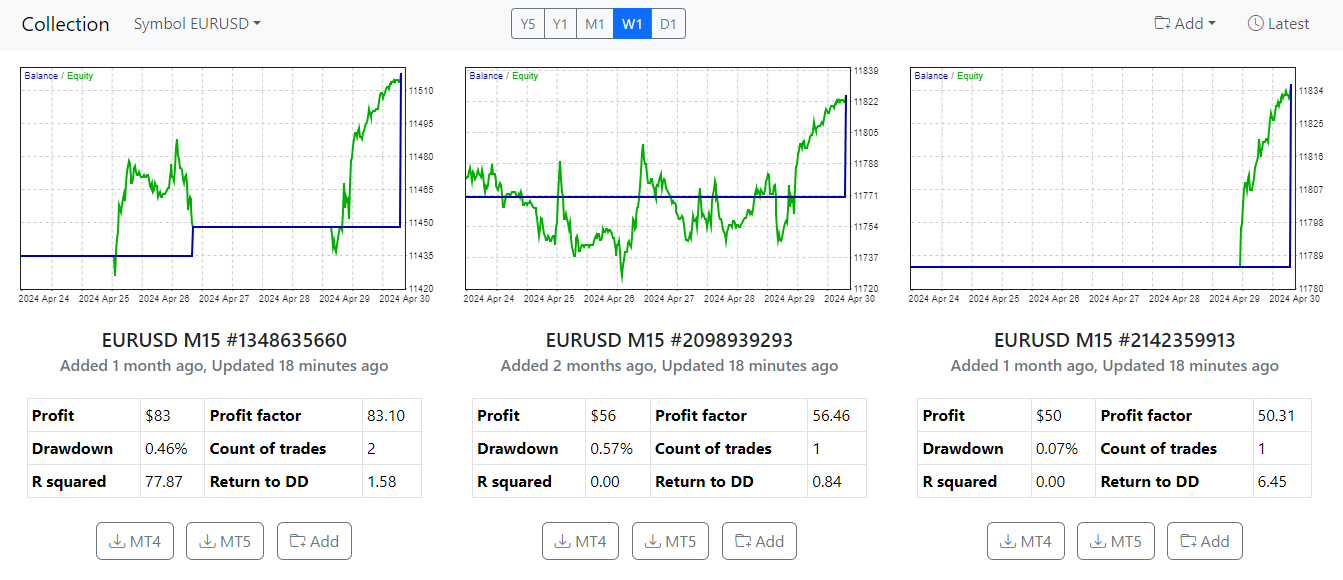
In each EA, you can see a number next to the pair and timeframe and example to that is EURUSD M15 #1348635660. This number #1348635660 is the number you need to look to see which EA is which.
Also, in the screenshot above, on the top right corner, there is the Latest button which if you click it, a window will appear that shows the latest strategies that were added and how much time ago:
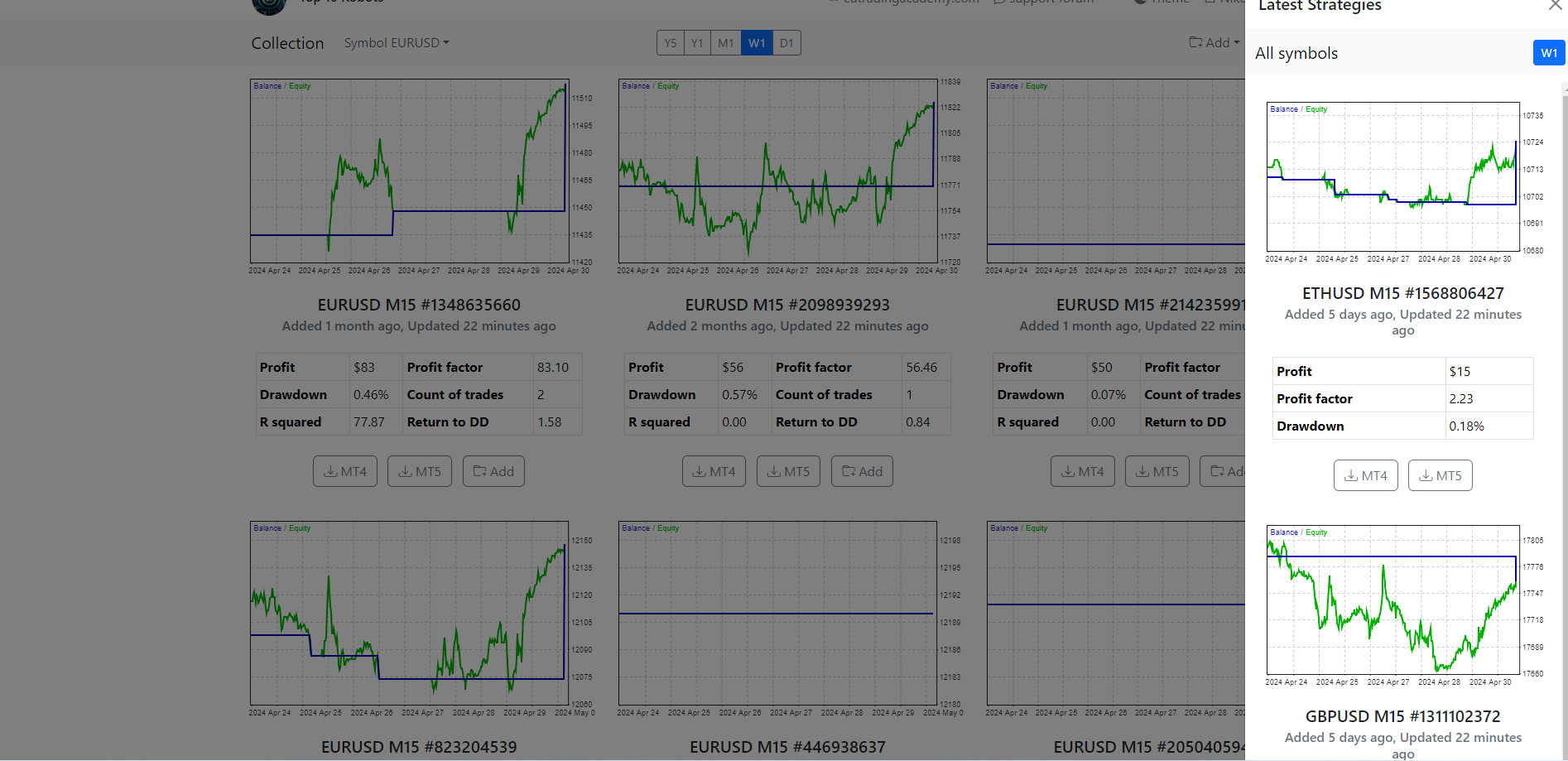
This is how it looks when you click the Latest button. Keep in mind that it shows the latest strategies from all pairs.
In order to identify which EA is which, you can just check the magic number as mentioned above and change them accordingly in your account.
Hope this helps!
If you have any more questions, let us know!
Kind Regards,
NikosMay 2, 2024 at 9:34 pm #252993MemberHi Nikos,
thanks for your input. I’ve been trading the 10 Portfolios of the Top 10 EAs app for a bit more than a week on a 100k demo account with the standard settings. I will choose the Top 3 best performing strategies and I will put them on a 25k FX2 Funding challenge and I want to make sure I have the right settings. I am allowed to have a max. DD on the account of 6% or $ 1500 and a max. daily DD of 4% or $1000. Considering spreads, swaps, comissions and slippage I will set max. daily loss at 3% to make sure I don’t get below the 4%. The min. equity I will set to $23700 with a buffer of $200. The max. equity I will set to 27 050 to be on the safe side. Since I don’t have a setting for the risk in the app(like in the Prop Firms App) I am not sure what to put into the lot size, the max. open positions and max. open lot? I want to trade with medium risk of 1% per trade, but can you please help me calculate these parameters to get the best out of it? I would definitely chose a max spread of 30 points. Is it reasonable to have the news filter switched on, or this will result in a poor performance? Thanks a lot!
Boyan
May 3, 2024 at 12:42 am #253015KeymasterHey Boyan,
So, in order to calculate the risk per trade and to make it be 1% per trade, you can try this link:
https://www.babypips.com/tools/position-size-calculator
It will help you calculate the risk per trade for the pairs that you wish to trade. I know that you said it’s portfolio but you can just see what pairs you have chosen and depending on that, you can write the correct information in the link that I provided so that you can see what would be the lots size.
Also, regarding the news filter, I suggest that you have it on, especially in a challenge!
Hope this helps!
If you have any more questions, let me know!
Kind Regards,
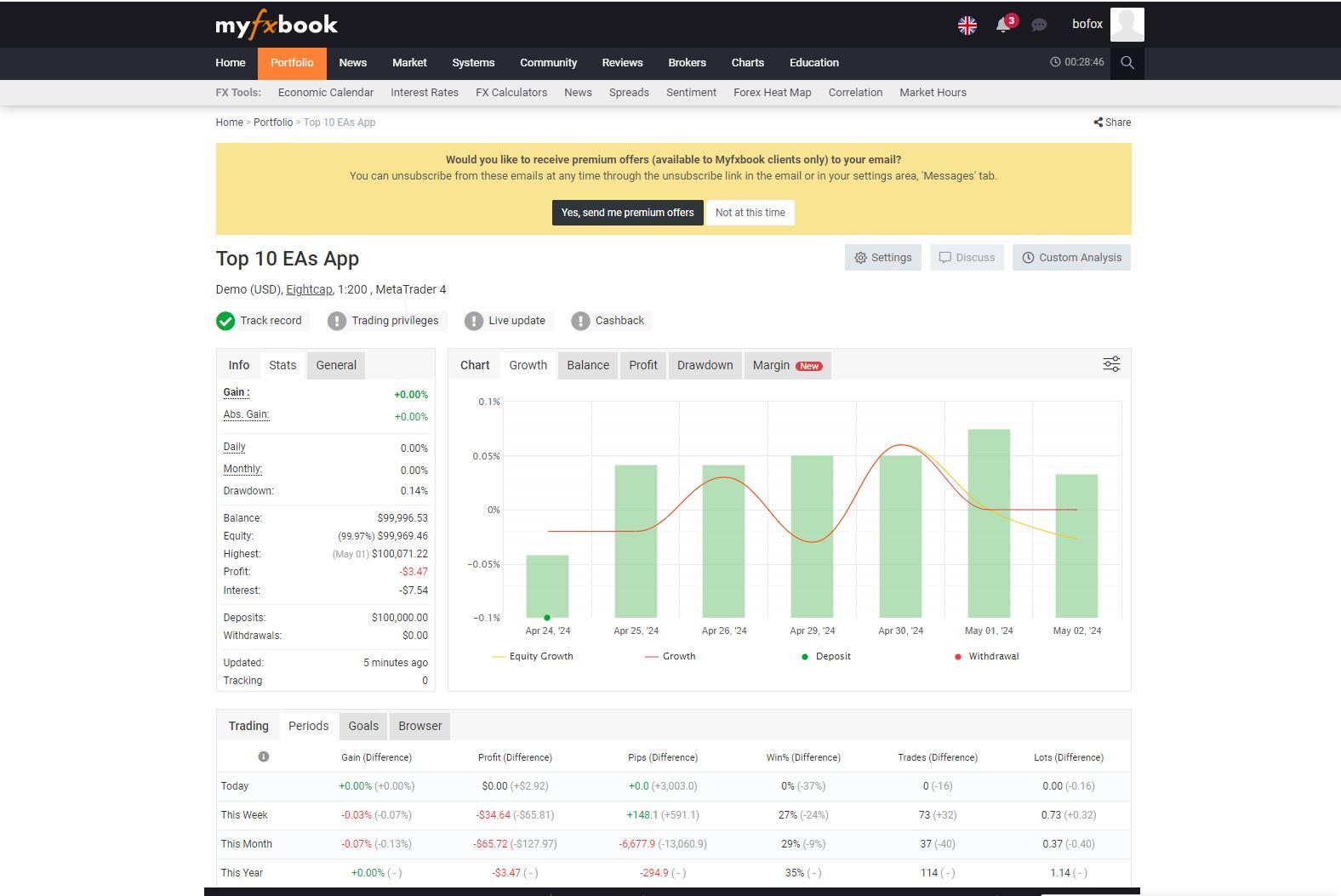
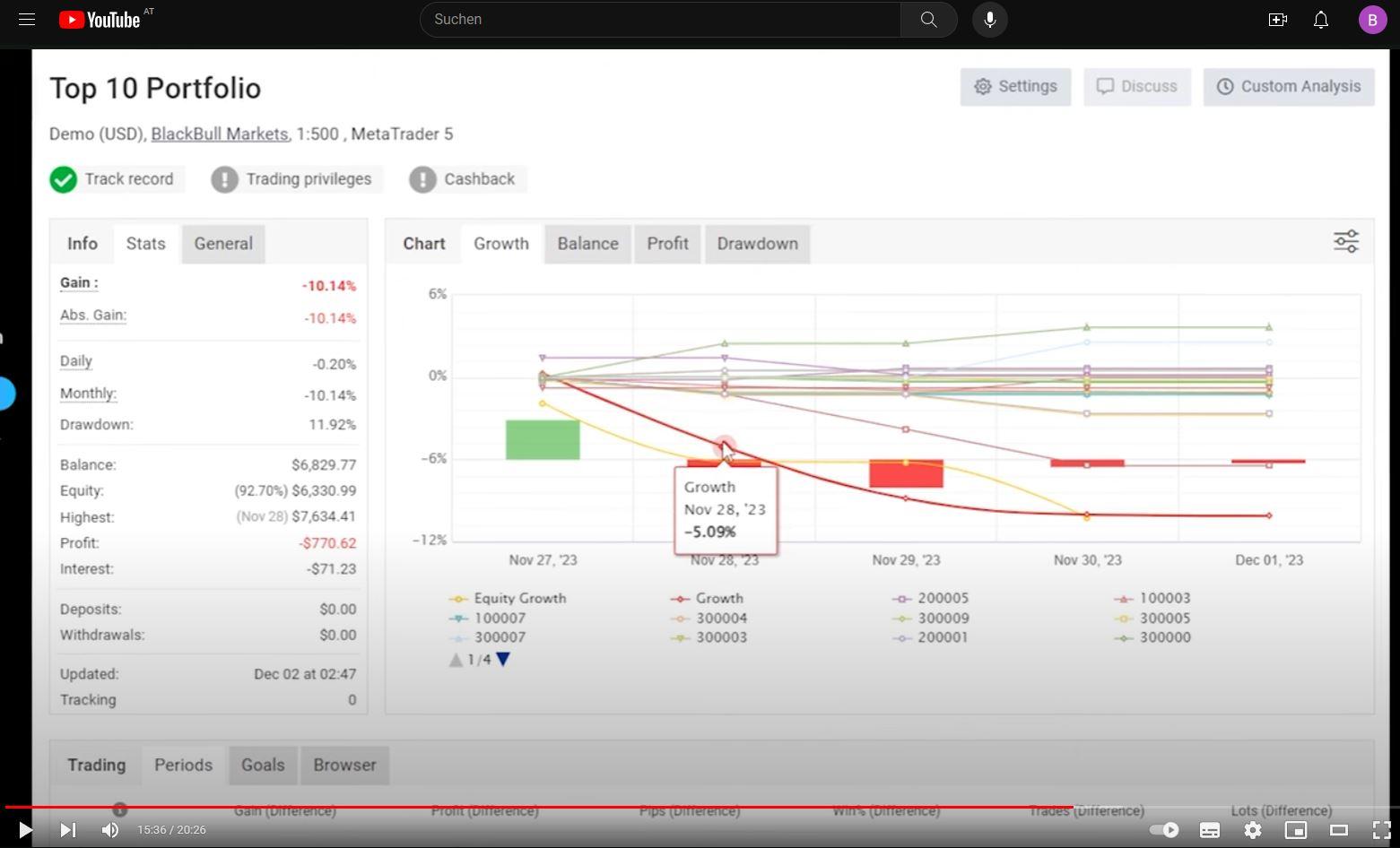
NikosMay 3, 2024 at 1:43 am #253023MemberThank you Nikos helps a lot. I connected my demo account with myfxbook to check the profitable strategies, but I cannot finde dem like in the Complete Guide video from Petko(second screenshot). Can you tell me what I am doing wrong? Thanks!
BoyanPS. I am sending this message for the third time. The first two times it had 2 screenshots, but it does not work with them, or at least I don’t see it.
May 3, 2024 at 2:32 am #253028MemberHi Nikos,
I registered now the account also with FX Blue and in the stats in the colimn net profit the best performing magic numbers are 100001, 100002 and 100006. The issue is I turned on the comments in mt4 and I see that the number 100001 ist having both eurgbp and xagusd trades, the number 100002 xagusd and eurusd and the number 100006 eurogbp and eurgbp. This is pretty confusing. And when I go to the App I see totally different numbers. Please help!
Boyan
May 3, 2024 at 10:45 am #253076KeymasterHey Boyan,
I see that you are confused with the magic numbers. Probably the reason there are 2 pairs in one magic number is due to portfolio robot.
Just so that I can understand more on where you are looking exactly, can you please provide a screenshot so that I can help you more?
Thank you!
Kind Regards,
NikosMay 3, 2024 at 10:48 am #253077KeymasterHey Boyan,
Can you please provide a screenshot for this as I cannot see any screenshot if you have provided any.
Thank you!
Kind Regards,
NikosMay 3, 2024 at 12:53 pm #253018MemberThanks Nikos, helps a lot. I guess for the SL in pips for the calculator I just have to take from the EA settings right? One more thing – I connected my demo account to myfxbook to check the profitable strategies like in the Complete Guide video from Petko(second screenshot), but I cannnot find them, can you tell me what I am doing wrong? Thank you!
Boyan
 May 3, 2024 at 1:39 pm #253109Member
Hey Nikos,
I just replied with 4 screenshots, but the reply does not appear again. Is there another way to contact you where I can also send the screenshots? Thanks.
Boyan
May 3, 2024 at 1:54 pm #253113KeymasterHey Boyan,
I was able to see 2 of the screenshots which makes me understand what you are talking about and I can assist you.
Before going to it though, for the risk calculator, you need to see the settings from the robot.
So, about the myfxbook, have the EAs made any trades in the account yet?
Kind Regards,
NikosMay 3, 2024 at 2:05 pm #253114MemberHey Nikos,
the Portfolios had many trades since the 23rd of april. I assume you saw the two screenshots of the myfxbook and of the Petkos’s video. I don’t see the 4 screenshot regarding the migic numbers though, I have no I idea why a reply with screenshots does not appear. The posting with the two screenshot was made last night and it took hours to appear. I don’t know what to do. Do you have an email?
regards
Boyan
-
AuthorPosts
- You must be logged in to reply to this topic.