
Community Forums › Forums › General Discussion › My automated filtering and trade copying system
- This topic has 29 replies, 8 voices, and was last updated 5 years ago by
riuzk.
-
AuthorPosts
-
October 16, 2020 at 7:47 am #63354
Ilan Vardy
ParticipantHey Jordy,
Net profit is of course very important, but I would include a minimum count of trades too. This way, you will know the EAs are more robust. But let us know how your current system is working.
Cheers,
Ilan
October 16, 2020 at 8:58 am #63358JordyTr971
ParticipantActually I am waiting for minimum 5 trades on all EA’s before activating the copier .
I’ll let you know how it work!
Hi petko,
I’ve hired a developer to code it for me .
October 16, 2020 at 9:42 am #63359Petko Aleksandrov
ParticipantGreat job, guys!
And I am very happy that you are sharing your work!
Long time it was just me sharing my EAs, strategies, courses, and now there are more people which make me feel great!
Cheers,
October 16, 2020 at 11:48 am #63362richard
ParticipantHey Petko, regarding the Database. It basically does a similar job as FX Blue but automatically and Live. It will show all of the strats in the app. Then you use the app to filter out the ones that you want to trade. Example: Allow the first 4 trades to be copied to the live account but then only copy trades that have a 1.2 PF over the last week and also a net balance of $1 and a R2 above 50% over the last month, or whatever you want. I can use any of the filters in the images above in any sequence and send only the selected ones to the live account. Basically exactly what you do manually when you select which strats to take to the live account the system will do it all Live and Automatically….
October 17, 2020 at 10:38 pm #63461emasammarketing
ParticipantRichard,
This is very impressive and I thank you very much for sharing.
Samuel
October 18, 2020 at 4:09 am #63464ParticipantThought I would post some results from the last week:
This is from Petko’s Top 30 for October. I missed the first week of the month as I had a bug I had to sort out in the system. So this has just the completed weeks data at this stage.
I am running 3 side by side tests and comparing the results:
Test 1 – No filters, so basically the demo trading and all trades included. I like to use this as my base and then see how effective the filtering is at increasing profitability, reducing DD etc….
Test 2 – Strict filter applied. Do not copy the first trade. Apply a 1.2 PF to ALL trades and also a 1.2 PF to the last 4 trades. This means all strategies need to perform well from the beginning and continue to perform or they will be dropped.
Test 3 – Relaxed filter applied. Allow the first 3 trades through with no filtering. Apply a 1.2 PF to the last 4 trades. This allows the strategies to get underway for a few trades without being removed too early and the 1.2 PF to the last 4 trades ensures that they are then performing reasonable well. Strategies that get off to a poor start but then improve and meet the 1.2PF for the last 4 trades criteria will then be selected
October 18, 2020 at 4:10 am #63465ParticipantTest 1:
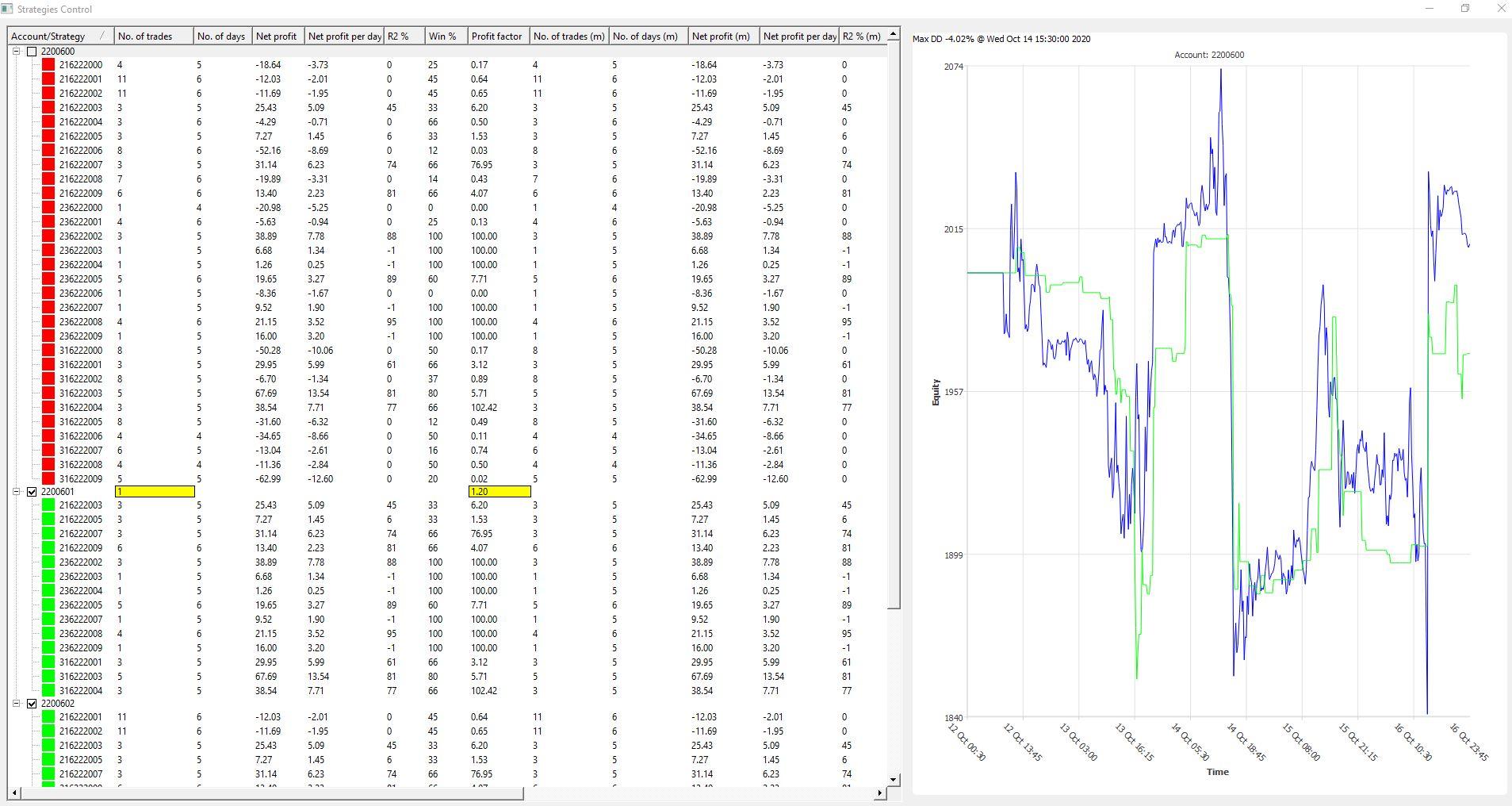
Sideways, which is good for the demo results.
October 18, 2020 at 4:12 am #63466ParticipantTest 2:
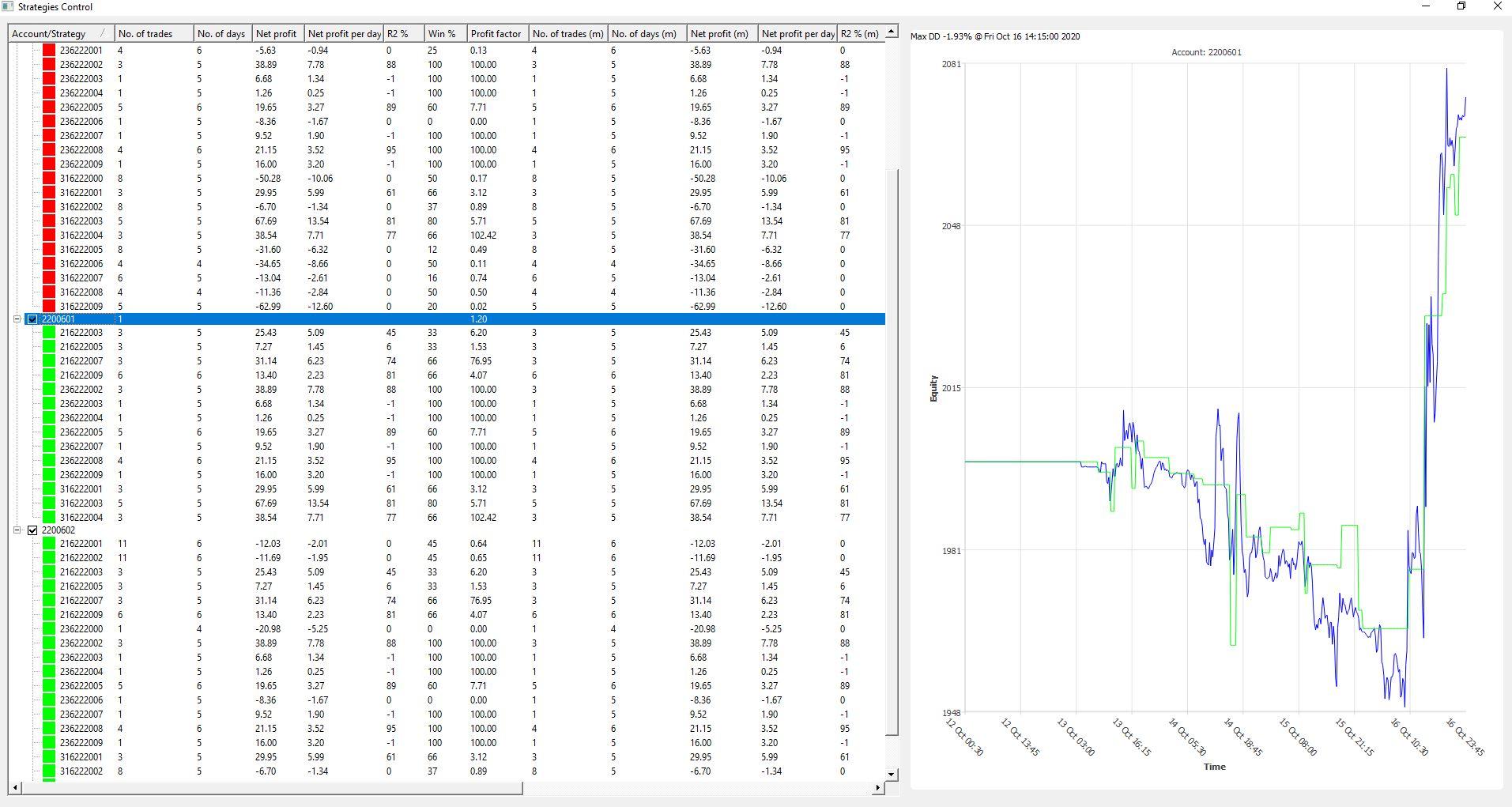
Was heading in the wrong direction and the market was very favourable in the fast session. I am not reading to much into the gains at this stage as it was just one good session. See what happens next week.
October 18, 2020 at 4:24 am #63467ParticipantTest 3:
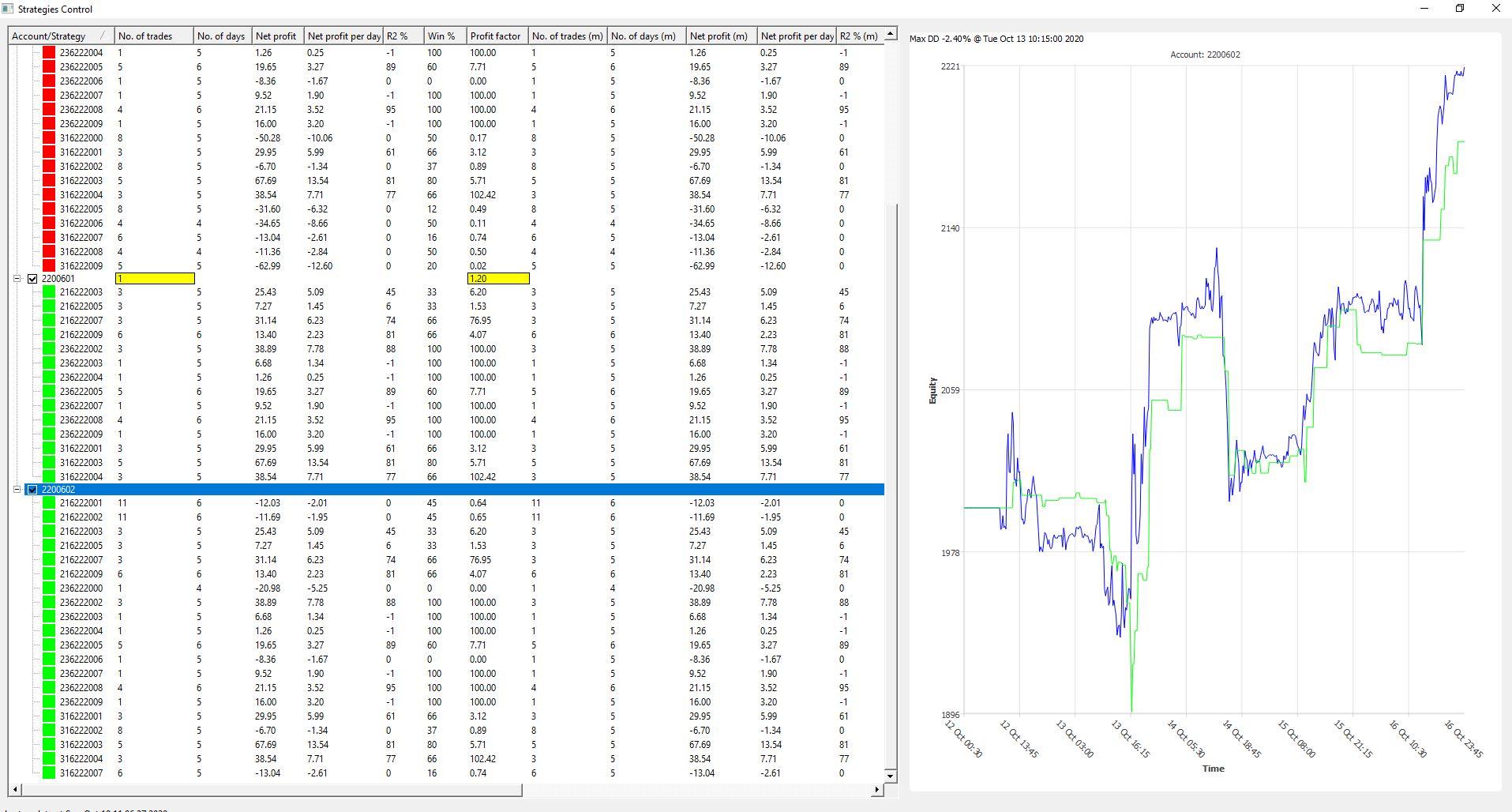
This is more what I am looking for…. Nice consistent gains. Another thing I am just starting to focus on is how well a Test handles things when the market moves against your positions. You can see in the demo that that big drop midweek was handled well by test 3 with a loss only about half the size of the demo. This is exactly what I am hoping to see….
You can see test 3 is now only running 20 of the 30 strategies that the demo is running. So 10 have been filtered out as not performing at this stage. Test 2 the stricter filtering has even less.
So for me finding the right filtering balance is very important. What I have learnt over the last few months is that light filtering works better then heavy filtering. If I try to remove too many strategies with strict criteria I don’t get as good results….
Light filtering appears to give the strategies enough room to prove themselves without getting taken out too early…
Any way these are just my ideas so please don’t take them as anything more than that….and test and prove your own systems….
October 18, 2020 at 4:33 am #63468ParticipantThis is the result from the first week of IIan’s Weekly Robots Course. (I’m hoping it is OK to post these results….. Let me know if not……)
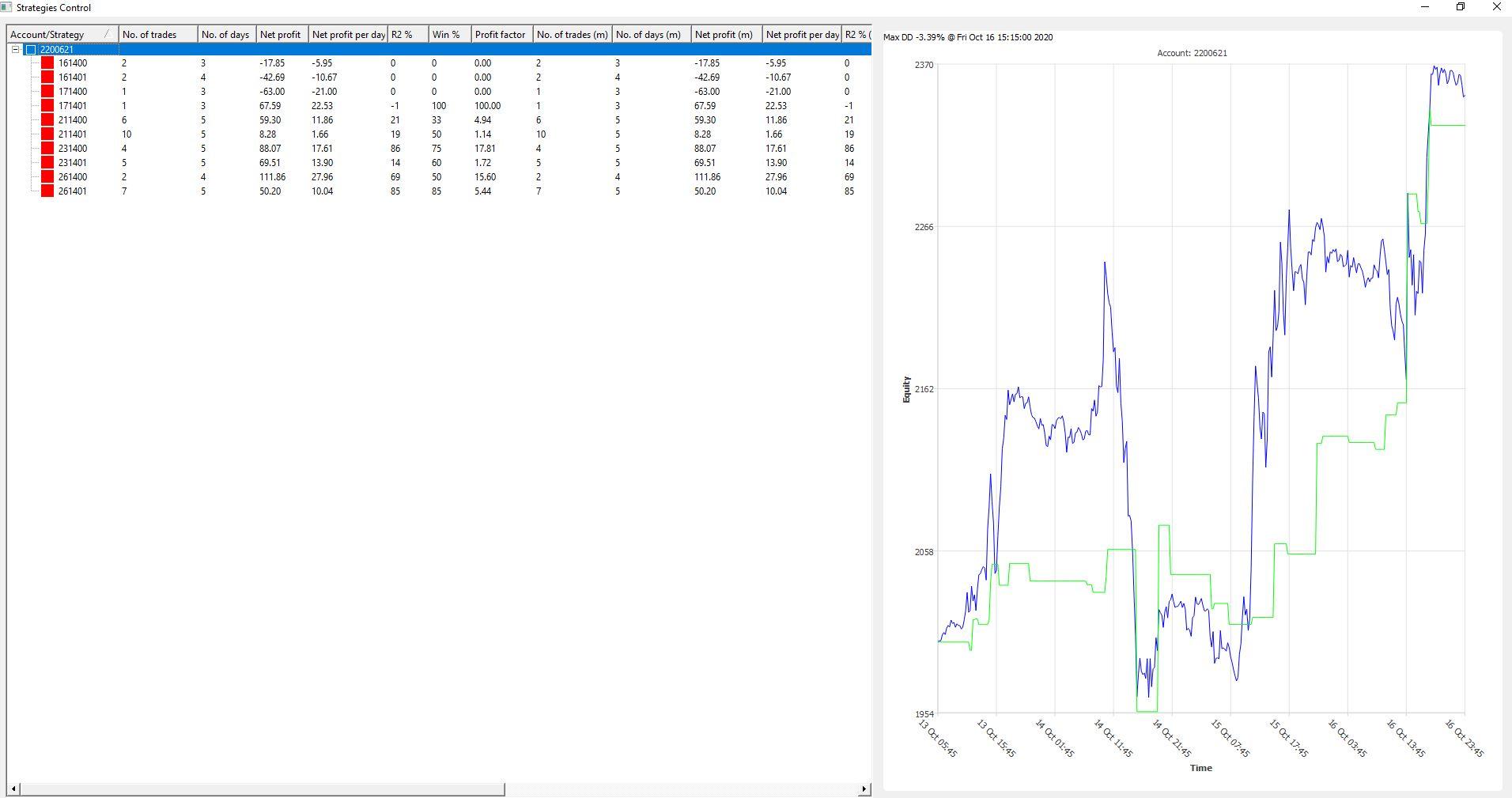
There is no filtering applied to these strats as they are already filtered for the week before installed. So they are simply left to run for the week as is. I definitely like this approach and have started running some demo’s looking to set up a similar system myself…..
But as you can see, a very successful week……
October 18, 2020 at 8:58 am #63470ParticipantHey Richard,
Great! How often do you filter, and move the EAs from demo to “live”?
Ilan
October 18, 2020 at 9:42 am #63471ParticipantOn Petko’s top 30 above it is set to live. The tick in the tick box next to the account number means that the filter is applied automatically and is live. So as trades close in the demo, the filter fields on the app are updated instantly. If those closed trades mean the strategy now meets the filter criteria that I set, then that magic number will be sent to the live account and held there. The next time the strategy opens / closes on the demo it will be auto copied to the live. Same as if a recently closed trade puts the strategy below the filter criteria the magic number will be removed from the live account. This way everything happens automatically and in real time…
I can also momentarily check the tick box and then untick it. This will send the filtered magic numbers to the live account but because it is then unticked the magic numbers will stay the same and not update as described above. This is what I am thinking I will do with my new demos when they have run for 2 weeks to emulate what you are doing. So i will set weekly and monthly to 1.4 PF, min of 3 trades and each week send the filtered magic numbers to the live. This will update the Live account. If any of the strats are the same it should just keep those running, remove any that no longer meet the criteria and then start opening in sync with the demo. The only issue I see with this is any strats that are already running on demo won’t start straight away on the live. I will have to wait for the next time they open on demo before they are copied to live. Anyway I will run some side by side tests with my system automatically running and manually placing them as you currently do and see what the results are….. Hope that makes sense……
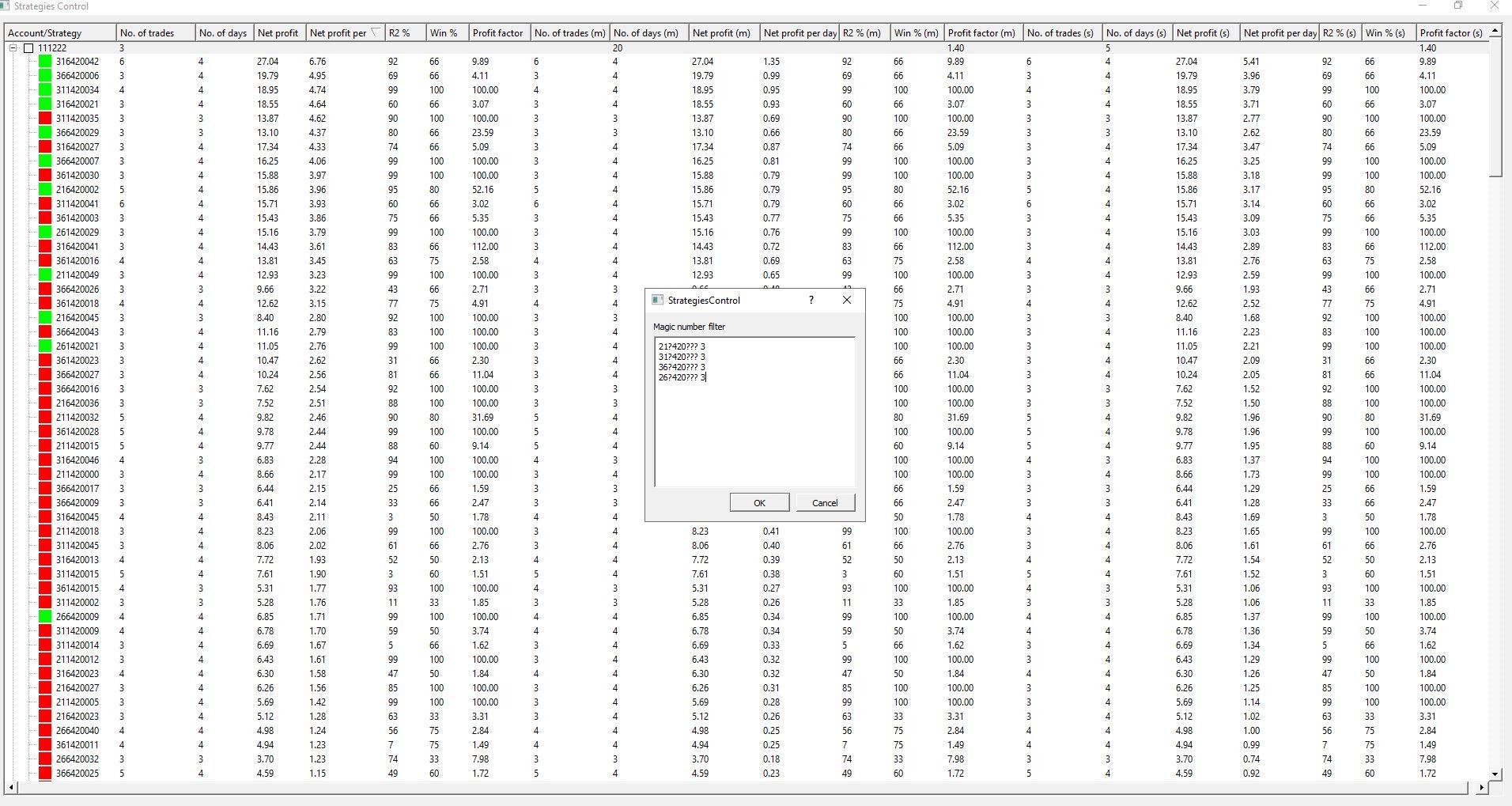
October 18, 2020 at 9:56 am #63472ParticipantSo this is how I would set up to trade what you do.
Minimum 3 trades. So you can see only strats with more than 3 trades are displayed. Then 20 days and 5 days set to 1.4PF, My system only reads trading days so this is 4 weeks and 1 week.
As you can see these strats were only started a few days ago so not ready yet but the system will automatically capture the last 5 days and 20 days and calculate the PF etc. Those that meet the criteria will stay displayed.
So that i send an even number of strats from each of the 4 currency pairs being traded I have also selected that only the top 3 of each currency are to be sent to live. (See pop up box) You can see this by the green boxes next to the strats. Again if a recently closed demo trade is better then 1 of the green strats then it will push it out of its spot and replace it……
 October 20, 2020 at 5:01 pm #63765
Eddie
ParticipantHi Richard
You’ve pot a hell of a lot of work into this project.
I really, really hope it works out well for you.
Keep up the gret work!
Best Regards
Eddie
PS Thanks for sharing.
February 13, 2021 at 5:00 pm #76940riuzk
ParticipantHey Richard,
Awesome project you have ongoing.
Any update on regarding the progress? Have you been trying to testing this out with an live account?
Thanks.
-
AuthorPosts
- You must be logged in to reply to this topic.