
Community Forums › Forums › Ready-to-use Robots › Prop Firm Robots › Prop Firm Robots: General questions
Tagged: "prop EAs unique", #Propfirmrobots #Propfirm, #rawfeed, App success, BTC robot, challenge, Challenges, daily stop, EA Manual, EA Trading academy, Failing challenge, FTMO 6.0, FTMO Robot, ftmo robot passed challenges update, FTMO ROBOTS, FTMORobot, funded accounts, Performance Issues, Prop Firm Live Trading, Prop Firm Robots, Prop Firm Robots 100k challenge, prop firm robots app, Prop Firm Robots Parameters, Settings, Suggest me a EA for all type of prop firms, telegram, Trial test with no result, USDJPY EAs
- This topic has 1,069 replies, 228 voices, and was last updated 3 weeks, 6 days ago by
Guenther.
-
AuthorPosts
-
July 8, 2024 at 6:07 pm #268921
Shekeb Khatibi
ParticipantDear Nikos,
I need assistance with an issue I’m facing with your trading bots on MetaTrader 5. After installing a new EA, it doesn’t open any positions for several hours. Eventually, it starts trading, but by then, new EAs are released on your website, requiring replacement. This cycle results in extended inactivity and no trading profits.Details:MT5 setup with your EAsVPS latency ~2ms to brokerEAs inactive for several hours post-installation
July 10, 2024 at 11:29 am #269234Marin Stoyanov
KeymasterHi, the results might be slightly different with different prop firms as they all use different quotes. In general, we haven’t seen any significant differences. In case you run a backtest, use Open prices only for the model.
July 10, 2024 at 11:31 am #269235KeymasterHi, some of the EAs from the Prop Firm Robots app use fixed SL and other use trailing SL. It would depend on the particular strategy.
July 10, 2024 at 11:43 am #269237KeymasterHi Shekeb, this isn’t a common behavior. Are you using the default settings, e.g. lots, protections, etc.?
Below you can see a screenshot from a challenge I’m currently running on my own. I added a new EA at midnight and it opened a position in less than one hour.

Do you see any warnings or error messages in the Experts and Journal tabs in your MT platform?
July 10, 2024 at 1:43 pm #269258ParticipantDear Marin,
I always use three top-performing robots, but unfortunately, after several hours of switching, only one of the robots becomes active and takes positions. I am using the main settings of the robots without making any additional changes.
I didn’t get any errors and in journal I didn’t see it.
July 10, 2024 at 2:19 pm #269267ParticipantDear Marin,
here is the journal log for EAs:
2024.07.10 07:12:00.545 Experts expert Prop Firm Robot 25k Medium EURJPY M15 1344481061 (EURJPY,M15) loaded successfully
2024.07.10 07:12:00.605 Experts expert Prop Firm Robot 25k Medium USDJPY M15 2013751115 (USDJPY,M15) loaded successfully
2024.07.10 07:12:00.771 Experts expert Prop Firm Robot 25k Medium XAGUSD M15 57633752 (XAGUSD,M15) loaded successfully2024.07.10 07:12:01.860 Network ‘77562683’: trading has been enabled – hedging mode
July 12, 2024 at 2:18 pm #269846KeymasterThere doesn’t seem to be anything wrong in the logs that you shared. You just need to wait for the EAs to receive confirmations from the underlying indicators to open trades.
July 12, 2024 at 3:03 pm #269855ParticipantDear Marin,
Ok thanks for replying.
July 14, 2024 at 8:58 pm #270252Michael Jonsson
ParticipantHi,
Where can I find the manual for the EA that describe all the settings ?
July 15, 2024 at 12:22 pm #270365NIKOS KYRIAKOU
MemberHey Michael,
We are currently working on the manual which will explains all about the settings of the EAs!
Kind Regards,
NikosJuly 16, 2024 at 3:51 pm #270561KeymasterHi guys,
I noticed that the top 3 weekly and top 5 weekly robots of the prop firm robots app tracking has been removed from the results of funded accounts table on your website. There was a 8 percent drawdown in the top 3 weekly the last I checked. Were these removed because of performance reasons?
Thanks
Kush.
July 16, 2024 at 4:12 pm #270566Keymasterhttps://platform.algotradingspace.com/funded-accounts/ this is the link
July 18, 2024 at 10:58 am #270884Craig
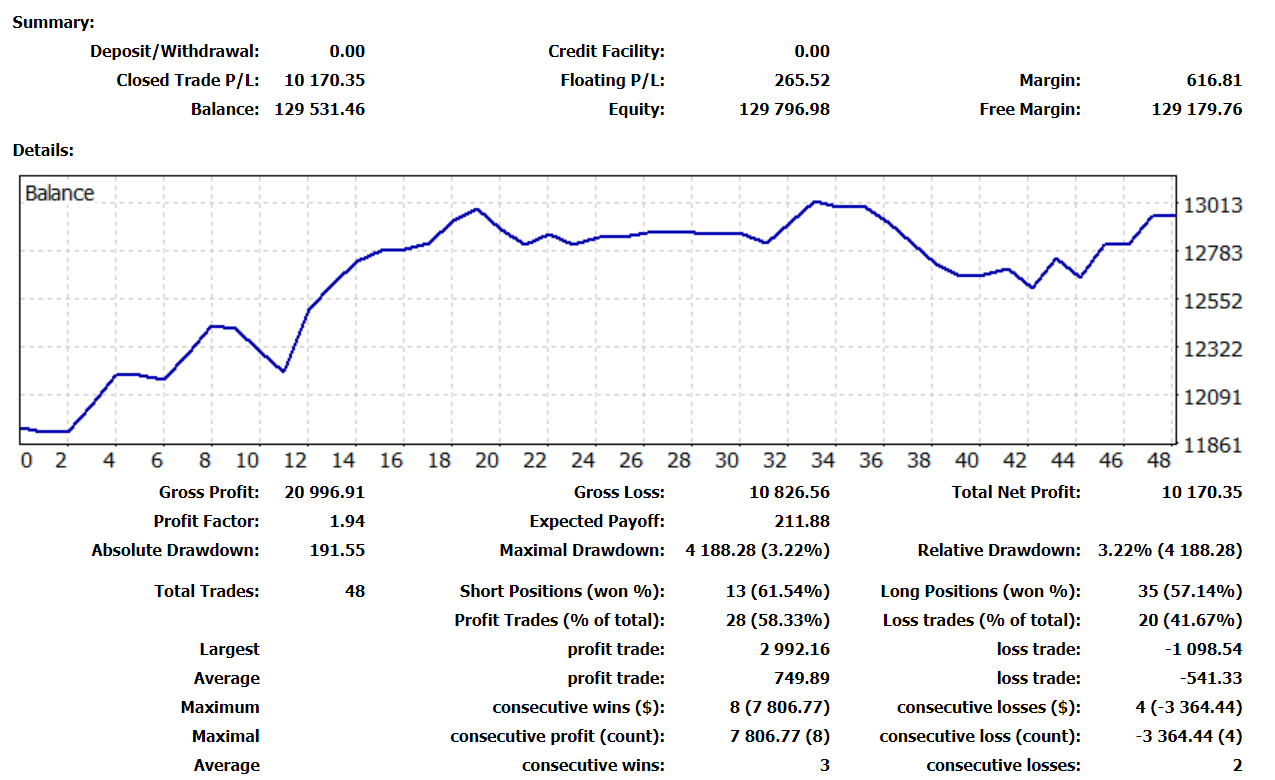
MemberLittle Update, After hitting 10% I have kept the process going.
It has had a bit of a flat spot and back to 10% gain but main thing for me is Daily DD not been touched and the balance has recovered. Lets see what the next week hold… roll on 20%
 July 18, 2024 at 1:50 pm #270945Member
Hey Craig,
Thank you for sharing your results and we are happy to know that our robots are doing well!
Keep updating us with the performance and results!
Thank you!
Kind Regards,
NikosJuly 19, 2024 at 2:50 pm #271314Keymaster -
AuthorPosts
- You must be logged in to reply to this topic.