
Community Forums › Forums › Ready-to-use Robots › Prop Firm Robots › Prop Firm Robots: General questions
Tagged: "prop EAs unique", #Propfirmrobots #Propfirm, #rawfeed, App success, BTC robot, challenge, Challenges, daily stop, EA Manual, EA Trading academy, Failing challenge, FTMO 6.0, FTMO Robot, ftmo robot passed challenges update, FTMO ROBOTS, FTMORobot, funded accounts, Performance Issues, Prop Firm Live Trading, Prop Firm Robots, Prop Firm Robots 100k challenge, prop firm robots app, Prop Firm Robots Parameters, Settings, Suggest me a EA for all type of prop firms, telegram, Trial test with no result, USDJPY EAs
- This topic has 1,069 replies, 228 voices, and was last updated 3 weeks, 6 days ago by
Guenther.
-
AuthorPosts
-
March 17, 2024 at 12:39 am #241979
Alan Northam
ParticipantHi Skeltor0906,
I didn’t like the gold investor because when I reviewed the videos by Petko I saw it had a stagnation period of about one year.
Alan,
March 18, 2024 at 9:38 am #242173Joseph Yong
ParticipantHi Guys,
I am running Ftmo APP on a small challenge, but notice the EA has stopped trading.
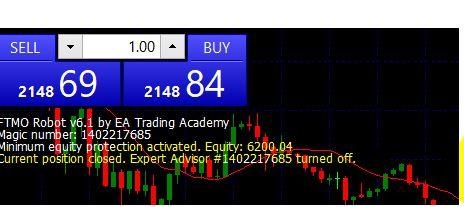
It says that the EA is turned off but the EA is on, but trading has stopped since 05/03/2024.
Has the Prop turned off my EA?
Any advice?
March 18, 2024 at 11:32 am #242188ParticipantHi Joseph,
The robot stopped trading because the Minimum Equity Protection at 6200 has been activated by the price on the chart has moved down to this price level. This Minimum Equity Protection keeps your challenge from failing and you losing your account.
Alan,
March 19, 2024 at 11:39 am #242382ParticipantHi Alan,
How do I change the setting to keep the EA trading to reach my profit target $6,650 without losing the Equity produced?
I need your help to get 3 set file from a youtube video produced by Petko on Percept trader to:
Perceptrader AI verified MyFxBook records:
https://www.myfxbook.com/members/Misc…
https://www.myfxbook.com/members/Misc…
https://www.myfxbook.com/members/Misc…
Hope you can help me out as well
Thank you again.
Joseph
March 19, 2024 at 11:43 am #242389ParticipantHi Joseph,
I am not familiar with Preceptrader AI but I will try to help. The links you provided only give me error message as I do not have access to that account.
What was the beginning account balance?
What is the daily loss limit?
What is maximum loss limit?
What is price target?Alan,
March 19, 2024 at 3:22 pm #242426Skeltor0906
ParticipantThe EA still hasn’t set a trade for me, it’s been running since last Thursday. Maybe I installed something wrong. I installed AU 6.0 and Xauusd 6.0/6.1
March 19, 2024 at 6:00 pm #242458ParticipantHi Skeltor0906,
I haven’t had much success picking the top 1 to top 3 from the Prop Firm Robots W1 or M1 settings. So I changed the way I select the robots. I set the Prop Firm Robots settings to Y5 and download and install all 14 robots in a Challenge. I then set the lot size to 0.01 for each of the 14 robots. This way when they trade they will not change the account balance significantly. I then let them all trade for 1 week. I then find the one or two robots that have traded during the week. I then set the lot size for these robots back to their normal value they had when downloaded. This way you let the market pick the robots that are performing well in the current market environment instead of you picking them. This will probably work better for you!
Alan,
March 19, 2024 at 9:14 pm #242489ParticipantHi Alan
This is your current data requested.
What was the beginning account balance?$6000
What is the daily loss limit?$240/4%
What is maximum loss limit?$5640
What is price target?$6600Thank you for your quick response
Joseph
March 20, 2024 at 12:52 am #242537ParticipantHi Joseph,
Just put those numbers into your robot properties and the robot should start working.
Alan,
March 20, 2024 at 11:26 am #242571ParticipantHI Alan,
This is some images from my trading account. As you can see from the image trading stopped on the 05/03/2024. No new trade has been taken by the FTMO APP.

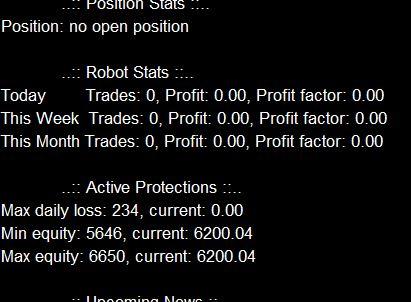
As you can see Alan no trades have been taken.
Do you have any solution to resolve this issue?
Thanks in advance
Joseph
March 20, 2024 at 11:29 am #242589ParticipantHi Joseph,
It looks like you have things setup correctly and as long as the MT4/MT5 has a smiley face or a blue hat in the upper right corner of the chart it should be placing trades. Can you do a backtest with the Strategy Tester to see how often trades are being taken?
Alan,
March 28, 2024 at 12:42 am #244838Gent Gashi
ParticipantShould I stop the position that the robot entered or does it stop itself (the position has been active for 24 hours)
March 28, 2024 at 8:49 am #244888Matt
ParticipantHi Gent,
The EA should have placed a TP and SL on for the trade, meaning you could let it ride to conclusion, until either one of those is hit, or close it whenever you like.
Your trading style and risk profile is up to you.Does that help?
Warmly
MattMarch 29, 2024 at 1:07 pm #245160ParticipantI saw some comments that EA passed their stages but then FTMO refused their payout, has this happend to you?
March 30, 2024 at 3:00 pm #245399Marin Stoyanov
KeymasterHello Gent,
Yes, this did happen to Petko, and he has also uploaded a video about it. You can watch it here:
Kind Regards,
Nikos -
AuthorPosts
- You must be logged in to reply to this topic.