
Community Forums › Forums › Ready-to-use Robots › Prop Firm Robots › Prop Firm Robots: General questions
Tagged: "prop EAs unique", #Propfirmrobots #Propfirm, #rawfeed, App success, BTC robot, challenge, Challenges, daily stop, EA Manual, EA Trading academy, Failing challenge, FTMO 6.0, FTMO Robot, ftmo robot passed challenges update, FTMO ROBOTS, FTMORobot, funded accounts, Performance Issues, Prop Firm Live Trading, Prop Firm Robots, Prop Firm Robots 100k challenge, prop firm robots app, Prop Firm Robots Parameters, Settings, Suggest me a EA for all type of prop firms, telegram, Trial test with no result, USDJPY EAs
- This topic has 1,069 replies, 228 voices, and was last updated 3 weeks, 6 days ago by
Guenther.
-
AuthorPosts
-
January 19, 2024 at 10:46 pm #228198
paul4x
ParticipantMaybe it depends on when thier week started? I am showing same results as you for usdCad, so confused as to why 4 trades showing also
January 20, 2024 at 9:15 am #228308Sammy Trader
MemberIt’s not strictly meant for FTMO prop firm. Those 1 week results are for general, but the only way to find out is use those Top 3 EAs on Monday for FTMO Demo and see how close they are matching. That’s what my plan is, I am with FTMO demo too.
January 20, 2024 at 12:56 pm #228352gabiscriba
ParticipantI have a confusion related to the last feature on the FTMO App.
I run all robots with 0.01 lotsize, both on an FTMO demo account and on a challenge account at another prop firm.
Referring strictly to the FTMO demo account, from what I have seen, I think that the trades that are running and have not yet closed also appear in the trade history. I selected D1 and in the App history the following appear: USDCAD – 1 trade – running, AUDUSD – 1 trade – running and XAUUSD – 2 trades – 1 closed and 1 running. At least this is the status of trades on my FTMO demo account.
But an extra trade is running on my account, which does not appear in D1 of the app history. GBPAUD sell, opened last night at 19.30.00, which is running at a loss at the moment.
My question is if the situation is the same for those of you who use FTMO account.January 20, 2024 at 2:10 pm #228368Alan Northam
ParticipantHi Rudy,
This first table shows the open trades from MT4 for the week of 01/14/2024 – 01/20/2024. Notice there is 1 open trade for USDCAD.

This second table shows the closed trades in the History tab of MT4. Notice there are 3 closed trades for USDCAD.

The FTMO app closes all open trades and adds them to the closed trades. This is why the FTMO app shows 4 trades.
Alan,
January 20, 2024 at 3:47 pm #228392Petko Aleksandrov
ParticipantThe FTMO app closes the opened trades just like the MetaTrader backtester does.
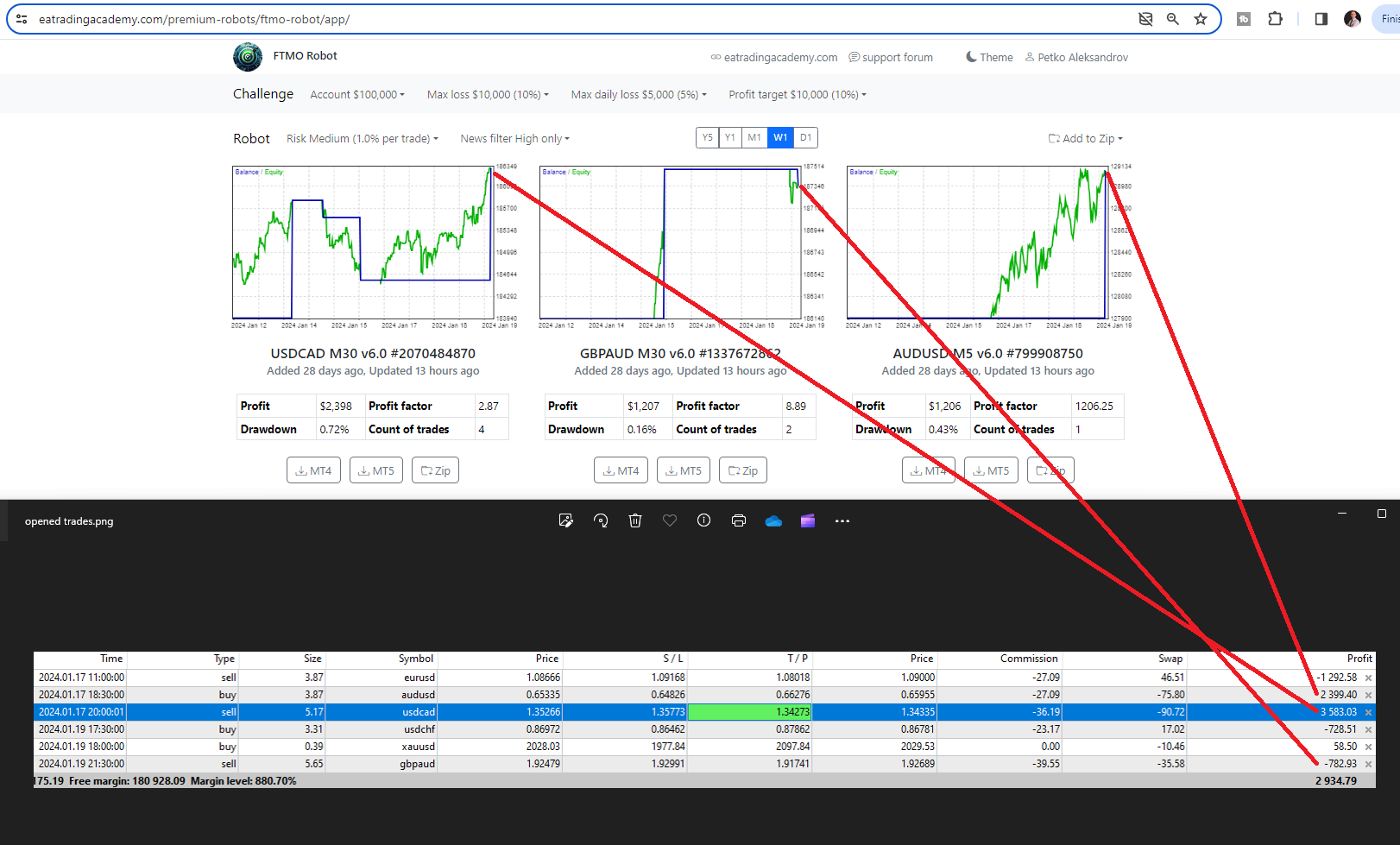
For example, currently, there are opened trades in my account, but those show as closed on the FTMO App.
This is why you will usually see more count of trades in the app compared to what you see in the account history.
But if you compare the opened trades, you will see they match.
January 20, 2024 at 4:56 pm #228406ParticipantThanks Petko, everything seems to be clear now.
I was misled by the fact that no trade appears on D1 for GBPAUD and I have one open. But in W1 two trades appear, which is correct.By the way, I run everything on VPS.
January 20, 2024 at 5:11 pm #228411ParticipantCan’t we change that then? So it keeps everyone results the same and not give a false stats?
January 20, 2024 at 5:13 pm #228412ParticipantIt seems that everyone using FTMO is getting the same results.
January 21, 2024 at 6:50 am #228528Trader 27
ParticipantHello, if the magic number used for the EA is same in both demo and real account, will it cause any functionality error?
January 21, 2024 at 10:25 am #228545ParticipantHi Trader,
Since the demo account and the real account are separate accounts it will not cause any problems if the magic numbers are the same in both accounts.
Alan,
January 21, 2024 at 11:52 am #228554ParticipantThanks for the info Alan. Cheers.
January 21, 2024 at 12:54 pm #228567Danny Pyttel
ParticipantHey Leute,
greift Ihr in die Arbeit des Roboters ein oder lasst ihr dem Roboter uneingeschränkt seine Arbeit machen.
January 21, 2024 at 1:12 pm #228572ParticipantHi Danny,
Can you please use English so everyone can understand your questions/comments?
Alan,
January 21, 2024 at 1:33 pm #228578ParticipantDo you intervene in the robot’s work or do you let the robot do its job without restrictions?
January 21, 2024 at 3:00 pm #228596ParticipantHi Danny,
The reason for using EAs/robots instead of manually trading the markets is to let the EAs do the trading for you. The EAs created at eatradingacademy are the result of backtesting 1000s of strategies to find the most profitable ones. As a result, it is not necessary to intervene in the trading of the EAs. However, some traders do intervene by closing trades early. Every trader has the right to trade the EAs as they seem fit. However, by closing the trades early limits the potential profit of the trade. Over the long, term there is a higher probability for higher profits by not intervening in the operation of the EAs.
Alan,
-
AuthorPosts
- You must be logged in to reply to this topic.