
Community Forums › Forums › Ready-to-use Robots › Prop Firm Robots › Prop Firm Robots: General questions
Tagged: "prop EAs unique", #Propfirmrobots #Propfirm, #rawfeed, App success, BTC robot, challenge, Challenges, daily stop, EA Manual, EA Trading academy, Failing challenge, FTMO 6.0, FTMO Robot, ftmo robot passed challenges update, FTMO ROBOTS, FTMORobot, funded accounts, Performance Issues, Prop Firm Live Trading, Prop Firm Robots, Prop Firm Robots 100k challenge, prop firm robots app, Prop Firm Robots Parameters, Settings, Suggest me a EA for all type of prop firms, telegram, Trial test with no result, USDJPY EAs
- This topic has 1,069 replies, 228 voices, and was last updated 3 weeks, 6 days ago by
Guenther.
-
AuthorPosts
-
December 18, 2023 at 8:31 pm #221369
Sammy Trader
MemberThanks, please keep us updated
December 19, 2023 at 11:20 pm #221549Trader 27
Participant<p style=”text-align: left;”>Thanks Alan, I appreciate the clarification and tips. Cheers.</p>
December 20, 2023 at 9:06 am #221658Petko Aleksandrov
ParticipantWEEK 3 – DEC – 2023
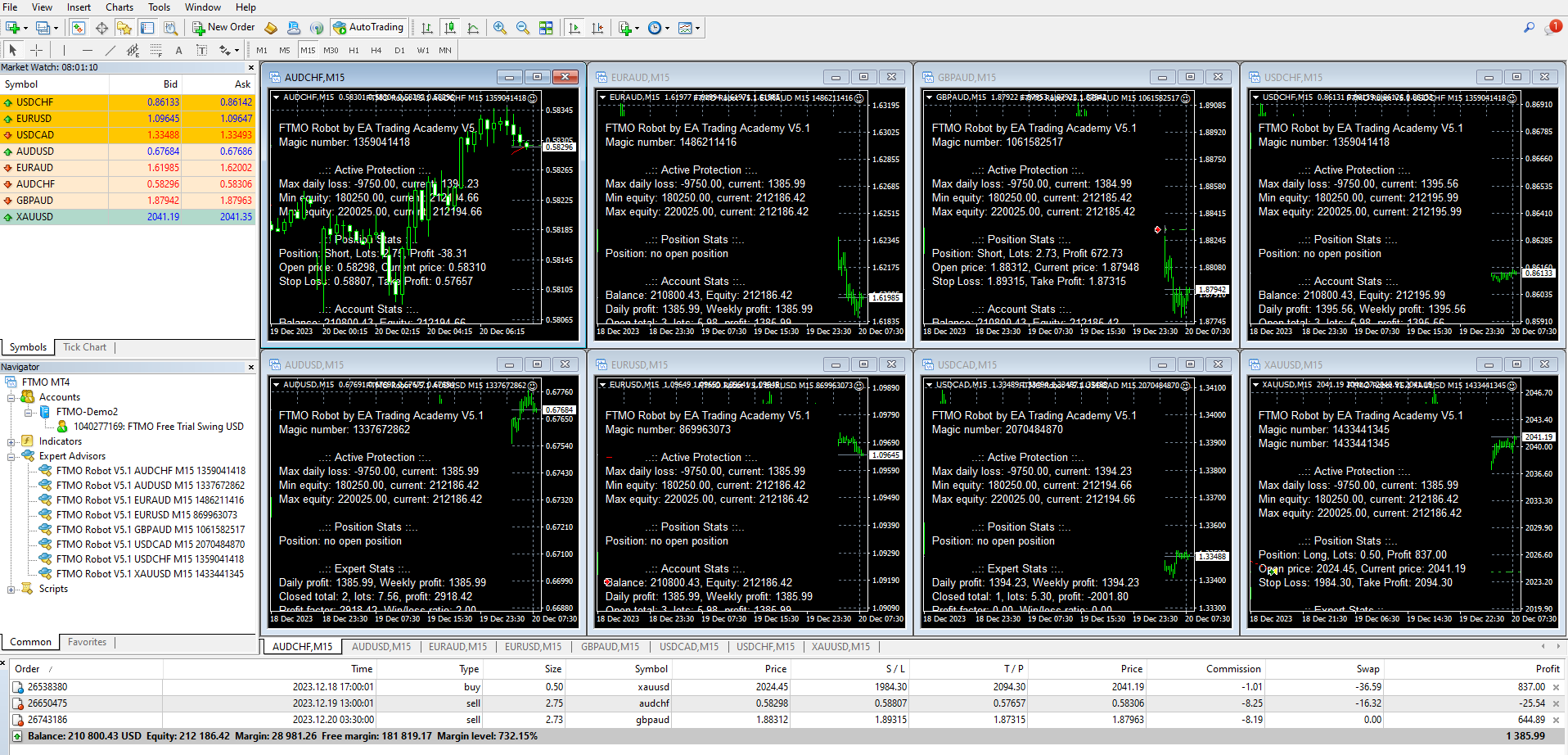
Here are the results I saw this morning:
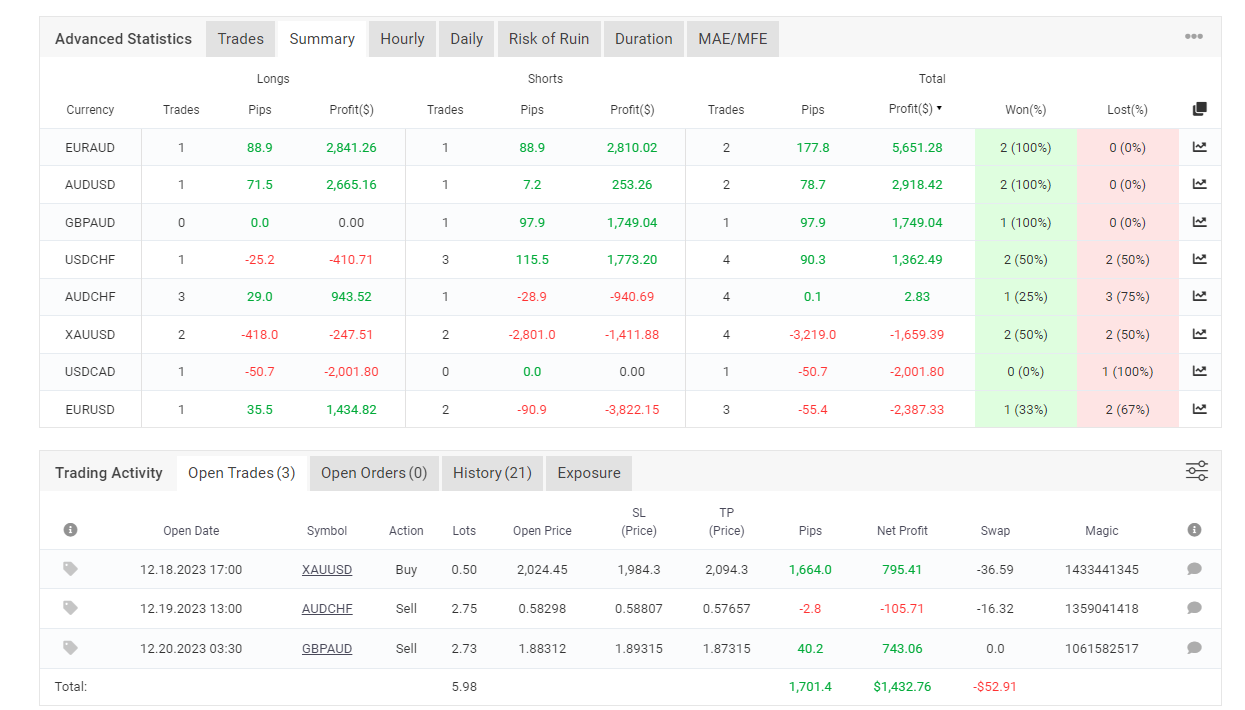
The trial account passed (it reached 5%):
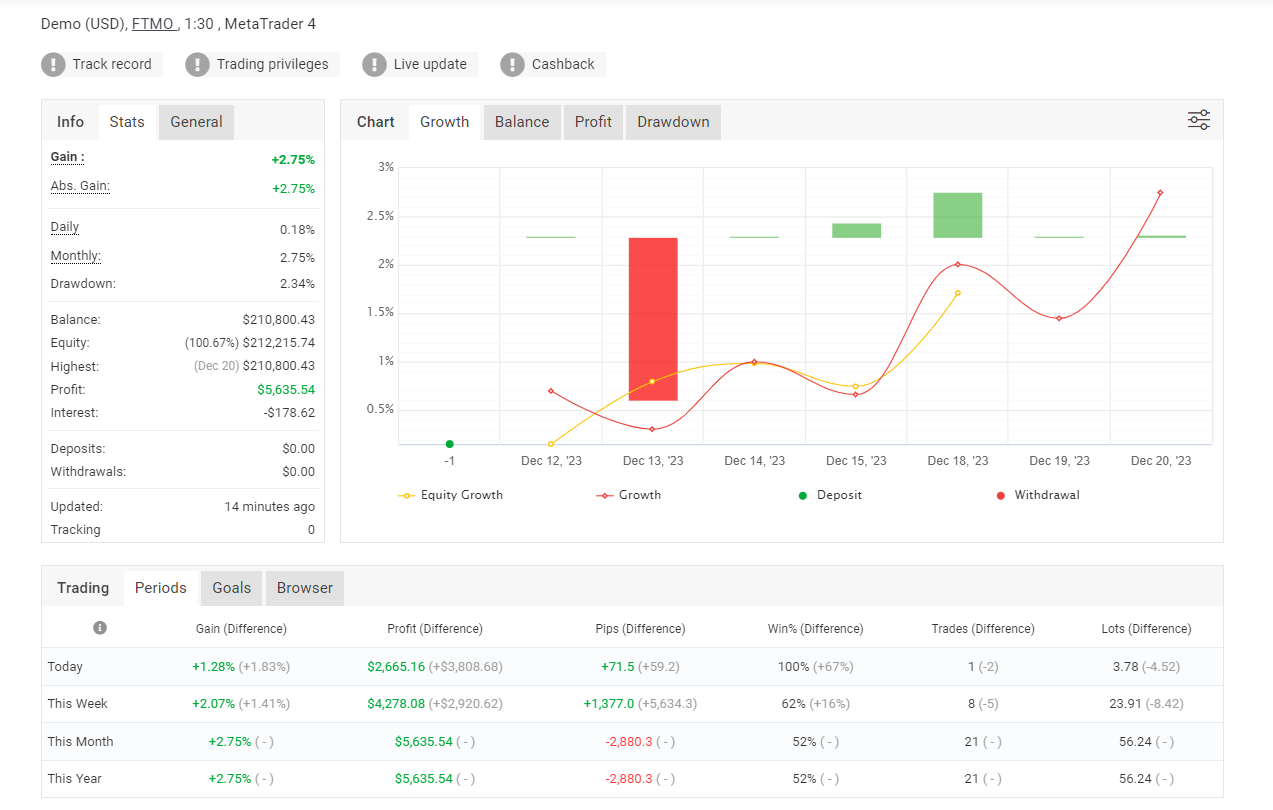
Here are the performances for the last 1 week:
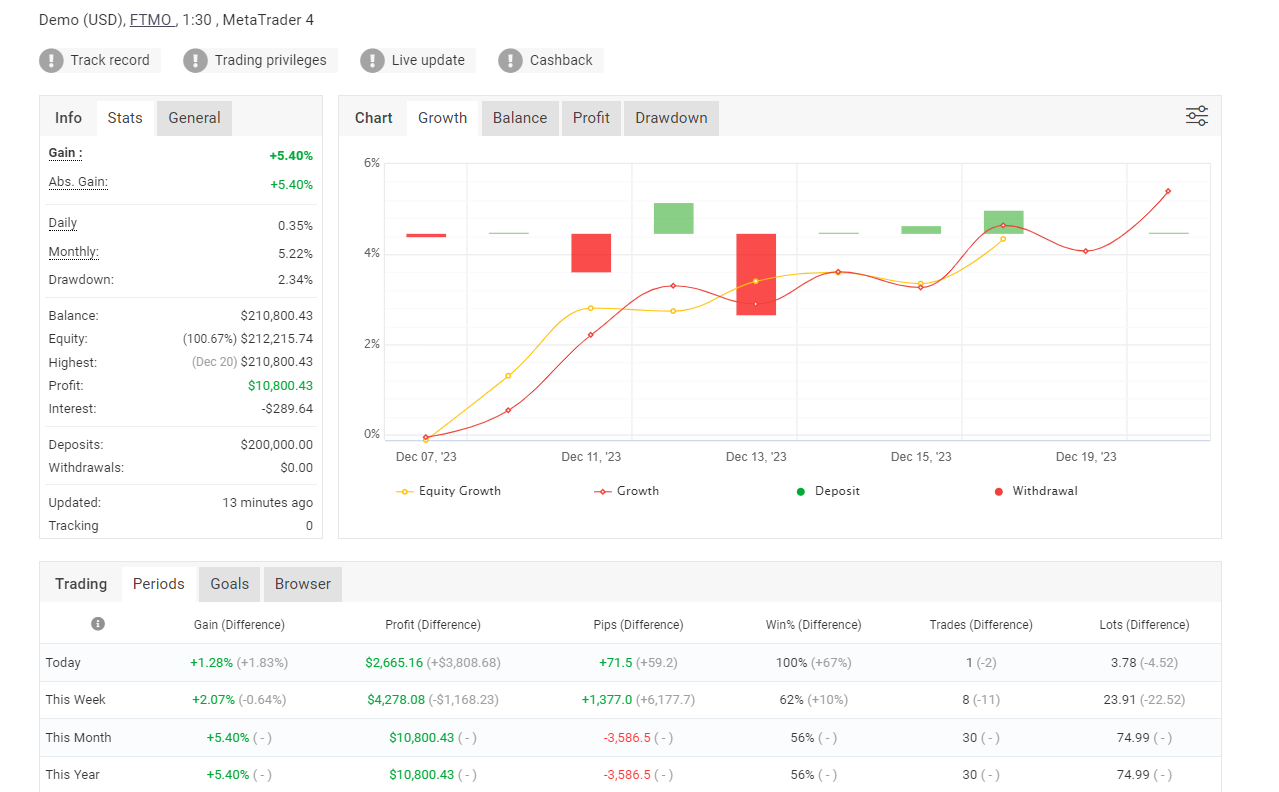
And here are the results for the last 2 weeks:
I would probably trade until the end of this week, and I will pause trading between the holidays (but that’s me).
I know many of you want us to provide the link to the testing account and save you the testing, but there are a few problems:
1. Once the trial passes, we must start a new account – we need one week to collect data in the new account. Traders who started in this period won’t have data to use.
2. It turns out that the results are different for the different prop firms. We tested the FTMO Robots on 5 different prop firms, and surprisingly, the prop firms offer very different quotes, which leads to different trades. This is why if you follow our FTMO Trial results but apply the best performers on Infinity, for example, you will not achieve optimal results.
3. Using myfxbook will always lead to some delay.
So what is the solution?
We are working on updating the FTMO Robots so the results will be displayed on the chart. This means that once you put the EAs on MetaTrader, it will start collecting the statistics.
We will also be able to select the period in days. For example, we will see the results for the last 1 week or any predefined period.
And this will be on the chart itself (where the stats are currently with V5.1).
But I can’t promise when this update will be ready because it requires much work.
However, the January update is ready! Which is huge! 🙂
Cheers,
Petko A
December 20, 2023 at 10:29 am #221676gabiscriba
ParticipantThat’s great!
December 20, 2023 at 1:12 pm #221700Alan Northam
ParticipantUPDATE ON MY FTMO STRATEGY V5.0
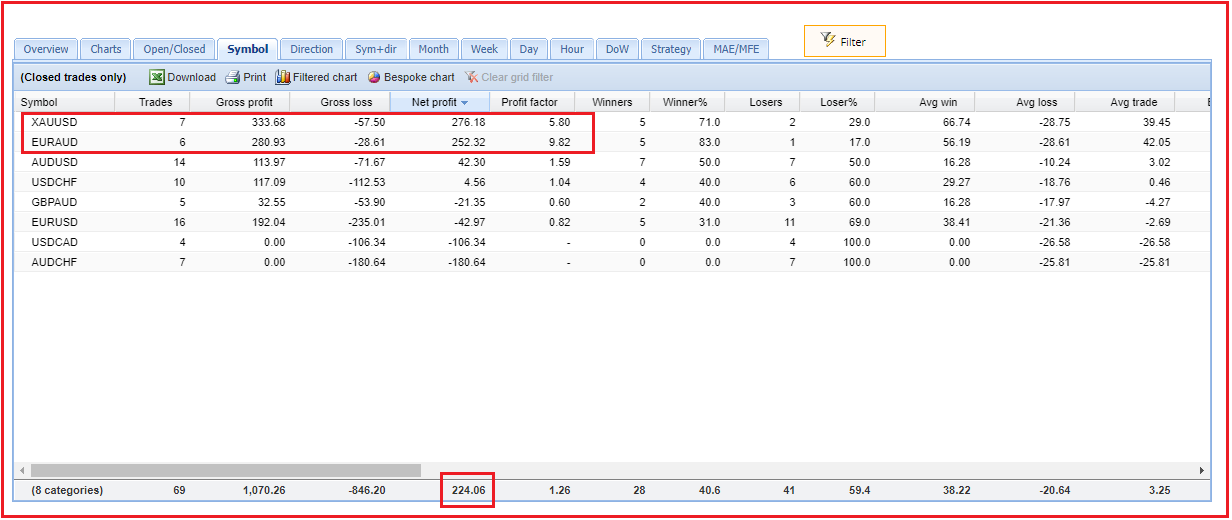
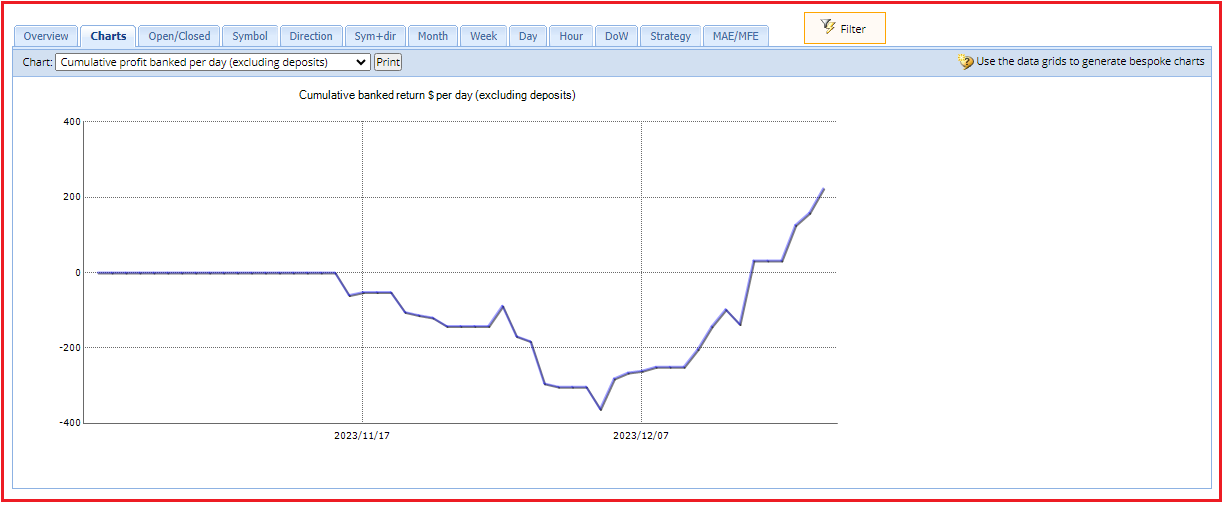
As of last Friday after the end of the trading week the FTMO V5.0 had a profit of $32 USD. The top 2 robots were XAUUSD and EURAUD as shown in the chart above. I then decided to double the lot size of each of these two robots from 1% of account balance each to 2%. This week is half over now so I decided to share my results so far this week. The top 2 robots remain the same and the account now has a profit of $224 USD. The following are my results:
Looking at the balance line it is still moving in an upward direction and has not started to show weakness. As a result, I expect to see this account continue to profit in the days ahead.
Alan,
December 20, 2023 at 9:37 pm #221756Robby Mesenberg
MemberHey Alan thanks for your help. Is there any way I can create 2 mt4 demo accounts with different was to test?
I mean one for v5 and one for 5.1. I need MT5 for live account.
Thank you for your time and your massive input to this forum. I think you’re helping many people without knowing.
December 20, 2023 at 10:00 pm #221763ParticipantHi Robby,
Thanks for the encouragement!
FTMO only allows one FREE FTMO demo account at a time for each trader.
If you are using your own broker you can open two demo accounts. Then install 2 different MT4 terminals. During the installation process you can give each MT4 terminal a unique name, like Demo V5 and Demo V5.1, so you can tell them apart.
Hope I have answered your question!
Alan,
December 20, 2023 at 10:23 pm #221766MemberHow do i install different Terminals? You mean Like from IG Broker and Capital.com Broker?
December 20, 2023 at 10:30 pm #221767ParticipantNo. For example you could open 2 demo accounts with the same Broker.
Alan,
December 20, 2023 at 10:37 pm #221768MemberYeah but how do i install the 2 on mt? I could Open them but then there are the Same chartwindows with the Same EA‘ for Both of the Accounts.
December 20, 2023 at 10:57 pm #221773ParticipantOpen two demo accounts named demo acct 1 and demo acct 2. Then install two separate MT4 terminals on your pc.
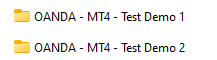
Then launch one MT4 Test Demo 1 and log into demo acct 1 using login name and pw and server name you got when you created demo acct 1. Now do the same for the other demo account.
Alan,
December 21, 2023 at 11:02 am #221845ParticipantThe FTMO Robot has passed another challenge! This time it was the Infinity Forex Funds 50k account.
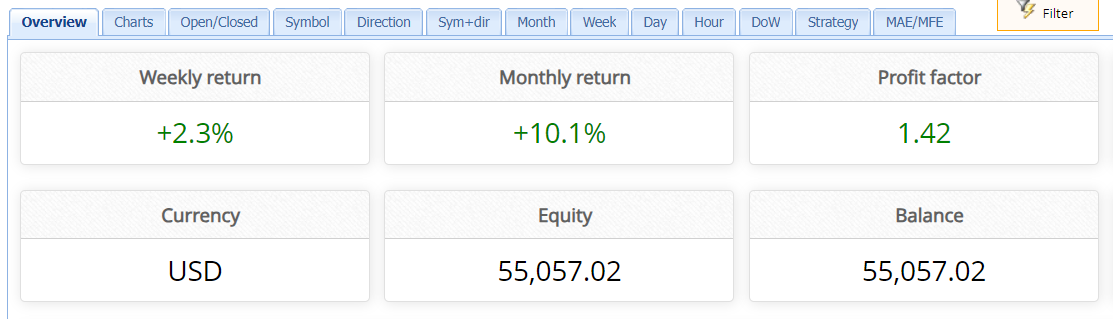
I used all the robots trading simultaneously with 1% (normal) risk per trade. Once the account reached 5% profit, I doubled the entry lot (keeping it at 5% max Daily Loss). This is a variation of the scaling-up system I teach in the FTMO Course.
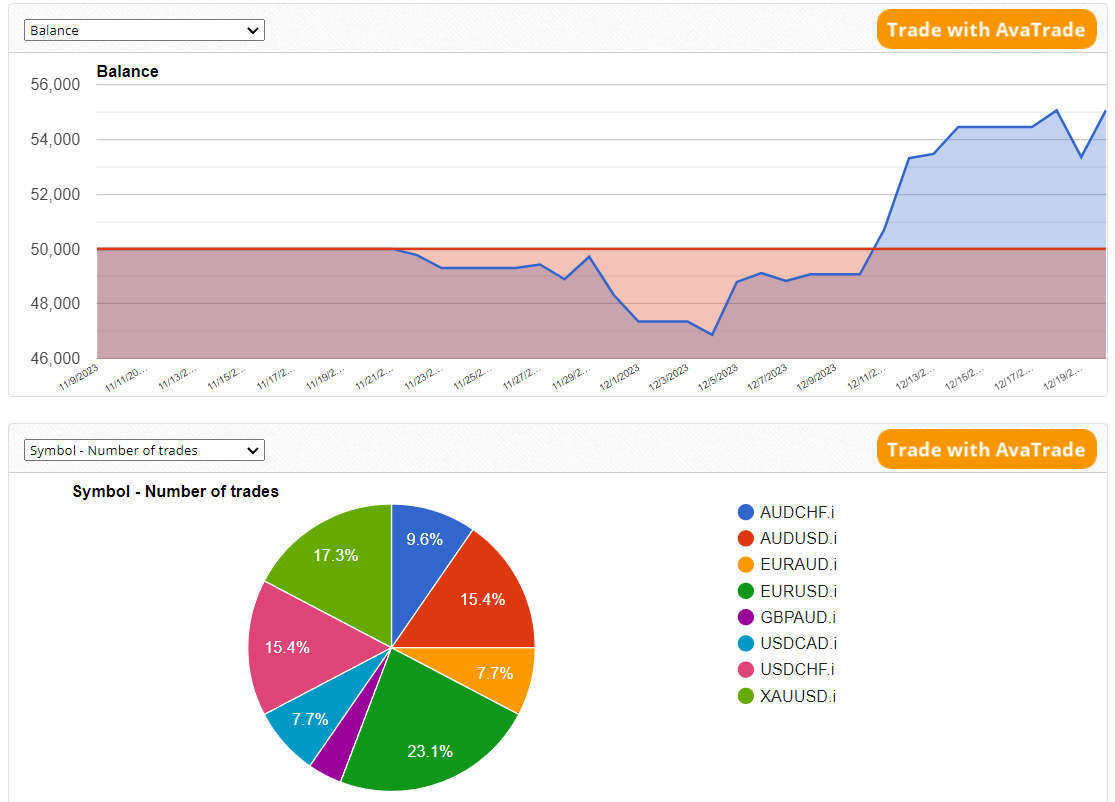
Once the equity reached $55,050, the trades were closed automatically using the integrated target protection settings in V5.1.
It took about 30 days for the FTMO Robots to pass the challenge. EURAUD and GOLD were the most profitable pairs. You can have a look at all of the stats here.
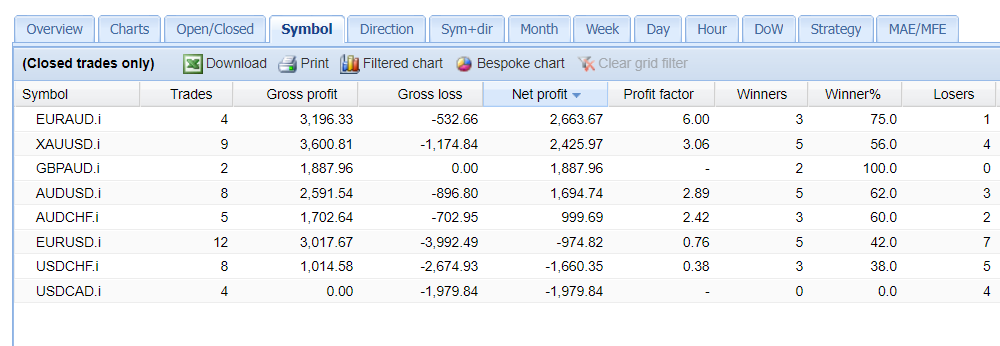
At the beginning of the challenge, I had the FTMO Robots V5.0, and then I replaced them with the Robots from V5.1 (that is why there are double magic numbers). I also doubled the lots according to the V5.1 values.
Scaling up works great for me! And I don’t find it as risky as the Martingale approach because we reinvest the profits in the account.
We plan to integrate the scaling-up method in the inputs of the EAs so that when one wants to double (any multiplier), the lots can do that automatically at a certain point.
In this example, it was just one one-time manual intervention but it would have been great to set this from the beginning:
– increase 2 x lots once the account reaches $52500 (5%).
We will work on that, and as soon as we develop it, we will add it as an option in the EAs.
 December 21, 2023 at 11:05 am #221847
Brian Pelton
ParticipantHi Alan,
I really like this approach to your challenge. I haven’t purchased the robots yet but plan to. My only concern is let’s say you’re testing on an Oanda MT4 demo for example and get your initial results after a few weeks. You then would take your top winners and place it on your prop firm challenge. I know for a fact your results would be very different, am I wrong?
So in this case for a prop firm that does not have a demo you could place all the robots on your challenge but set the risk very low, then after each week see if you have some clear winners and increase the lot size to equal 1% risk. Is this essentially what you’re doing?
December 21, 2023 at 11:36 am #221860ParticipantHi Brian,
Yes I see differences when I test on Oanda and trade the top performers on FTMO Challenge. So what I do is to place all robots in a challenge with small lot size. Then when I see top performers I increase the lot size to 1%.
Alan,
December 21, 2023 at 11:57 am #221863ParticipantThis is a brilliant idea. This will be the approach I take as well. Makes the most sense because even on an FTMO demo for example I’m almost certain it will be different when you actually take a challenge. Please keep us posted!
-
AuthorPosts
- You must be logged in to reply to this topic.