
Community Forums › Forums › Historical Data › Historical Data
Tagged: historical data, history data
- This topic has 17 replies, 8 voices, and was last updated 4 months, 3 weeks ago by
Samuel Jackson.
-
AuthorPosts
-
October 7, 2018 at 10:14 pm #6578
Roman
ParticipantGood afternoon Everybody,
I’m returning after a bit of a break from beating my head against the wall when it came to Historical Data. I recently changed my US broker and they have a quant service where they provide historical data. The problem is every time I open it in Excel both FSB nor EA studio can make use of it. Any tips on reformatting the cells to make this usable?
Gracias,
RomanOctober 8, 2018 at 9:53 am #6582Petko Aleksandrov
ParticipantHello Roman,
actually the FSB pro csv files could be opened in excel. So just try the other way around. Save the files in csv, and try to place them in FSB Pro.
If not working open one sheet of excel from your broker, and one sheet of excel with the file you get when you use the script for FSB Pro.
If there are differences try to eliminate them, and make the same files. Than you should be able to use this Historical data from your broker in FSB Pro.
October 12, 2018 at 3:00 am #6600ParticipantHi Petko,
Thank you I’ll try to see if I can get it to work!
October 12, 2018 at 10:07 am #6602ParticipantHey Roman, sure let me know if there is something more with the Historical data. Cheers
October 25, 2018 at 6:52 pm #6683ParticipantHi Roman,
I succeeded to download some data from the broker, but still not sure if I can use it.But for the moment, the easiest thing you can do is leave Meta Trader opened, and it collects the new Histroical data. Sometimes I download the hst files, to make sure I wont lose them.
When I create strategies, I just drop the scripts over the charts.
November 9, 2018 at 10:20 am #6812ParticipantRight, Andi. Not a bad idea to download the hst files from time to time on external drive.
I have been fighting with the Historical data from the broker for quite a long time, and still leaving the Meta Trader is the best method to collect proper Historical data.
May 5, 2020 at 2:39 pm #46961CuriousGeo
ParticipantHi all,
FXCM broker offers a free historical data downloader. There is plenty of data available (ie. approx 1000000 bars on M5) to download in .csv
Do you know any good software that converts .csv to .json?
(Petko) Do we download bid, ask or both prices for EA studio?
Best
Marek
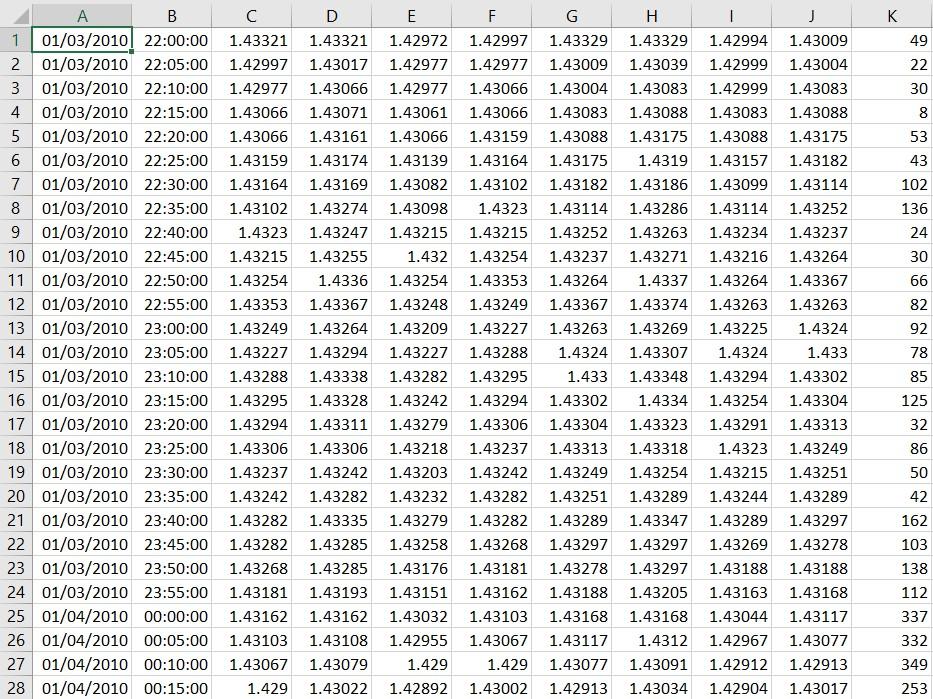
May 5, 2020 at 3:59 pm #46962ParticipantTo be more specific, what columns/data do I need to have so converted json is readable by EA studio?
Downloaded csv (Bid and Ask prices EURUSD M5) looks like the below
 May 9, 2020 at 2:27 pm #47462Participant
Hello Marek,
Honestly, I never used that data downloader, and I am not sure how accurate it is. Did you see the Free app that we have for Forex Historical data? it downloads in all formats.
I am not sure if you will be able to find such a tool to convert your data or at least I am not aware of such.
May 9, 2020 at 2:36 pm #47465ParticipantHi Petko
Thanks for your response.
Will stick with Dukascopy history data for now as it has been generating some good results for the last couple of weeks.
October 14, 2020 at 9:32 pm #63320emasammarketing
ParticipantHello Everyone,
I have insufficient data from Brokers, IG, and Oanda. Is the DukasCopy Data or Meta trader 4 data a better alternative? If not, please recommend a good data source.
Thanks,
Samuel
October 15, 2020 at 6:14 am #63321Ilan Vardy
ParticipantHi Samuel,
My advice would be to use either the Premium Data (DukasCopy) or Meta-trader Demo (JFD) data in EA Studio, if possible. If the asset you want to generate strategies with is not listed, then I would look at DukasCopy to export historical data from. From my experience, they have the most amount of bars. On most M15 time frames, for example, you should get about 65 000+ bars. Just remember to change the Symbol Settings to match the broker you’ll be trading with.
Here is a video explaining how you can do it:
Thanks,
Ilan
August 14, 2022 at 6:28 pm #121308Tanya Jay
ParticipantHello everyone!
Has anyone gotten different results from broker data and premium data?
I generated EAs using H1 broker data in the past 5 years (because I can get 5 years of data of H1, but only 1.5 years of M15). And then, I used Validator to run these EAs with the same exact acceptance criteria using premium data with my broker settings (add $7 commission fees, change timezone GMT+3).
Out of 204 collections:
Premium data = 89 (43.63 %) Passed validation
Broker data = 201 (98.53 %) Passed validationSide note:
– On data horizon, I used data start date 05/11/2017 and end date 05/11/2022
– Acceptance criteria: 20% OOS, PF 1.2, min trade 300
– I tested it without Monte Carlo
– My broker is IC markersWhy so much difference between premium data and my broker data? Anyone here experienced this?
Cheers,
TanyaAugust 15, 2022 at 12:46 am #121333Samuel Jackson
MemberHi Tanya,
As you had sent me you collection I was able to check this quickly for you. First of all I changed the dates to 11/05/2017 and 11/05/2022 (since 05/11/2022 is a few months into the future so I assumed a typo?).
I have run it using IC Broker data and Premium data including Monte Carlo and there are 121 strategies passing for premium data validation and 176 for IC broker data.
This is totally fine, it is likely that many only marginally passed the acceptance criteria for IC and only marginally failed for IC data. Also plenty could have been overfit to the data used to generate (IC?) and therefor aren’t performing as well on different broker data which is a good robustness test and best to lose those strategies anyway.
You can also simply load the full 204 collection into EA studio and open up each strategy individually and see how the chart looks when you change between the data sources and remove the ones that differ too much, should give similar results. Probably about an hours work for 204 strategies but a good exercise.
All is well, these results seem very reasonable to me. The broker data wont be hugely different but it can be different enough to get these results.
September 28, 2025 at 11:28 am #473185Stanislav P.
MemberHello,
I tried to export Historical Data : I selected my timezone, loaded the data and exported it. But in the file the hours are the same for all the timezones tested. The price chart is the same for different timezones selected too.
PS : when I change the timezone and the Maximum bars – the number of lines exported in the file changes, but not the time. So, it seams that the maximum bar selections in working, but not the timezone.
Could you check if there is a bug or if I’m doing something wrong ?
Stanislav
-
AuthorPosts
- You must be logged in to reply to this topic.