
Community Forums › Forums › EA Studio › Generator in EA Studio › Generator in EA Studio: Strategies
Tagged: Generating strategies, generator, Generator in EA Studio, reactor, Settings, spread, symbol settings
- This topic has 80 replies, 13 voices, and was last updated 1 year, 7 months ago by
[email protected].
-
AuthorPosts
-
February 22, 2017 at 8:04 pm #435890
Stoyan Stoyanov
ParticipantIn this topic, traders can share and comment strategies related questions within the EA Studio Generator tool.
P.S. Please use the Reply button if you want to reply to a specific comment. This would make the topic organized and easier to navigate through and will reduce number of duplicate questions.
June 16, 2020 at 11:19 am #51206veejay108
ParticipantI am failing to generate strategies don’t know why? I tried on 2 assets XAUUSD & EURUSD. I keeping getting message of Acceptance Criteria too strict etc. I am following exactly the steps recommended by Petko and I list below the same:
1. Historical Data – I am taking from FS Dukas copy- adapted to my broker specification. M-15 Time frame.
2. Strategy properties – SL – always use; fixed or trailing; Range 10 – 100; TP – always use; range – 10 to 50 pips
3. Generator setting – 300 mins; Net Balance; 20% OOS. Common Acceptance Criteria – Min net balance 10; Min count of trades -300, Min profit factor – 1.2; In sample (training) profit factor 1.1; Out of Sample (trading) profit factor 1.1;
4. Back Test output – Net profit; Profit factor; R squared; Max stagnation; count of trades;
5. Collection – I have no performance filters; only resolve correlation automatically.
6. Data – Max Bars – 200.000; Min Bars – 300; Not using any date range.
I am not even using reactor because at generator level itself I am not generating strategies or sometime one or two! What mistake am I making? Help please. It seems for XAUUSD a different approach is required – Petko can guide please. But why am I failing? What other possibilities should I be experimenting with to generate strategies?
VJ
June 16, 2020 at 10:50 pm #51253Petko Aleksandrov
ParticipantHey Veejay,
I think you are missing something with the historical data. Could you please attach a screenshot so we can see better?
For the Gold, you need to place a wider range for sure. Try 10-10000. And see what values will be there in the strategies that are generated.
Usually, the gold is with different count of digits with the brokers. Usually, it would 200 pips= $20. But it might be different.
Strange you don’t get strategies for EURUSD….you can test if the issue is with the broker. Just remove the acceptance criteria, and generate. If still nothing, it is something from the Historical data. If it works, just start adding acceptance criteria slowly, one by one and you will see what stops you…
June 19, 2020 at 7:07 pm #51333ParticipantHi,
I followed your advice. I did a sample run of the generator for 300 mins; Net Balance and In sample without any acceptance criteria and without any filter criteria in collection. I used FS DukaCopy database for M15 and it loaded 200,000 bars from 01/06/2012 to 12/06/2020. I adjusted the specs to that of my broker for EURUSD for spread @ 20 points (although the actual spread was 16 points), Swap day to Wednesday and swap rates for long and short. I noticed something interesting – it generated very quickly 100 strategies within first 5 and 10 minutes and then stayed at that right up to the end. Of the 100 strategies, 98 strategies were correlated. If I checked the ‘resolve correlations automatically’ I am then left with only 2 strategies! Collection record stats read – Pushed total strategies -4012, Added Strategies 4021; Resolved correlations -0 ; Pruned excessive strategies -3921; Correlated strategies – 98. I am yet to check out XAUUSD as per advice and will do so. Look forward to your advice as to able to generate strategies. Somewhere something is amiss. The problem it seems that far too may correlated strategies are being throughput and why after 100 the collection doesn’t collect any more strategies I don’t know. I don’t think it is the historical data but you know better 🙂
June 20, 2020 at 2:25 pm #51339ParticipantHello Veejay,
Actually, you need to check the box with Resolve Correlations before you run the Reactor. Not after that.
The generator generates strategies all the time and pushes the ones that pass the acceptance criteria in the collection.
The maximum is 100. When this number is reached, it keeps pushing, and in this 100 will come just better and better strategies until the end.
So they are not the same strategies staying in there.
I think what happened in this case, is that the generator found a great strategy with many correlated versions and non of the rest succeeded to show better results. When the generator was over, and you clicked to resolve the correlations, obviously you will be left just with a few.
So try again, but first, check the Resolve Correlations and after that run the reactor.
Also, check the tools if everything is fine.
Cheers,
June 22, 2020 at 8:54 pm #51649ParticipantOk, followed your advice to obtain limited success but don’t know if it is adequate. I will present my findings. I used the Reactor with Monte Carlo validation. Details as under:
Data Source: FS DukasCopy; USDJPY; M15; 200k bars; Did not use date. Strategy properties: SL – always use; fixed or trailing; Min pips 10 – Max pips 100; TP – Always use; Min 10; Max 100 pips;
Generator setting – 600 mins; search best – Net Balance; OOs 20%; Common Acceptance Criteria – Min Net profit – 10; Min count of trade – 500; Min profit factor – 1.2; In sample (training) min profit factor of 1.1; OOS (trading) 1.1;
Optimizing strategy – None. Perform Robustness testing – Monte Carlo validation.
Collection – No performance filters; Only ticked resolve correlation automatically.
Tools – General Settings – ticked both start backtest from 100 bars and close the position at the end of the back test.
Correlation Analysis threshold at 0.98; and ticked both detect balance lines correlation and detect strategies with similar trading rules.
Settings – Account currency USD; Initial Amount – USD 3k; Leverage 1/200; Trading session – everything is at 00:00 to 24:00 and do not trade on Sunday; ( just for info – my broker does not trade on saturday either);Back test output metrics – Net profit; Profit factor; R-squared; Max stagnation and count of trades;
Data horizon – Max data bars – 200k; Min data bars – 0.3k; No dates were used
The outcome is – Generated 91,643 strategies; Passed validation – 3 (0.00%); Monte Carlo validation – Calculated strategies 3(60); Passed validation 2 (66.67%). Please advice if these results are in keeping with what is to be expected? Personally I feel they are too less. Leave me with very little scope to even have a portfolio! What I observe from Petko’s training videos is that always lot more strategies are generated. I don’t know what mistake I am doing anymore! Clearly something is amiss, or so I think! While my patience is tested, I do believe am doing something wrong – hoping someone will guide me through as patiently 🙂
June 23, 2020 at 8:41 am #51783ParticipantHello Veejay,
That is great info that you provide. Usually, the traders ask me questions with ver small information, and I just need to guess what they are doing 🙂
OK, from what I see, first, you are doing a great job! I think you understand clearly what you are doing.
Here is my opinion what might be stopping you from having more strategies in the collection:
1. The SL with option trailing. Give it a try with fixed. I don’t know why, but for me, it works better.
2. You have to lower the acceptance criteria. For example, just OOS 20% + Profit Factor 1.2 and Count of Trader 300. 500 is a lot for some currency pairs.
The process to figure out what is stopping you is the following:
1. Run the Reactor without any acceptance criteria(no monte Carlo) Just generator.
2. Start adding some criteria. For example, Profit Facto 1.1. See how it goes for 2-3 min. Add Profit Factor 1.2…it will start filtering more and more the strategies. Keep adding until you see a decent amount of strategies.
BUT For 600 min if you see 10 strategies. That is good enough. Sometimes I run multiple times the Reactor for 600min before I get 20-30 strategies. And that is the better thing, rather than having 100s and to waste time on Demo testing.
December 1, 2020 at 3:45 pm #68154Asser
MemberHi Petko,
Having problems generating good strategies with EA Studio, let alone generating strategies at all.
What’s wrong?
Is it my settings?
Are my brokers’ spreads too high?
Attached, please check my settings.Followed your settings (to the letter) in the following course:
Algorithmic Trading – The Complete Expert Advisor Bootcamp
Apart from “Broker” and “Symbol settings”, the “Reactor” had the exact same settings. Nevertheless, I get the message:
The Generator Cannot Find Strategies.It’s almost the same with any currency pair I choose. Either the generation is too slow or I’m not generating any strategies at all.
Of course if I don’t select any Acceptance Criteria, no Monte Carlo, no SL or TP, then I can generate many strategies.
But even with minimum criteria like:
Minimum count of trades of 300 (for M15 and 3,6 years of period)
or
Minimum profit factor of 1,1 (for generating only winning strategies)
… I’m still having problems generating strategies.PLEASE HELP!
Thanks.
December 1, 2020 at 4:57 pm #68172MemberAttempt to attach the lost screenshot… (Edit: obviously successfully this time)
December 2, 2020 at 12:23 am #68264ParticipantHey Asser,
That is super strange. There is no reason to have no strategies even with PF of 1.1…
The quality of the pic is not very clear but as far as I can see it, all looks good.
Did you try generating strategies with MetaTrader-Demo data with only PF of 1.1?
If it still fails then it is something in your generator settings that you are missing.
Can you send me screenshots of your settings there? (in separate posts)
December 2, 2020 at 4:15 am #68267MemberDecember 5, 2020 at 3:30 pm #69091MemberHey Petko,
Thank you for looking at the screenshots and for suggesting to me to set the starting amount to $10,000 and the entry lot to 0.1.
That would have generated strategies but not for my account and might not solve my problem.As I showed you in the screenshots, both my brokers are from AU (not from the UK) and the leverage is 1:500 (not 1:30).
My initial capital is only $1,000 (with each of my two brokers) because Corona had (and still has) a huge impact on my private finances. $10,000 is not realistic at all for me.You’re right, I am “missing a little bit of the Forex basics. 1 lot = $100,000 trading units“… I’m still a beginner and can easily miss something – but did you take into consideration that my account has high leverage?
I’ll try to look (again) into generating strategies with 0.01 lot – but have tried that already and it’s only a partial and and limited solution – which is why I asked for help in the first place.
– Are there any Forex settings suitable for generating strategies with $1,000 and 1:500?
– Would I be better off if I reduce my leverage to 1:30 or lower?
– Can anyone put me on the right track please?Thank you in advance.
December 6, 2020 at 10:14 am #69104ParticipantHello Asser,
Glad to hear from you again.
If you are with the AU broker then you can have the 1:500. Actually, I think 1:100 is just enough.
You were not getting strategies because you were using 1 lot in a 1000k account. Even your leverage is big, in a few trades you will hit the margin call. And you require 300 trades as a minimum….do you understand what I say? You CAN NOT trade with 1 lot in $1000 account no matter what type of trading you are doing.
This is pure gambling if you open the first trade to go on a profit, and the second and the third…and on 4th, for example, you will blow your account. That is why EA Studio can not find you strategies – it is meant for real Forex trading with appropriate risk in the account.
So keep your account to $1000 in the settings but select 0.01 lot. And this is how much you should be using after that as well.
To see strategies in your account:
- put 0.01 lot in $1000
- min 300 counts of trades
- 1.1 Profit Factor (increase if you see t many)
- Monte Carlo 20 tests and 80%
December 6, 2020 at 10:27 pm #69122MemberThank you Petko.
Glad to hear from you too.
You’re right: I totally missed the relationship between lot size and initial balance when I copied the 1 lot size from your course. Thank you for putting me on the right track.
YES, I do understand that 1 lot and $1000 account is gambling.
Actually, I was generating strategies quickly (for testing purposes) on 0.01 lot only on 2 brokers and different length of historical data for two weeks. However, I was able to generate very little or no strategies at all when I decided to follow your steps and copied the 1 lot size from your above-mentioned course. As it turned out (thanks to your reply) I totally missed the relationship of the lot size with the initial amount and am so glad you pointed this out for me.
I may also have found two other reasons for little or no strategies:
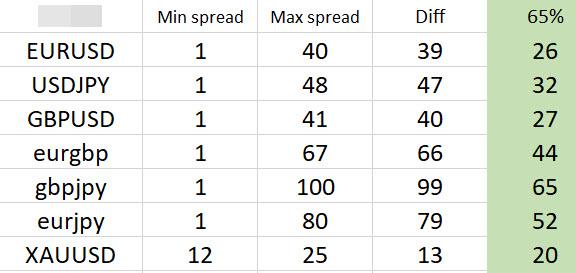
1. Spread value in symbol settings doesn’t have to be so set as high as I did. I took the highest value and round it up to factor 10. That’s too much. For example: If my broker’s GBPUSD is between 0 and 41, I set the value in “Symbol settings” to 50. That’s good but too high to generate strategies. I found that a more realistic value would be at 66% or 2/3 of their value as in the following table:
2. From your (Petko’s) comments to others in this forum, I understand that (everything else being equal) generating strategies slowly isn’t a necessarily a bad sign. Sometimes we have to be patient and wait longer for good strategies to appear.
As to the leverage, I’m not keen on reducing it to less than 1:500 for now. I need the high leverage because I’m unable to increase my initial amount and hope to become good at working with calculated risk at least until my account is big enough.
Thanks.
December 8, 2020 at 1:55 am #69146MemberWell, no more
1:500leverage in Australia as per 29. March 2021.
I just received an email from my broker announcing that ASIC decided to follow Europe’s, UK’s and Japan’s regulatory authorities and drop the leverage of CFD for retail traders to 1:30 for Forex pairs, 1:20 for Metals and 1:2 for Crypto-currencies. They don’t like people like us shorting the market. -
AuthorPosts
- You must be logged in to reply to this topic.