
Community Forums › Forums › Ready-to-use Robots › Prop Firm Robots › Prop Firm Robots: Errors and Solutions
- This topic has 782 replies, 1 voice, and was last updated 1 week, 1 day ago by
jordan6566.
-
AuthorPosts
-
October 11, 2023 at 8:25 pm #204197
Ruben Alday
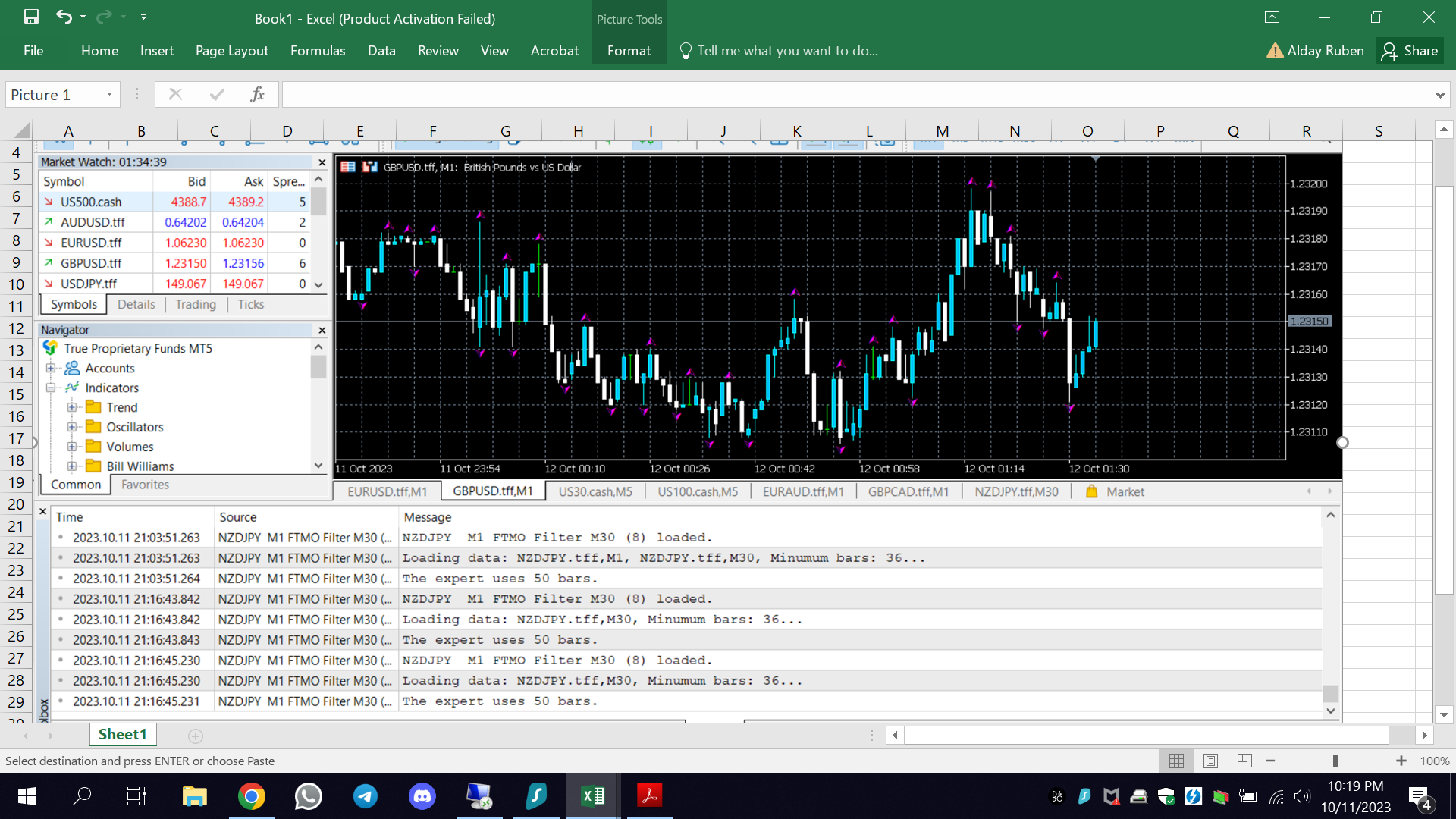
ParticipantThe same as some above traders, the FTMO ea does not take any trades; I set it up according to videos. Please advise. Thanks
 October 12, 2023 at 12:08 pm #204308
Alan Northam
ParticipantHi Ruben,
I see you just installed the FTMO EA on Oct 11. The FTMO EAs don’t necessarily place trades everyday because of the M30 filter. Give it another day or two and you should see a trade being placed.
Alan,
October 12, 2023 at 4:31 pm #204352Gary Wenger
ParticipantWhat is the minimum number of bars that are needed for the M30 filter to work properly? My demo account only provides 30 days of history on the M30 chart. I tried holding down the home button and it did not make any difference. Is there something else I can do to add more data for the M30 timeframe?
Gary
October 12, 2023 at 5:10 pm #204358ParticipantHi Gary,
Go to Tools>options>Charts
Then go to ‘Max bars in history’ and fill in the white space with 999999999999999
Then go to ‘Max bars in chart’ and fill in the white space with all 999999999999999
Then go back to chart and hold down HOME key and see if you get more data.
If this does not work then you will need to add premium data to the chart. Let me know how it goes!
Alan,
October 13, 2023 at 2:13 pm #204506rodwick solomon
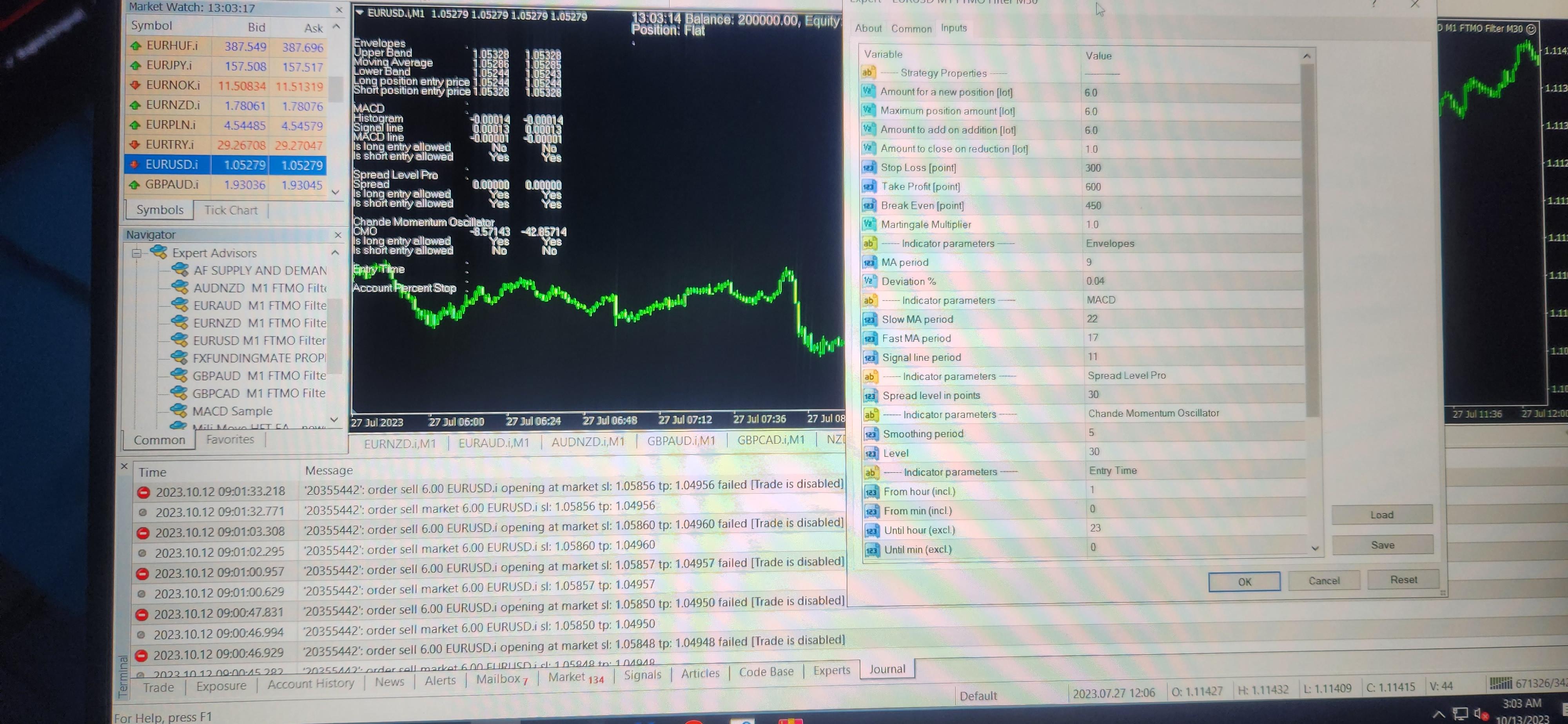
Participantcan someone tell me why the robot has not made any trades with my settings? i have these disabled notes in the journal section and no codes under expert.
 October 13, 2023 at 3:10 pm #204517Participant
This is most likely an issue with your broker. Try a much smaller lot size. Also, does your broker allow auto trading with EAs?
October 13, 2023 at 7:38 pm #204587Participantyes broker allows EA’s
October 13, 2023 at 8:38 pm #204603ParticipantGood! So maybe there was a reason your broker wouldn’t allow trades to be taken at that time. Maybe wait and see if it will take trades in the future. I would close your computer and restart it and then see if it will start taking trades. There is nothing wrong with the EA and it looks like it is installed correctly so the issue has to be with the broker. Keep me posted!
October 25, 2023 at 2:29 pm #206989Diego Del Castillo
ParticipantHi, I purchased the FTMO robot and tried it for 1 week in a demo account with good results. Then I attached it to my live account and it’s been 36 hours and not 1 trade even if the market has provided opportunities. My broker uses a suffix BTW (EURUSDx) I am thinking that could be it…also my journal shows no errors upon loading…. Please help! Using EURUSD only…
October 25, 2023 at 3:14 pm #207010ParticipantThe suffix is just the name of the chart and has nothing to do with the chart history data, so that is not the problem. As long as the EA has been properly attached to the chart it will open a trade. I have seen the FTMO EAs not open a trade for two days. So hang in there the EA will most likely open a trade soon.
Alan,
October 25, 2023 at 4:39 pm #207035ParticipantThanks for your answer. I’ll excessive patience. It’s just strange that on the demo account it even opened up to 2 trades a day and now…nothing…
October 25, 2023 at 5:07 pm #207049Lee Wagstaff
ParticipantAre the charts loaded. on mt4 i have to load them twice as the first time it will say loading bars.
October 25, 2023 at 5:32 pm #207056ParticipantIs the demo account still opening trades? Does the demo account and the live account use the same broker?
October 25, 2023 at 5:37 pm #207059Trinidad Simmz
ParticipantI’ve been running the 7 FTMO ea’s on an mt4 demo account for 6 days now, my aim was to track the results on FX Blue as I do for all my EA’s.
However none of them have entered a trade, and this is weird to me. I was thinking maybe the EA’s are just stagnant for long periods at times. However, after seeing some other reviews/results from people on YouTube/ blogs, it seems the EA’s are normally fairly active, (including this last week based on what I could gather)
I think between the 7 currency pairs- there is surely enough volatility for at least one trade on any pair to trigger. So Im wondering if there is something I have done incorrectly.
To ensure I remove any potential issues I did the following;
All data bars from M1 & M30 was loaded first,
Ive used 3 separate MT4 terminals,
Tried 2 different demo accounts,
Tried 3 different Brokers (Eightcap, Foreign Clearing House, Oanda)
Tried both M1 and M30 windows openAuto Trading is ON, (both in the options and on the main interface window)
MT4 terminal is functional as I have other EA’s that enter trades,
The MT4’s smiley face confirmation is active on all the FTMO Robot pair windows
No errors in the Expert section of MT4
Acc sizes: 10,000k & 100,000k
The dates tested since purchase so far was the 18th, 19th, 20th, 23rd, 24th and today the 25th of Oct.
Can anyone using the FTMO robot confirm they had entries during these dates??
I would appreciate some guidance, as maybe I have done something wrong.
October 25, 2023 at 6:42 pm #207071ParticipantBased on MT4 Strategy Tester backtest of EURUSD on live FTMO account from the 18th until today there were 16 trades. I am not using Petkos FTMO EAs on the live FTMO account. I am using my own EAs. So all I can say is that backtesting with Strategy Tester shows there were 16 trades.
-
AuthorPosts
- You must be logged in to reply to this topic.