
Community Forums › Forums › Ready-to-use Robots › Prop Firm Robots › Prop Firm Robots: Errors and Solutions
- This topic has 782 replies, 1 voice, and was last updated 1 week, 1 day ago by
jordan6566.
-
AuthorPosts
-
July 9, 2024 at 7:57 am #268993
NIKOS KYRIAKOU
MemberHey Derek,
Each and every strategy differs and that is why you see different SL and TP values. But the performance can also depend on the broker or prop firm.
Kind Regards,
Nikos
July 9, 2024 at 8:00 am #268997Strobeman
ParticipantHi Nikos,
I am using Tickmill.
I can understand how that would cause the amount to change slightly between brokers but not the number of trades and by such a large amount.July 9, 2024 at 8:33 am #269001Marin Stoyanov
KeymasterSo basically it may or may not work at all it all depends. Well for me this bot has lost consistenly and already blew up a prop challenge. I would like a refund. I have tried it out and it does not work
July 9, 2024 at 9:17 am #269027KeymasterThe Problem with this strategy is I did the samething tested for 3 week-4 weeks saw which EA’s were profitable with the broker I am using and then added to the chart for my prop challenge. I was profitable for a week then in 1 week lost all my profits. New EAs come out everyday you add you test those by the time you test them and find winners new bots come out and even if you add after a succesful test they dont last more than a week or two and by then you already had a huge drawdown. So you are in a constant struggle of testing finding winners they work for a week you add new ones and those have a huge drawdown and wipe away all your gains from the week before. So you are in a loop of getting up then giving it all back then getting up then giving it all back.
July 12, 2024 at 2:24 pm #269848KeymasterSome of the strategies may have a trailing stop-loss. You can look in the Journal tab for messages stating something like “position modified”. If you see such, this means that the particular EA has Trailing SL. I see form your screenshot that you’re trading with XAGUSD only so you may try few other pairs at the same time, as it might be the market is not good for this pair at the moment. On our accounts we achieved the best results when trading with 3-5 EAs at the same time, picking the top performers from the weekly or monthly charts, and replacing them daily so everyday we can trade with the top performers for the desired period according to the app.
July 23, 2024 at 10:16 am #271940KeymasterHi Guys
i have 3 prop firm robots. they are trading. there is a message that they have cancelled all positions and will suspend trading until the date and time is reset to 0.
could this have to do with daily limit protections being activated.
since im trading them on a demo account, i have removed the daily protections.
what do i do now.
July 23, 2024 at 10:18 am #271944KeymasterSorry i meant they are not trading
July 23, 2024 at 12:30 pm #271969MemberHey Tsholo,
I see what the issue is. Please, try to close the charts and then put them on the platform again. Then try to put the robots back on the chart and the issue should be gone!
Hope this helps!
Let me know if you have any more questions!
Kind Regards,
NikosJuly 23, 2024 at 3:07 pm #271994KeymasterHi Nikos
Ive done this and the Problem persists.
it says “Entry order was cancelled. New entries are suspended until Daily Reset Hour:0.
It gave this message just a few minutes ago.
Regards,
Tsholo
July 23, 2024 at 3:09 pm #271996MemberHey Tsholo,
I see. Another solution would be to redownload the robots and try the same steps!
Kind Regards,
NikosJuly 23, 2024 at 3:10 pm #271997Keymasterok.
July 23, 2024 at 6:10 pm #272015Y X
Participanthello,
Could someone please tell me? Is this a bug?2024.07.23 11:14:59.376 Prop Firm Robot 100k Medium USDCHF M15 1991239386 (USDCHFp,M15) Error with OrderCheck: Unsupported filling mode
2024.07.23 11:14:59.376 Prop Firm Robot 100k Medium USDCHF M15 1991239386 (USDCHFp,M15) Filling mode changed to: ORDER_FILLING_IOCJuly 24, 2024 at 5:55 pm #272160MemberHey Y X,
That can happen sometimes, no need to worry though. Please close the chart and try setting it again in the platform. After that, try to put the robot in it again and try again!
Let me know if that works!
Kind Regards,
NikosJuly 25, 2024 at 9:35 am #272237ParticipantHi Nikos,
I understood. Thank you for your reply.
I have another question about the inputs in the Prop Firm Robot. I think the [Entry lots] will be set automatically by Prop Firm Robot App, However, the account size I want to challenge is not included in the options, so I would like to know how the lot size is calculated.July 25, 2024 at 7:41 pm #272321Koala
ParticipantHello,
Could someone please help me run the program?I’m trying to run it on the platform “the5ers” MT5.
Program Shows information “Current position closed. Expert Advisor #…. turned off.
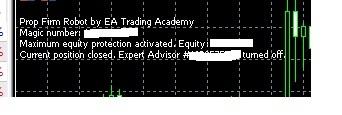
-
AuthorPosts
- You must be logged in to reply to this topic.