
Community Forums › Forums › Ready-to-use Robots › Prop Firm Robots › Prop Firm Robots: Errors and Solutions
- This topic has 782 replies, 1 voice, and was last updated 1 week, 1 day ago by
jordan6566.
-
AuthorPosts
-
May 6, 2024 at 11:15 am #253503
Wolfgang Hahn
Participanti have a successful installation on FTMO and other firms. but on chart it says EA is turned off and it removes itself also successfully from the chart. I changed lotsize and all other robot are working fine.
So a successful automatic removal of the EA from the chart is my experience with EA trading academy Robots.
May 6, 2024 at 11:25 am #253504paul4x
Participantthat sometimes happens if you have your min equity is set wrongly, the bot takes it as being hit EP and removes the bot
May 6, 2024 at 11:30 am #253506Participantok, any solutions what to do.?
May 6, 2024 at 11:39 am #253507Participanti changed the inputs to reflect the account. nothing changed. please see attached.
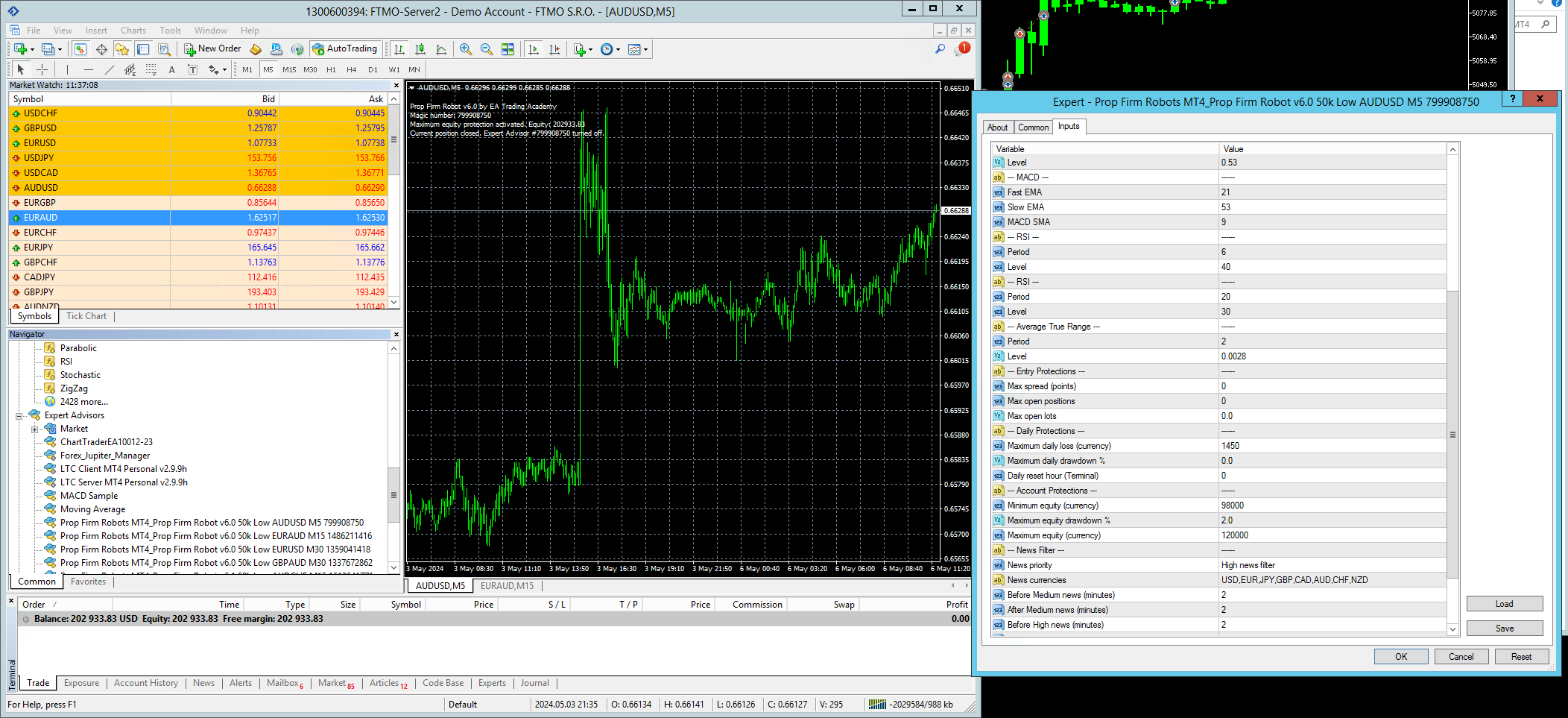 May 6, 2024 at 11:56 am #253508
superalf
ParticipantHi @Alan
Yes I’m aware that I can change the magic number, that’s not the point. Why have the same default magic number for 2 different pairs when everything is tied to the magic number (the EA name, the filename, etc). Makes tracking the results very difficult. I’m continuously installing and moving the EAs around different accounts to test and see which are the better performers. Having to change the magic number every time I add it to a different account just adds one more thing to do that should be automatic.
Btw, is there a way to download all 14 EAs together? In the FTMO robots app I can only download the ones visible in each view (yearly, monthly, weekly, etc) but they don’t all appear together.
May 6, 2024 at 12:20 pm #253512Alan Northam
ParticipantHi paul4x,
The EA is set up so as not to take any new trades 15 minutes before the market closes for the day. New trades can then be taken after the market re-opens 15 minutes later. This is done to avoid a new trade occurring 15 minutes before the market closes with super large spreads. There are also large spreads right after the market re-opens, so I would change the number from 0 to 1 or 2 to avoid these large spreads.
Note: The number zero represents the beginning of the new trading day. The number one represents one hour after the market opens for the day.
Alan,
May 6, 2024 at 12:24 pm #253513ParticipantMay 6, 2024 at 12:41 pm #253518ParticipantHi Wolfgang,
If there is a smiley face in the upper right corner of the trading chart then you are good to go. Just wait for new trades to develop. To properly protect your FTMO account I would suggest the following:
In the Prop Firm Robot app look at the top left area of the screen where it says Account. Select the account size you will be trading in the FTMO challenge. Also select the correct Max loss, Max daily loss, Profit target, Risk, and the news option. After you make these selections then download the robots you want to trade. So I would remove the robots you downloaded and re-download the correct ones.
Alan,
May 6, 2024 at 12:46 pm #253519ParticipantHi superalf,
The magic numbers are randomly generated. As fate would have it, the random generator picked the same magic number for the same magic number for these two robots. Change the magic number in the source code and re-compile. Then when you move the robots around from account to account you won’t have to keep changing the magic numbers.
To download all 14 robots at the same time select Y5, select Add to zip, and then select All.
Alan,
May 6, 2024 at 1:03 pm #253523ParticipantHi calebfg256,
You are not using any risk diversification.
Alan,
May 6, 2024 at 1:38 pm #253535ParticipantHi Alan,
As far as I can tell not all the robots appear under Y5. I only see 12 EAs under Y5 and as I was under the impression that there are 14 in total. For instance I don’t see the USDCAD M5 EA under Y5 and there must be another one missing.
May 6, 2024 at 1:49 pm #253537ParticipantHi superalf,
Right now there are only 12. Petko has removed 2 of them and has not yet replaced them.
Alan,
May 6, 2024 at 2:22 pm #253544ParticipantSo the USDCAD M5 pair that appears under the W1 EA we should not use?
 May 6, 2024 at 2:30 pm #253546Participant
Hi Superalf,
That pair did not trade last week. However, it will continue to trade in the future. I trade 10 different EAs in my Infinity Forex Fund challenge and in some weeks certain EAs do not trade for a week or two and then they start trading again. So, this is normal. Further, you may pick some robots that traded last week but one or two of them may not trade next week. This is why it is a good idea to diversify.
Alan,
May 6, 2024 at 2:44 pm #253555ParticipantHi Alan,
Maybe I’m not explaining myself correctly, let me rephrase. You said that Petko has reduced the FTMO robots to 12 pairs. In the Y5 page there are 12 pairs, so I’m guessing those are the 12. But if I drill down into the other time frames (weekly, daily, etc) there are other pairs aside from the 12 that show up in the Y5 page. So my question is, which are the 12 official EAs that we should use and which are the ones that have been removed that we should stop trading? Is USDCAD M5 v.61 one of the ones to avoid (does not appear in Y5 page). There is also a AUDCHF M5 v6.1 EA which does not show up in the Y5 (but does in the W1). can you please clarify this?
-
AuthorPosts
- You must be logged in to reply to this topic.